
IVR Software That Routes Callers on Intent
51% of customers have walked away from a company over a bad phone menu.
CloudTalk's IVR software fixes the maze: drag-and-drop call flows you build without code, intent-first routing, AI Voice Agents that handle the routine calls, and a one-step handoff to a live rep.
Live in an afternoon, included in your plan, from $25/user, connected to 100+ CRMs
 SOC2 CompliantISO 27001
40% Faster Handling Time
Smarter IVR system routing cuts wait times and frees agents for the calls that actually need a person.
Resolve 3 of 10 Calls Without an Agent
Resolve 30% of calls without an agent. Self-service answers common questions on the spot, so your team handles the critical conversations.
5x More Satisfaction
Callers reach the right place fast, with no repeat explanations and no bouncing between departments. Less frustration all around.
See How Fast You Can Build an IVR
Take a 60-second interactive tour and see how to build a working call flow, step by step. No sign-up, no sales call.
Interactive Voice Response
Everything You Need to Route Calls Smarter
All the menus, routing, and self-service tools your team needs, with no code required.
Drag and Drop Call Flow Designer
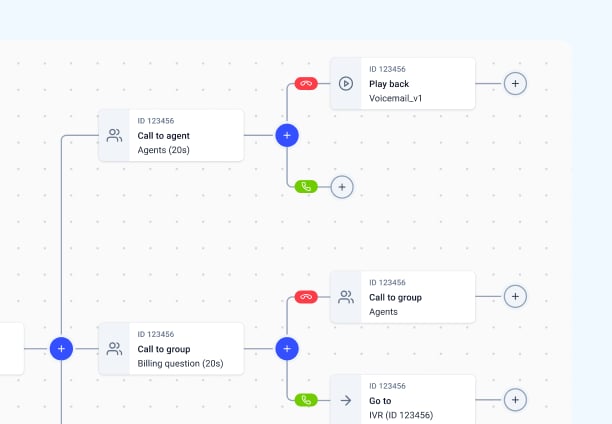
Build and reshape multi-level IVR menus in an intuitive call flow designer editor, no code or IT ticket.
Multi-Level IVR Menus
Nest options so callers reach the right team on the first try, not the third transfer.
Skill-Based & Caller-Based Routing
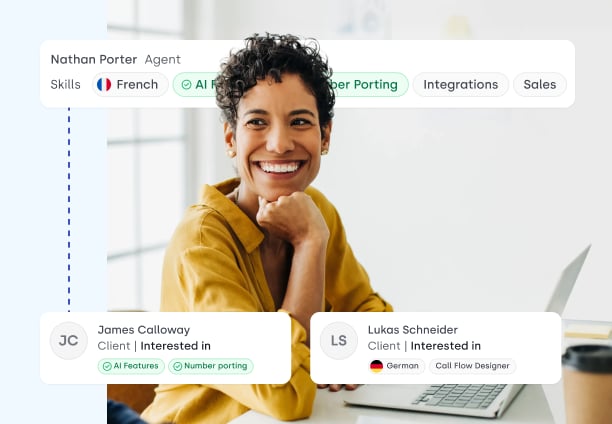
Route every call by agent skill, language, or caller history, automatically.
IVR Text-to-Speech
Spin up and update natural-sounding menus instantly, no voice actor or re-recording.
Conversational IVR with Voice Agents
Let callers say what they need; AI reads intent and detects sentiment, plus routes or resolves, 24/7.
Callbacks, Queuing & Analytics
Offer callbacks, smooth out queues, and see exactly where callers drop off with analytics.
Trusted by 30,000+ sales & support professionals to power more & better conversations
















IVR Pricing Overview
Simple, transparent IVR software pricing that grows with you.
Essential
$29/ user/mo
Billed annually. Where IVR starts.
- Multi-level IVR menus
- Drag-and-drop Call Flow Designer
- Skill-based routing
- Caller-based routing
- IVR text-to-speech
- Automated callbacks
- Advanced analytics
- Unlimited recording storage
Expert
$49/ user/mo
Everything in Essential, plus:
- Unlimited concurrent calls
- VIP call queues
- "Go to" Call Flow Designer step
- Call monitoring
- Mandatory call tagging
- Single sign-on (SSO)
- Smart dialer
Interactive Voice Response
What is IVR Software?
IVR (interactive voice response) software is an automated phone system that answers inbound calls with a voice or keypad menu, and routes each caller to the right place.
- 01Greets and identifies: Welcomes the caller with a custom text-to-speech or recorded greeting and asks them to select an option (e.g., "Press 1 for Sales").
- 02Gathers customer context: Pulls caller data from your CRM or asks for account numbers to understand who is calling before an agent even picks up.
- 03Routes or resolves: Directs the caller to the best-suited agent, places them in the right queue, or lets them resolve basic requests (like checking an order status) entirely on the

How Does IVR Software Work?
When someone calls, your IVR software greets them with a custom menu you design.
What is the IVR menu?
The IVR menu is the specific set of options your IVR phone system presents to callers. These are the familiar "Press 1 for Sales, Press 2 for Support" choices that instantly segment and route conversations.
With CloudTalk, you can customize the menu of your IVR solution, matching caller needs to the exact agent with the right skills.
How to Set Up an IVR Call System in CloudTalk
- 01In your CloudTalk account, click the left-hand side Numbers tab on the Dashboard to access your IVR call system.
- 02Select the number to edit your IVR telephone flow by clicking the blue pen button on the far-right side.
- 03Add new steps to the Interactive Voice Response path by clicking the blue “+” button next to the latest step, or edit pre-existing steps by clicking the gray “cog” button.
- 04Click the green “Save Plan” button to confirm your changes and launch your custom IVR.
We’ve helped thousands of global companies
Case studies featuring customers who are building faster.

Global Sales Engine Powered by Connected Conversations
“CloudTalk’s AI transcripts and analytics make it easier to track talk ratios, discovery depth, and regional performance—all without requiring formal training to get started.”

Revolutionizing Revolut’s Efficiency and Saving 40+ Hours
"Thanks to CloudTalk’s reliability, we could improve sales teams’ performance and close more deals than we could have ever imagined."

Increasing productivity for 200 customer support agents
"With CloudTalk's Analytics I now get to see every step of the way. We can find discrepancies and gain a much better understanding of our teams."

Delivering success for Glovo’s customer support team
"CloudTalk improved our team's cost and efficiency. The script feature allows us to lead the calls in a much more systematic way."
Integrations
Connect Your IVR to the Tools Your Team Already Uses
CRMs, helpdesks, applicant tracking systems and more. Get started instantly with 100+ built-in integrations, or expand further with Zapier, Make or CloudTalk’s own workflow automation builder.


Features
Discover More IVR Features You Might Find Useful

Call Queuing
Automatically distribute calls to relevant agents based on customer status, technical skills or business needs.
Learn more about Call Queuing
Workflow Automation
Fully automate repetitive or time-consuming tasks like follow-ups, ticket creation, and call transcriptions.
Learn more about Workflow Automation
Skill-Based Routing
Assign custom skills to your agents or teams and route customer calls automatically based on their expertise.
Learn more about Skill-Based Routing
Caller-Based Routing
Automatically route customers based on factors such as location, purchase history, and language.
Learn more about Caller-Based Routing
Ready to get started?
Join over 5,500+ modern companies that already trust CloudTalk to have MORE and BETTER calls.
IVR Software FAQs
IVR stands for interactive voice response. It is the system that answers an inbound call, works out what the caller needs, and either resolves it or routes the call to the right person. Older systems did this with numbered menus. Newer ones, including CloudTalk's, let the caller say what they want instead.
An afternoon for a working flow. CloudTalk's call flow designer is drag-and-drop, so you build the greeting, the options and the routing rules without writing anything or waiting on a developer. Complex flows with CRM lookups and multiple languages take longer, but you are not blocked on an implementation project to get started.
An auto attendant answers and transfers: press 1 for sales, 2 for support. An IVR can also resolve the call itself, by looking up an order status or taking a payment without involving an agent. Every auto attendant is a simple IVR; not every IVR is just an auto attendant.
Not with intent-based routing. The caller says what they need in their own words and the flow sends them to the right place, which avoids the numbered maze most people associate with phone systems. You can still build a traditional keypad menu if your callers prefer one, and many do.
IVR and call routing are included from Starter, CloudTalk's baseline plan. AI Voice Agents, which handle routine calls end to end rather than routing them, are a separate add-on rather than part of any plan.
Yes. You can branch the flow by the number dialled, by the caller's country, or by asking them once and remembering the answer, then route to agents who speak that language. For teams covering several markets from one team this is usually the main reason to move off a basic phone menu.
The call goes to a person, in one step, with whatever the caller already said attached. The failure mode worth designing against is the caller who explains their problem to a machine and then has to explain it again to an agent, which is the single fastest way to make an IVR worse than no IVR at all.


Hello 👋 My name is Emma. Still have questions?
Can’t find the answer you’re looking for? Please chat to our friendly team.