
10 Best HubSpot Phone Integrations & VoIP Systems (2026) — Dial Faster, Log Smarter

SUMMARY:
We analyzed 30+ VoIP providers and selected the 10 best options for teams using HubSpot in 2026. Our selection is based on the depth of native integration, bi-directional data syncing, automation triggers, and overall call quality.
10 best HubSpot phone integrations by use case:
-
01
CloudTalk – Best overall for high-volume sales and support teams needing deep automation and data-driven workflows.
-
02
Aircall – Best for fast-growing SMBs needing a flexible, native-feeling HubSpot CTI with rich automation.
-
03
JustCall – Best for remote-first teams needing multichannel communication (Voice + SMS) and AI coaching.
-
04
Ringover – Best for SMBs looking for a plug-and-play telephony solution with very fast deployment.
-
05
Dialpad – Best for teams seeking built-in AI tools like real-time transcription and sentiment tracking.
-
06
8×8 – Best for growing organizations that need unified voice, video, and contact center features in one place.
-
07
RingCentral – Best for mid-market teams and larger SMBs looking to consolidate multiple communication tools under one provider.
-
08
Zoom Phone – Best for teams already using Zoom Meetings who want a lightweight, familiar phone add-on.
-
09
Vonage – Best for SMBs needing a reliable, multi-channel tool with high uptime and global reach.
-
10
Nextiva – Best for companies seeking an all-in-one customer experience platform including chat, video, and analytics.
CloudTalk is the best HubSpot VoIP integration for growing businesses that need more than just a basic “click-to-call” button, as it transforms your CRM into a fully automated communication engine.
Larger organizations or those needing highly specialized compliance and unified communications across every department may find 8×8 or RingCentral more aligned with their enterprise requirements.
HubSpot customers generate 129% more leads and close 36% more deals within a year of integrating their phone system¹. But to see those results, you need a setup that works with your CRM, not against it.
We’ve cut through the noise to bring you the definitive list of the best phone integrations for HubSpot in 2026. We didn’t just look at feature lists; we compared these tools across the criteria that actually impact your bottom line: bi-directional sync speed, native CTI functionality, pricing transparency, and workflow automation.
Whether you’re a startup looking for your first cloud phone or a mid-market sales team needing a high-velocity power dialer, this guide reveals which systems that integrate with HubSpot help you dial faster and log smarter.
Cut manual admin and follow up faster with the best phone integration for HubSpot
Top 10 HubSpot VoIP Integrations (2026 Guide)
If you are comparing the best phone systems for HubSpot, this shortlist highlights the platforms that offer the deepest functionality and most reliable syncing in 2026.
Side-by-Side Comparison: Best VoIP Integrations for HubSpot
The table below compares the top 10 VoIP providers based on their specific strengths for HubSpot users.
To help you avoid the common “basic plan” pricing trap, we’ve listed the minimum price tier required to unlock HubSpot integration.
Best HubSpot Phone Integrations in 2026
| VoIP Integration | Best for | Starting Price* (annual billing) | G2 Rating |
|---|---|---|---|
| CloudTalk | High-velocity SMB sales & support teams needing native HubSpot CTI, AI dialers, and advanced workflow automation. | $29/user/mo (Essential) | 4.4/5 |
| Aircall | Service-heavy teams looking for a simple, embedded CTI focused on basic support workflows. | $50/user/mo (Professional) | 4.4/5 |
| JustCall | Multichannel outreach needing a combined dialer with SMS and WhatsApp automation. | $49/user/mo (Pro) | 4.3/5 |
| Dialpad | Data-driven managers who want real-time AI transcription and automated sentiment tracking. | $25/user/mo (Pro) | 4.4/5 |
| Ringover | European SMBs requiring local numbers and a quick, plug-and-play HubSpot setup. | $44/user/mo (Business) | 4.6/5 |
| 8×8 | Cross-departmental orgs that need to unify phone, video, and HubSpot logging in one tool. | $24/user/mo (X2 Edition) | 4.1/5 |
| RingCentral | Mid-market companies needing enterprise-grade reliability and complex call-routing flows. | $25/user/mo (Advanced) | 4.1/5 |
| Zoom Phone | Small startups already using Zoom who just want basic “Click-to-Call” functionality. | $10/user/mo (Basic) | 4.6/5 |
| Vonage | Global businesses needing localized presence in 40+ countries with high uptime. | $21/user/mo (Premium) | 4.3/5 |
| Nextiva | Customer experience teams wanting a 360-degree view of chat, video, and HubSpot data. | $25/user/mo (Engage) | 4.5/5 |
*Note: Prices reflect the lowest tier that supports HubSpot CRM integration (billed annually). Access to advanced automation or dialer modes may require higher plans.
1. CloudTalk — Best HubSpot Phone Integration for High-Velocity Sales & Support Teams
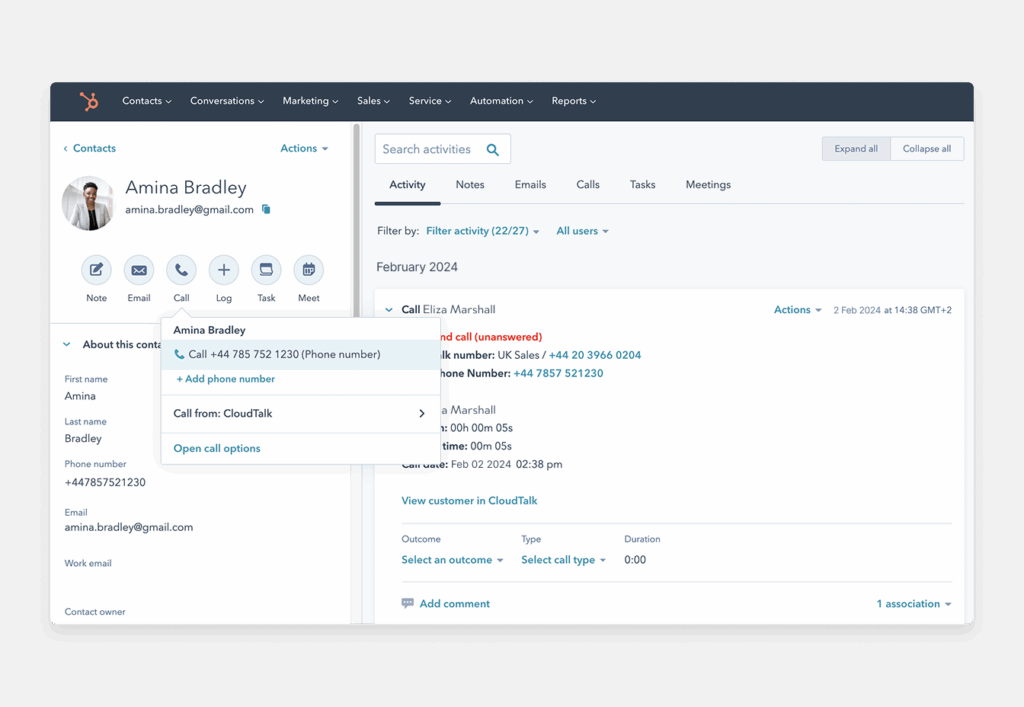
CloudTalk is trusted by 4,000+ businesses, and is a trusted HubSpot integration, recommended by Hubspot itself.
It integrates seamlessly with 100+ tools, and has an open API that allows you to customize workflows and scale operations internationally with local numbers in 160+ countries.
Best for
SMBs and mid-market teams with high call volumes, especially sales and support teams needing automated, data-driven calling workflows
Best features
- Live Call Monitoring: Team leads can listen to active calls in real time to assess agent interactions and ensure service quality — all without interrupting the conversation.
- Coaching Mode (Whisper): Supervisors can offer private, mid-call coaching to agents during live conversations. The customer remains unaware, making it ideal for on-the-spot guidance or onboarding support.
- Call Intervention (Barge): Managers can step into live calls when necessary, offering immediate assistance to agents handling complex or sensitive issues.
- Wallboard: Track call center activity in real time with a visual dashboard that highlights KPIs like active calls, wait times, and agent availability — perfect for keeping teams on pace and performance visible.
Integrations
- HubSpot: Bi-directional sync keeps contact details, call notes, and engagement history up to date automatically, giving agents full context without switching tools.
- Salesforce: Connects seamlessly to log calls, surface insights, and enable click-to-dial within sales and support workflows.
- Zoho CRM: Supports workflow automation, contact sync, and deep analytics, helping teams personalize communication and spot trends.
- Pipedrive: Lets users manage calls directly in the CRM, log activities with custom rules, and track performance in real time.
Pros
- Ease of use: The interface is intuitive and streamlined, making it easy for teams to get up and running quickly.
- Scalability: As your team grows, CloudTalk makes it simple to add users, lines, and features without switching systems.
- Cost-effective: Offers advanced functionality at a competitive price, ideal for budget-conscious teams looking for high performance.
Cons
- Limited offline functionality: Because CloudTalk is cloud-based, poor internet connectivity can affect call quality.
- No video conferencing: Teams needing video conferencing will need to use a separate tool alongside CloudTalk.
G2 Rating
4.4/5 (1,700+ reviews), praised for CRM integration and ease of use.
When HubSpot recommended CloudTalk, we thought, ‘Why look further?’ The integration was there, the features made sense, and it addressed our biggest pain points.
AJ Pyper, Mortgage Advisor at My Mortgage Finder
CloudTalk Pricing
- Lite ($19/user/month]): Includes unlimited US & Canada calling, business SMS, International Numbers, Call Recording, basic call analytics, and 24/7 email/chat support.
- Essential ($29/user/month): It offers 1,000 domestic outbound minutes, 24/7 live support, advanced analytics, IVR, Skill-Based routing, Integrations + Open API.
- Expert ($49/user/month): It includes features like Power Dialer, Smart Dialer, VIP Queues, WhatsApp Inbound & Outbound Messages, and Call Monitoring.
- Custom (Varies): This plan is tailored for businesses who need it, and includes custom onboarding, unlimited outbound calls with flat rates, enterprise-level security, and developer support.
Simplify your HubSpot workflows and ramp up team productivity with the right VoIP integration.
How to Integrate CloudTalk with HubSpot (Step-by-Step)
Setting up your CloudTalk HubSpot integration is simple and doesn’t require a developer. By linking the two platforms, you enable a seamless flow of data that powers your HubSpot dialer integration for faster outbound calling.
- Log in to CloudTalk: Open your CloudTalk dashboard and navigate to the Account tab, then select Integrations.
- Find HubSpot: Locate HubSpot in the integration list and click the + Add button.
- Authorize the Connection: You will be redirected to a HubSpot login page. Select the specific HubSpot account you want to connect and click Choose Account.
- Grant Permissions: Review the access request and click Connect App. This allows CloudTalk to sync call logs and contact details.
- Configure Your Settings: Once redirected back to CloudTalk, you can customize the sync. You can choose to pull contacts from HubSpot, push new callers as HubSpot contacts, and decide which call types (inbound, outbound, missed) should be logged to contact timelines.
- Install the Extension: To enable click-to-call directly inside HubSpot, ensure your team installs the CloudTalk Chrome extension.
Once these steps are complete, your phone and CRM will work as one. Your team can immediately start making calls from contact records, knowing that every interaction is being captured in real-time.
The More You Know:
Want to know more about CloudTalk integrations? Check out our Help Center and learn how to set up integrations with the most popular CRM tools.
2. Aircall

Aircall is a cloud-based VoIP system designed to help support and sales teams manage customer conversations at scale. It integrates natively with HubSpot, providing automation, real-time insights, and simple call management from directly inside your CRM.
Best for
SMBs looking for a fast, flexible solution to unify phone support, track call performance, and integrate seamlessly with HubSpot workflows.
Best Features
- Click-to-Call & Screen Pop: Agents can place and receive calls with one click from HubSpot, while caller details automatically populate before pickup.
- Insight Cards: Aircall pulls relevant HubSpot data into every inbound call, so agents know exactly who they’re speaking to—and what’s next.
- Call Tagging & Notes: After each call, users can tag contacts, log notes, and assign follow-ups, all without leaving the HubSpot interface.
- HubSpot Automation: Trigger workflows based on call outcomes—like sending a follow-up email or assigning a task—to keep pipelines moving.
Integrations
- HubSpot: Native integration supports click-to-call, real-time sync, call logging, and automation triggers within the HubSpot ecosystem.
- Salesforce: Syncs calls, notes, and contacts to give full visibility across sales stages.
- Intercom & Zendesk: Streamlines support by tying voice conversations to tickets and live chats.
- Pipedrive, Shopify, and 100+ others: Aircall plays well with a wide range of CRMs, helpdesks, and business tools via direct and Zapier integrations.
Pros
- Quick setup: Aircall can be deployed in hours, not days — no hardware or IT support needed.
- Rich HubSpot experience: The HubSpot CTI widget is one of the most complete, offering real-time insights, tagging, and automation.
- Call routing options: IVR menus, queueing, and fallback rules give teams control over how calls are handled.
Cons
- Price scaling: Costs increase with team size and add-ons, making it less affordable for very small teams.
- Occasional call delays: Some users report lag or echo during peak times or with limited bandwidth.
- SMS functionality limitations: Not all countries or plans support full SMS capabilities.
G2 Rating
4.4/5 (1,500+ reviews), with many users praising its ease of use, fast deployment, and CRM integrations. Some reviewers mention call quality can vary based on location or network stability.
Aircall Pricing
- Essentials: $40/user/month: Includes basic integrations (HubSpot, Zendesk), IVR, call recording, and analytics.
- Professional: $70/user/month: Adds power dialer, advanced analytics, queue callbacks, and Salesforce integration.
- Custom: Contact for pricing: Tailored for larger teams with global calling, API access, and dedicated support.
3. JustCall

JustCall is a cloud-based phone and SMS platform built for remote and hybrid teams. With its native HubSpot phone integration, it enables automatic call logging, SMS syncing, and AI-powered coaching features — all from inside your CRM.
Best for
Sales and support teams that need multichannel communication (voice, SMS, WhatsApp) paired with AI-driven performance insights — especially in remote-first setups.
Best Features
- Click-to-Call & SMS from HubSpot: Call or text leads directly from the HubSpot interface, with every interaction auto-logged.
- AI Call Insights: JustCall’s AI listens to conversations and provides summaries, sentiment scores, and coaching suggestions — cutting QA time dramatically.
- Call Scoring & Smart Notes: The platform analyzes performance and generates scorecards based on call quality and key phrases.
- SMS Campaign Automation: Schedule and send SMS sequences directly from HubSpot to increase reach and follow-up consistency.
Integrations
- HubSpot: Native CTI widget supports calling, texting, logging, and syncing notes, activities, and recordings.
- Salesforce, Zoho CRM, Pipedrive: Deep integrations help unify workflows across tools, especially for sales teams.
- Slack & Zapier: Use Slack alerts for call activity or connect JustCall to 3,000+ apps with Zapier to automate notifications, tasks, and more.
- CloudTalk (Complementary): For teams seeking deeper call analytics or AI voice agent functionality, CloudTalk can run alongside JustCall in specific workflows.
Pros
- AI-Powered Coaching: Built-in AI insights help managers identify coaching opportunities without reviewing every call manually.
- SMS + Voice in One Tool: Streamlines outbound efforts by unifying calling and texting in a single interface.
- Strong UI/UX: Clean, modern design that’s easy for teams to adopt without heavy training.
Cons
- Advanced features gated: AI features and automation are only available in mid- or top-tier plans.
- Variable SMS deliverability: Delivery rates may vary by country or carrier — worth testing in international campaigns.
- Support response time: Some users report delayed responses from support during setup or technical issues.
G2 Rating
4.3/5 (2,300+ reviews), with many praising its HubSpot integration and automation. Common feedback includes appreciation for the ease of logging calls and the usefulness of AI summaries.Pricing
JustCall Pricing
- Team: $39/user/month: Includes calling, SMS, HubSpot integration, and basic automation tools.
- Pro: $69/user/month: Adds AI summaries, SMS campaigns, sales dialers, and conversation scorecards.
- Pro Plus: $109/user/month: Includes AI coaching and tracking.
- Business: Custom pricing: Designed for larger teams needing advanced analytics, premium support, and API access.
4. Ringover

Ringover is a cloud-based business phone system offering seamless HubSpot integration with built-in call routing, real-time monitoring, and CRM syncing. It’s designed for SMBs that need a plug-and-play telephony solution without sacrificing performance.
Best for
Small to mid-sized teams that want quick setup, essential VoIP features, and smooth HubSpot integration without heavy IT overhead.
Best Features
- Click-to-Call in HubSpot: Agents can initiate calls directly from HubSpot, with instant screen pop-ups for contextual insights.
- Automatic Logging: Calls, voicemails, recordings, and notes are synced back to HubSpot automatically, reducing manual admin.
- Call Routing & Queues: Build call flows using IVR, skill-based routing, or working hours logic to ensure every call reaches the right person.
- Real-Time Supervision: Team leads can listen in, whisper, or barge into live calls — ideal for coaching and support (similar to CloudTalk’s Call Monitoring tools).
Integrations
- HubSpot: Certified integration supports full CTI capabilities, including contact sync, call logging, and in-record calling.
- Salesforce, Zoho CRM, Microsoft Teams: Additional integrations extend visibility and automate workflows across platforms.
- Zapier & API: Build custom workflows by connecting Ringover to over 5,000 other apps or developing through its open API.
Pros
- Fast Deployment: Setup can be completed in under an hour with minimal onboarding.
- Solid HubSpot CTI Features: Most key HubSpot call actions are supported natively, with no need for third-party tools.
- Multichannel Support: Combines calls, SMS, and instant messaging in one place.
Cons
- Feature limitations by plan: Advanced call routing or analytics may require premium tiers.
- Fewer enterprise features: Not as customizable or robust for large-scale operations compared to providers like CloudTalk or Dialpad.
- SMS & add-ons not included: Some users report frustration with needing to pay extra for basic features like SMS or additional numbers.
G2 Rating
4.6/5 (450+ reviews), Ringover is often described as “easy to use” and “quick to deploy,” with users highlighting its HubSpot and Salesforce integrations as standout features.
Ringover Pricing
- Smart Plan: From $29/user/month: Includes unlimited calls to select countries, HubSpot integration, and basic routing.
- Business Plan: From $54/user/month: Adds advanced IVR, analytics, call coaching, call tags, and team supervision.
- Advanced: Custom: Includes premium features like CRM call scripting, API access, and onboarding support.
5. Dialpad

Dialpad is an AI-powered business phone and contact center platform that integrates directly with HubSpot to deliver automated call logging, real-time transcription, and voice intelligence—all from a clean, modern interface. It’s especially well-suited for distributed teams who want smarter call handling without enterprise-level complexity.
Best for
SMBs and mid-market teams seeking built-in AI tools (like call summaries and sentiment tracking) with seamless HubSpot syncing—ideal for fast-moving sales and support environments.
Best Features
- Real-Time Transcription & AI Notes: Dialpad automatically transcribes calls as they happen, generating action items and summaries without the need for manual notes — similar to CloudTalk’s call transcription tools.
- Smart CRM Syncing: Every call is logged to the right HubSpot record, complete with duration, outcome, and agent notes.
- Sentiment Analysis: The system flags positive, neutral, or negative calls to help managers prioritize coaching efforts.
- Mobile & Chrome Extension Access: Teams can take and log calls from anywhere, ensuring context stays in sync no matter where they work.
Integrations
- HubSpot: Native CTI includes click-to-call, call logging, and record syncing from inside HubSpot contact or deal views.
- Salesforce, Zendesk, Microsoft Teams: Dialpad also works across major CRMs and support platforms for a unified communication stack.
- Google Workspace & Office 365: Integrated calendaring, contact sync, and meeting scheduling support.
Pros
- Built-in AI features: AI summaries, call transcripts, and auto-tagging come standard — no need for separate tools.
- Flexible access: Use via desktop app, mobile app, or browser extension.
- Simple UX: Clean, lightweight interface that’s easy for non-technical users to adopt quickly.
Cons
- Feature tiers: Sentiment analysis and advanced routing require Pro or Enterprise plans.
- Limited analytics depth: While it includes AI summaries, it lacks the deep call center KPIs and dashboards offered by platforms like CloudTalk’s analytics suite.
- Support delays: Some users mention slower resolution times during onboarding or plan changes.
G2 Rating
4.4/5 (4,000+ reviews), with users praising the transcription quality and mobile-friendly experience. Common critiques mention that the Standard plan omits key features like advanced routing or CRM integrations.
Dialpad Pricing
- Standard: $27/user/month: Includes unlimited calling, transcription, voicemail, and GSuite/Microsoft integrations.
- Pro: $35/user/month: Adds CRM integrations (including HubSpot), 24/7 support, multiple numbers, and call queues.
- Enterprise: Custom: Includes Single Sign-On (SSO), global support, and custom SLAs.
6. 8×8

8×8 is a unified communications and contact center platform with built-in VoIP, messaging, video, and analytics. Its HubSpot phone integration allows teams to log calls, sync contact data, and trigger workflows — making it a flexible solution for SMBs and enterprises alike.
Best for
Growing companies and enterprise teams that need voice, video, and contact center features in one place — especially those looking to unify communication across multiple departments.
Best Features
- Click-to-Call + Screen Pop: Reps can call HubSpot contacts with one click and see full contact records as the phone rings.
- Automatic Call Logging: Calls, voicemails, and notes are instantly synced to HubSpot records to reduce admin work.
- Multi-Channel Support: Offers voice, video meetings, SMS, and team messaging in a single platform — ideal for cross-functional teams.
- Call Monitoring & Coaching: Supervisors can monitor live calls, whisper guidance, or barge in as needed — comparable to CloudTalk’s call monitoring features.
Integrations
- HubSpot: Native CTI supports call logging, record syncing, and in-app dialing.
- Microsoft Teams, Salesforce, NetSuite: Widely used in large organizations for unified data sync and communication across tools.
- Open APIs: Custom workflows can be built using 8×8’s developer tools to fit unique operational needs.
Pros
- Complete UC + CC Suite: Combines business phone, video, and contact center tools under one platform.
- Reliable infrastructure: Known for enterprise-grade uptime and call quality.
- Multi-site scalability: Great for distributed teams with users across regions or departments.
Cons
- Complex onboarding: Initial setup and configuration can be time-consuming for smaller teams.
- Pricing transparency: Costs can vary by contract size and region, making comparisons harder.
- Feature gating: Some of the more advanced analytics or coaching tools are only available on higher-tier plans.
G2 Rating
4.1/5 (200+ reviews), with strong feedback on voice quality and reliability. Users appreciate the breadth of features, though some note a steeper learning curve than simpler platforms.
8×8 Pricing
8×8 offers various plans, but you must contact sales for a quote. However, the plan that features HubSpot integration (X2 edition) is reported to cost $24/user/month.
7. RingCentral

RingCentral is an all-in-one cloud communications platform that combines VoIP, video meetings, messaging, and contact center functionality. Its certified HubSpot phone integration enables sales and support teams to make and log calls, sync contact activity, and launch workflows without leaving the CRM.
Best for
Larger SMBs and mid-market teams that want to consolidate multiple tools (calling, texting, meetings, messaging) under one provider — especially those already using RingCentral for other business communications.
Best Features
- Click-to-Call with Auto-Logging: Place calls directly from HubSpot and automatically log the outcome, call notes, and recording — reducing manual CRM work.
- Screen Pop & Activity Sync: When a call comes in, RingCentral surfaces the contact’s HubSpot data in real time, improving call context and response time.
- Workflow Automation: Create HubSpot workflows triggered by RingCentral call events, such as missed calls or completed conversations.
- Call Monitoring Tools: Supervisors can listen, whisper, or barge into active calls — ideal for coaching and QA.
Integrations
- HubSpot: Certified HubSpot integration includes click-to-call, automatic call logging, contact syncing, and event-triggered workflows.
- Salesforce, Zendesk, Microsoft Teams: Robust integrations allow full communication visibility across departments.
- RingCentral App Gallery: Includes 300+ integrations across CRMs, helpdesks, analytics, and productivity apps.
Pros
- Enterprise-grade scalability: RingCentral supports complex org structures, making it a solid choice for multi-team environments.
- Unified communications: Combines voice, SMS, fax, and video — eliminating the need for multiple platforms.
- Strong compliance & security: HIPAA-ready, GDPR-compliant, and supports advanced admin controls.
Cons
- Steep learning curve: Admin setup and call routing workflows can take time to master.
- Higher cost at scale: Add-ons and seat-based pricing can push total cost above other HubSpot VoIP tools.
- UI can feel dated: While functional, the interface isn’t as modern or lightweight as platforms like CloudTalk or Dialpad.
G2 Rating
4.1/5 (1,250+ reviews), with users praising its call quality and integration depth.
RingCentral Pricing
- Core: From $30/user/month: Includes phone, messaging, HubSpot integration, and voicemail transcription.
- Advanced: From $35/user/month: Adds auto call recording, advanced analytics, and CRM integrations.
- Ultra: From $45+/user/month: Includes real-time analytics, device status alerts, and unlimited storage.
8. Zoom Phone
Zoom Phone is a cloud-based telephony add-on to Zoom’s unified communications suite. It integrates with HubSpot to allow agents to make calls, log activity, and play back voicemails—all from directly inside the CRM.
Best for
Teams already using Zoom Meetings who want a lightweight phone system that lives alongside their video tools, with basic CRM logging and voice infrastructure.
Best Features
- Click-to-Call from HubSpot: Place Zoom Phone calls directly from contact records or phone numbers in HubSpot — no switching apps required.
- Automatic Call Logging: Each call, voicemail, and recording is automatically logged and linked to the right HubSpot record .
- Voicemail & Recording Access: Agents can access voicemails and recordings via HubSpot call records.
- Basic Call Controls: Mute, hold, and note-taking are available within the Zoom Phone widget in HubSpot.
Integrations
- HubSpot: Certified integration offers CTI functionality — click-to-call, logging, screen pop, and voicemail playback within contact records.
- Zoom Ecosystem: Works seamlessly alongside Zoom Meetings, Chat, and Video, enabling smooth transitions across voice and video channels.
- Platform Ecosystem: Integrates with tools like Salesforce, Slack, Google Workspace, and Microsoft 365 for expanded workflow functionality.
Pros
- Lightweight & familiar: Ideal for teams already immersed in Zoom’s ecosystem.
- Simple CRM sync: Logs basic call metrics without extra setup or cost.
- Affordable entry: With plans starting under $20, it’s a low-risk way to activate VoIP within HubSpot.
Cons
- Limited HubSpot depth: Minimal analytics, no sentiment analysis, and outcomes/transcripts aren’t automatically tracked.
- Some features require extra plans: SMS, international numbers, and advanced call queue analytics need paid add-ons.
- User feedback is mixed: Users mention call drops, missing data, and friction during setup.
G2 Rating
4.6/5 (2,600+ reviews), with praise for its simplicity and familiarity. However, recurring criticisms focus on quality inconsistencies and shallow HubSpot functionality.
Zoom Phone Pricing
- US & Canada Calling: $15/user/month (US/CA): Includes metered or unlimited calling with SMS, Online Fax and AI Companion.
- Pro Plus: $18.33/user/month (US/CA): Includes Zoom Phone and Workplace Pro.
- Business Plus: $22.49/user/month: Pro Plus with Scheduler, Meetings, and Cloud Storage.
9. Vonage

Vonage Business Communications is a versatile cloud-based phone system that supports voice, SMS, and video. Its HubSpot integration lets users place or receive calls directly from their CRM and automatically logs call activities and notes.
Best for
SMBs needing a multi-channel communication tool—voice, text, and video—in one system, especially if you want automation with HubSpot workflows.
Best Features
- Click-to-Call & Screen Pop: Click any number in HubSpot to make calls, with caller details displayed before you answer.
- Auto-Logging with Tags: All call data—including notes and outcomes—is synced into HubSpot records automatically.
- SMS Integration: Send and log messages via HubSpot for added follow-up utility. Though support is limited to SMS in some regions, it’s a powerful multi-channel extension.
- Workflow Automation: Leverage HubSpot triggers—like new calls or missed calls—to kick off automated sequences (e.g., follow-up SMS or task creation).
Integrations
- HubSpot: Certified “Vonage Integration Suite” extends CTI with click-to-call, call logging, SMS, and reporting.
- Google Workspace, Salesforce, Zendesk: Enables seamless data sharing across tools.
- Custom API / Zapier: Use Vonage’s APIs or Zapier for tailored workflows—send SMS, sync data, trigger actions—similar to CloudTalk’s API flexibility.
Pros
- Unlimited calling & texting: Many plans include these without per-use fees .
- Reliability & global reach: 99.999% uptime plus service in 40+ countries.
- Scalable add-ons: Customize your setup with optional call recording, advanced routing, and CRM integrations as your business grows .
Cons
- Trouble-free setup not guaranteed: Several users report inconsistent HubSpot syncing or stability issues.
- Pricing complexity: Many features (e.g., CRM logging, call recording) require separate add-ons—can increase total cost.
- Regional SMS limits: SMS may only function fully in certain regions, with messaging support restricted.
G2 Rating
4.3/5 (490+ reviews), noted for its reliable voice/SMS and robust uptime. User feedback on HubSpot integration is mixed—some report it works well, others mention persistent logging issues.
Vonage Pricing
- Mobile: $19.99/user/month: Voice, voicemail, SMS—no video.
- Premium: $29.99/user/month: Adds video, team messaging, CRM integration, but extras like call recording cost more.
- Advanced: $39.99/user/month (billed yearly): Includes unlimited calling, CRM add-ons, and select advanced options.
10. Nextiva

Nextiva is a robust cloud communications and customer experience platform that offers VoIP, video, messaging, and contact center features. Its HubSpot integration brings CTI capabilities into your CRM—logging calls, popping contact records, and syncing data seamlessly.
Best for
SMBs and mid-market companies seeking an all-in-one solution—not just voice, but chat, video, and analytics with strong CRM syncing.
Best Features
- Click-to-Call & Screen Pop: Launch calls directly from HubSpot; incoming calls trigger a pop-up with contact details, speeding up response time .
- Auto Call Logging: Every call activity is automatically recorded in HubSpot as an engagement—no manual entry required.
- AI-Powered Analytics: Includes voicemail transcription, sentiment analysis, and real-time dashboards.
- Omnichannel Communication: Supports voice, video, SMS, live chat, and social messaging in one platform—ideal for teams managing multiple touchpoints .
Integrations
- HubSpot: Certified CTI sync with click-to-call, logging, screen pops, and event-triggered workflows.
- Salesforce, Zendesk, Microsoft Teams & Outlook: Ensures full communication context across departmental systems.
- Open API & Zapier: Enables custom workflows—similar flexibility to CloudTalk’s integration capabilities..
Pros
- Unified communications suite: Voice, SMS, chat, video, and analytics under one roof.
- Enterprise-grade analytics: Built-in tools like sentiment tracking, transcript search, and dashboards make quality monitoring easy.
- High reliability & support: Consistently praised for uptime, customer service, and onboarding assistance.
Cons
- Feature gating per tier: Many core capabilities (CRM sync, call transcription, sentiment) require higher-tier plans, pushing costs up.
- Mobile app limitations: Users report occasional glitches and less fluid experiences on mobile versus desktop.
- Pricing complexity: Numerous features depend on add-ons or enterprise-level plans—can lead to unexpected costs.
G2 Rating
4.5/5 (3,400+ reviews), often praised for solid uptime, AI insights, and omnichannel readiness—though select reviews mention mobile issues and plan uncertainty.
Nextiva Pricing
- Core: $36/user/mo (annual): Adds voice, SMS (100/mo), video & call logging.
- Engage: $50/user/mo (annual): Adds chatbots, live chat, advanced reporting.
- Power Suite: $75/user/mo (annual): Includes omni-route, queue dashboards, and more advanced CX tools.
- Enterprise: From $129/user/mo to $199/user/mo: Full contact center tools, WFM, IVR, compliance features.
How We Chose the Best HubSpot VoIP Integrations in 2026
To narrow down this list, we analyzed 30+ providers to identify the 10 best systems that offer more than just a basic connection. We focused on finding a HubSpot telephony integration that actually eliminates manual work rather than adding more tabs to your browser.
Here’s our selection criteria:
- Bi-directional sync: The ability to share data instantly between the phone and CRM so records are always current.
- Native CTI (Computer Telephony Integration) features: High-quality “Click-to-Call,” screen pops, and in-app dialers that live inside the HubSpot interface.
- Automation potential: Tools that allow call outcomes to trigger HubSpot workflows, like auto-sending a “Thank You” SMS.
- Ease of deployment: Integrations that can be authenticated in minutes without needing a dedicated IT department.
- Reliability & voice quality: High call quality, uptime, and global carrier networks to ensure your HubSpot phone system integration never drops a lead.
Why Trust Our Software Reviews
For over a decade, we’ve helped more than 30,000 professionals navigate the complex world of business comms. Our team doesn’t just skim feature lists; we dive into verified user feedback from platforms like G2 and Capterra and cross-reference them with real-world performance data.
In the last year alone, we have published over 1,000 human-led articles designed to simplify technical decisions. We prioritize transparency and data-backed insights so you can choose a CloudTalk HubSpot integration or any other tool with total confidence in its performance.
Learn how we keep our content integrity and our software review methodology.
What is HubSpot VoIP integration?
HubSpot VoIP integration connects your phone system to your CRM, so every call, contact, and follow-up is logged automatically.
That means your reps always have the context they need—who they spoke to, what was said, and what to do next—without switching tools or taking notes. It works through a native or third-party integration, depending on your provider.
Benefits of Integrating VoIP with HubSpot CRM
TL;DR:
A deep HubSpot VoIP integration automates the administrative “heavy lifting.” It ensures 100% data accuracy through auto-syncing, provides instant caller context via screen pops, and uses workflow triggers to move deals forward—all while centralizing your performance analytics inside a single dashboard.
Connecting your business phone system directly to your CRM turns every conversation into a data point for growth. Instead of manually logging details after a call, a HubSpot phone system integration handles the admin work for you.
This ensures your sales and support teams spend their time talking to people, not filling out spreadsheets. By centralizing your business communication, you gain a “single source of truth” that prevents leads from falling through the cracks and keeps customer history transparent across the whole company.
1. Instant Data Sync and Accuracy
Manual logging is the biggest enemy of clean data. When your phone system is linked to your CRM, every call, recording, and voicemail is instantly attached to the correct contact timeline
This means managers don’t have to chase reps for updates, and every team member can see the latest interaction status without asking for a debrief.
2. Contextual Conversations for Better Service
When the phone rings, a screen pop displays the caller’s HubSpot record before you even pick up.
Having immediate access to a customer’s purchase history or open support tickets allows you to skip the “identify yourself” phase and get straight to solving their problem.
It makes your team look more professional and saves minutes on every customer interaction.
3. Automated Workflow Triggers
A deep integration allows call outcomes to drive your next steps. For example, if a rep marks a call as “Interested,” HubSpot can automatically send a follow-up email with a calendar link.
If a call is missed, the system can instantly create a high-priority task for a callback. This ensures your pipeline stays moving even when your team is busy.
4. Unified Performance Reporting
Instead of jumping between different apps to see how many calls were made, you can view everything inside your HubSpot dashboards. You can compare call volume against deal revenue or see how many touches it takes to close a lead.
This level of HubSpot telephony integration removes the friction between “doing the work” and “recording the work,” allowing your team to operate at a much higher velocity.
How to Pick The Right HubSpot Voip Integration
Choosing the right HubSpot VoIP integration isn’t just about features — it directly affects how your sales and support teams connect with customers, follow up, and grow.
Below are the five factors that matter most when evaluating your next solution:
1. Prioritize Call Quality and Reliability
Your customer conversations should sound as professional as they are. Prioritize solutions that guarantee high uptime and global voice quality. Check whether they use proprietary infrastructure or third-party carriers — because even the smartest features won’t help if calls keep dropping.
2. Evaluate Integration Depth
The best HubSpot VoIP integrations go far beyond call logging. Look for two-way sync between contacts, automated follow-up actions, and seamless data sharing across your CRM. Whether you’re running outbound sales or resolving support tickets, the integration should support your actual workflow — not force workarounds.
3. Think About Scalability
Will your phone system still work when your team doubles in size or enters new markets? Review pricing flexibility, user limits, and international capabilities. The right solution should make it easy to scale up — adding numbers, features, and teammates—without locking you into expensive upgrades.
4. Check the Implementation Timeline
Speed matters. Some tools take weeks to set up and require IT support; others can be running in an afternoon. Look for providers that offer guided onboarding, clear documentation, and fast-response support. You don’t want your team stuck in limbo when they could be closing deals.
5. Understand the Total Cost
Per-user pricing is just the surface. Dig into the fine print: setup fees, premium feature add-ons, and minute overages can add up fast. The cheapest option isn’t always the most cost-effective—focus on tools that give your team time back and deliver ROI through automation and efficiency.
Recommended articles
Bottom Line: Scale Your Workflows with the Best HubSpot Phone Integration
Unlocking a 129% increase in lead generation starts with making your data work for you. A deep HubSpot integration ensures every conversation moves the needle, giving your team the speed and visibility they need to outpace the competition without the manual overhead
Whether you’re streamlining sales outreach, improving support conversations, or automating follow-ups, your phone system should work within your CRM, not around it.
If you’re looking for a solution that combines a native HubSpot CTI, high-velocity dialer automation, and the scalability required for growing teams, CloudTalk is the clear choice for 2026.
It eliminates the manual “heavy lifting,” allowing your reps to focus on what they do best: talking to customers and closing deals.
See how the CloudTalk Hubspot integration works today and give your teams the tools they need to dial smarter and log data faster.


from 1,630+ reviews
Sources:
- HubSpot: Annual ROI Report






















