TL;DR: What This Business Phone Number Guide Covers
| Topic | Quick Answer |
|---|---|
| What Is a Business Phone Number | A dedicated line for work calls, separate from your personal number, with voicemail, recording, and routing built in. |
| How to Get a Business Phone Number | Four steps: pick a number type, choose a provider, set up call flows, then connect your CRM and start calling. |
| Types of Business Phone Numbers | Local, toll-free, vanity, and international numbers, each suited to a different audience and budget. |
| Business Phone Number Benefits | A professional image, better privacy, stronger branding, and features like call routing and analytics. |
| Best Business Phone Number Providers | CloudTalk, RingCentral, Dialpad, Aircall, Quo, 8×8, and Vonage compared on price, features, and country coverage. |
| How to Choose the Best Provider | Weigh scalability, ease of use, support, integrations, and security before committing to a plan. |
Running your business off a personal cell number looks unprofessional, and every missed call is a missed lead. To stop bleeding revenue, and actually start growing, you simply need a proper business phone number.
However, the number of business number options doesn't make it easier. Local, toll-free, vanity, international, VoIP: every provider claims theirs is the best fit, and picking wrong means paying for features your team will never use. This guide cuts through it.
Here's what to expect: what each number type actually does, how to set one up in four steps, and a direct comparison of the 7 top business phone number providers, so you can pick with confidence and get your number live today.
Get a Business Phone Number That Grows With Your Team
What Is a Business Phone Number?
A business phone number is a dedicated virtual phone line used exclusively for professional communication. Unlike personal numbers, it helps companies manage calls, route inquiries, and maintain a consistent brand presence. Some people call it a company phone number or a business telephone number, but the idea stays the same: one dedicated line for every work call.
When evaluating business telephone numbers, companies typically choose between local, toll-free, or virtual VoIP options depending on their geographic reach. Depending on your setup, it can work through desk phones, softphones, or mobile apps.
Using a business number also allows you to protect personal privacy, present a professional image, and access call management features like voicemail, call recording, and analytics.
How to Get a Business Phone Number?
Getting a dedicated number for your business is easier than ever, but only if you know the right steps. Below, we break down how to get a business phone number in four clear phases, from choosing a number type to setting up your system with the right provider.
Step 1: Choose the Type of Business Phone Number
Before you sign up, decide what kind of number fits your business. Not all phone numbers for businesses work the same way, and each format offers different benefits based on customer base, location, and growth plans:
- Local numbers are perfect for companies looking to build trust in specific communities. A local presence helps with credibility and boosts local search visibility
- Toll-free numbers (like 800, 888, or 877) let customers call you without long-distance fees and signal a national, established brand
- Vanity numbers spell out words like 1-800-FLOWERS. They’re great for brand recall but often come at a premium
- International numbers let you establish a global presence without physical offices. With a provider like CloudTalk, you can activate local lines in 160+ countries
This step is crucial for teams wondering how do I get a phone number for my business that actually aligns with long-term strategy.
Step 2: Select a Business Phone Service Provider
Once you’ve picked a number type, the next step is finding a provider that fits your tech stack, budget, and call volume.
Look for platforms that offer:
- Call routing, IVR, voicemail-to-email, and mobile apps
- Integrations with major sales and support tools like Salesforce, Zendesk, or HubSpot
- Transparent pricing, no long-term lock-ins, and strong call quality
Choosing the right vendor is the best way to get a business phone number that supports growth without adding complexity.
Step 3: Set Up Your Number and Configure Call Flows
After signup, it’s time to activate your number. Most VoIP providers offer guided onboarding or allow you to add a new number directly from your dashboard.
Set your:
- Business hours
- Routing rules by department or agent
- Voicemail greetings
- Auto-attendants and fallback options
If you're wondering how to set up business phone number systems without IT help, modern platforms like CloudTalk make this process visual and code-free.
Step 4: Connect Your Tools and Start Calling
With your number live, you can sync it with your CRM, helpdesk, or calendar platform. This ensures every call is logged, tracked, and integrated into your daily workflows.
Need to get a business number that works across devices? Choose a provider that offers a desktop app, mobile support, and full VoIP flexibility.
And if you're asking how to have a business phone number that feels seamless, unified communication is the answer.
How To Choose a Business Phone Number?
Choosing the right number isn’t just about picking digits. It’s about finding a system that matches your brand, supports your workflows, and grows with your team. Before you move forward, here are the key factors to consider when deciding how to get a phone number for business that’s built to last:
- Match the number to your brand style and customer base: A local number builds trust with nearby customers, while a toll-free line adds credibility on a national scale.
- Think about marketing impact and memorability: If you're planning ad campaigns or want stronger brand recognition, a vanity number can help. A business phone number example like 1-800-CALL-NOW sticks better than a random string of digits
- Focus on what your business needs right now: Whether you need a phone number for small business support or sales outreach, choose a format and feature set that aligns with how your team actually works
- Plan for long-term scalability: As your team grows, you may need more users, integrations, or global reach. Cloud-based providers make it easier to scale your system without changing providers down the road
- Balance cost against future flexibility: Ask not just how much is it to get a business phone number, but what that investment unlocks in terms of features, support, and automation
Choosing the right number now means you won’t have to rebuild your setup later. For most modern companies, especially remote or hybrid teams, virtual systems offer the best mix of performance, affordability, and control.
What Are the Main Types of Business Phone Numbers?
Choosing the right phone number format can impact everything from brand perception to customer trust, and even how much you pay per call. Below are the most common telephone numbers for business, from classic local and toll-free lines to national, shared-cost, mobile, WhatsApp, and SMS numbers, along with when to use each one and why.
Business Phone Number Types: Quick Comparison
| Type | Best For | Key Benefits |
|---|---|---|
| Local Numbers | Local businesses and regional outreach | Build trust, boost local SEO |
| Toll-Free Numbers | Nationwide or service-based businesses | Professional image, no cost to callers |
| Vanity Phone Numbers | Marketing-heavy or brand-focused teams | Easy to remember, brand-aligned |
| National Numbers | Companies wanting one number for the whole country | One memorable number, no regional area code |
| Shared-Cost Numbers | Businesses that want to split call costs with callers | Cheaper than toll-free, still affordable for callers |
| Mobile Numbers | Mobile-first markets and texting-heavy teams | Feels native on mobile, works with SMS and WhatsApp |
| WhatsApp Numbers | Teams supporting customers over chat | Meets customers on an app they already use |
| SMS Numbers | Reminders, order updates, and quick follow-ups | Two-way texting from your business number |
| International Numbers | Global companies or expanding startups | Local presence abroad, no intl calling fees |
1. Local Numbers
Local virtual numbers for business include area codes tied to a specific city or region (e.g., 212 for NYC or 415 for San Francisco). They help businesses establish a hometown presence, even if their team works remotely.
Best for:
Companies serving a specific geographic area or building trust in regional markets.
Key Features:
- Local caller ID
- Higher answer rates from nearby leads
- Great for small businesses or local services
2. Toll-Free Numbers
Toll-free virtual numbers for business (800, 888, 877, etc.) allow customers to call you without paying long-distance charges. They’re ideal for nationwide outreach and support lines.
Best for:
Businesses wanting to project a national image or simplify inbound calls.
Key Features:
- Cost-free for the caller
- Professional and trustworthy image
- Works across regions and marketing channels
3. Vanity Phone Numbers
A vanity business number uses letters to spell words related to your brand (like 1-800-FLOWERS). It’s a powerful way to make your business more memorable.
Best for:
Marketing-heavy businesses or companies running ad campaigns.
Key Features:
- Boosts brand recall
- Great for print, radio, or billboard marketing
- Often toll-free, but can be local
If you want to create a business phone number that reinforces your brand, this format is your best bet, just be aware of limited availability.
4. National Numbers
National virtual numbers for business work across an entire country at one shared rate, without being tied to a specific city or area code. They give your business one memorable number that reaches customers nationwide, instead of a different line for every region.
Best for:
Companies operating across multiple regions that want a single number instead of separate local lines.
Key Features:
- One number, reachable nationwide
- Not tied to a single city or area code
- Simplifies marketing across multiple locations
5. Shared-Cost Numbers
Shared-cost numbers split the price of a call between your business and the caller, landing somewhere between a free toll-free line and a standard local rate. Customers get an affordable way to reach you, while your own cost per call stays lower than toll-free.
Best for:
Businesses that want a professional number without absorbing the full cost of every inbound call.
Key Features:
- Lower cost to the business than toll-free
- Still feels affordable to the caller
- Common for support lines across Europe and the UK
6. Mobile Numbers
Mobile numbers use a mobile prefix instead of a landline or toll-free format, so they look and feel like the numbers already saved in your customers' contacts. That makes them a natural fit for texting, WhatsApp, and mobile-first markets where landlines see less use.
Best for:
Teams targeting mobile-first markets or running SMS and WhatsApp campaigns.
Key Features:
- Feels native to mobile-first customers
- Works seamlessly with texting and messaging apps
- Useful where landline adoption is low
7. WhatsApp Numbers
A virtual WhatsApp business number connects your business line to WhatsApp Business, so customers can message you on the app they already use every day. It runs alongside your regular calling number, adding a chat channel without adding a second phone system.
Best for:
Support and sales teams whose customers prefer messaging over phone calls.
Key Features:
- Reaches customers on an app they already use
- Chat-based support without a separate tool
- Runs alongside your existing business number
8. SMS Numbers
SMS-enabled numbers let you send and receive text messages from the same number customers call, so a missed call can turn into a quick text instead of a lost lead. They work well for reminders, order updates, and quick conversations that don't need a full phone call.
Best for:
Businesses that rely on appointment reminders, order updates, or quick customer follow-ups.
Key Features:
- Two-way texting from your business number
- Great for reminders and quick follow-ups
- Cuts down on missed-call follow-up friction
9. International Business Phone Numbers
International virtual numbers help businesses establish a local presence in other countries, even without physical offices there.
Best for:
Global sales and support teams, or businesses testing new international markets.
Key Features:
- Local dial-in for foreign customers
- Reduced or eliminated international fees
- Helps build regional trust
What Are the Benefits of Business Phone Numbers?
If you’re still wondering do I need a business phone number, here’s your answer: absolutely, especially if you care about growth, branding, and communication efficiency.
Here’s the main benefits a professional business number unlocks for your company:
1. A Professional Brand Image
Using a company telephone number helps you project professionalism, whether you're a solo founder or running a 100-person team. Customers trust businesses with dedicated lines over personal mobile numbers.
2. Enhanced Privacy and Security
A separate line protects your team’s personal information while allowing full control over call logs, recordings, and routing. Modern virtual systems also encrypt data for extra protection.
3. Better Work-Life Balance for Teams
A business number for cell phone setups keeps work and personal calls separate. That way, your team can disconnect after hours while customers still reach voicemail or after-call routing.
4. Stronger Branding and Marketing Recall
With vanity or toll-free options, your business telephone numbers become marketing assets. Think 1-800-GOT-JUNK or 1-888-CLEANUP. Memorable numbers reinforce your brand.
5. Streamlined Call Organization
Business numbers connect with IVRs, smart routing, and team queues. You can set rules for departments, regions, or shifts, which matters when learning how to obtain a business phone number that works at scale.
6. Data-Driven Performance Tracking
Track every call, tag conversations, and evaluate team output with analytics dashboards. Cloud-based systems let you analyze KPIs in real-time. Learn more about analytics-driven platforms.
7. Easy to Scale as You Grow
If you’re planning to expand, knowing how to set up business phone number systems that support new agents, markets, and locations is essential. Virtual platforms let you add users and numbers in seconds.
What Are the Best Business Phone Number Providers?
Finding the best business virtual number provider is essential when figuring out how to get a business cell phone number or setting up a cloud-based phone system. Below is a quick side-by-side comparison of the 7 best platforms, followed by detailed breakdowns to help you choose the best fit.
Best Business Phone Number Providers Compared
| Provider | Best For | Starting Price | Top Features | Country Coverage |
|---|---|---|---|---|
| CloudTalk | SMBs seeking scalable call solutions | $25/user/month | Smart Dialer, Call Flow Designer, CRM Sync | 160+ countries |
| RingCentral | Enterprises with hybrid workforces | $20/user/month | Voicemail-to-text, Analytics, Team Messaging | 100+ countries |
| Dialpad | Productivity-focused teams | $15/user/month | AI Coaching, Call Recording, Real-Time Analytics | 50+ countries |
| Aircall | Teams needing CRM integrations | $30/user/month | IVR, Call Monitoring, Advanced Reports | 100+ countries |
| Quo (formerly OpenPhone) | Startups on a budget | $15/user/month | Shared Numbers, Call Recording, Transcripts | US and Canada only |
| 8×8 | Teams prioritizing voice + video | Custom pricing (roughly $24/user/month) | Unlimited Calling, Multi-channel, Analytics in all plans | 100+ countries |
| Vonage | Mobile-friendly small businesses | $13.99/user/month | Smart Numbers, Call Routing, Mobile App | 90+ countries |
1. CloudTalk: Best Business Phone Number Provider for SMB Sales & Support Teams That Need Global Presence
What Is CloudTalk?
CloudTalk is a feature-rich VoIP solution tailored to the needs of small and medium-sized businesses. It offers advanced call management features, seamless integrations, and exceptional support to help teams enhance customer communication and streamline workflows.
Most importantly, CloudTalk covers 160 countries, more than any other provider on this list, so growing teams can add a local number wherever they're expanding next.
Who Is CloudTalk Best For?
CloudTalk is the best business number provider for small and medium-sized businesses that want to scale their sales and support operations globally, all without compromising call quality and their budget.
What Are the Best Features of CloudTalk?
CloudTalk's standout features center on call recording, real-time analytics, and deep CRM integrations.
- Automatic and on-demand call recordingEvery call is recorded automatically, so teams can review conversations, train new agents, and resolve disputes without relying on memory.
- Real-time analytics and dashboardsLive dashboards show call volume, agent performance, and queue times as they happen, so managers can spot problems the same day they occur.
- Integration with 100+ tools, including HubSpot and SalesforceCloudTalk connects natively to HubSpot and Salesforce, so every call logs automatically instead of relying on manual data entry.
- Power Dialer and Call Flow DesignerThe Power Dialer speeds up outbound calling, while the Call Flow Designer lets you build routing rules without any code.
- Local and international numbers in 160+ countriesBuy a local, toll-free, or international number in minutes (depending on the country and number type), giving your team a local presence anywhere your customers are.
What Are the Pros & Cons of CloudTalk?
| Pros | Cons |
|---|---|
| Exceptional customer support | Advanced features require setup |
| User-friendly interface | Limited offline functionality |
| Seamless CRM integrations | Higher-tier plans are pricier |
| Real-time analytics | Limited features in the basic plan |
How Much Does CloudTalk Cost?
CloudTalk pricing starts at $25/user/month (Starter plan, annual billing), and scales up based on the features your team needs.
CloudTalk Pricing Plans
| Plan | Price (annual billing) | Key Features |
|---|---|---|
| Starter | $25/user/month | Unlimited inbound calling, 500 outbound minutes/mo (regional), call queues, transfers, click-to-call, automatic call recording (1-month retention) |
| Essential | $29/user/month | Everything in Starter + 100+ CRM integrations, IVR, skill-based routing, workflow automation, unlimited outbound (FUP applies), unlimited call recording retention |
| Expert | $49/user/month (3-seat min) | Everything in Essential + Salesforce Ecosystem Integration, Power Dialer, 24/7 phone support |
| Virtual Numbers | From $6/number/month (bundled options at better price available too) | Local, toll-free, national, mobile, shared-cost, SMS & WhatsApp numbers for 160+ countries. Provisioning time depends on the country and documents required (many countries are instant). |
| Conversation Intelligence (add-on) | $9/user/month | AI call summaries, sentiment analysis, AI call scoring, topic detection, and more as an add-on to any plan |
| AI Receptionist | 50 free min/account (one-time), then $99/month (200 min) up to $699/month (2,500 min) | Inbound, no-code, 24/7, 60+ languages, first 50 minutes free |
| AI Voice Agent (Specialist) | From $349/month (1,000 min) | Inbound and outbound, sales-led setup, complex workflows |
What Does CloudTalk Integrate With?
CloudTalk natively integrates with 100+ popular CRMs and helpdesks, including these:
What Countries Does CloudTalk Offer Business Phone Numbers for?
CloudTalk offers business phone numbers in 160 countries, including these popular markets:
Expand to pretty much anywhere:
CloudTalk offers virtual phone numbers in over 160+ countries, making it one of the best business phone number providers for country coverage. Explore all the countries you can scale your business in with CloudTalk.
What Are CloudTalk's Customers Saying?
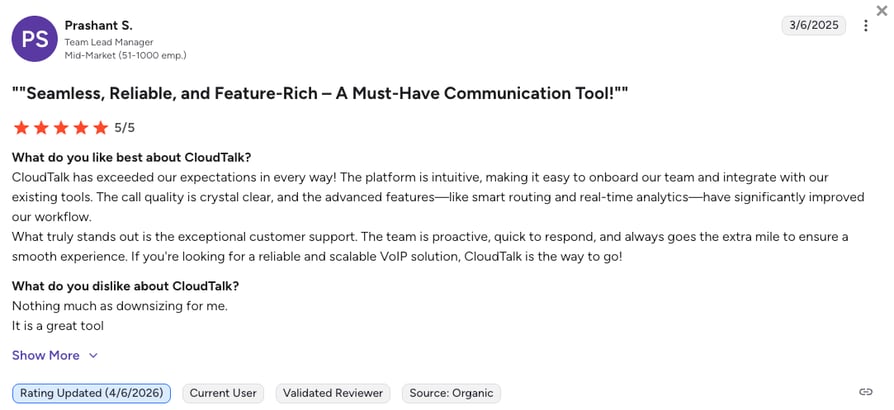
CloudTalk users consistently highlight CRM sync that does not require manual cleanup, a support team that responds quickly to complex tickets, and pricing they can forecast without surprise upgrades.
How Do G2 Users Rate CloudTalk?
CloudTalk's current G2 rating is 4.4/5, out of 1,800+ verified user reviews.
How to Get a Business Phone Number with CloudTalk?
Setting up a business phone number with CloudTalk takes only a few minutes. No hardware, contracts, or technical complexity required. Here’s how to do it:
- Step 1: Start Your Free Trial
Sign up for a 14-day free trial. No credit card needed - Step 2: Choose Your Business Number
Pick a local, toll-free, or international number based on your target audience. CloudTalk lets you select from 160+ country and area codes - Step 3: Customize Call Flows
Use CloudTalk’s drag-and-drop Call Flow Designer to set business hours, voicemail, call routing, and auto-attendant. No IT team required - Step 4: Connect Your Tools
Integrate CloudTalk with CRMs and helpdesks like HubSpot, Salesforce, or Zendesk. Automatically sync call logs, notes, and recordings - Step 5: Start Making & Receiving Calls
Launch calls from desktop, mobile, or browser. All you need is an internet connection. Scale your system as your team grows
See How Fast You Can Get a Business Number Live
2. RingCentral: Best for Enterprises With Remote or Hybrid Workforces
What Is RingCentral?
RingCentral is a leading UCaaS (Unified Communications as a Service) provider offering cloud-based communication solutions with voice, video, and team messaging features. Its flexibility and reliability make it ideal for businesses of all sizes.
Who Is RingCentral Best For?
RingCentral works best for enterprises with remote or hybrid workforces that need reliable video and voice in one platform.
What Are the Best Features of RingCentral?
RingCentral's strongest features are voicemail transcription, advanced call analytics, and built-in team messaging.
- Voicemail transcriptionVoicemails convert to text automatically, so agents can scan messages instead of listening to every recording.
- Advanced call analyticsDetailed call analytics help managers track volume, duration, and outcomes across the whole team.
- Automatic call recordingCalls are recorded by default, giving teams a record for training, quality checks, and dispute resolution.
- Team messagingBuilt-in chat keeps quick internal conversations in the same app as calling, cutting down on tool switching.
What Are the Pros & Cons of RingCentral?
| Pros | Cons |
|---|---|
| Reliable video conferencing | Steep learning curve for new users |
| Robust mobile app | Limited customer support in basic plans |
| Comprehensive analytics tools | Higher pricing for advanced features |
| Easy-to-use admin interface | Limited customization options |
How Much Does RingCentral Cost?
RingCentral pricing starts at $20/user/month (Core plan, annual billing), with the following plans available:
RingCentral Pricing Plans
| Plan | Price (annual billing) |
|---|---|
| Core | $20/user/month |
| Advanced | $25/user/month |
| Ultra | $35/user/month |
What Does RingCentral Integrate With?
RingCentral connects with the everyday tools most teams already use, including Microsoft Teams, Slack, Google Workspace, and Salesforce.
What Are RingCentral's Customers Saying?
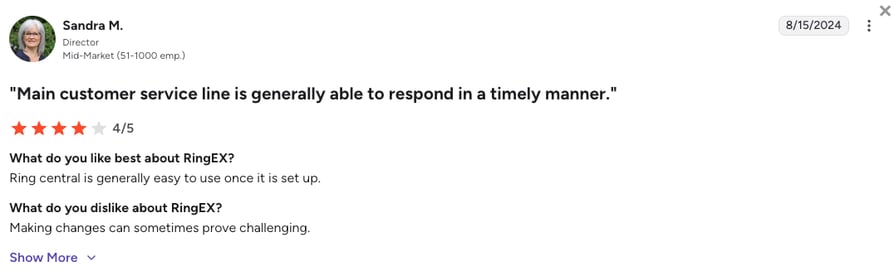
RingCentral users value the all-in-one reliability and the breadth of integrations. The most consistent complaints are around pricing complexity, where features that sound bundled often require a separate add-on.
How Do G2 Users Rate RingCentral?
RingCentral holds a 4.2/5 rating on G2 (for its RingEx suite), based on 1,400+ verified reviews.
3. Dialpad: Best for AI-Powered Productivity and Team Collaboration
What Is Dialpad?
Dialpad is an AI-powered VoIP phone system that focuses on productivity and collaboration. With features like call transcription and real-time coaching, Dialpad is ideal for modern teams that need both reliable phone numbers and quality AI tools.
Who Is Dialpad Best For?
Dialpad fits teams focused on productivity and collaboration who want AI baked into every call
What Are the Best Features of Dialpad?
Dialpad leans on real-time call transcription, automatic call recording, and AI-powered analytics as its core strengths.
- Real-time call transcriptionEvery call is transcribed live, so agents can focus on the conversation instead of taking notes.
- Automatic call recordingCalls save automatically for training and quality review, no manual setup required.
- AI-powered analyticsDialpad surfaces trends and coaching insights from call data automatically, without a separate reporting tool.
What Are the Pros & Cons of Dialpad?
| Pros | Cons |
|---|---|
| AI-powered features | Limited CRM integrations |
| Affordable entry-level pricing | Occasional call quality issues |
| Easy-to-use interface | Advanced features require higher-tier plans |
| Real-time transcription | Limited offline support |
How Much Does Dialpad Cost?
Dialpad pricing starts at $15/user/month (Standard plan, annual billing), with the following plans available:
Dialpad Pricing Plans
| Plan | Price (annual billing) |
|---|---|
| Standard | $15/user/month |
| Pro | $25/user/month |
| Enterprise | Custom pricing |
What Does Dialpad Integrate With?
Dialpad integrates with quite many tools, including the major ones like HubSpot, Google Workspace, or Microsoft 365.
What Are Dialpad's Customers Saying?
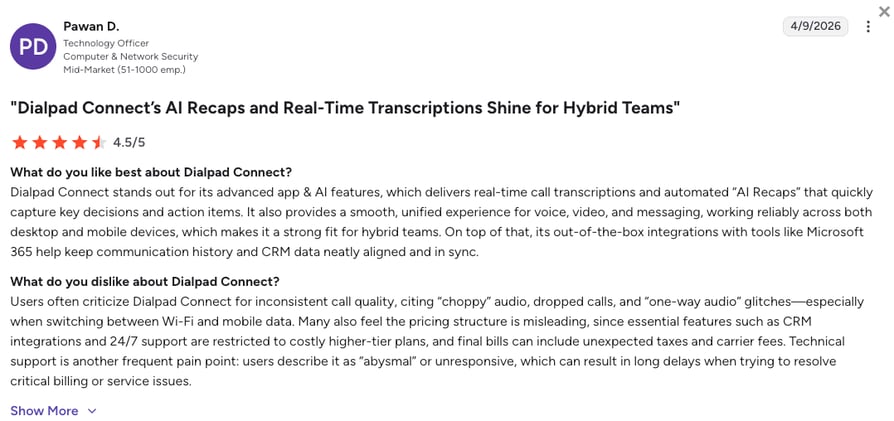
Dialpad users consistently highlight the AI transcription quality, calling it more accurate than competing tools, along with the clean interface.
How Do G2 Users Rate Dialpad?
Dialpad holds a 4.4/5 rating on G2, based on 4,100+ verified reviews.
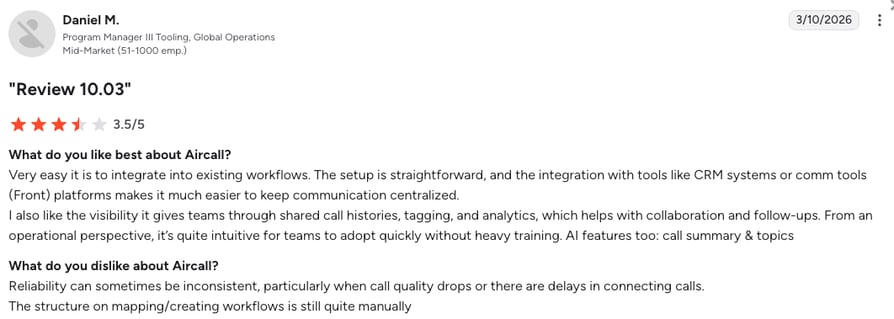
4. Aircall: Best for CRM-Heavy Sales and Support Teams
What Is Aircall?
Aircall is another extremely popular business phone system for growing teams, especially support teams that need a calling platform that integrates with many helpdesk tools. Aircall offers phone numbers for more than 100 countries, which is a lot, but it's still trailing behind CloudTalk's 160+.
Who Is Aircall Best For?
Aircall suits sales and support teams that live inside a CRM and want their calling tool to sync tightly with it.
What Are the Best Features of Aircall?
Aircall's core strengths are unlimited call recording, IVR with skill-based routing, and advanced reporting tools.
- Unlimited call recordingEvery call is recorded with no cap, so support and sales teams always have a record to review.
- IVR and skill-based routingCalls route to the right agent automatically based on skill or department, cutting down on transfers.
- Advanced reporting toolsDetailed reports track call outcomes and team performance without needing a separate analytics tool.
What Are the Pros & Cons of Aircall?
| Pros | Cons |
|---|---|
| Quick and intuitive setup process | Premium pricing with costly add-ons |
| Comprehensive call monitoring tools | Reported issues with call quality |
| Extensive integration ecosystem | Inconsistent customer support response times |
| Advanced calling features | Mobile app reliability concerns |
How Much Does Aircall Cost?
Aircall pricing starts at $30/user/month (Essential plan, 3-user minimum, annual billing), and it offers these plans:
Aircall Pricing Plans
| Plan | Price (annual billing) |
|---|---|
| Essentials | $30/user/month (3-user minimum) |
| Professional | $50/user/month |
| Custom | Contact for enterprise solutions |
What Does Aircall Integrate With?
Aircall integrates with 200+ popular CRM and helpdesk apps, including HubSpot, Salesforce, Zoho CRM, Zendesk, or Freshdesk.
How Do G2 Users Rate Aircall?
Aircall's current G2 rating is 4.4/5, out of 1,600+ verified user reviews.
5. Quo (formerly OpenPhone): Best for Budget-Friendly VoIP Calls
What Is Quo?
Quo, formerly known as OpenPhone, makes obtaining a VoIP number straightforward while offering robust business communication features. It enables teams to manage business calls and texts from a single platform.
Who Is Quo Best For?
Quo works well for startups that need cost-effective VoIP without a big feature list to manage.
What Are the Best Features of Quo?
Quo stands out for shared business numbers, voicemail transcription, call recording, and custom business hours.
- Shared Business NumbersMultiple team members can share one number and see the full conversation history, useful for small collaborative teams.
- Voicemail TranscriptionVoicemails convert to text automatically, so you can scan messages instead of listening to each one.
- Call RecordingCalls are recorded for training and quality review without extra setup.
- Custom Business HoursQuo lets you set specific business hours so calls route to voicemail or an auto-reply outside your working day.
What Are the Pros & Cons of Quo?
| Pros | Cons |
|---|---|
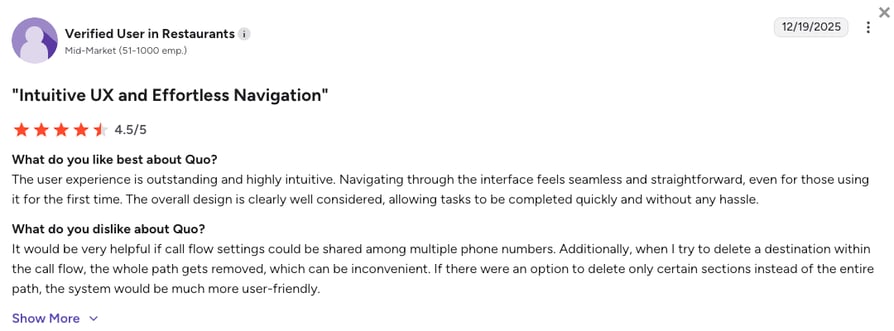
| Affordable pricing | Limited advanced features |
| User-friendly design | No video conferencing options |
| Reliable texting capabilities | Limited scalability for larger teams |
| Flexible business hours settings | Basic reporting features |
How Much Does Quo Cost?
Quo pricing starts at $15/user/month (Starter plan, annual billing), and the platform lets you choose from these tiers:
Quo (formerly OpenPhone) Pricing Plans
| Plan | Price (annual billing) |
|---|---|
| Starter | $15/user/month |
| Business | $23/user/month |
| Scale | $35/user/month |
What Does Quo Integrate With?
Quo connects with everyday tools like HubSpot, Slack, and Google Contacts.
What Are Quo's Customers Saying?
Quo users consistently praise the clean interface and the shared inbox experience, which is genuinely useful for small teams managing calls together.
How Do G2 Users Rate Quo?
Quo holds a 4.7/5 rating on G2, based on 3,300+ verified reviews.
6. 8×8: Best for Combined Voice and Video Communication
What Is 8×8?
8×8 is a versatile VoIP solution offering voice, video, and chat capabilities in one platform. It’s known for its global reliability and robust enterprise-level features tailored to SMBs and larger organizations.
Who Is 8×8 Best For?
8×8 fits teams that prioritize voice and video working together as one system.
What Are the Best Features of 8×8?
8×8's biggest draws are unlimited calling, advanced analytics, call recording, and multi-channel integration.
- Unlimited CallingCalls are unlimited across supported regions, so teams do not need to track minutes used.
- Advanced AnalyticsDashboards break down call volume and quality trends across the whole organization.
- Call RecordingCalls are recorded for quality checks, training, and dispute resolution.
- Multi-channel IntegrationVoice, video, and chat sit in one platform, so agents do not need to switch tools mid-conversation.
What Are the Pros & Cons of 8×8?
| Pros | Cons |
|---|---|
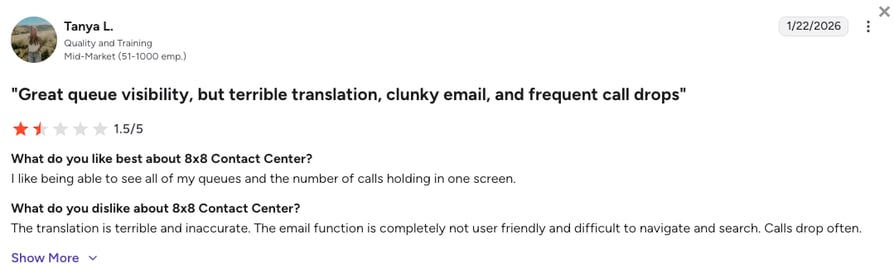
| Reliable global communication | Complex setup for smaller teams |
| Comprehensive features for SMBs | Pricing increases with add-ons |
| Seamless video integration | Limited customizability |
| Extensive reporting tools | Learning curve for new users |
How Much Does 8×8 Cost?
8×8 pricing is a mystery since the provider doesn’t publish it. The online space reports it starts roughly at $24/user/month, but to get a complete picture, you’ll need to request a quote based on your team size.
What Does 8×8 Integrate With?
8×8 connects with widely used tools like Microsoft Teams and Salesforce.
How Do G2 Users Rate 8×8?
8x8's current G2 rating is 4.1/5, out of 250+ verified user reviews.
7. Vonage: Best for Mobile-Friendly Small Business Teams
What Is Vonage?
Vonage offers cloud-based communication solutions with flexibility for SMBs. Its VoIP services include advanced call routing, mobile integration, and productivity-enhancing features.
Who Is Vonage Best For?
Vonage suits small businesses that want a mobile-friendly system their team can use from anywhere.
What Are the Best Features of Vonage?
Vonage's core strengths are advanced call routing, a full-featured mobile app, and smart numbers.
- Advanced Call RoutingCalls route based on rules you set, so the right agent or department picks up every time.
- Mobile AppThe full-featured mobile app lets teams make and receive business calls from anywhere.
- Smart NumbersSmart Numbers let you assign different call behavior to a single number depending on time of day or caller.
What Are the Pros & Cons of Vonage?
| Pros | Cons |
|---|---|
| Mobile-friendly functionality | High pricing for advanced plans |
| Scalable for growing teams | Pricing increases with add-ons |
| Easy integration capabilities | Basic features on lower tiers |
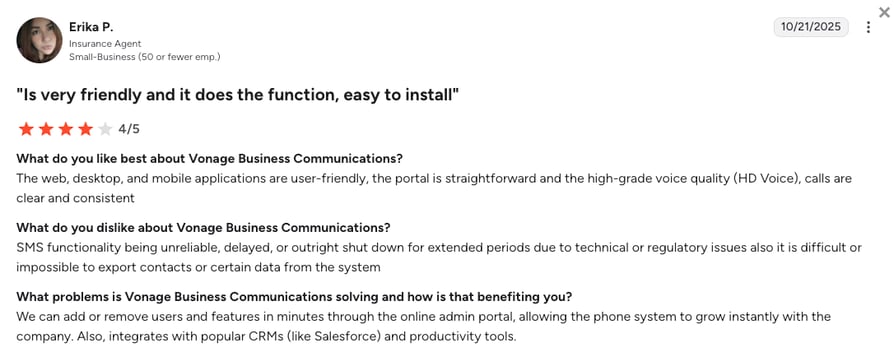
| Excellent voice quality | Support response times vary |
How Much Does Vonage Cost?
Vonage pricing starts at $13.99/user/month (Mobile plan, annual billing), and you can choose from the following Vonage Business Communications plans.
Vonage Business Communications Pricing Plans
| Plan | Price (annual billing) |
|---|---|
| Mobile | $13.99/user/month |
| Premium | $20.99/user/month |
| Advanced | $27.99/user/month |
What Does Vonage Integrate With?
Vonage connects with common CRM tools like Zoho CRM and Salesforce.
What Are Vonage's Customers Saying?
Vonage users appreciate the API depth and the CRM integration quality when properly configured. The most common frustrations center on pricing opacity once add-ons and regulatory fees are included.
How Do G2 Users Rate Vonage?
Vonage Business Communications holds a 4.3/5 rating on G2, based on 500+ verified reviews.
How to Choose the Best Business Phone Provider?
When it comes to choosing the best business phone number provider, unfortunately, there’s no one-size-fits-all solution. The right fit depends on your team size, industry, and communication goals. However, there are some universal factors to consider when making your decision:
- Scalability: Make sure the provider can grow with you. Adding new agents, numbers, or locations should be seamless
- Ease of Use: Look for intuitive platforms with quick setup and minimal learning curve for your team
- Features vs. Price: Balance essential tools like call routing, analytics, and CRM integrations against monthly costs
- Customer Support: Prioritize vendors with responsive, 24/7 support, especially if your business relies heavily on inbound or outbound calls
- Integration Ecosystem: Choose a solution that connects easily with your existing CRM, helpdesk, or productivity tools
- Flexibility for Remote Teams: Ensure it offers mobile apps, browser-based dialers, and cloud routing for hybrid or distributed teams
- Data Security & Compliance: Opt for providers with call encryption, GDPR/HIPAA compliance, and detailed access controls
CloudTalk checks all these boxes, offering a fully cloud-based VoIP solution designed for growing teams that need flexibility, automation, and advanced features without enterprise-level complexity.
Still Comparing Providers?
If You Want to Sound Like a Professional, Start With the Number
A professional number isn’t just about picking digits. It’s about building trust, staying organized, and showing up like a business that means business. Whatever you call it, a company phone number, a business telephone number, or simply a phone number for business, the right pick pays off in trust and organization.
Whether you need to scale fast, route smarter, or connect teams and customers across borders, the right provider makes all the difference.
CloudTalk gives you local presence, toll-free flexibility, and enterprise-grade features, all without the enterprise hassle. If you’re ready to stop missing calls and start making impressions, it starts here.
Ready to Sound Like a Global Business?
Frequently Asked Questions About Business Phone Numbers
Answers to the most common questions about getting, choosing, and paying for a business phone number.
An example of a business phone number is 1-888-555-BOOK, which is a business toll-free line that spells out a memorable word. Local phone number examples work the same way, just with an area code instead of an 800 prefix. If you're not sure which area code fits your market, an area code finder can point you to the right one. Either way, the goal is a number customers recognize and trust, not a random string of digits tied to someone's personal phone.
To get a free business phone numbers, start with a free trial from a VoIP provider like CloudTalk. You get a real business number to test call routing, voicemail, integrations, call flow designer, and more, and you can test it for two weeks before paying anything. Just keep in mind that "free" usually means the trial period rather than a permanent free plan, since professional-grade numbers need a subscription to stay active.
Yes. A VoIP app puts your business number right on your existing phone, so you can make and take work calls without carrying a second device. Your personal number stays private on caller ID, and you can turn off work notifications once you clock out for the day.
Yes. Porting your personal number into a VoIP system lets you keep the same digits your contacts already know, now running through a business-grade phone system. Once ported, it works like any other business number, with call routing, voicemail, and recording included. Just know the number becomes tied to your business account going forward, so switching it back to personal use later takes another port request.
Entry-level VoIP plans for a business phone number typically run $15 to $30 per user a month, and that usually covers call routing, voicemail, and basic analytics. Costs climb from there if you add call recording, CRM integrations, or international numbers. Traditional landlines and on-site hardware tend to cost more upfront and offer far less flexibility as your team grows.
Yes. Most providers let you port your existing number over during onboarding, so your customers never notice the switch. The transfer usually takes anywhere from a few days to a couple of weeks, depending on your old carrier. Keep your old service active until your new provider confirms the port is complete, so you don't lose calls in between.
Yes. Most VoIP-powered business numbers handle SMS alongside calls, so you can text customers from the same number they call. That's useful for appointment reminders, quick order updates, or replying to a missed call with a text instead of playing phone tag.
With CloudTalk, you can get a local, toll-free, or international business number, activated instantly with no hardware to install. CloudTalk covers 160 countries, so you can build a local presence anywhere your customers are, even without opening a local office.
You can get a free business telephone number by signing up for a trial with a VoIP provider like CloudTalk, which offers 14 days to test the platform before you pay anything. A few "freemium" services exist too, but they usually cap features hard. Professional-grade numbers generally need a paid subscription to guarantee things like HIPAA/GDPR compliance, call recording, and reliable uptime.
Yes. Modern business telephone numbers use ring groups or call queues to ring multiple employees at once, or in a set sequence, from a single number. That way, inbound sales or support calls always land with the first available agent instead of piling up on one person's line. You can also set fallback rules so calls roll to voicemail or another team if nobody picks up in time.
To get a professional business number, sign up with a VoIP provider, pick a local, toll-free, or vanity number, then turn on voicemail and call routing. CloudTalk sets this up in minutes, with no hardware and no long contracts.
To add a business phone number to your phone, download your provider's mobile app and log in with your account. CloudTalk's app lets your business number ring and dial from your own cell phone, so your personal number stays private.
To register a business phone number, choose a VoIP provider, confirm your business details, and pick your number type: local, toll-free, or international. Most providers activate the new number the same day, often within minutes.
To set up a business phone number, sign up with a provider, choose your number, then configure your business hours, voicemail greeting, and call routing. CloudTalk's Call Flow Designer handles this with simple drag-and-drop steps, no IT help required.
To get a cheap business phone number, choose a VoIP plan instead of a traditional phone line, since VoIP numbers skip hardware and installation fees. CloudTalk plans start around $25 per user a month, and a free trial lets you test it first.
To make a business phone call, open your business phone app or desktop dashboard and dial as you normally would. The system shows your business caller ID instead of your personal number, keeping every call professional.
To get your business phone number in minutes, sign up with a VoIP provider online, choose your number type, and your line goes live right after signup. There's no hardware to install and no technician visit to wait for.
A business phone number is a dedicated line used only for work calls, kept separate from your personal cell phone. This virtual business number can be local, toll-free, or nation-wide, and usually comes with voicemail, call recording, and call routing built in.