
What Is Affinity Phone Integration?
Affinity phone integration connects a business phone system to Affinity, the relationship intelligence CRM built for venture capital, private equity and professional services firms. Affinity tracks deal pipelines, engagement history and every relationship inside a firm's network.
CloudTalk adds the voice layer on top of that record. Each conversation your team has lands on the matching Affinity contact and opportunity, and nobody types it in by hand.
How Does Affinity Phone Integration Work With CloudTalk?
CloudTalk's Affinity phone integration syncs records between the two systems and matches contacts and opportunities on email address. You decide which fields import into CloudTalk and which ones export back to Affinity.
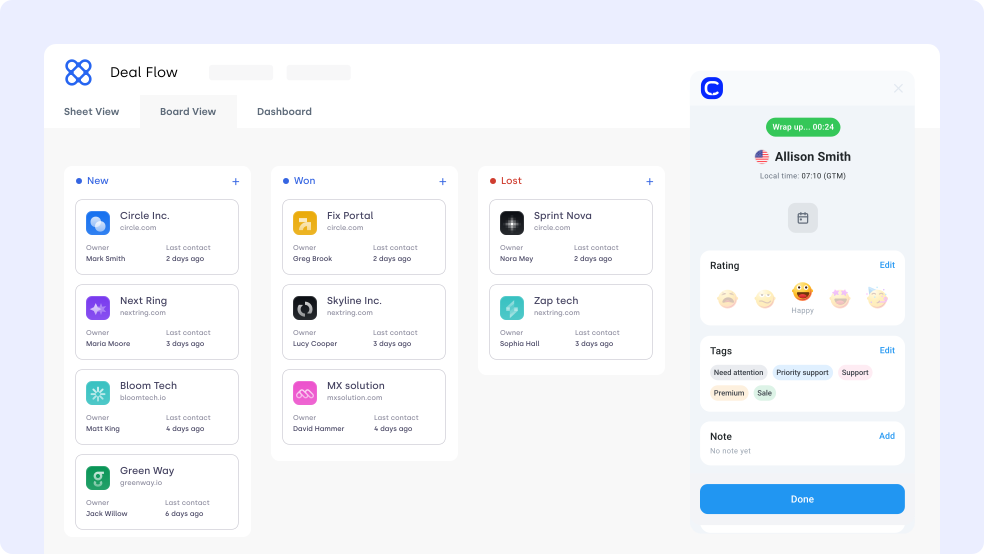
When a call ends, CloudTalk writes the outcome to the matching Affinity record. Call logs, voicemails, SMS threads and Call Notes all attach to the contact and the opportunity behind it.
Benefits of Affinity Phone Integration
- 01Log Every Call and SMS to Affinity AutomaticallyCalls, SMS messages, voicemails and notes post to the correct Affinity contact and opportunity on their own. Nobody retypes an outcome, and the call recording link sits on the record for whoever needs the detail.
- 02Enrich Affinity Records With AI Call InsightsEach logged call can carry an AI summary, the topics discussed and a set of tags. Topics Extraction and Sentiment Analysis run on the AI Conversation Intelligence add-on.
- 03Map Affinity Fields the Way Your Firm WorksRecords match on email, and you pick which fields move in each direction. Contact Import pulls Affinity contacts into CloudTalk, and call outcomes export back, so both systems hold the same data.
- 04Keep One Shared Record Across the FirmCalls link to the Affinity user who made them, so deal teams, investor relations and partnership managers read the same history. Call Tagging keeps that history searchable months later.
- 05See Which Outreach Moves DealsCloudTalk logs campaign names and call dispositions into Affinity alongside the contact record. Pair that with call statistics to see which outreach patterns come before a closed deal.
Affinity Phone Integration

CloudTalk's Affinity phone integration logs every call, SMS and voicemail against the right Affinity contact and opportunity. Map the fields your firm cares about, sync them both ways, and stop retyping call outcomes into the CRM.

What Data Do Affinity & CloudTalk Share?
Affinity CloudTalk
Affinity & CloudTalk exchange
Affinity receives
AI handles the routine. Your team handles what matters.
CloudTalk's Affinity phone integration writes every call outcome, SMS and note onto the matching Affinity contact and opportunity. Your pipeline stays current without anyone touching a keyboard.

Good morning! Thank you for your call. I am CeTe, your AI voice assistant. How can I help you today?
Still on the Fence?
Unsure if CloudTalk is right for you? Let us help make up your mind.
100%
Security
Summaries, transcripts, sentiment, automation, all built into a reliable calling foundation. Let your team focus on having conversations, not catching up.
Explore AI Features5,500+
Happy customers (and counting)
From fast-growing startups to global brands, teams trust CloudTalk to power conversations that drive results.
View Wall of LoveOur reviews
Hear first-hand from our incredible community of customers.
I love the smart dialer as it removes procrastination from cold calling business development time. I also recently trialled the AI notetaker and will be purchasing that as it removes the need to write notes manually. It was very accurate as well!
Co-Founder
We needed the lines for our business with a lot of urgency and the team resolved it for us in just one business day. Everything was integrated and set up immediately, ready for our team to deliver support right away.
Project Manager
Easy to use. I love that support quickly and clearly helped me understand the more difficult mechanisms. The integration via API with our inhousing application also allowed for automations like SMS reminders.
Customer Support Specialist
It's simple to use, has a clean interface, and offers many options for using numbers from many parts of the world. It's also a great tool to use for opening accounts on messaging platforms like WhatsApp and Telegram.
Revenue System Specialist
The calling dashboard and the reporting structure is flawless as it supports campaign-wise reporting as well. We can allocate caller IDs to ISDRs, making it easier to use them whenever required in real-time...
Senior Manager
For us the main upside of using CloudTalk is saving of contacts. We're a business thousands of people contact, so seeing who's calling prior to taking the calls is a big boost. It also has detailed analytics for tracking.
Account Manager
Integrations
Get more value from your tools
Connect your tools, connect your teams. With over 100 apps already available in our directory, your favourite tools are just a click away.

HubSpot
Supercharge your outreach connecting CloudTalk to HubSpot for automated call logging and real-time data synchronization.
Learn more
Salesforce
Empower your sales and support teams with a seamless 2-way data sync between your phone system and Salesforce CRM.
Learn more
Zendesk Sell
Maximize productivity and drive revenue through a simple platform that offers full pipeline visibility.
Learn more
Pipedrive
Accelerate your sales cycle by making and logging calls directly within your Pipedrive deal pipelines.
Learn more
noCRM
Focus strictly on closing deals by eliminating manual logging through a streamlined outbound calling integration.
Learn more
MS Dynamics 365
Optimize your enterprise workflows by connecting professional telephony to your Microsoft Dynamics environment.
Learn moreDiscover 99+ Integrations


What Changes When Your Team Calls From CloudTalk Numbers?
Want 3x more of your calls picked up and up to 40% fewer missed? These teams got there with local numbers, one phone system and AI.

3x Pickup Rate With Local Mobile Numbers
“With CloudTalk, we could get real mobile numbers in-region, not just landlines. It made a huge difference in deliverability and how prospects responded.”

Up to 40% Fewer Missed Calls Globally
“CloudTalk isn't just a tool, it's become a core part of how we connect with prospects, manage conversations, and grow our presence in the U.S. market.”

From a Personal iPhone to Local Numbers
“We went from juggling personal phones and manual call forwarding to a unified platform that saves us time and delivers a much better customer experience.”

Missed Calls Cut From 80% to Just 16%
“Customers used to wait over 20 minutes just to speak to an agent. Now, they get through in 3 to 4 minutes. We also went from missing 80% of calls to just 16%.”

40% More Connected Calls for Sales Reps
“Find a tool that's not only reliable but can scale with your growth. CloudTalk offered us the consistency and support we needed to expand with confidence.”

500+ SDRs on One Global Phone System
“We managed to reduce sales operations by 40 hours per month and give our team the tools they need to scale globally, without sacrificing efficiency.”

Is your existing phone system more drama than dial tone? Book a chat with CloudTalk - we make calls fun again!
Join thousands of teams already growing with CloudTalk.
Affinity Phone Integration FAQ
Everything you need to know about this integration.
The Affinity phone integration connects in minutes from CloudTalk's integrations dashboard. You authorize the connection once, then map the contact and opportunity fields you want to keep in sync.
Yes. CloudTalk includes the Affinity phone integration in every subscription plan at no extra cost. AI Conversation Intelligence is a separate paid add-on.
The Affinity CloudTalk integration syncs calls, SMS, contacts and notes between the two systems in real time. Records match on email address, so each interaction lands on the right contact and opportunity.
CloudTalk writes campaign names and call dispositions into the Affinity record. Partners can see which outreach sequence a contact came from without leaving the CRM.
Dialing from inside Affinity is not supported today. CloudTalk logs every inbound and outbound call into Affinity, so the contact record stays complete either way.
Affinity is a relationship intelligence CRM and ships no telephony of its own. Firms add a provider such as CloudTalk to place calls, send SMS and keep the interaction history attached to Affinity records.
CloudTalk adds an AI summary, the topics discussed, call tags and a recording link to each Affinity call log. These outputs come from the AI Conversation Intelligence add-on, which transcribes each call once it ends.
CloudTalk's analytics dashboard reports call volume, connection rate and talk time by agent, number and campaign. The same call records also sit on the Affinity contact for the deal team to read.
CloudTalk publishes its certifications, data handling practices and subprocessor list on the security page. Review it before you connect Affinity to any system holding investor or client data.


Hello 👋 My name is Emma. Still have questions?
Can't find the answer you're looking for? Please chat to our friendly team.