
14 Types of Business Communication, Examples & Tools to Master Each
How would you like to save $12,506 a year for every employee on your team?
That’s how much poor communication costs businesses annually, per person¹. Missed deadlines, unhappy customers, and lost context drain productivity, damage trust, and slow growth.
The good news? You can prevent it, and even save thousands per rep, by breaking down silos, keeping messaging consistent, and centralizing your tools.
Knowing the different types of business communication and when to apply each can help you apply these fixes easily. In this guide, we break down all 14 business communication types and, when to use them, sharing examples and best practices you can act on right away.
Key takeaways:
-
There are 14 types of business communication. Knowing when to use each keeps information flowing in the right direction without delays or misalignment.
-
Matching the right business communication method to the right scenario improves clarity, speed, and customer experience across sales, support, and internal teams.
-
Consistent, well-structured communication boosts productivity, shortens decision cycles, and strengthens brand trust.
-
The 7 Cs and 8 best practices of business communication turn theory into repeatable habits that prevent breakdowns before they happen.
-
A unified cloud communication platform like CloudTalk makes it possible to apply these principles at scale, keeping every call, message, and update connected — and measurable.
See how you can elevate your communication with the right business phone system.
What Are the 14 Types of Business Communication?
Before diving in, here’s a quick look at the 14 main types of business communication:
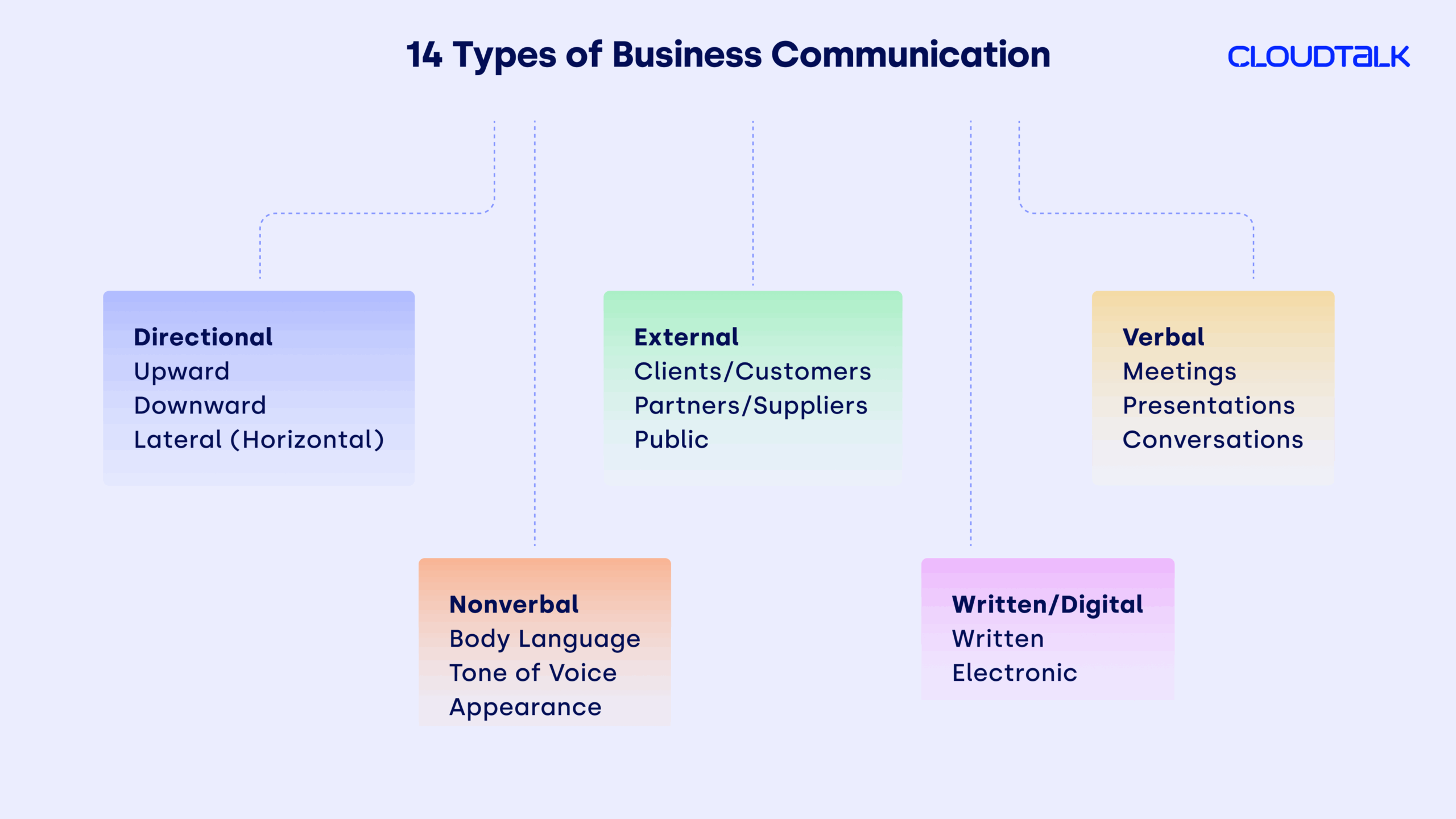
-
01
Upward Communication
-
02
Downward Communication
-
03
Lateral (Horizontal) Communication
-
04
External: Clients/Customers
-
05
External: Partners/Suppliers
-
06
External: Public Communication
-
07
Verbal: Meetings
-
08
Verbal: Presentations
-
09
Verbal: Conversations
-
10
Nonverbal: Body Language
-
11
Nonverbal: Tone of Voice
-
12
Nonverbal: Appearance
-
13
Written: Emails, Reports, Letters, Memos
-
14
Electronic: IM, Video Conferencing, Social Media, Intranet
Each type has its own strengths, limitations, and ideal use cases. Knowing when (and when not) to use each allows you to keep information flowing in the right direction without clogging inboxes, overwhelming people with calls, or losing key details.
Let’s now explore them one by one.
1. Directional: Upward Communication
What it is: Upward communication keeps leadership grounded in reality by giving them direct insight from the people closest to the work. It ensures decision-makers stay informed about daily challenges, opportunities, and frontline perspectives.
When to use it: To gather insights from staff, surface issues early, or pitch new ideas.
What to watch out for: Fear of criticism can discourage openness and limit valuable feedback.
Tips to improve it: Create regular two-way feedback sessions and make them safe spaces for honesty. Anonymous surveys can surface issues that might not come up in meetings. For feedback shared over calls, recordings or transcripts ensure leaders can revisit exact wording and tone when making decisions.
Example scenario:
A customer support team notices a recurring issue with a new product feature. They document examples, gather feedback from users, and present the findings to the product manager. This early communication helps the product team fix the issue before it affects a larger customer base.
Takeaway: When leadership listens effectively, they make better-informed decisions and build trust across the organization.
2. Directional: Downward Communication
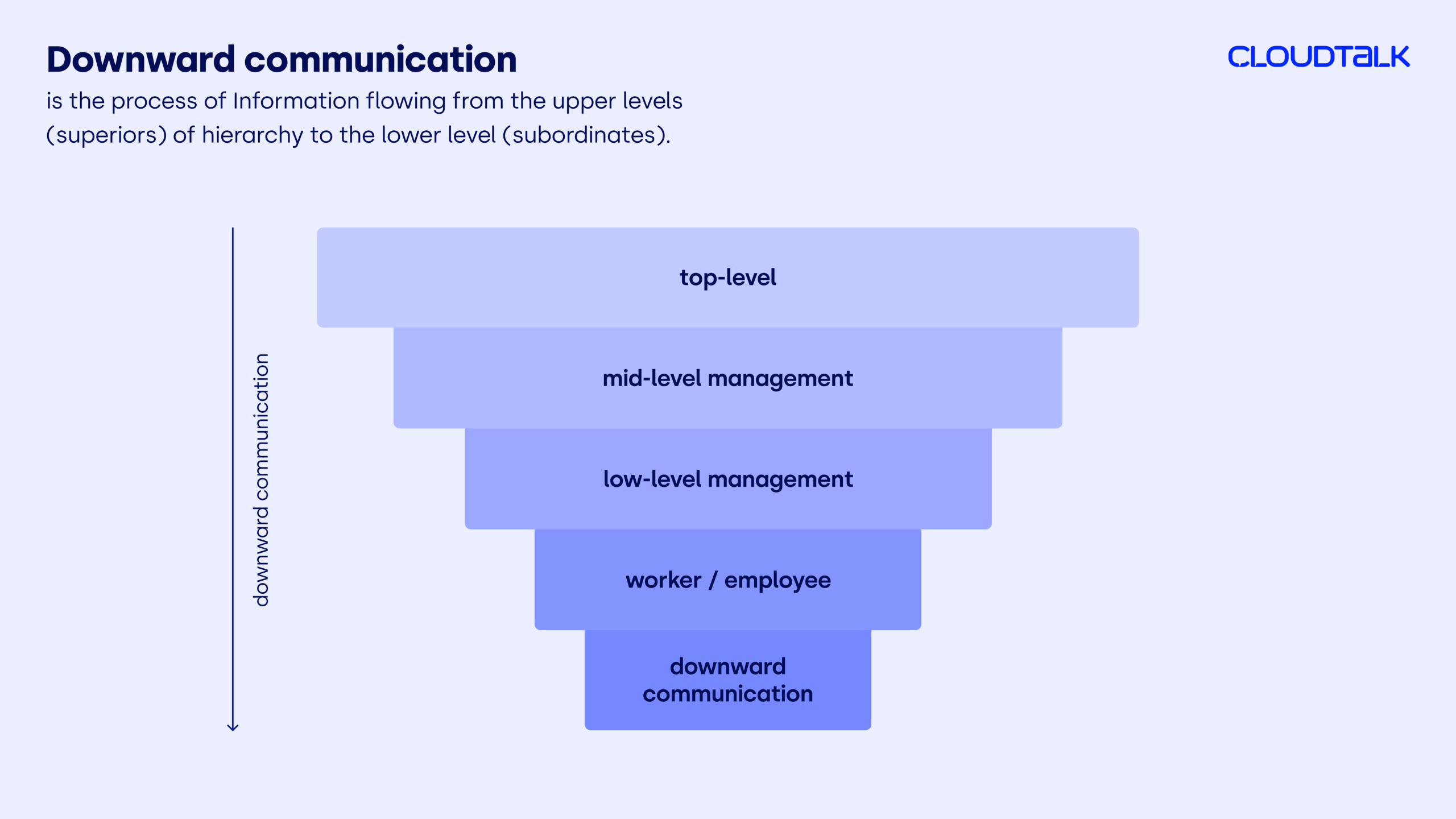
What it is: Downward communication is the flow of information from leadership to employees. It ensures teams understand company objectives, policies, and expectations, making it easier to work toward common goals.
When to use it: To announce changes, explain policies, share performance expectations, or provide feedback.
What to watch out for: Overloading teams with too much information at once can cause confusion and reduce focus.
Tips to improve it: Pair verbal communication (meetings, calls) with written follow-ups. Break complex updates into digestible parts and give employees time to ask questions.
Example scenario:
A department head rolls out a new quarterly sales strategy during a team meeting, then follows up with a concise written summary and resource links so every rep has clear instructions to reference later.
Takeaway: Clear downward communication keeps teams aligned and turns strategy into action.
3. Directional: Lateral (Horizontal) Communication
What it is: Lateral (or horizontal) communication flows between colleagues or departments at the same level—like sales and marketing. It ensures both sides share information quickly, coordinate efforts, and solve problems without escalating to management.
When to use it: To align campaign messaging, coordinate lead follow-up, or share market insights between teams.
What to watch out for: Lack of documentation can cause misaligned outreach and duplicate work.
Tips to improve it: Use shared dashboards that combine live campaign updates, call notes, and customer details so sales and marketing teams see the same information in real time. Pair this with regular syncs to review data and adjust strategies together.
Example scenario:
A sales team and marketing team hold a weekly sync to prepare for a new campaign launch. During the call, they update a shared dashboard with lead lists, campaign creatives, and talking points, ensuring both teams see the same live data and can adjust outreach in real time.
Takeaway: Strong lateral communication keeps work moving smoothly between teams.
4. External: Clients/Customers
What it is: Client-facing communication includes all interactions with customers, from sales pitches to service follow-ups. It shapes their perception of your brand.
When to use it: To build relationships, resolve issues, answer questions, or collect feedback.
What to watch out for: Inconsistent tone, delayed responses, or lack of personalization can damage trust.
Tips to improve it: Keep detailed customer records so every interaction is informed and relevant. Integrating your calling tool with your CRM means reps see the full customer history before picking up the phone.
Example scenario:
A support rep sees a returning customer’s past ticket history in the CRM and references it while solving their new issue, showing the customer they’re valued and remembered.
Takeaway: Consistent, personalized customer communication creates loyalty and long-term value.
5. External: Partners/Suppliers
What it is: Communication with partners and suppliers keeps collaborations productive and mutually beneficial. It ensures expectations, timelines, and deliverables are clear.
When to use it: For contract negotiations, progress updates, or operational coordination.
What to watch out for: Misaligned priorities or unclear responsibilities can lead to delays and friction.
Tips to improve it: Hold regular check-ins, use shared project timelines, and document all agreements in a centralized hub. Integrate your CRM or partner management system so calls, emails, and shared files are automatically logged—making it easy for both sides to reference the same details, stay aligned, and avoid missed commitments.
Example scenario:
A retailer and supplier agree on seasonal inventory deadlines via a shared production calendar, reducing stock shortages during peak sales periods.
Takeaway: Good partner communication strengthens reliability and prevents costly breakdowns in supply or delivery.
6. External: Public Communication
What it is: Public communication reaches audiences outside your direct network—such as the media, industry peers, and the general public.
When to use it: For press releases, public statements, or major announcements.
What to watch out for: Messaging that doesn’t align with your internal narrative can cause credibility issues.
Tips to improve it: Align all public messaging with internal communications for authenticity and consistency.
Example scenario:
A company announcing a major sustainability milestone ensures that the press release matches the internal memo sent to employees, so everyone shares the same talking points.
Takeaway: Public communication works best when it reflects the same story you tell internally.
7. Verbal: Meetings
What it is: Meetings provide a space for live discussion, collaboration, and decision-making—particularly for topics that benefit from direct interaction.
When to use it: For strategic planning, complex problem-solving, or brainstorming sessions.
What to watch out for: Meetings without a clear agenda often waste time and lose focus.
Tips to improve it: Set a clear agenda, assign roles, and close with action items and deadlines. If the meeting is held by phone or video, use recording and searchable notes to ensure nothing gets missed.
Example scenario:
A cross-departmental meeting on a marketing campaign ends with clear next steps, assigned owners, and due dates documented in the shared task manager.
Takeaway: Well-run meetings turn ideas into committed action plans.
8. Verbal: Presentations
What it is: Presentations allow you to share information in an organized, often visual format—ideal for persuasion, reporting, or training.
When to use it: For sales pitches, onboarding, or quarterly updates.
What to watch out for: Overloading slides with text can overwhelm your audience.
Tips to improve it: Keep slides visual, focus on key points, and rehearse delivery. If you’re presenting remotely, recording the session ensures absent team members can watch later, and syncing it with your CRM helps keep all stakeholders in the loop.
Example scenario:
A sales manager delivers a quarterly performance presentation, using clear visuals and bullet points instead of dense paragraphs, helping executives grasp key trends in minutes.
Takeaway: Clear, engaging presentations make information easier to absorb and act on.
9. Verbal: Conversations
What it is: Informal conversations—whether in person or via messaging—are ideal for quick clarifications and small decisions.
When to use it: For daily operational updates or on-the-spot problem-solving.
What to watch out for: Important points from casual conversations can be forgotten if not documented.
Tips to improve it: Follow up important conversations with a quick written summary to keep everyone aligned.
Example scenario:
A developer and designer chat briefly over coffee to confirm a last-minute change, then log the update in the project tracker to keep the team in sync.
Takeaway: Quick conversations keep work moving but still need a record to avoid missteps.
10. Nonverbal: Body Language
What it is: Body language—posture, gestures, and facial expressions—adds meaning to verbal communication.
When to use it: In negotiations, interviews, or sensitive discussions.
What to watch out for: Unintentional negative signals, like crossed arms, can create distance.
Tips to improve it: Maintain open posture, make eye contact, and be mindful of expressions during important conversations.
Example scenario:
During a job interview, a hiring manager leans in slightly and maintains eye contact, putting the candidate at ease and encouraging openness.
Takeaway: Positive body language strengthens your message and builds trust without saying a word.
11. Nonverbal: Tone of Voice
What it is: Tone shapes how your words are interpreted, influencing trust, empathy, and authority. Even if your words are perfect, the wrong delivery can change the meaning entirely.
When to use it: In any spoken interaction, especially customer-facing conversations.
What to watch out for: Mismatched tone and message can confuse or alienate listeners.
Tips to improve it: Match tone to context, and keep it warm and professional to foster trust. If you manage a customer-facing team, sentiment analysis tools can help you detect shifts in tone—both positive and negative—in real-time, making it easier to coach reps and address issues before they escalate.
Example scenario:
A customer success rep delivers bad news about a delayed shipment in a calm, empathetic tone, helping the customer stay understanding instead of frustrated. A sentiment analysis dashboard flags that the rep maintained a positive tone throughout the call, reinforcing the customer’s trust.
Takeaway: The right tone can turn a difficult conversation into a positive experience, and tracking it over time ensures consistency in quality.
12. Nonverbal: Appearance
What it is: Visual presentation—clothing, grooming, and setting—affects how others perceive you before you speak.
When to use it: In first meetings, presentations, and public appearances.
What to watch out for: Dress or setting that conflicts with brand image.
Tips to improve it: Align appearance with company culture and the audience you’re addressing.
Example scenario:
For a video sales pitch, a rep wears brand colors, uses a tidy background, and adjusts lighting to appear professional on camera.
Takeaway: A professional appearance reinforces credibility before the conversation even starts.
13. Digital: Written—Emails, Reports, Letters, Memos
What it is: Written formats like emails, reports, and memos create a lasting record and allow for precise messaging.
When to use it: For formal correspondence, documenting decisions, or sharing detailed information.
What to watch out for: Long or unclear writing can cause readers to miss key points.
Tips to improve it: Keep it concise, use formatting for readability, and proofread before sending.
Example scenario:
A project lead emails a concise weekly update with bullet points and bolded deadlines, making it easy for stakeholders to scan and act.
Takeaway: Strong written communication reduces misunderstandings and speeds up decision-making.
14. Digital: Electronic—IM, Video Conferencing, Social Media, Intranet
What it is: Electronic communication includes instant messaging, video conferencing, social media, and intranet platforms, enabling instant connectivity across teams and time zones.
When to use it: For quick updates, remote collaboration, or public engagement.
What to watch out for: Over-reliance without documentation can cause information loss, and switching between too many apps can fragment conversations.
Tips to improve it: Pair real-time tools with a central knowledge hub to store key updates. A multichannel communication platform that integrates telephony, chat, and video ensures every conversation—no matter where it starts—stays connected and easy to find.
Example scenario:
A remote sales team uses video conferencing for a strategy session, follows up with instant messages for quick clarifications, and logs call recordings in the same platform. Because all channels are connected, no one wastes time digging for missing context.
Takeaway: Multichannel integration gives you the speed of real-time conversations without sacrificing continuity or record-keeping.
Pro Tip:
Ready to Master These Communication Types?
Why Business Communication Matters to Your Company’s Success
The importance of business communication lies in its ability to help teams work toward shared goals, speed up decision-making, and build trust with customers.
Let’s now look at the five key benefits of good business communication in detail.
1. Align Teams Efficiently
When communication is aligned, everyone understands the company’s objectives, priorities, and their role in delivering them. This prevents teams from working in silos or duplicating effort.
How to achieve it: Hold regular all-hands or department updates, and follow up with written summaries in a shared hub. Company-wide broadcast tools or synced call notes from team leaders ensure the same message reaches everyone at the same time, regardless of location.
2. Accelerate Decision-Making
Delays often occur when decision-makers lack the right information at the right time. Transparent communication—supported by real-time updates—lets teams act quickly and confidently.
How to achieve it: Use instant notifications for urgent items, and maintain shared dashboards where stakeholders can access live data. Features like multi-channel monitoring give leaders full context to make fast, informed choices without switching tools. Warm call transfers add another layer of efficiency, allowing the right person to step in mid-conversation without losing context.
3. Enhance Customer Experience
Customers value quick, consistent, and empathetic interactions. Whether you’re resolving a problem or answering a query, how you communicate shapes your interactions with them and their perception of your brand.
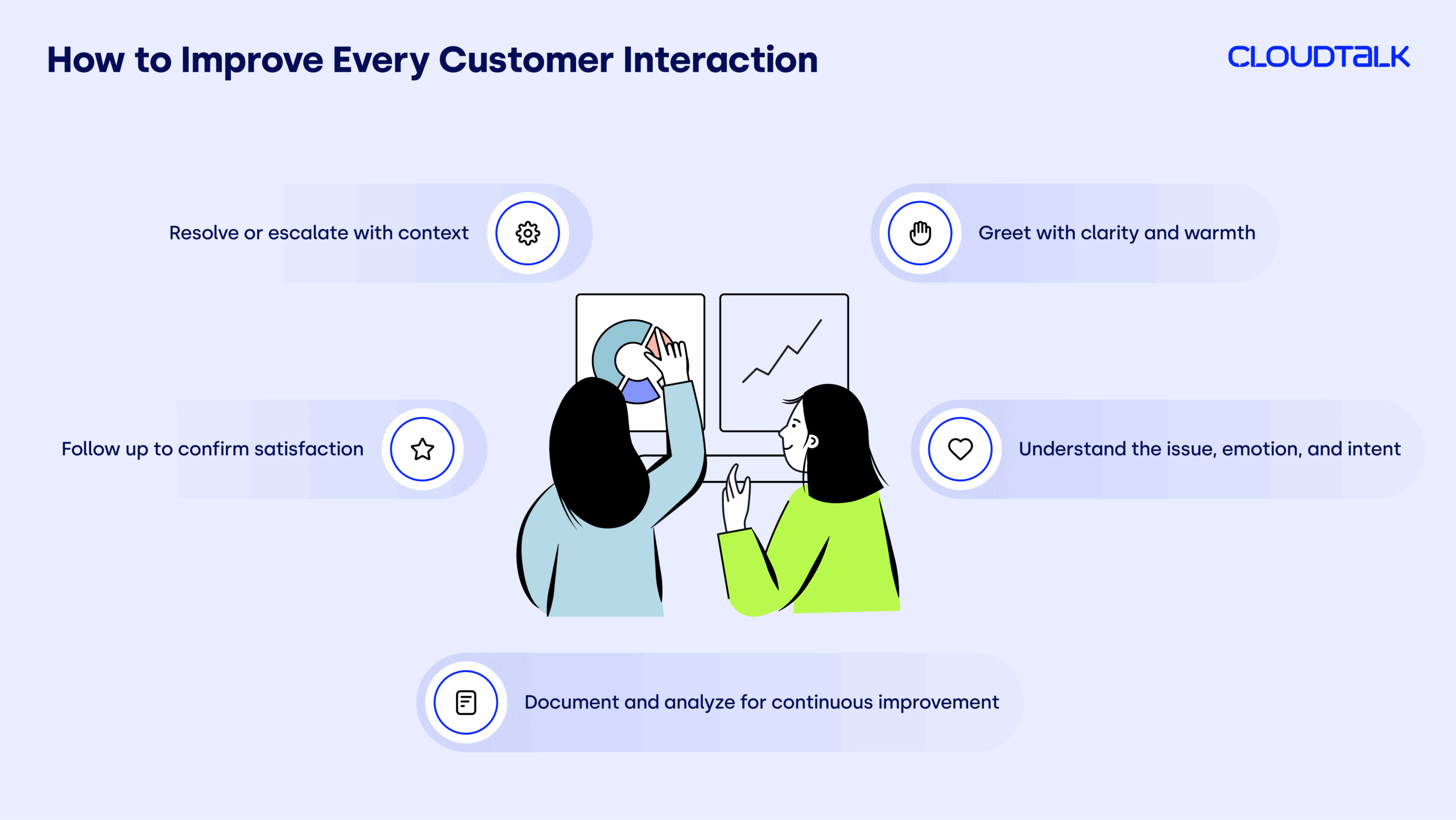
How to achieve it: Give customer-facing teams access to CRM-integrated communication tools so they have the full history in front of them. Pair this with call tagging and post-call notes so the next agent instantly knows the customer’s journey—whether it started on a phone call, live chat, or email.
4. Boost Productivity
Every miscommunication adds time, cost, and frustration. Clear processes for how and when to use certain communication channels can dramatically reduce wasted effort.
How to achieve it: Define standard operating procedures for different scenarios, and use automated call routing to send queries directly to the right person or team. Pair this with internal messaging guidelines to cut down on low-priority pings and duplicated status updates, keeping focus on high-value work.
5. Strengthen Brand Reputation
Your communication style and tone reflect your brand values. Consistency—both internally and externally—shows professionalism and reliability, which strengthens trust with employees, customers, and the public.
How to achieve it: Create brand communication guidelines, and provide employees with pre-approved messaging templates for everyday situations. Tools like call scripts or shared response libraries align tone and language across every interaction.
When you know the benefits, you can better spot real-world examples—which is exactly what’s next.
Pro Tip:

Join 4,000+ Teams Communicating Smarter

Examples of Business Communication in Action
Real-world examples make it easier to see how these communication types play out in day-to-day business operations—especially for teams balancing sales, support, and cross-department collaboration.
-
Quarterly performance reviews (downward):
Leaders share revenue progress, pipeline health, and key market shifts before outlining new priorities for the coming quarter. Pairing this meeting with a concise written recap ensures every rep has the same roadmap to hit targets.
-
Proactive customer outreach (external-clients):
Account managers schedule regular check-ins with strategic accounts to share relevant updates and anticipate potential challenges. This keeps relationships strong, helps spot opportunities early, and prevents last-minute fire drills.
-
Mid-campaign alignment sessions (lateral):
Marketing and sales teams meet during a live campaign to exchange feedback on messaging performance and lead quality. Agreeing on adjustments midstream means both teams can pivot quickly—without waiting for end-of-quarter reviews.
-
Coordinated public launches (external-public):
Ahead of a product release, teams work together to ensure external announcements, sales decks, and event presentations reflect the same story. This avoids mixed messages and ensures prospects hear a unified pitch across all channels.
-
Open idea channels (upward):
Employees submit suggestions for process improvements through a dedicated channel where leaders can review and respond. This keeps valuable insights from getting lost in day-to-day noise and reinforces that contributions are valued.
-
Collaborative supplier reviews (external–partners):
Procurement meets with suppliers to assess results, address recurring issues, and set shared objectives. Documenting these discussions makes it easier to track progress over time and hold both sides accountable.
These examples show that intentional communication isn’t just about avoiding misunderstandings. It’s mainly about keeping information flowing in the right direction at the right time so teams can act faster and more effectively.
How a Cloud Communication Platform Solves the Challenges We’ve Covered
By now, we’ve looked at:
-
The 14 main types of business communication.
-
The biggest reasons communication impacts company success.
-
Real-world examples of what works—and what breaks down.
The common thread so far? Even the best communication strategy can stumble if your tools don’t connect, your information isn’t accessible, or your teams can’t act quickly on what they learn.
That’s where CloudTalk comes in. Our unified communication suite will keep every conversation, update, and decision moving in the right direction.
1. Centralize Every Conversation
Confusion and misalignment often come from scattered communication—calls in one tool, chats in another, customer details somewhere else.
CloudTalk integrates telephony, chat, and your existing video tools with CRM data in one place so:
-
Every interaction lives in a single timeline per customer, partner, or project.
-
Reps have full context before they start talking.
-
Teams can switch between channels without losing history.
2. Turn Talk Into Action
Meetings, calls, and quick syncs only help if they’re documented and actionable.
With CloudTalk, you can:
-
Record calls and generate searchable transcripts for easy reference.
-
Tag and categorize conversations so follow-up tasks never get lost.
-
Sync notes automatically to your CRM or helpdesk for team-wide visibility.
3. Accelerate Decision-Making
Slow decisions usually mean the right people didn’t have the right information at the right time.
CloudTalk speeds this up through:
-
Real-time Call Monitoring for instant coaching or escalation.
-
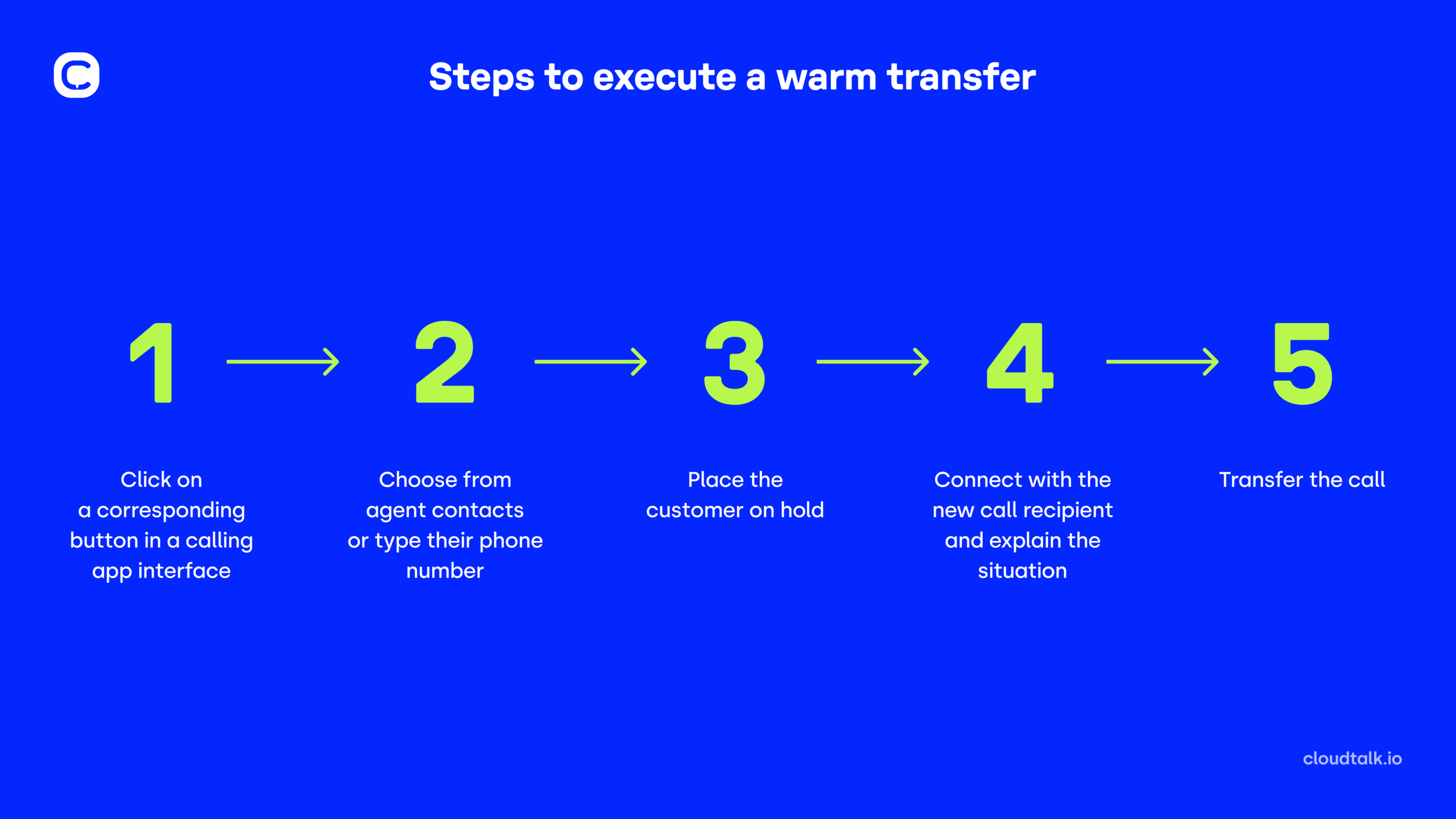
Warm call transfers so the right person can join mid-conversation without losing context.
-
Live dashboards showing Call Queues, campaign results, or team performance in real-time.
4. Boost Outbound Productivity
When teams spend more time dialing than talking, opportunities are lost, and slow outreach can cause communication gaps across sales, support, and partners.
CloudTalk’s dialing modes help you maximize live connections by automating outbound calling:
-
Power Dialer works through contact lists automatically, saving staff from manual dialing and ensuring timely follow-ups with customers, suppliers, or internal stakeholders.
-
Parallel Dialer calls up to 10 numbers at once, detects voicemails, and connects the first live pick-up, reducing idle time and speeding urgent outreach.

With these sales automation tools, every call is logged with full history and context, follow-ups across sales, support, or partnership teams stay fast and consistent, supporting upward, downward, and lateral communication flows.
5. Keep Customers Engaged and Loyal
Customer trust builds when every interaction feels personal, timely, and consistent.
CloudTalk supports this by:
-
Displaying the entire customer history before the call connects.
-
Using call tagging and post-call notes so every agent knows the latest status.
-
Deploying the AI Voice Agent to handle after-hours calls, answer FAQs, and route urgent issues, ensuring communication never stops, even when your team is offline.

AI Voice Agents

Nudge expiring offer
Riley, Sales Reminder Agent

Qualify a student lead
Avery, Course Inquiry Agent

Get a payment reminder
Casey, Payment Reminder Agent

Qualify a patient lead
Jordan, Healthcare Intake Agent

Qualify insurance lead
Taylor, Insurance Intake Agent

Accept updated terms
Quinn, T&C Acceptance Agent

Qualify legal inquiry
Drew, Legal Intake Agent

Get post-interview feedback
Jamie, Candidate Feedback Agent

Pre-screen a candidate
Skyler, Applicant Pre-screen Agent

Confirm account action
Morgan, Action Reminder Agent

Get a renewal reminder
Logan, Subscription Renewal Agent

Get CSAT after support
Morgan, CX Feedback Agent

Get NPS or demo feedback
Parker, Post-Sales Feedback Agent

Qualify a trial lead
Blake, Trial Signup Qualifier
Sales Reminder
Agent
Client
Sales / Marketing
Course Inquiry
Agent
Client
Education / EdTech
Payment Reminder
Agent
Client
Financial Services
Healthcare Intake
Agent
Client
Healthcare
Insurance Intake
Agent
Client
Insurance
T&C Acceptance
Agent
Client
Legal Services
Legal Intake
Agent
Client
Legal Services
Candidate Feedback
Agent
Client
Recruitment / HR
Applicant Pre-screen
Agent
Client
Recruitment / HR
Action Reminder
Agent
Client
SaaS / Software & Apps
Subscription Renewal
Agent
Client
SaaS / Software & Apps
CX Feedback
Agent
Client
SaaS / Software & Apps
Post-Sales Feedback
Agent
Client
SaaS / Software & Apps
Trial Signup
Qualifier
Client
SaaS / Software & Apps
6. Eliminate Internal Bottlenecks
Internal miscommunication can stall progress just as much as external delays.
CloudTalk helps you:
-
Route calls directly to the right team member based on skills or availability.
-
Assign calls automatically using Workflow Automation to balance workloads.
-
Share pre-approved scripts and templates so messaging stays aligned across every interaction.
Bottom line:
CloudTalk unites your business communication strategy from end to end. By unifying your channels, giving teams instant context, and removing friction from every interaction, it turns conversations into faster decisions, stronger relationships, and measurable business results.
Test drive the platform that’ll solve all your communication challenges?
Essential Business Communication Tips (The 7 Cs of Business Comms)
Even the best tools can’t guarantee great communication—what matters most is how you use them. The most successful sales, support, and cross-department teams follow a set of proven principles to ensure every message is clear, actionable, and aligned.
That’s why you need to stick to the “7 Cs.” Think of them as your quality checklist for every call, email, meeting, or update—helping you avoid rework, speed up decisions, and keep everyone on the same page, no matter which channel you’re using.
The 7 Cs of business communication are:
-
Clear
-
Concise
-
Concrete
-
Correct
-
Coherent
-
Complete
-
Courteous
Let’s now look a bit deeper into each.
1. Make Communication Clear to Ensure Understanding
Clear communication removes guesswork and eliminates the “what did they mean?” moments. It uses simple language, organizes ideas logically, and avoids jargon that could confuse your audience.
Example: In a support handoff, stating “Follow up with the customer by EOD Thursday about invoice #482” is clear; saying “Handle the billing thing soon” is not.
2. Keep Communication Concise to Maintain Attention
Concise communication respects your audience’s time. It delivers the essentials without filler, making it easier for busy professionals to process and act quickly.
Example: A sales rep sends a 3-bullet follow-up email summarizing a prospect call instead of a full page of notes—helping the decision-maker respond faster.
3. Use Concrete Communication to Build Credibility
Concrete communication leans on specific facts, numbers, and examples instead of vague statements, which boosts trust and influence.
Example: A marketing manager tells the sales team “This campaign drove 214 qualified leads last week,” instead of “The campaign is going well.”
4. Keep Communication Correct to Protect Credibility
Correct communication—factually and grammatically—maintains professionalism and prevents misunderstandings that could damage relationships.
Example: Double-checking a customer’s contract details before a renewal call ensures the proposal matches the agreed terms.
5. Make Communication Coherent to Improve Flow
Coherent communication connects ideas in a logical order so the message is easy to follow from start to finish.
Example: In a cross-department update, grouping “what happened,” “impact,” and “next steps” keeps stakeholders oriented and reduces follow-up questions.
6. Keep Communication Complete to Avoid Gaps
Complete communication gives recipients everything they need to act without chasing extra details.
Example: When escalating a support case, including the customer’s history, ticket ID, and your attempted fixes avoids duplicate work and delays.
7. Deliver Courteous Communication to Build Relationships
Courteous communication shows respect and professionalism, even when addressing tough issues, strengthening collaboration and trust.
Example: A project manager says, “I understand the delay; let’s work together to adjust the timeline,” instead of, “You’re holding us up again.”
8 Best Practices in Business Communication (With Examples)
Now that you know the different communication types, their benefits, and the principles that make them effective, the next step is turning them into daily habits. These habits directly answer the question: What are the best practices in business communication?
They work with or without specialized tools, but unified platforms like CloudTalk make it easier to apply them consistently and at scale.
1. Match the Channel to the Message
Choose the medium that best fits the urgency and complexity of your message so nothing gets delayed or lost in translation.
Example: A sales manager pings the team on instant message to flag a hot inbound lead, then follows up with a short, detailed email summarizing qualification notes.
When paired with intelligent routing in a platform like CloudTalk, the right messages reach the right people instantly.
2. Document Important Interactions
If it matters, write it down. Documentation keeps everyone aligned and prevents confusion later.
Example: After a supplier call, the operations lead logs a note in the shared project tracker so the updated delivery date is visible to all.
With call recording, searchable transcripts, and automatic CRM syncing, CloudTalk makes documentation part of the workflow instead of an extra step.
3. Review and Analyze Communication Patterns
Regularly step back to see how your team communicates and where it slows down.
Example: A support manager spots that 30% of escalations come from missing context in handoffs, then updates the process to fix it.
Analytics dashboards in CloudTalk make these patterns visible in minutes, helping leaders act before small issues grow.
4. Personalize Customer Interactions
Use context to make every conversation relevant and memorable.
Example: Before a renewal call, an account manager reviews the client’s past tickets and references how those issues were resolved.
With CRM-integrated calling, CloudTalk displays the full customer history before you even say hello.
5. Train Teams on Communication Skills
Strong communication skills make every tool more effective. Invest in role-play, shadowing, and constructive feedback.
Example: Sales reps practice objection handling using real call recordings from recent deals.
CloudTalk’s live call monitoring and coaching tools let managers guide reps in the moment for faster skill-building.
6. Keep a Consistent Tone Across Channels
Your tone should reflect your brand in every interaction—whether on the phone, over email, or in chat.
Example: A marketing coordinator ensures all campaign responses use the same friendly, approachable voice customers know from social media.
Shared scripts and templates in CloudTalk help teams keep tone aligned without slowing down.
7. Respond Promptly
Speed shows respect for the other person’s time and keeps momentum going.
Example: A support rep acknowledges a customer’s ticket within five minutes, setting expectations for the resolution timeline.
With CloudTalk’s real-time notifications, urgent queries never slip through the cracks.
8. Measure and Improve Continuously
Treat communication as a process to refine, not a task to check off.
Example: After seeing lower first-call resolution rates, a contact center tweaks call scripts and routing, improving results the next month.
CloudTalk’s reporting turns raw data into actionable insights so teams can adapt faster.
With these best practices in place, your team is equipped to communicate with clarity, consistency, and purpose. The only question left is what that level of alignment could mean for your productivity, customer satisfaction, and profitability.
Turn Every Conversation Into a Competitive Edge
Strong business communication means your message reaches the right people, lands with clarity, and drives immediate action.
Teams often invest in training and processes, only to find their efforts undermined by scattered tools that don’t talk to each other—like running a relay race but dropping the baton at every handoff.
CloudTalk unifies calls, internal chat, CRM data, and your existing video tools with built-in automation and integrations—ensuring every handoff is seamless and nothing gets lost along the way. With transparent pricing, flexible plans, and a focus on measurable outcomes, it scales with your business while keeping costs predictable.
Whether you’re closing a deal, resolving an urgent support case, or aligning teams on a major launch, our AI-powered platform gives you the speed, clarity, and consistency to make every interaction count—and start chipping away at the $12,506 cost of poor communication from day one.
Stop Dropping the Baton in Your Business Communication.
Sources:






















