The 8 Types of Call Centers: Definitions, Use Cases & How to Choose
A call center is a centralized team that handles inbound and outbound phone calls with customers. There are 8 main types, each built for a different mix of support, sales, cost, and control.
The 8 types of call centers are:
- Inbound call centers handle incoming calls for customer support, order processing, and technical help
- Outbound call centers focus on proactive sales outreach, telemarketing, surveys, and lead generation
- Blended call centers combine inbound and outbound into one operation for teams that do both
- Virtual call centers run on cloud-based VoIP software with agents working across different locations and time zones
- Automated call centers use IVR, SMS automation, and self-service tools to reduce manual agent workload
- Multichannel and omnichannel contact centers handle phone, SMS, email, and social media, with omnichannel unifying all channels into a single view
- In-house vs. outsourced call centers differ in operational control, with in-house offering higher quality oversight and outsourced offering lower upfront costs
- Offshore call centers are outsourced operations based in lower-cost regions, suited for small businesses with limited budgets
CloudTalk supports all eight types with cloud-based calling, Smart Call Routing, IVR, Power Dialer, CRM integrations with HubSpot and Salesforce, and local numbers across 160+ countries.
Not sure which type of call center fits your team?
What Is a Call Center?
A call center is a centralized department that handles inbound and outbound calls to and from customers. Unlike contact centers—which manage multiple channels like email, SMS, and social media—call centers focus strictly on phone calls.
Call centers serve as an extension of both the sales and customer service departments. They're integral to driving revenue, generating leads, answering customer questions, solving problems, and creating great customer experiences. But despite their importance, they often face operational and strategic challenges, so understanding common call center problems upfront can significantly improve their efficiency.
Key distinction:
A call center handles voice calls only. A contact center handles voice and digital channels like SMS, email, chat, and social. Same team goal, wider channel mix.
The 8 Types of Call Centers at a Glance
Few call centers do everything. Each of the 8 types focuses on a different aspect, so your choice will depend on your company's needs and expectations. Here's a quick comparison of what each type does best—and who it's best suited for.
| Call Center Type | Main Focus | Tools Typically Used | Best For |
|---|---|---|---|
| Inbound Call Center | Customer support & service | ACD, IVR, Skill-Based Routing | Businesses with frequent customer inquiries |
| Outbound Call Center | Sales & outreach | Click-to-Call, CRM Integration, Call Tagging, Outbound IVR | SaaS, banking, real estate, or market research teams |
| Blended Call Center | Sales & support combo | Mix of inbound/outbound tools | Companies handling both inbound queries and outbound sales |
| Virtual Call Center | Remote, decentralized teams | Cloud-based calling, CRM access, VoIP platforms | Global businesses or remote-first companies |
| Automated Call Center | Self-service & automation | IVR, SMS automation, appointment reminders, auto-responders | Companies aiming to reduce manual workload |
| Multichannel & Omnichannel | Support across many communication channels | Phone, SMS, Email, Social Media, CRM tools | Businesses wanting cohesive, seamless experiences |
| In-house & Outsourced | Operational control vs. cost savings | Cloud platforms, local or third-party tools | Companies choosing between control and convenience |
| Offshore Call Center | Cost-effective outsourcing abroad | Similar to outsourced—often basic VoIP and CRM tools | Small businesses with tight budgets |
#1 What Is an Inbound Call Center?
As the name suggests, inbound call centers focus on incoming calls rather than outreach. Their tasks include answering questions, tech and customer support, inbound sales, order processing, loyalty programs, and dispatch.
Inbound call centers rely on a few core tools:
- Automatic Call Distribution (ACD): Routes incoming calls to the most appropriate agent or department based on predefined rules.
- Skill-based Routing: Directs calls to agents with the specific skills needed to handle the inquiry efficiently.
- Interactive Voice Response (IVR): Lets callers navigate menus and access information using voice commands or keypad inputs.
Is an inbound call center right for you? If you sell products or services, yes. Customers always have questions or need help, and a quick, efficient path to answers wins their loyalty.
#2 What Is an Outbound Call Center?
Outbound call centers specialize in taking the initiative and contacting your customers. This type has multiple use cases, including telemarketing, phone surveys, lead building, market research, and customer onboarding.
Outbound teams lean on a different toolkit:
- Outbound IVRs: Automated voice systems that initiate calls for reminders, surveys, or promotions without a live agent.
- Click-to-Call: Initiate a phone call instantly by clicking a button on a website, app, or email.
- Call Tagging: Label calls with tags or categories to track and organize interactions for better analysis.
- CRM Integration: Connects call center software with a CRM so agents see customer data and interaction history in real time.
Who should implement an outbound call center? The industries that use it most are SaaS, tourism, insurance and banking, telecommunications, and real estate.
#3 What Is a Blended Call Center?
A blended call center combines inbound and outbound into one operation, covering everything from sales to support. That includes using all of the tools listed above.
Who should use a blended call center? Anyone who can afford it and needs to make sales via phone and provide efficient support—all from the same team.
#4 What Is a Virtual Call Center?
Unlike the previous three types, virtual call centers don't differ in their goals but in their organization. In the past, technical limitations demanded that call center technology be centralized in a single location—typically an office building. That made expanding into foreign markets and covering off-hours prohibitively expensive.
Today, thanks to modern internet technologies, you can operate a decentralized virtual call center composed of professionals across various locations, languages, and time zones. All you need is a strong internet connection and good call center software like CloudTalk.
CloudTalk lets your agents work remotely from their device of choice (smartphone, laptop, desktop) with full access to the information and features they need. That makes onboarding new employees and expanding into new markets simple and cost-effective.
Who should use a virtual call center? Anyone who needs an inbound, outbound, or blended operation and wants to save money while raising efficiency. Who should use a virtual call center? Anyone who needs an inbound, outbound, or blended operation and wants to save money while raising efficiency, especially with call center time tracking software helping keep distributed teams accountable and on schedule.
Need help picking a call center type?
#5 What Is an Automated Call Center?
Automated call centers are defined by their heavy use of automation inside daily workflows. These tools make life easier for agents and customers and include appointment reminders, online scheduling, email management, holiday greetings, automatic SMS messages, and dealer/franchise locators.
In practice, that might mean pre-recorded messages inside your IVR menu so callers can quickly self-serve for FAQs, company terms and conditions, and more.
Who should use them? Like virtual call centers, anyone who values their team's time and resources. Automation lets agents focus on tasks that truly need a human—and leaves the rest to bots.
#6 Multichannel vs. Omnichannel Contact Centers: What's the Difference?
Multichannel and omnichannel contact center systems can look identical at first glance. Like virtual call centers, both can be inbound and outbound, and both facilitate customer conversations across phone, SMS, email, and social media. But there's one crucial difference.
In a multichannel contact center, each channel works in isolation. In an omnichannel contact center, every channel is united in one place, so agents can easily follow up with customers on previous conversations even when they happened on a different channel.
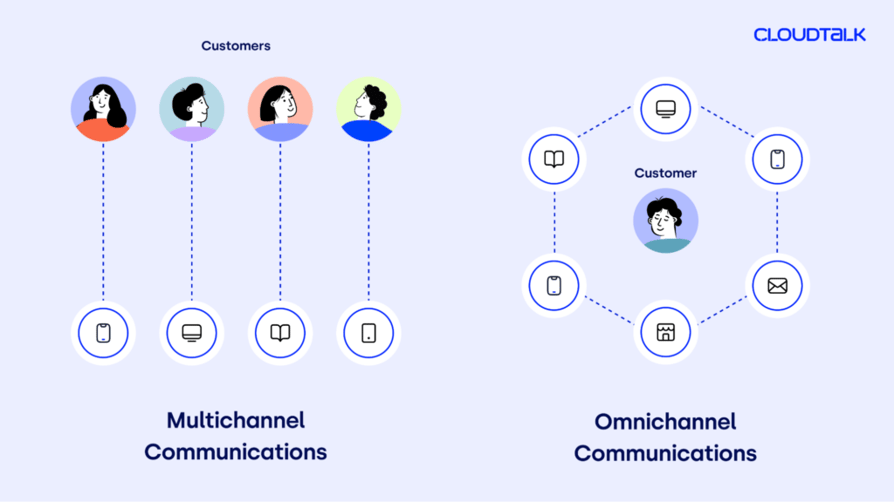
Which one should you choose? That depends on your resources and whether you're starting from scratch. Omnichannel contact centers are clearly superior—but transforming an existing multichannel setup into an omnichannel one takes real time, effort, and budget.
#7 In-house vs. Outsourced Call Centers: Which Should You Pick?
The difference here is straightforward. You operate an in-house call center yourself; with an outsourced call center, you pay someone else to do it. The real question is how much control you want over your call center's operations—and how many resources (time, employees, effort) you're willing to invest.
Building an in-house call center is more expensive up front. It may get progressively cheaper, but you'll still handle hiring and onboarding new employees, deploying tools, and evaluating operations.
Outsourced call centers, sometimes called BPO (Business Process Outsourcing) call centers, don't require much from you beyond hiring the external organization. The trade-off: less oversight, which can mean lower quality outcomes.
Which one should you choose? It comes down to how much money and manpower you're willing to invest for the best possible results.
#8 What Is an Off-Shore Call Center?
Off-shore call centers are a type of outsourced call center, typically located in a region where prices are lower, like India, Indonesia, or the Philippines.
Their benefit is a lower price, but they come with their own limitations. Off-shore call centers can create language barriers between agents and customers, on top of the usual issues that come with outsourcing.
Who are they right for? Off-shore call centers work well for small business owners with little money to spare. Before committing, weigh whether the potential problems are worth the lower price.
What Type of Call Center Is Right for You?
Now that you know what each type represents, it's time to find the solution that fits. Whether you're launching outreach campaigns, handling high call volumes, or managing a global team, CloudTalk has you covered.
CloudTalk is a cloud-based VoIP solution that lets you send and receive calls with a single click, seamlessly integrate your CRM into your call center app, and boost agent productivity with 100+ features. Setup takes just a few minutes, and you can try it out free for 14 days—no credit card required.


Sources:
- 01Zendesk — CX Trends Report
Frequently asked questions
The 8 most common types are: Inbound, Outbound, Blended, Virtual, Automated, Multichannel, Omnichannel, In-house, Outsourced, and Off-shore call centers.
Inbound centers handle incoming calls—support, questions, orders. Outbound centers initiate calls for sales, surveys, or onboarding. Blended teams do both, using shared tools like CRM integrations, IVR, and skill-based routing.
A virtual call center usually wins on cost and flexibility—no office, no hardware, agents anywhere. Off-shore setups are cheaper still, but come with language and quality trade-offs that can hurt customer experience long term.
Both cover phone, SMS, email, and social. In multichannel, each channel works in isolation. In omnichannel, every channel is unified, so agents can pick up conversations seamlessly across channels without losing context.
In-house gives you full control over quality, training, and customer experience but costs more up front. Outsourced call centers save money and effort, but with less oversight. The right choice depends on budget and priorities.
Yes. The phone is still the most-used channel for customer service, and voice remains the fastest way to resolve complex issues. Modern platforms like CloudTalk blend voice with digital so you don't have to choose one over the other.