
Call Center Analytics Software: What to Track, What to Buy, and How to Start
Ready to find out why your numbers moved, not just that they did?
Get call center analytics included on every CloudTalk plan. Watch queues and wait times live, or dig into six built-in reports covering agents, groups, calls and messages.
- Live dashboards for queues, wait times, and missed calls
- Transcripts and sentiment behind any call, no export step
- Join our customers who cut QA review time from 2 hours to 20 minutes
 SOC2 CompliantISO 27001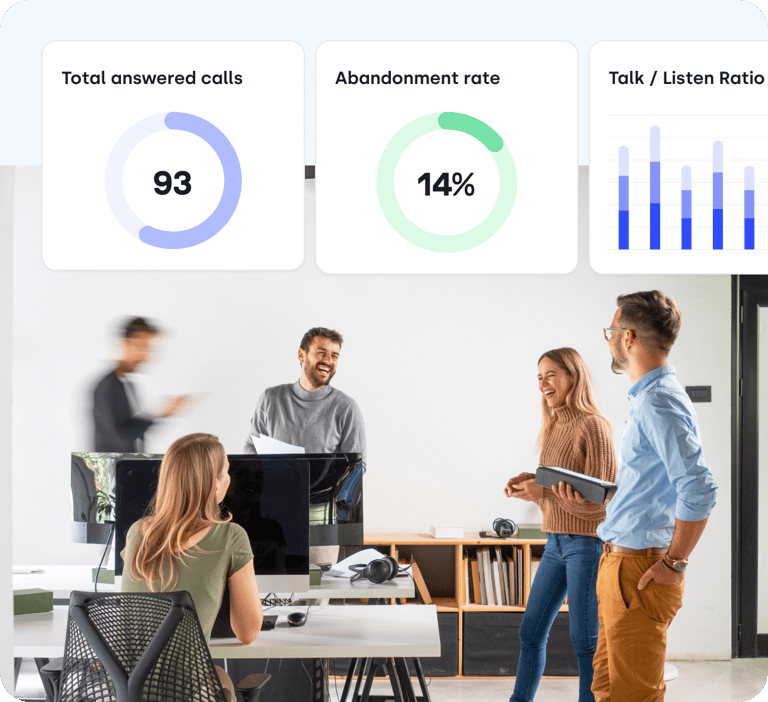
Trusted by 30,000+ sales & support professionals to power more & better conversations
















Analytics
What Is Call Center Analytics?
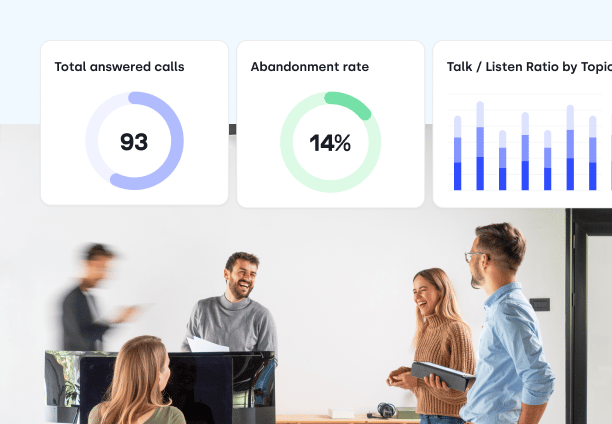
Call center analytics is software that collects data from phone conversations and turns it into decisions about staffing, coaching, and customer experience, all on one call center dashboard. You get live queue metrics, historical performance reports, and AI analysis of what was actually said on the call.
- How long the caller waited
- Who picked up, and who didn't
- How long the conversation ran
- Whether it got resolved
- What was actually said
What Are the Types of Call Center Analytics?
Descriptive Analytics: what happened?
Historical performance. Handle time by agent, outbound success rates, missed calls by team. In CloudTalk this is the Group, Agent and Call Log reports.
Real-Time Analytics: what is happening right now?
Who is waiting, how long they have held, who is free. The type you use to intervene, before the abandonment rate moves.
Speech and Text Analytics: what are customers actually saying?
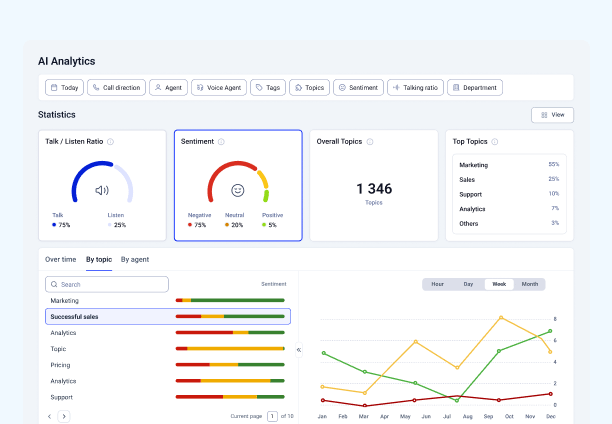
Transcripts, topics and talk-to-listen ratio, so nobody sits through recordings. Capitalo cut QA review from two hours to twenty minutes.
What Does Call Center Analytics Software Do?
Save Costs up to 30%
Spot the queues, hours, and call types driving cost, then staff against real demand instead of last quarter's guess.
Cut Handling Time by 40%
Find where handle time actually goes: wrap-up, transfers, or repeat contacts, and fix the step that is costing you minutes.
Increase Conversions by 50%
Compare outbound success rates by agent and campaign to see which lists and approaches convert.
Step Inside CloudTalk's
Call Analytics
Two minutes, no signup. Filter a report, drill into a call, export the result.
Actionable Insights
Use Call Analytics Software to Hit Every KPI
Leverage real-time analytics to enhance performance and drive smarter decision-making.
Which Call Center Metrics Should You Track?
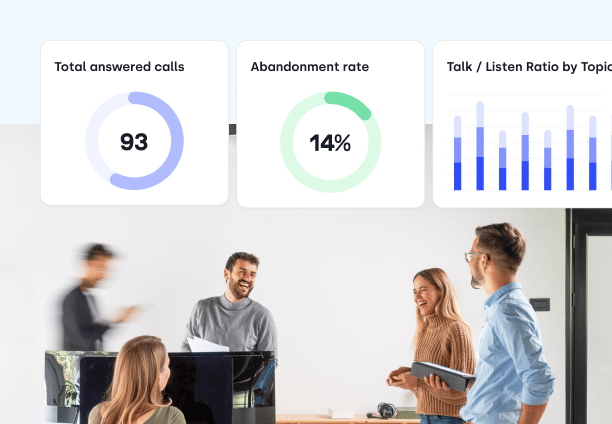
Start with four: outbound success rate, average talk time, call abandonment rate, and average handling time. CloudTalk's contact center analytics software tracks all of them automatically, letting you see exactly what your team is doing right, what they are doing wrong, and how it all impacts the customer experience.
- Outbound Call Success Rate: The percentage of outgoing calls that actually connect. Use this to measure the true effectiveness of your outreach and contact lists.
- Average Total Talk Time: The exact amount of time agents spend actively speaking with customers, which helps gauge caller engagement and agent efficiency.
- Call Abandonment Rate: How often callers hang up before reaching an agent. A high rate points directly to wait-time or staffing issues.
- Average Handling Time (AHT): The total time required to resolve a call, including the conversation and after-call work. This is your baseline for measuring agent productivity.
What Reports Does CloudTalk Analytics Include?
CloudTalk Analytics includes four report types: Agent, Group, Call Log, and Messages. Instead of digging through scattered data, our call center reporting software organizes your metrics top-down, so you start with the team view and drill to the individual call.
- Agent & Group Reports: Track individual productivity and compare team performance using core metrics like talk times, handle times, and resolution rates.
- Real-Time Monitoring & Wallboards: Keep an eye on live queues, active calls, and agent statuses on a single screen to spot bottlenecks the second they happen.
- Comprehensive Call Logs: Tap into our call analytics software to review, search, and filter detailed historical data across your entire account—retained for up to 12 months.
- Customizable Filters & Exports: Filter your data by date, team, or custom call tags, then instantly export your reports to CSV or PDF when you need them.
How to Set Up Call Center Analytics in CloudTalk?
Analytics is on by default. Log in, pick a report type, set your filters, and export. There is no setup project and no separate license.
- 01Log in to CloudTalk and access Analytics via the dashboard.
- 02Choose a report type (Group, Agent, Call Log, Messages).
- 03Customize and explore data by adjusting filters or clicking on data points for deeper insights.
- 04Track each call's journey, helping you understand call flow and improve system efficiency.
- 05You can also export data via CSV or PDF.
Benefits of Analytics
What Are the Benefits of Call Center Analytics?
Create Seamless Customer Experiences
Call center analytics reveal exactly what's impacting customer satisfaction by tracking key metrics like First Call Resolution (FCR) and Average Speed of Answer (ASA). This information allows businesses to pinpoint service bottlenecks and take action.
Turn Your Agents Into Top Performers
Your agents are at the heart of every customer interaction, and analytics tools give them the support they need to excel. With real-time performance tracking, managers can identify areas for improvement and help agents sharpen their skills.
Streamline Overall Operations
A call center that runs like a well-oiled machine is essential for keeping costs down and service levels high. Analytics tools streamline operations by predicting call volumes, ensuring that staffing matches demand, reducing wait times and minimizing idle time.
Make Smarter Decisions With Data
Analytics turns raw interactions into valuable insights. By identifying trends and recurring pain points, businesses can spot what's working and what needs improvement. Data-driven insights take the guesswork out of strategy.
Features
Other features you might like

Group Reporting
Give your managers full visibility over their team's performance, and the tools to identify what, when and how to improve.
Learn more about Group Reporting
Wallboard
Showcase real-time performance and call center metrics to your entire team — live and in a variety of different formats.
Learn more about Wallboard
Agent Reporting
Track your agents' performance directly in CloudTalk and optimize for the best customer experience possible.
Learn more about Agent Reporting
Real-Time Dashboard
Monitor agent or group activity in real time, from phone calls and performance metrics to their general availability.
Learn more about Real-Time DashboardIntegrations
Plug into everything you use
CRMs, helpdesks, applicant tracking systems and more. Get started instantly with 100+ built-in integrations, or expand further with Zapier, Make or CloudTalk’s own workflow automation builder.


We’ve helped thousands of global companies
Case studies featuring customers who are building faster.

Global Sales Engine Powered by Connected Conversations
“CloudTalk’s AI transcripts and analytics make it easier to track talk ratios, discovery depth, and regional performance—all without requiring formal training to get started.”

Revolutionizing Revolut’s Efficiency and Saving 40+ Hours
"Thanks to CloudTalk’s reliability, we could improve sales teams’ performance and close more deals than we could have ever imagined."

Increasing productivity for 200 customer support agents
"With CloudTalk's Analytics I now get to see every step of the way. We can find discrepancies and gain a much better understanding of our teams."

Delivering success for Glovo’s customer support team
"CloudTalk improved our team's cost and efficiency. The script feature allows us to lead the calls in a much more systematic way."

See your own numbers in the dashboard
Book 20 minutes and we will walk your team through the reports that answer whatever you are currently guessing at.
Call Center Analytics FAQs
What call center analytics software does, which metrics and reports it gives you, how to choose one, and what to check on GDPR before you buy.
Call center analytics software measures what happens on your calls and turns it into data you can query. It records and transcribes conversations, separates who said what, tags topics and sentiment, and syncs the results into your CRM and reporting tools, so voice stops being a black box sitting next to every other channel you already measure.
You will also see it sold as contact center analytics software, call analytics software, conversational intelligence, or voice analytics. The labels differ; the underlying job does not.
What it does, step by step
- Speaker separation: splits the agent's audio from the customer's, which is what makes talk-to-listen ratios and interruption counts measurable at all.
- Transcription: converts the recording into searchable text, so a six-month archive becomes something you can run a query against instead of listen to.
- AI analysis: extracts topics, classifies intent, scores sentiment, and writes post-call summaries without anyone opening the recording.
- Reporting: aggregates all of it into live dashboards and historical reports you can filter by agent, team, campaign, or date range.
Where teams actually use it
- Sales: identifies which objection-handling techniques and pricing conversations correlate with closed deals, so managers can coach the habits of top performers instead of guessing at them.
- Customer experience: surfaces macro-trends across thousands of calls. If a specific product issue or competitor starts getting mentioned far more often in a single week, that shows up as a trend rather than as churn three months later.
- Compliance: audits interactions for required disclosures instead of relying on a supervisor sampling a handful of calls a month.
- Product: routes recurring feature requests and usability complaints from frontline calls back to the people who can fix them.
Analytics is rarely a standalone purchase. Its value multiplies when call data flows into the rest of the stack: CRMs and helpdesks for auto-logged calls and summaries against the right record, and BI tools like Power BI, Tableau, or Looker Studio for reporting alongside everything else the business measures.
Call analytics software turns phone conversations into structured, searchable data. It transcribes calls, separates who said what, tags intent and sentiment, and pushes the results into your CRM and reporting tools so voice stops being a black box.
Most platforms combine four things:
- Speech recognition: converts call audio into searchable transcripts.
- Speaker separation: splits agent and customer audio so talk-to-listen ratios and interruptions can actually be measured.
- AI analysis: classifies intent, scores sentiment, extracts topics, and writes post-call summaries.
- Integrations and exports: sync call data to your CRM, helpdesk, or BI stack.
Sales teams use it to find out which objection handling actually closes deals. Support teams use it to catch recurring issues early. Compliance teams use it to prove the disclosures were read.
Call reporting software turns your call history into structured reports: who called, how long they waited, who handled it, and what happened. It is the historical half of call center analytics, where dashboards handle the live view and reports handle the trend.
Call center reporting software usually covers four things:
- Agent reports: individual productivity, talk time, handle time, and call outcomes.
- Group reports: team-level comparison across the same metrics, so you can see whether a problem is one rep or one queue.
- Call logs: searchable, filterable history of every call on the account.
- Exports: CSV or PDF for the people who want the numbers in a deck rather than a dashboard.
The distinction between reporting and analytics is mostly about what you do next. Reporting tells you the abandonment rate went up. Analytics tells you which queue, which hour, and which calls.
Call center analytics measures voice conversations. Contact center analytics covers every channel a customer uses: voice, email, chat, SMS, and social. The difference is scope, not sophistication.
In practice the line blurs, since most vendors use the terms interchangeably and most support teams still resolve their hardest issues by phone. What actually matters when you compare tools:
- If phone is your primary channel: voice-first analytics will give you deeper conversation data, including transcripts, sentiment, talk-to-listen ratios, and topic extraction.
- If you run true omnichannel support: look for a platform that reports across channels so you are not stitching four dashboards together by hand.
- Either way, check the exports: your CRM and BI stack are where cross-channel reporting actually gets built, so API access matters more than the label on the box.
Call analytics measures the call. Speech analytics measures what was said in it. Call analytics counts volume, wait time, handle time, abandonment, and outcomes. Speech analytics works on the transcript itself, looking for keywords, phrases, topics, and emotional tone.
Most modern platforms do both, which is why the terms get used interchangeably. The practical question when comparing tools is how deep the speech side goes:
- Transcription and topic extraction: table stakes. Every serious platform converts audio to text and tags recurring themes.
- Sentiment scoring: tracks whether the customer's mood improved or deteriorated across the call, which is where coaching moments usually hide.
- Keyword and phrase spotting: flags specific language, usually for compliance disclosures or competitor mentions.
- Real-time analysis: some enterprise platforms analyze speech mid-call to prompt the agent. Most, including CloudTalk, analyze after the call ends.
CloudTalk covers the transcript side through AI Conversation Intelligence: transcription, sentiment analysis, and topic extraction on completed calls, sitting in the same record as the call metrics.
Key features of call center analytics software include real-time reporting, AI-driven insights, and conversation analysis that help businesses improve customer experience and agent performance. A cloud-based solution collects data from calls, recordings, and integrated CRMs, turning every interaction into actionable intelligence.
Core features to look for in call center analytics software include:
- Real-time dashboards: monitor live metrics such as call volume, service levels, and queue performance to make staffing adjustments instantly.
- Historical reporting: review long-term KPIs like first-call resolution, average handle time, and call outcomes over time.
- Conversation Intelligence: automatically transcribe calls, detect sentiment, and extract topics with conversation analytics to surface customer needs and coaching opportunities.
- Agent performance tracking: analyze talk-to-listen ratios, wrap-up times, and call quality to identify where coaching has the most impact.
- CRM and helpdesk integrations: sync call data with tools like Salesforce, HubSpot, and Zendesk for a complete customer view.
- API exports and BI integrations: connect CloudTalk Analytics to platforms like Power BI, Tableau, or Looker Studio for deeper visualization.
A call center dashboard should show what a supervisor can still act on: live queue depth, current wait times, agent availability, and calls in progress. Anything you cannot change before the shift ends belongs in a report, not on the wall.
A useful call center analytics dashboard usually covers:
- Queue status: how many callers are waiting and for how long, so you can move people before abandonment climbs.
- Agent availability: who is on a call, who is in wrap-up, who is idle.
- Service level against target: the percentage answered inside your threshold, today, not last month.
- Missed and abandoned calls: with enough detail to see which number or team they came from.
In CloudTalk, the real-time dashboard handles the live view and the Wallboard puts it on a screen the whole floor can see. Trend analysis lives in the historical reports instead, where it belongs.
Key benefits of using call analytics software include better customer experiences, higher agent productivity, and smarter business decisions. With CloudTalk Analytics and Conversation Intelligence, teams move beyond surface-level metrics and uncover insights directly from conversations.
- Improve customer experience: detect recurring issues, monitor sentiment trends, and address pain points before they escalate.
- Enhance agent performance: use transcripts, AI summaries, and talk/listen ratios to deliver precise, data-backed coaching.
- Optimize staffing efficiency: forecast demand, balance agent workloads, and reduce idle time across queues.
- Enable data-driven decisions: access clear dashboards and topic trends to identify where processes need refinement.
- Reduce costs: lower churn and training overhead by solving problems early and targeting coaching where it matters most.
Choosing the best call analytics software comes down to usability, data depth, AI-powered insights, and compliance readiness. The right tool makes analytics actionable for both managers and front-line agents, not just data teams.
Key factors to evaluate when comparing call center analytics tools:
- Reporting depth: ensure coverage of real-time dashboards, historical KPIs, and campaign-level detail, not just summary numbers.
- AI-powered Conversation Intelligence: prioritize solutions that include call transcription, sentiment analysis, and topic extraction, not just call logging.
- Integration ecosystem: confirm compatibility with your CRM and helpdesk so call data flows automatically into the tools your team already uses.
- Ease of use: dashboards that require an analyst to interpret won't be used by front-line managers, so look for customizable, intuitive interfaces.
- Compliance readiness: confirm GDPR, HIPAA, and regional regulation support for safe data handling before signing any contract.
- Scalability: adopt a cloud-based system that can grow with your team and call volume without requiring re-implementation.
Getting value from call center analytics starts with knowing which metrics matter for your goals. Most teams begin with high-level KPIs like call volume, abandonment rate, and average handle time, then drill deeper into agent-level and campaign-level data over time.
Practical steps to use call center data analytics effectively:
- Set a baseline first: export your current metrics and identify your biggest performance gaps before making changes, or you will have nothing to measure improvement against.
- Segment by team and agent: group-level data tells you where the problem is; agent-level data tells you who needs coaching and on what specific behavior.
- Use AI summaries instead of listening to recordings: AI-generated call summaries let you spot patterns across hundreds of calls in minutes rather than hours.
- Act on trends, not outliers: a single bad call is an exception; the same issue appearing across 30% of calls is a process problem that needs fixing.
- Close the loop: use insights to update scripts, retrain agents, and adjust routing, then measure the impact in the next reporting cycle.
Customer service teams should prioritize queue-level visibility, first-call resolution tracking, and quality monitoring at scale. Sales analytics optimize for conversion. Support analytics optimize for speed and consistency, which means a different set of features matters.
- Real-time queue dashboards: see wait times, abandonment, and service levels while you can still do something about them.
- First-call resolution tracking: measure how often issues close on first contact instead of bouncing between agents.
- Automated quality scoring: review a meaningful sample of calls rather than the three someone had time for, with AI call scoring applied to the full volume.
- Sentiment and topic detection: surface frustration and recurring problems without listening to every recording.
- Call summaries and tags: give the next agent context so customers stop repeating themselves.
- Agent performance reporting: individual-level data on handle time and call outcomes, paired with live call monitoring, so feedback is targeted rather than generic.
Yes. Every CloudTalk Analytics report exports to CSV or PDF, and the API connects to BI tools like Power BI, Tableau, and Looker Studio. CSV covers the ad hoc request, the API covers the recurring one.
Which route you want depends on who is asking:
- CSV or PDF: the fastest way to get numbers into a board deck or a monthly review, straight from the report you are already looking at.
- API to a BI tool: for teams that want call data sitting alongside revenue, ticket, and product data in one place, refreshed automatically.
- CRM sync: for call outcomes attached to the individual record rather than aggregated in a report.
CloudTalk retains call logs and historical analytics for up to 12 months, and retention periods are configurable. That covers year-on-year comparison for most teams without holding personal data longer than you have a reason to.
Two things worth setting up early rather than later:
- Decide your retention period deliberately. Under GDPR, recordings and transcripts are personal data, so "keep everything forever" is not a neutral default.
- Export what you need to keep longer. If you want multi-year trend analysis, push the aggregated numbers into your BI tool rather than extending retention on the raw call data.
GDPR compliance is a critical requirement for any business using call center analytics software to process personal data. Under GDPR, call recordings, transcripts, and customer interaction data are classified as personal data, meaning businesses must have a lawful basis for processing them, inform customers when calls are being recorded, and store data securely with defined retention periods.
UK and EU teams shopping for call centre analytics software face the strictest version of these rules, so treat compliance as a gating criterion rather than a final check.
CloudTalk is built with data protection at its core. It is certified to ISO 27001 and SOC 2, and compliant with GDPR, HIPAA, and PCI-DSS. Key compliance features include:
- Configurable data retention policies: define exactly how long recordings and analytics data are stored and when they are automatically deleted.
- Automatic call recording disclosures: play consent announcements via IVR before a call connects, with no manual agent steps required.
- Role-based access controls: restrict access to recordings and transcripts so only authorized team members can view sensitive call data.
- Data export and deletion: honor subject access requests and right-to-erasure obligations with built-in data management controls.
Full details of CloudTalk's security and compliance practices are available on the security page. For jurisdiction-specific guidance, always consult your data protection officer or legal counsel.
Low adoption is the most common reason call analytics software delivers less value than expected. The data is available, but if managers and agents aren't reviewing dashboards or acting on reports, the investment stalls. The fix is behavioral, not technical.
- Start with one metric per role: give agents their talk-to-listen ratio, give managers call abandonment rate. One clear number is more motivating than a full dashboard nobody reads.
- Connect analytics to goals agents already care about: frame insights in terms of handle time, FCR, or call quality scores, not abstract data points.
- Make data visible: use the Wallboard to display live performance metrics on screen. When numbers are public, teams engage with them.
- Celebrate wins with data: when analytics show improvement, call it out by name. Positive reinforcement builds the habit of checking performance data regularly.
- Build it into 1:1s and team reviews: managers who use call analytics data in coaching sessions normalize the tool for the whole team over time.


Hello 👋 My name is Emma. Still have questions?
Can’t find the answer you’re looking for? Please chat to our friendly team.