En résumé
Verdict : CloudTalk est le meilleur logiciel SVI pour les PME et les équipes commerciales en pleine croissance, grâce à ses flux d’appels visuels, ses intégrations CRM poussées et ses agents vocaux IA. Les structures plus importantes avec des opérations multicanales se tourneront plutôt vers des logiciels SVI pour centres de contact d’entreprise comme Genesys, NICE CXone ou Talkdesk.
Les 8 meilleurs logiciels SVI par cas d’usage :
- 01CloudTalk : meilleur logiciel SVI pour les PME qui souhaitent évoluer
- 02MightyCall : meilleur pour sa simplicité d’utilisation et son prix abordable
- 03Twilio : meilleur pour la flexibilité des développeurs et les configurations sur mesure
- 04Genesys : meilleur pour les grands centres de contact multicanaux
- 05NICE CXone Mpower : meilleur pour les environnements réglementés à fort volume d’appels
- 06RingCentral : meilleur pour une automatisation évolutive avec de solides intégrations
- 07Five9 : meilleur pour ses fonctionnalités IA et son support omnicanal
- 08Talkdesk : meilleur pour l’automatisation et la sécurité adaptées aux grandes entreprises

Évitez de faire raccrocher vos clients de frustration. Laissez votre SVI faire le travail difficile.
Qu’est-ce qu’un logiciel SVI ?
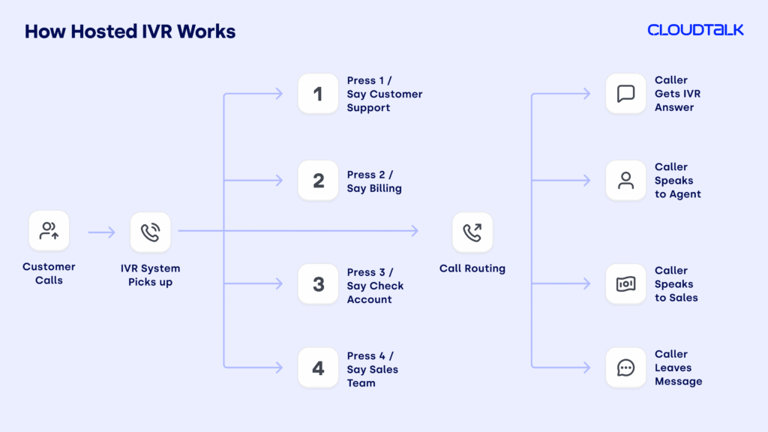
Un logiciel SVI, abréviation de Serveur Vocal Interactif, est un système qui répond et gère automatiquement les appels entrants, sans qu’un conseiller ait besoin de décrocher immédiatement.
Lorsqu’une personne appelle, au lieu de parler directement à un conseiller, elle entend un menu d’options préenregistré, du type « Appuyez sur 1 pour consulter votre solde, appuyez sur 2 pour parler au service client ». L’appelant utilise ensuite son clavier ou parle simplement pour choisir ce dont il a besoin. Les logiciels d’appels SVI modernes associent ces menus à la reconnaissance vocale, aux données CRM et à l’IA, afin que les appelants soient orientés plus rapidement et que de nombreuses demandes soient résolues sans aucune intervention humaine.
Le libre-service est désormais devenu la norme attendue par la plupart des appelants, et non l’exception. Un bon système SVI répond à cette attente en automatisant le routage des appels, en améliorant les temps de réponse et en permettant à votre équipe de se concentrer sur les conversations qui nécessitent un échange humain.
La vidéo ci-dessous explique plus en détail le fonctionnement du SVI :
Quelle est la différence entre un SVI et un standard automatique ?
Le SVI et le standard automatique répondent tous deux aux appels, diffusent des messages enregistrés et orientent les personnes vers le bon interlocuteur sans intervention humaine directe. S’ils se ressemblent, ils présentent pourtant d’importantes différences.
| Standard automatique | SVI | |
|---|---|---|
| Objectif | Oriente les appelants vers le bon service ou la bonne personne | Automatise les tâches et aide les appelants à résoudre eux-mêmes leurs demandes |
| Interaction | Utilise des menus simples du type « appuyez sur 1, appuyez sur 2 » | Prend en charge les commandes vocales, les saisies au clavier et les flux plus complexes |
| Fonctionnalités | Routage de base des appels | Automatisation avancée avec des intégrations telles que des CRM ou des bases de données |
| Idéal pour | Les besoins simples de gestion d’appels | Réduire la charge de travail des conseillers et améliorer le libre-service client |
Standard automatique : un routage rapide avec des options fixes
Voyez le standard automatique comme un réceptionniste numérique. Il propose des menus simples basés sur des touches (« appuyez sur 1, appuyez sur 2 ») à partir de scripts préenregistrés. C’est la solution idéale pour les configurations simples où vous avez juste besoin d’orienter rapidement les appels vers le bon service.
Un petit cabinet comptable utilise un standard automatique pour diriger les appels vers la facturation, la paie ou la réception sans avoir besoin d’un standardiste.
SVI : intelligent, orienté vers l’action et intégré
Les systèmes d’appels SVI vont encore plus loin. Ils permettent aux appelants de parler au lieu d’appuyer sur des touches, se connectent à vos autres outils comme un CRM et gèrent des tâches de manière autonome, comme le suivi d’une commande ou la prise de rendez-vous.
Une entreprise de e-commerce utilise un SVI pour permettre à ses clients de suivre l’état de leur livraison ou de lancer un retour sans parler à un conseiller.
Combien coûte un logiciel SVI ?
Les prix des SVI varient considérablement : les forfaits de base commencent à €15–€30/utilisateur/mois, tandis que les logiciels SVI avancés pour centres de contact peuvent dépasser €100/utilisateur/mois.
Les principaux fournisseurs de SVI intègrent généralement le routage dans leurs offres globales de communication cloud plutôt que de le facturer séparément. Voici les trois principaux modèles de tarification que vous rencontrerez, et ce qu’ils signifient pour votre budget :
- 01Basé sur le cloud (SaaS) :Le plus courant pour les PME, entre €15 et €100/utilisateur/mois avec des frais d’installation minimaux. Idéal pour les équipes qui ont besoin de flexibilité et d’un déploiement rapide. C’est le moyen le plus rentable d’ajuster vos flux de travail et d’ajouter des licences au fil de votre croissance.
- 02Sur site (on-premises) :Investissement initial élevé (plus de €10k à €50k) en matériel et logiciels. Adapté aux grandes entreprises qui ont besoin d’un contrôle total et d’une personnalisation poussée.
- 03CPaaS / basé sur l’usage :Certains fournisseurs facturent à la minute ou par heure d’utilisateur actif. Idéal pour les développeurs ou les équipes ayant un volume d’appels fluctuant.
SVI Cloud ou SVI sur site : quelle solution convient à votre entreprise ?
Le SVI Cloud (SaaS) fonctionne entièrement sur l’infrastructure du fournisseur. Il n’y a aucun matériel à acheter ni à entretenir, il est accessible depuis n’importe quel appareil, s’adapte en quelques minutes et est facturé par utilisateur ou par mois. Idéal pour : les PME et les équipes en pleine croissance qui recherchent de la rapidité, de la flexibilité et des coûts prévisibles. Le principal inconvénient est qu’il nécessite une connexion Internet fiable et que vos données sont hébergées dans le cloud.
Le SVI sur site (on-premises) implique l’installation de matériel et de logiciels dans votre propre centre de données. Vous bénéficiez d’un contrôle total sur la configuration et les données, mais au prix d’un investissement initial élevé (de €10k à €50k+) et de la nécessité de disposer d’un support informatique interne. Idéal pour : les grandes entreprises soumises à des exigences strictes en matière de souveraineté des données ou les secteurs hautement réglementés (gouvernement, défense) qui ne peuvent pas utiliser d’infrastructure cloud.
Les facteurs de coût supplémentaires incluent :
- Les frais de télécommunication à l’usage (minutes d’appel, numéros verts)
- Les fonctionnalités d’IA (reconnaissance vocale, routage conversationnel)
- Les intégrations CRM et helpdesk
- La prise en charge du SVI multilingue
- Les analyses avancées et rapports
Comment nous avons choisi les meilleurs logiciels SVI
Pour concevoir ce guide, nous avons examiné et comparé plus de 20 plateformes SVI de premier plan, en nous appuyant sur les retours de plus de 2 000 professionnels des équipes de support client, de vente et d’opérations sur G2, Capterra et TrustRadius.
Lors de l’évaluation d’un logiciel de système SVI, il est essentiel d’aller au-delà du simple routage par touches et de rechercher des plateformes qui proposent une automatisation intelligente et une synchronisation CRM en temps réel.
Les 8 meilleurs fournisseurs de logiciels SVI ont été sélectionnés sur la base de leurs capacités de routage d’appels, de leur simplicité de configuration, de leurs intégrations CRM et helpdesk, de leurs fonctionnalités d’automatisation et d’IA, de leur conformité, ainsi que de leurs performances dans des flux de travail réels de service client. Nous n’avons inclus que des solutions SVI qui apportent de vrais résultats, avec des précisions sur les types d’équipes, les cas d’usage et les volumes d’appels pour lesquels chacune est la plus adaptée.
Pourquoi faire confiance à nos évaluations de logiciels ?
Depuis près d’une décennie, nous avons aidé plus de 30 000 professionnels à choisir et à mettre en œuvre de meilleurs outils de communication. Nous avons analysé plus de 200 produits, examiné plus de 5 500 avis vérifiés sur G2 et Capterra, et tiré parti des retours d’utilisateurs sur des plateformes comme Reddit et Quora.
Rien que l’année dernière, nous avons publié plus de 1 000 articles, tous rédigés et relus par des humains, pour des humains, afin de fournir des informations fiables et fondées sur des données concrètes.
Découvrez nos engagements concernant l’intégrité de notre contenu et notre méthodologie d’évaluation des logiciels.
Tableau comparatif rapide des meilleurs logiciels SVI
Le tableau ci-dessous compare en un coup d’œil les 8 plateformes de logiciels SVI. Passez directement aux évaluations détaillées pour découvrir l’analyse complète de chaque outil.
Meilleur logiciel SVI pour les petites entreprises et les centres d’appels
| Logiciel SVI | Fonctionnalités clés | Idéal pour | Note G2 | Prix de départ |
|---|---|---|---|---|
| CloudTalk | Agent vocal IA, concepteur visuel de flux d’appels, plus de 100 intégrations, analyses en temps réel | PME et équipes de vente/support en pleine croissance | 4.3/5 | Dès €25/utilisateur/mois |
| MightyCall | SVI multi-niveaux, routage d’appels personnalisable, mise en attente des appels, tarif abordable | Simplicité d’utilisation et tarif abordable | 4.4/5 | Dès €20/utilisateur/mois |
| Twilio | Concepteur visuel low-code, personnalisation par l’IA, numéros internationaux dans plus de 100 pays | Flexibilité pour les développeurs et configurations sur mesure | 4.1/5 | Dès €35/utilisateur/mois |
| Genesys | Routage d’appels intelligent, intégration omnicanale, concepteur de flux par glisser-déposer | Grands centres de contact multicanaux | 4.4/5 | €75/utilisateur/mois |
| NICE CXone Mpower | Routage d'appels avancé, reconnaissance vocale et IA conversationnelle, intégration CRM | Environnements réglementés à volume élevé | 4.3/5 | Dès €110/utilisateur/mois |
| RingCentral | Générateur de SVI par glisser-déposer, menus multi-niveaux, plus de 300 intégrations | Automatisation évolutive avec des intégrations solides | 4.1/5 | Dès €20/utilisateur/mois |
| Five9 | SVI visuel et optimisation mobile, support omnicanal, agents virtuels intelligents | Fonctionnalités IA et support omnicanal | 4.1/5 | Dès €119/utilisateur/mois |
| Talkdesk | Agent virtuel, SVI conversationnel, résumés d'appels par l'IA | Automatisation et sécurité d'entreprise | 4.4/5 | Dès €85/utilisateur/mois |
Logiciel SVI pour PME : comment choisir le bon système
La plupart des logiciels de SVI ont été conçus pour les centres de contact d'entreprise comptant plus de 100 agents et des équipes informatiques dédiées. Les petites entreprises ont besoin d'autre chose : un système rapide à configurer, facile à gérer sans expertise technique et suffisamment abordable pour être rentable avec 10 à 50 postes. Voici ce qu'il faut rechercher.
- 01Configuration sans code :Les petites équipes ne peuvent pas se permettre d'attendre la configuration informatique. Recherchez un concepteur visuel de flux d'appels par glisser-déposer que vous pouvez configurer vous-même en moins d'une heure, sans développeur ni consultant en intégration. Le Concepteur de flux d'appels de CloudTalk et le concepteur visuel de MightyCall sont tous deux conçus pour cela. Évitez les plateformes d'entreprise (Genesys, NICE CXone) qui nécessitent des services professionnels pour être déployées.
- 02Tarification transparente par utilisateur :Les plateformes de SVI d'entreprise ne publient souvent pas leurs tarifs. Pour les PME, une facturation mensuelle prévisible est essentielle : vous devez connaître le coût total avant de vous engager. CloudTalk publie des tarifs à partir de €19/utilisateur/mois, et MightyCall à partir de €20/utilisateur/mois. Les deux proposent des forfaits mensuels sans engagement annuel pour les premiers niveaux de prix.
- 03Intégration CRM sans middleware :Votre SVI doit se synchroniser avec votre CRM sans avoir à passer par une solution de contournement comme Zapier. Pour les PME qui utilisent HubSpot ou Pipedrive, CloudTalk propose des intégrations bidirectionnelles natives sur ses forfaits intermédiaires : les appels sont enregistrés, les contacts sont mis à jour et les parcours SVI sont automatiquement visibles dans le CRM.
- 04Marge de croissance :Choisissez un système qui évolue sans nécessiter de migration de plateforme lorsque vous atteignez 50 ou 100 postes. CloudTalk prend en charge jusqu'à 500 postes sur ses forfaits standards ; l'ajout d'agents vocaux IA, de la messagerie omnicanale ou du routage avancé se fait par simple mise à niveau du forfait, et non par un changement complet de plateforme.
Les 8 meilleurs logiciels SVI pour 2026, passés au crible
Le marché regorge de fournisseurs de solutions SVI, mais les plateformes ci-dessous se distinguent par leur fiabilité, leur simplicité d'utilisation et leurs fonctionnalités avancées de flux d'appels. La meilleure solution SVI dépend de votre taille et de vos besoins : CloudTalk est le choix idéal pour les PME en pleine croissance et les équipes commerciales, tandis que les plateformes d'entreprise comme Genesys ou Talkdesk conviennent aux grands centres de contact multicanaux.
1. CloudTalk : le meilleur logiciel SVI pour les PME
Qu'est-ce que CloudTalk ?
CloudTalk est une plateforme de SVI basée sur le cloud et alimentée par l'IA, conçue pour les PME qui souhaitent un routage de qualité professionnelle à un tarif adapté à leur budget. Adoptée par plus de 5,500 entreprises, elle associe des fonctionnalités d'IA avancées, des flux d'appels personnalisables et des analyses en temps réel au sein d'un seul logiciel d'appel SVI évolutif. Elle s'intègre à plus de 100 outils, propose une API ouverte, prend en charge les numéros locaux dans plus de 160 pays et affiche un taux de disponibilité de 99.999% avec un support client multilingue.
À qui s'adresse CloudTalk ?
Aux PME à la recherche d'un système SVI flexible, évolutif et riche en fonctionnalités, en particulier aux équipes qui souhaitent améliorer l'expérience client, optimiser leurs flux de travail et accompagner leur croissance sans investissement initial lourd ni complexité technique.
Quelles sont les fonctionnalités clés de CloudTalk ?
- Agent vocal IA : qualifie les prospects, confirme les rendez-vous, envoie des rappels et recueille des commentaires, disponible 24h/24 et 7j/7 avec transfert en temps réel vers des agents humains si nécessaire.
- Routage d'appels intelligent : oriente les appels en fonction des choix du client, des compétences de l'agent, de la localisation géographique, des données client et du statut VIP, pour que l'appelant joigne rapidement le bon interlocuteur.
- Menus multi-niveaux personnalisables : créez des menus SVI multi-niveaux et des flux d'appels avec une logique de routage complexe, le tout sans la moindre ligne de code.
- Suivi SVI et analyses en temps réel : des tableaux de bord et rapports affichent en direct les parcours dans les menus, les points d'abandon et les performances des files d'attente.
Quelles sont les meilleures intégrations de CloudTalk ?
Quels sont les forfaits et tarifs de CloudTalk ?
Flexible Pricing Plans to Scale with You
Compare our plans
Quels sont les avantages et inconvénients de CloudTalk ?
| Avantages | Inconvénients |
|---|---|
| Facilité d'utilisation : navigation intuitive, prise en main rapide et sans courbe d'apprentissage abrupte | Fonctionnalités hors ligne limitées : dépend d'une connexion Internet stable |
| Évolutivité : ajoutez des utilisateurs et développez vos capacités au fil de votre croissance | Pas de visioconférence : un inconvénient pour les équipes qui dépendent de ce canal |
| Économique : plus abordable que la concurrence tout en offrant des fonctionnalités avancées |
Que disent les clients de CloudTalk ?
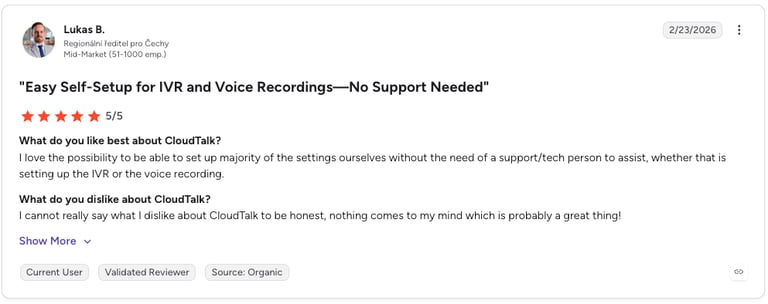
Les avis G2 attribuent à CloudTalk la note de 4.3/5. Les utilisateurs apprécient le SVI de CloudTalk pour son interface intuitive, ses flux d'appels faciles à personnaliser et ses intégrations CRM fluides avec des outils comme HubSpot et Salesforce.
Testez le système SVI en direct et optimisez vos parcours clients
2. MightyCall : le logiciel d'appel SVI le plus simple d'utilisation
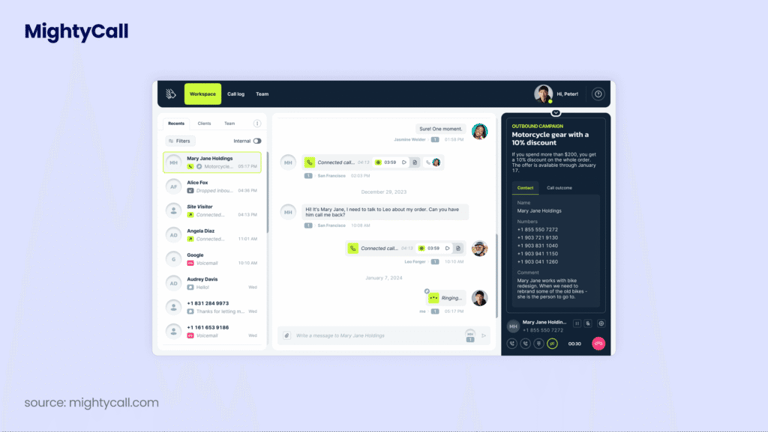
Qu'est-ce que MightyCall ?
MightyCall est réputé pour son interface conviviale et sa configuration rapide, ce qui facilite le déploiement et la gestion d'un système SVI VoIP sans connaissances techniques poussées. Il propose un SVI multi-niveaux, le routage des appels, l'enregistrement des appels et des messages d'accueil personnalisés sur une plateforme cloud abordable, évolutive et adaptée aux mobiles, avec un support client réactif.
À qui s'adresse MightyCall ?
Aux PME qui recherchent une gestion des appels efficace à un tarif compétitif.
Quelles sont les fonctionnalités clés de MightyCall ?
- SVI multi-niveaux : un concepteur visuel par glisser-déposer pour créer des menus multi-niveaux, des règles de routage et des messages d'accueil personnalisés.
- Routage d'appels personnalisable : acheminez les appels selon le type d'appelant (habituel, VIP, liste noire), l'heure de la journée ou le choix effectué dans le menu.
- Gestion des files d'attente : un système avancé de mise en file d'attente pour gérer les volumes d'appels élevés et réduire l'attente.
Quelles sont les meilleures intégrations de MightyCall ?
- HubSpot
- Salesforce
- Zoho CRM
Quels sont les forfaits et tarifs de MightyCall ?
Les tarifs de MightyCall commencent à €20/utilisateur/mois (facturation annuelle, minimum de 3 utilisateurs) répartis sur quatre forfaits :
- Core (€20/utilisateur/mois)
- Pro (€38/utilisateur/mois)
- Power (€54/utilisateur/mois)
- Enterprise (€65/utilisateur/mois)
Quels sont les avantages et inconvénients de MightyCall ?
| Avantages | Inconvénients |
|---|---|
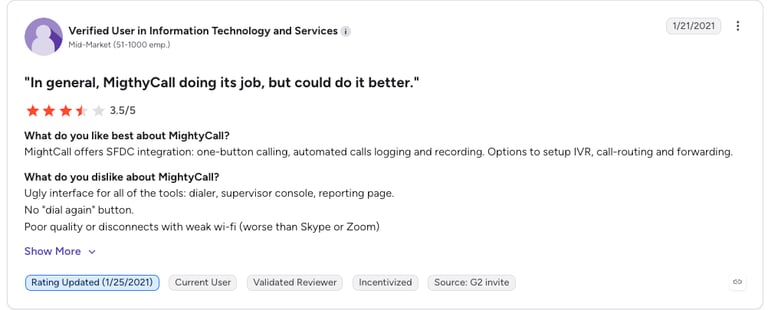
| Interface intuitive | Problèmes d'appels (appels entrants manqués, difficultés de transfert) |
| Tarif abordable | Bugs système (le clavier numérique ne fonctionne pas par moments) |
| Excellent support client | Problèmes de qualité d'appel (coupures d'appels) |
Que disent les clients de MightyCall ?
Les avis G2 attribuent à MightyCall la note de 4.4/5. Les utilisateurs apprécient son SVI pour sa simplicité de configuration, sa personnalisation et sa capacité à automatiser le routage des appels et à s'intégrer à d'autres outils professionnels.
Lectures recommandées
3. Twilio : le meilleur logiciel SVI pour la flexibilité des développeurs
Qu'est-ce que Twilio ?
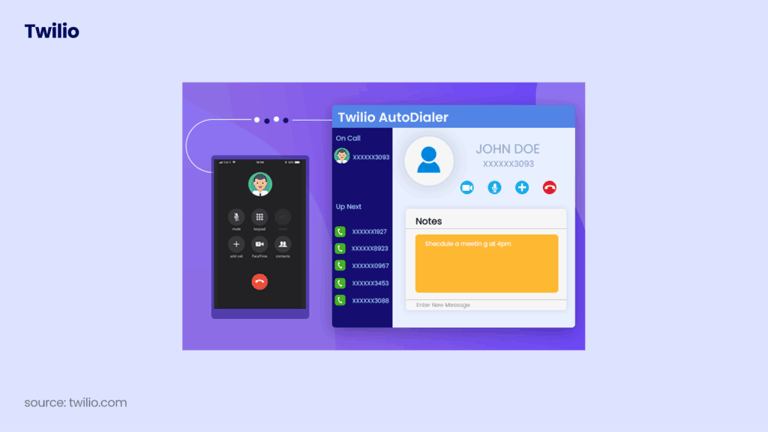
Twilio est une plateforme de communication programmable qui se distingue par sa flexibilité. Grâce à Twilio Flex, son concepteur visuel sans code, ses modèles prêts à l'emploi, sa personnalisation par l'IA et ses API omnicanales, les équipes peuvent concevoir des expériences SVI fluides et centrées sur le client, même si la plupart des personnalisations nécessitent l'intervention d'un développeur.
Pour quels besoins Twilio est-il idéal ?
Les petites équipes profitent de sa flexibilité, mais ce sont les entreprises disposant de ressources de développement qui tirent le meilleur parti de son évolutivité et de ses fonctionnalités basées sur l'IA.
Quelles sont les fonctionnalités clés de Twilio ?
- Générateur de flux visuel et low-code
- Capacités d'IA et de personnalisation, y compris un SVI personnalisé
- Numéros internationaux dans plus de 100 pays
Quelles sont les meilleures intégrations de Twilio ?
- Salesforce
- HubSpot
- Zendesk
Quels sont les tarifs et abonnements de Twilio ?
Les tarifs de Twilio pour Flex reposent sur deux modèles : €35 par heure d'utilisateur actif, ou €150 par utilisateur nommé/mois. Les nouveaux comptes bénéficient de 5 000 heures d'utilisateurs actifs gratuites. Les appels, SMS et numéros de téléphone sont facturés séparément en plus de la licence Flex.
Quels sont les avantages et inconvénients de Twilio ?
| Avantages | Inconvénients |
|---|---|
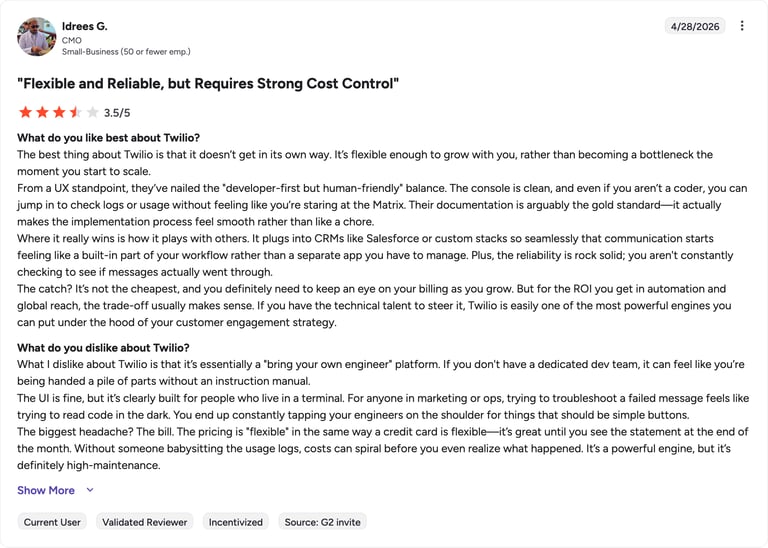
| Intégrations faciles | Support client (les utilisateurs signalent des temps de réponse lents) |
| API fiables et communications stables | Coûts élevés pour les petites équipes ou à faible usage |
| Plateforme flexible et programmable | Configuration complexe pour les paramètres avancés |
Que disent les clients de Twilio ?
Les avis G2 attribuent à Twilio la note de 4.2/5. Les utilisateurs apprécient la simplicité de mise en œuvre du SVI, avec d'excellentes fonctionnalités de synthèse vocale et de routage des appels, tout en soulignant qu'il peut être complexe pour les non-développeurs et limité pour les besoins professionnels standards sans codage personnalisé.
Lectures recommandées
4. Genesys : le meilleur logiciel SVI pour les grands centres de contact
Qu'est-ce que Genesys ?
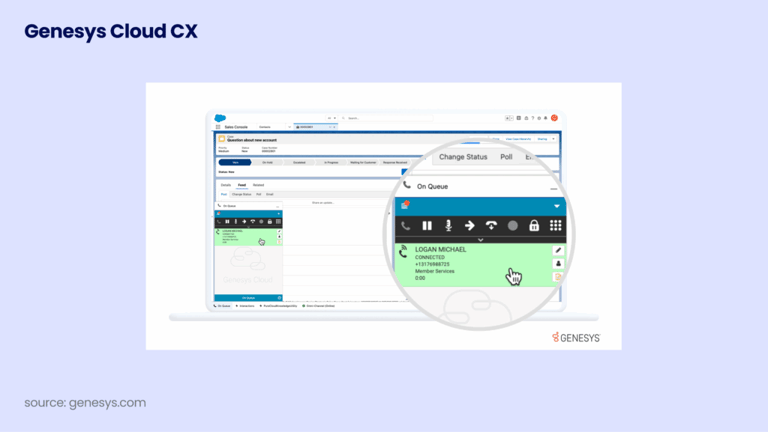
Genesys se distingue en tant que fournisseur de systèmes SVI grâce à ses capacités de conversation basées sur l'IA, son intégration omnicanale, sa conception flexible dans le cloud et son accent prononcé sur la personnalisation et l'analyse.
Pour quels besoins Genesys est-il idéal ?
Populaire auprès des entreprises de taille moyenne, il est particulièrement adapté pour accompagner la croissance des grands centres de contact complexes.
Quelles sont les fonctionnalités clés de Genesys ?
- Routage intelligent des appels
- Intégration omnicanale connectant le SVI au chat, au web, aux SMS et à la messagerie
- Générateur de flux en glisser-déposer
Quelles sont les meilleures intégrations de Genesys ?
- Salesforce
- Microsoft Dynamics
- Zendesk
Quels sont les tarifs et abonnements de Genesys ?
Les tarifs de Genesys commencent à €75/utilisateur/mois (facturation annuelle) à travers quatre niveaux de Cloud CX :
- Cloud CX 1 (€75/utilisateur/mois)
- Cloud CX 2 (€115/utilisateur/mois)
- Cloud CX 3 (€155/utilisateur/mois)
- Cloud CX 4 (€240/utilisateur/mois)
Les minutes de télécommunication et de nombreuses intégrations CRM sont facturées séparément en tant qu'options.
Quels sont les avantages et inconvénients de Genesys ?
| Avantages | Inconvénients |
|---|---|
| Interface conviviale | Coût élevé, avec des options qui augmentent le total |
| Mises à jour régulières et nouvelles fonctionnalités | Outils de reporting jugés limités par rapport aux concurrents |
| Automatisation et IA | Trop complexe pour les petites équipes aux besoins basiques |
Que disent les clients de Genesys ?
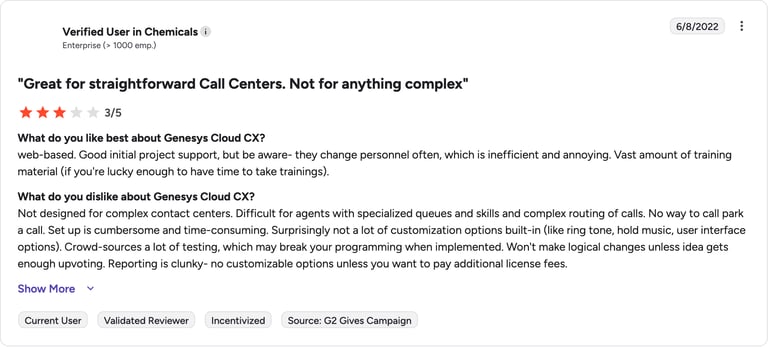
Les avis G2 attribuent à Genesys la note de 4.3/5. Les utilisateurs apprécient la flexibilité de la plateforme pour concevoir et personnaliser les systèmes d'appels SVI selon les besoins spécifiques de l'entreprise.
Lectures recommandées
5. NICE CXone Mpower : le meilleur logiciel SVI pour les environnements réglementés
Qu'est-ce que NICE CXone Mpower ?
NICE se démarque par son IA avancée et son traitement du langage naturel pour des interactions plus intuitives. Sa plateforme cloud unifiée prend en charge la voix, le chat et l'e-mail, s'adapte aux entreprises de toutes tailles et renforce l'efficacité opérationnelle grâce à des intégrations fluides et une interface intuitive.
Pour quels besoins NICE CXone Mpower est-il idéal ?
Les centres d'appels opérant dans des environnements complexes ou hautement réglementés.
Quelles sont les fonctionnalités clés de NICE CXone Mpower ?
- Routage d'appels avancé
- Reconnaissance vocale et IA conversationnelle
- Intégration CRM et tierces applications
Quelles sont les meilleures intégrations de NICE CXone Mpower ?
- Salesforce
- Microsoft Dynamics 365
- Oracle Service Cloud
Quels sont les tarifs et abonnements de NICE CXone Mpower ?
Les tarifs de NICE CXone commencent à environ €110/utilisateur/mois et évoluent à travers plusieurs niveaux supérieurs en fonction des canaux, de l'IA et des outils de gestion des effectifs.
- Omnichannel Suite : €110/agent/mois
- Essential Suite : €135/agent/mois
- Core Suite : €169/agent/mois
- Complete Suite : €209/agent/mois
- Ultimate Suite : €249/agent/mois ou €0.25 par session
Quels sont les avantages et inconvénients de NICE CXone Mpower ?
| Avantages | Inconvénients |
|---|---|
| Facilité d'utilisation | Problèmes d'appels (appels coupés ou non répondus) |
| Efficacité et fiabilité sur une infrastructure cloud stable | Problèmes techniques (blocages du système, lenteurs) |
| Support client fiable | Fonctionnalités manquantes selon certains utilisateurs |
Que disent les clients de NICE CXone Mpower ?
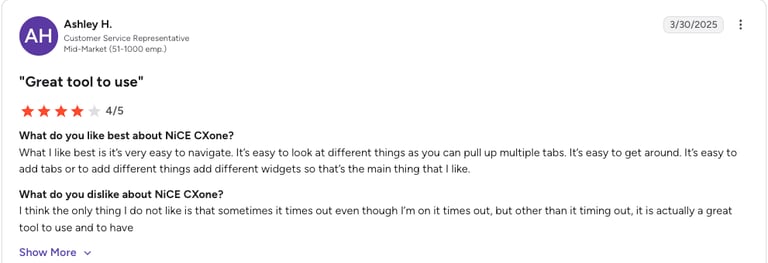
Les avis G2 attribuent à NICE CXone Mpower la note de 4.3/5. Les utilisateurs soulignent sa polyvalence, son intégration transparente, ses capacités de libre-service et sa fiabilité, tout en notant une courbe d'apprentissage abrupte pour les scripts avancés.
Lectures recommandées
6. RingCentral : le meilleur logiciel SVI pour une automatisation évolutive
Qu'est-ce que RingCentral ?
RingCentral combine des fonctionnalités SVI avancées et personnalisables avec une grande facilité d'utilisation, des intégrations puissantes et une évolutivité adaptée aux entreprises, ce qui en fait un choix solide pour les structures qui souhaitent automatiser et améliorer leur communication client.
Pourquoi choisir RingCentral ?
Les moyennes et grandes entreprises qui prévoient de se développer ou qui ont besoin d'une automatisation et d'une intégration robustes.
Quelles sont les fonctionnalités clés de RingCentral ?
- Générateur de SVI visuel par glisser-déposer
- Menus multiniveaux personnalisables
- Routage d'appels flexible
Quelles sont les meilleures intégrations de RingCentral ?
- Salesforce
- Microsoft Dynamics
- Zendesk
Quels sont les tarifs et abonnements de RingCentral ?
Les tarifs de RingCentral pour son téléphone professionnel RingEX commencent à €20/utilisateur/mois (facturé annuellement) :
- Core (€20/utilisateur/mois)
- Advanced (€25/utilisateur/mois)
- Ultra (€35/utilisateur/mois)
- Customer Engagement Bundle (sur devis)
RingCX, la solution de centre de contact dédiée, commence à €65/utilisateur/mois.
Quels sont les avantages et inconvénients de RingCentral ?
| Avantages | Inconvénients |
|---|---|
| Tarif d'entrée abordable | Dépendance aux modules complémentaires (de nombreuses fonctionnalités nécessitent des forfaits supérieurs) |
| Fonctionnalités collaboratives (partage de fichiers, visioconférence) | Fonctionnalités manquantes (ex. : numéroteurs commerciaux, automatisation) |
| Capacités d'intégration (plus de 300 intégrations) | Support client (des lacunes sont signalées par les utilisateurs) |
Que pensent les clients de RingCentral ?
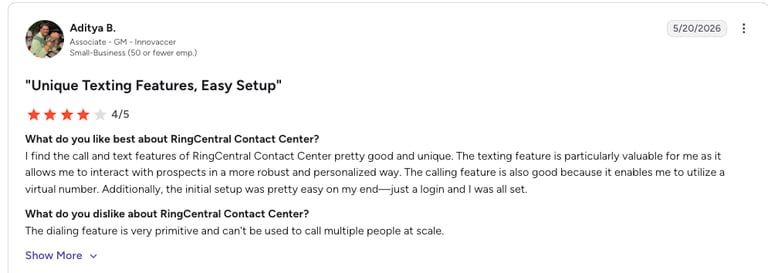
Les avis G2 attribuent à RingCentral la note de 4,0/5. Les utilisateurs trouvent le SVI facile à configurer et utile pour gérer efficacement les flux d'appels.
Lectures recommandées
7. Five9 : le meilleur logiciel SVI pour centre d'appels avec IA & omnicanal
Qu'est-ce que Five9 ?
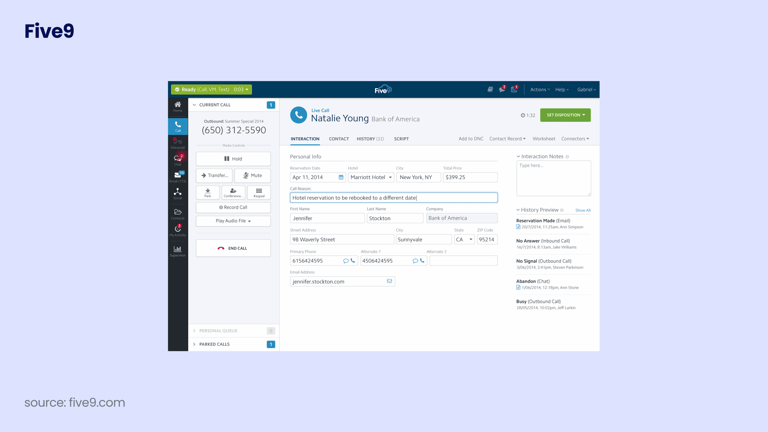
Adopté par plus de 3 000 clients dans le monde, Five9 se distingue en tant que logiciel SVI pour centre d'appels grâce à ses fonctionnalités basées sur l'IA, ses interfaces visuelles et mobiles, ses intégrations poussées et son attention portée à la fois sur l'expérience client et agent.
Pourquoi choisir Five9 ?
Les moyennes et grandes entreprises, en particulier celles qui recherchent des fonctionnalités avancées telles que la communication omnicanale et la gestion des effectifs.
Quelles sont les fonctionnalités clés de Five9 ?
- SVI visuel et optimisation mobile
- Support omnicanal pour la voix, le chat, les réseaux sociaux et l'e-mail
- Agents virtuels intelligents (IVA) et capacités d'IA
Quelles sont les meilleures intégrations de Five9 ?
- Salesforce
- Microsoft Dynamics 365
- Oracle Service Cloud
Quels sont les tarifs et abonnements de Five9 ?
Les tarifs de Five9 commencent à €119/utilisateur/mois.
- Digital : €119/utilisateur/mois
- Core : €159/utilisateur/mois
- Plus : sur devis
- Pro : sur devis
- Enterprise : sur devis
Quels sont les avantages et inconvénients de Five9 ?
| Avantages | Inconvénients |
|---|---|
| Facilité d'utilisation | Problèmes d'appels (certains utilisateurs signalent des coupures) |
| Fonctionnalités (routage d'appels, enregistrement, suivi SVI) | Fonctionnalités manquantes ou options payantes |
| Support client réactif | Configuration complexe et courbe d'apprentissage pour les flux de travail avancés |
Que pensent les clients de Five9 ?
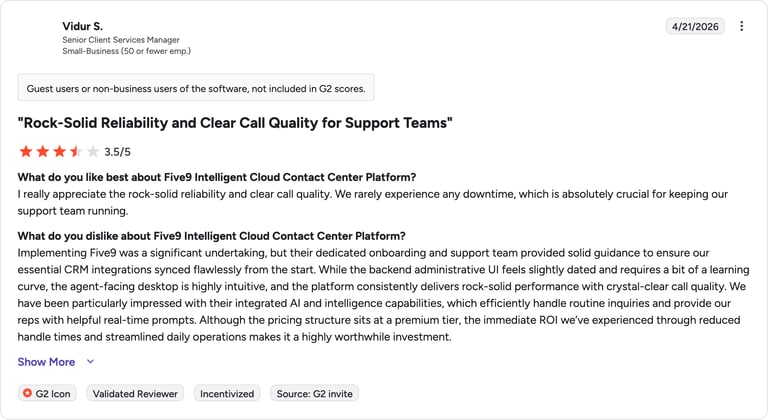
Les avis G2 attribuent à Five9 la note de 4,1/5. De nombreux utilisateurs apprécient la flexibilité et la facilité de personnalisation.
Articles recommandés
8. Talkdesk : le meilleur logiciel SVI pour centre de contact des grandes entreprises
Qu'est-ce que Talkdesk ?
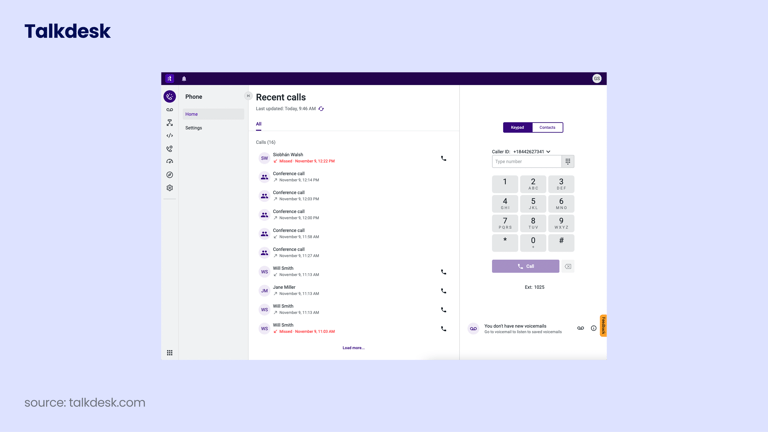
Talkdesk est utilisé par plus de 1 800 entreprises dans le monde et propose une conception SVI intuitive, des fonctionnalités optimisées par l'IA et un routage avancé pour un service personnalisé. Il est idéal pour les entreprises qui privilégient l'automatisation, le support aux agents et les performances basées sur les données.
Pourquoi choisir Talkdesk ?
Les entreprises de toutes tailles, bien que les tarifs soient mieux adaptés aux grandes structures.
Quelles sont les fonctionnalités clés de Talkdesk ?
- Agent virtuel qui gère les requêtes courantes et collecte les données de l'appelant
- SVI conversationnel
- Résumés post-appel automatiques générés par l'IA
Quelles sont les meilleures intégrations de Talkdesk ?
- Salesforce
- Zendesk
- Slack
Quels sont les tarifs et abonnements de Talkdesk ?
Les tarifs de Talkdesk commencent à €85/utilisateur/mois à travers quatre abonnements :
- Digital Essentials (€85/utilisateur/mois)
- Voice Essentials (€105/utilisateur/mois)
- Elite (€165/utilisateur/mois)
- Industry Experience Clouds (€225/utilisateur/mois)
Quels sont les avantages et inconvénients de Talkdesk ?
| Avantages | Inconvénients |
|---|---|
| Capacités d'intégration (plus de 60 intégrations) | Tarif de départ qui peut être élevé pour les petites entreprises |
| Adapté aux grandes entreprises (clouds dédiés à la santé, la finance, le secteur public) | Configuration complexe |
| Sécurité et conformité (HIPAA et RGPD) | Accès limité sur les forfaits inférieurs |
Que pensent les clients de Talkdesk ?
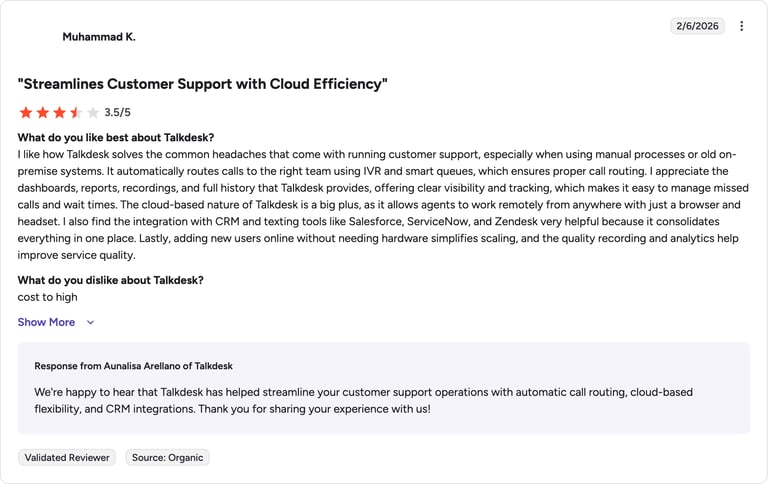
Les avis G2 attribuent à Talkdesk la note de 4,4/5. De nombreux utilisateurs le trouvent facile à gérer et apprécient de pouvoir personnaliser les flux SVI sans compétences en code.
Lectures recommandées
Comment fonctionne un logiciel SVI ?
Le système SVI guide les correspondants à travers un menu d'options préenregistrées. Les appelants appuient sur une touche ou parlent, et la technologie couplage téléphonie-informatique (CTI) détecte leur choix pour orienter automatiquement l'appel vers la bonne destination.
Par exemple, un correspondant peut appuyer sur la touche « 3 » pour écouter instantanément les horaires d'ouverture, ce qui lui fait gagner du temps et réduit son attente.
Testez le système SVI en direct et fluidifiez le parcours de vos clients
Les principaux avantages d'un logiciel SVI
Le SVI est comme le GPS de vos appels clients : il guide chaque conversation vers la bonne destination, sans détour. Voici ses avantages pour votre entreprise :
- 01Réduisez vos coûts grâce à l'automatisation :Le SVI automatise les tâches courantes comme la réponse aux questions fréquentes (les horaires d'ouverture ou le statut d'une commande). C'est bien moins cher que de confier chaque appel à un agent, ce qui réduit vos coûts opérationnels.
- 02Améliorez la satisfaction avec des réponses instantanées :Une expérience client réussie commence dès l'accueil téléphonique. Le SVI apporte des réponses rapides et oriente les appels vers le bon interlocuteur dès la première tentative, limitant ainsi les attentes et les transferts.
- 03Augmentez la productivité :Le SVI gère seul les appels de routine pour libérer vos agents au profit de tâches plus complexes, et transfère les appels vers le bon service dès le départ pour éviter les transferts inutiles.
- 04Proposez une assistance 24h/24 et 7j/7 sans surcoût :Votre SVI ne dort jamais : les entreprises peuvent ainsi offrir un service disponible en continu, permettant aux clients d'obtenir des informations, d'effectuer des paiements ou de joindre le bon service à toute heure.
- 05Prenez de meilleures décisions grâce aux analyses :Associer des outils d'analyse à votre SVI vous révèle le comportement des appelants : heures de pointe, options de menu les plus demandées, moments d'abandon ou d'attente. De quoi identifier facilement ce qui fonctionne et ce qu'il faut corriger.
- 06Renforcez votre image de marque :Personnalisez la voix, le ton et le style de votre SVI pour refléter l'identité de votre entreprise, par exemple avec une voix chaleureuse et un langage simple dans vos messages SVI.
Le SVI sortant : de quoi s'agit-il et quand en avez-vous besoin ?
On associe souvent le SVI aux appels entrants : le système répond quand un client appelle. Pourtant, le SVI sortant est tout aussi précieux. Il initie des appels et diffuse des messages vocaux automatisés à grande échelle auprès de vos clients ou prospects, sans mobiliser d'agent sur chaque ligne.
- Rappels de rendez-vous :Les cabinets médicaux, dentaires et prestataires de services utilisent le SVI sortant pour appeler leurs clients ou patients avant un rendez-vous planifié. Cela réduit les rendez-vous manqués sans mobiliser le temps de vos équipes. L'appel se lance automatiquement, confirme ou annule le rendez-vous via le clavier téléphonique, puis enregistre la réponse.
- Notifications de paiement et de renouvellement :Les services financiers et les entreprises fonctionnant par abonnement utilisent le SVI sortant pour prévenir de manière proactive leurs clients d'une échéance proche, d'un retard de paiement ou d'un renouvellement de contrat, pour une fraction du coût d'un appel d'agent.
- Enquêtes post-interaction :Dès qu'un ticket d'assistance est résolu, le SVI sortant peut rappeler immédiatement le client pour lui soumettre une enquête de satisfaction en deux questions. Vous recueillez ainsi son avis à chaud, au moment le plus pertinent.
- Qualification des leads à grande échelle :Les équipes commerciales s'appuient sur le SVI sortant pour qualifier de larges listes de leads entrants via des questions préalables avant de les orienter vers un commercial. Les chargés de compte ne parlent ainsi qu'aux prospects qualifiés ayant confirmé leur intérêt.
Ne choisissez pas un SVI sans ces 6 fonctionnalités clés
Le marché propose une multitude d'options de SVI, de quoi s'y perdre. Voici les fonctionnalités essentielles dont vous avez réellement besoin :
- 01Déterminez ce qui se produit lors d'un appel grâce au concepteur de flux d'appels : quelles options sont proposées, vers où est orienté l'appel et dans quel ordre.
- 02Connectez votre SVI à votre CRM, vos solutions de paiement ou votre outil de helpdesk. Les intégrations avec Salesforce, HubSpot, Zendesk ou Pipedrive font gagner du temps et fluidifient les échanges.
- 03Un SVI moderne ne doit pas se limiter à diffuser des enregistrements. La reconnaissance vocale et la compréhension du langage naturel (NLU) permettent à vos clients de s'exprimer naturellement plutôt que d'appuyer sur des touches.
- 04La synthèse vocale convertit vos textes écrits en voix. Plus besoin d'enregistrer chaque message manuellement, le système peut répondre ou router l'appel automatiquement selon les propos du correspondant.
- 05Les statistiques vous indiquent le nombre d'appels reçus, les options de menu sélectionnées et les points d'abandon : des données concrètes pour ajuster et améliorer votre service.
- 06Le routage d'appels oriente chaque appel vers le bon agent ou le bon service dès le départ, pour la plus grande satisfaction de vos clients et de vos équipes.
Comment choisir le bon logiciel SVI
Choisir le bon fournisseur de SVI peut s'avérer complexe face à la multitude d'offres. Pour vous faire gagner du temps, suivez simplement ces étapes.
1. Définissez vos besoins professionnels
Faites la liste des options dont vous ne pouvez pas vous passer. Au minimum : routage intelligent, files d'attente, menus multi-niveaux, self-service, rapports d'activité et intégration CRM.
2. Identifiez les fonctionnalités indispensables
Dressez la liste des fonctionnalités indispensables pour votre SVI. Au minimum : le routage d'appels intelligent, les files d'attente d'appels, les menus multi-niveaux, les options de libre-service, les rapports et les intégrations CRM.
3. Vérifiez les possibilités d'intégration
Votre SVI doit s'interfacer facilement avec les outils que vos équipes exploitent au quotidien. Sans connexion fluide avec votre CRM, votre service client ou vos autres applications, le système risque de vous ralentir plutôt que de vous aider.
4. Privilégiez l'évolutivité et la flexibilité
Optez pour une solution capable de suivre la croissance de votre entreprise, d'absorber une hausse des appels, d'accompagner de nouveaux sites ou de gérer des langues additionnelles. Les solutions cloud sont idéales pour adapter vos capacités sans installer de matériel supplémentaire.
5. Testez avant de vous engager
Faites toujours un essai préalable. Profitez des démonstrations ou des essais gratuits pour évaluer le SVI en conditions réelles. Assurez-vous de sa simplicité de configuration, vérifiez qu'il répond à vos critères et obtenez l'adhésion de vos équipes avant de valider votre choix.
Votre solution SVI idéale est à portée de clic
Comment créer votre propre système SVI (Guide pratique rapide)
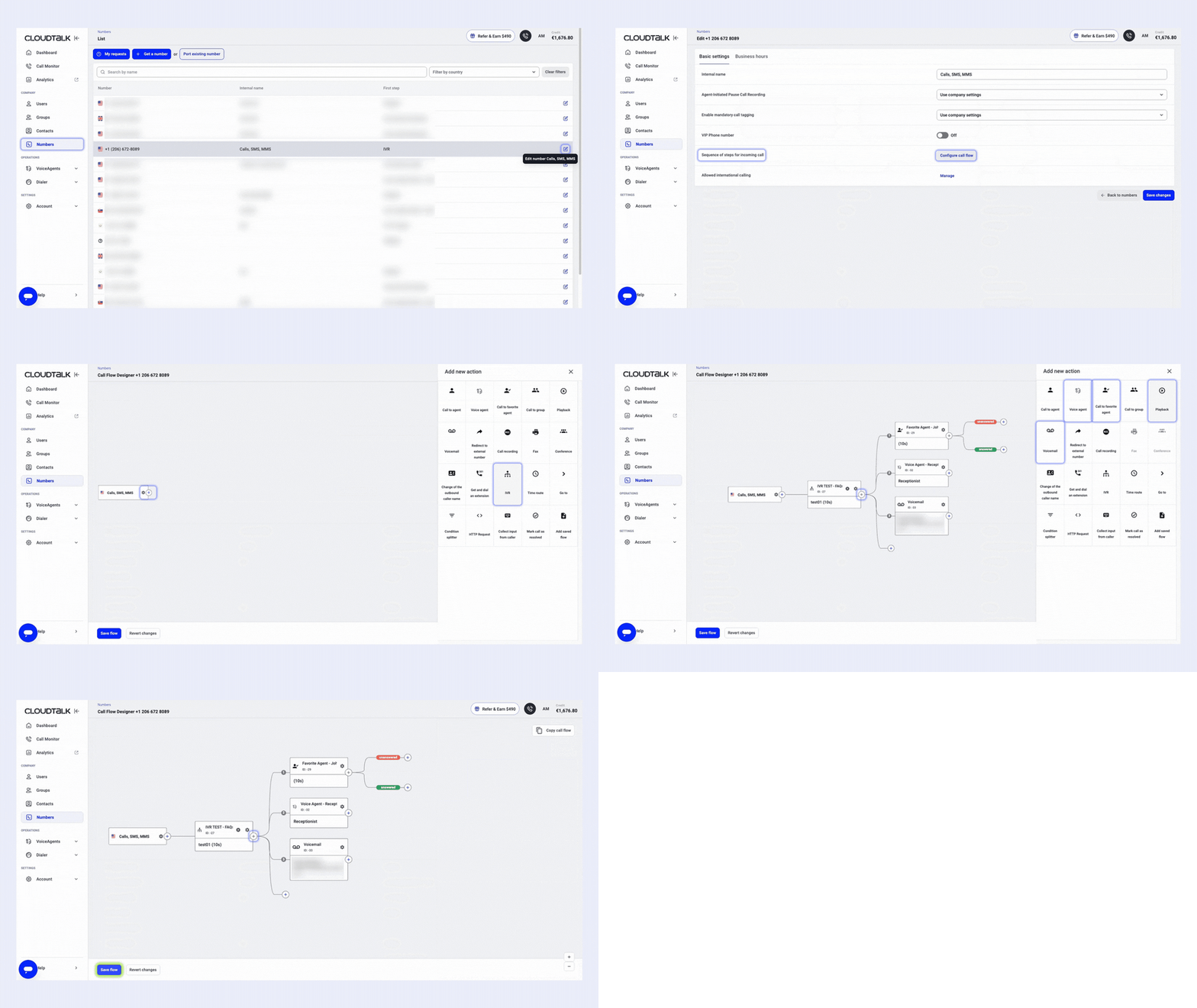
Créer un SVI dans le cloud ne nécessite plus d'équipements coûteux ni d'ingénieurs télécoms. Grâce au concepteur de flux d'appels intuitif de CloudTalk, configurez votre système en quelques minutes sans compétences techniques.
Voici les 5 étapes simples pour créer votre flux d'appels SVI :
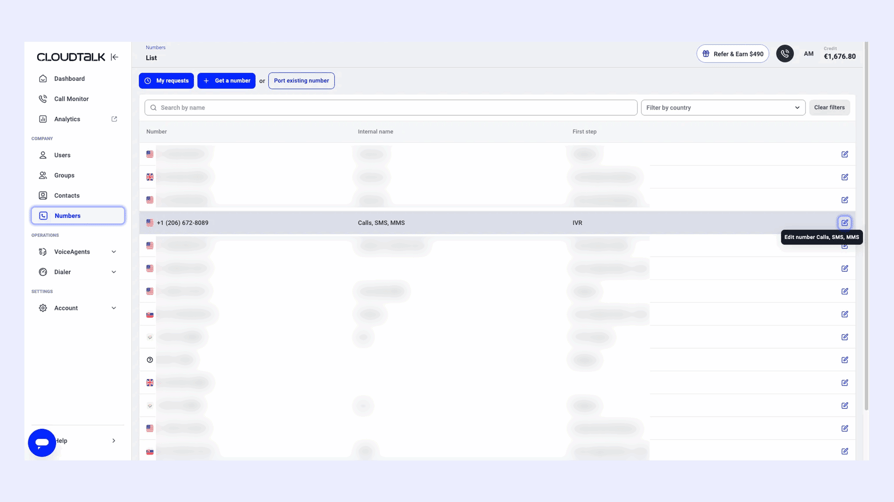
Étape 1 : Connectez-vous à votre tableau de bord CloudTalk
Une fois connecté, rendez-vous dans le menu de gauche et cliquez sur Numéros. Sélectionnez le numéro auquel attribuer le SVI et cliquez sur l'icône de crayon bleu pour le paramétrer.
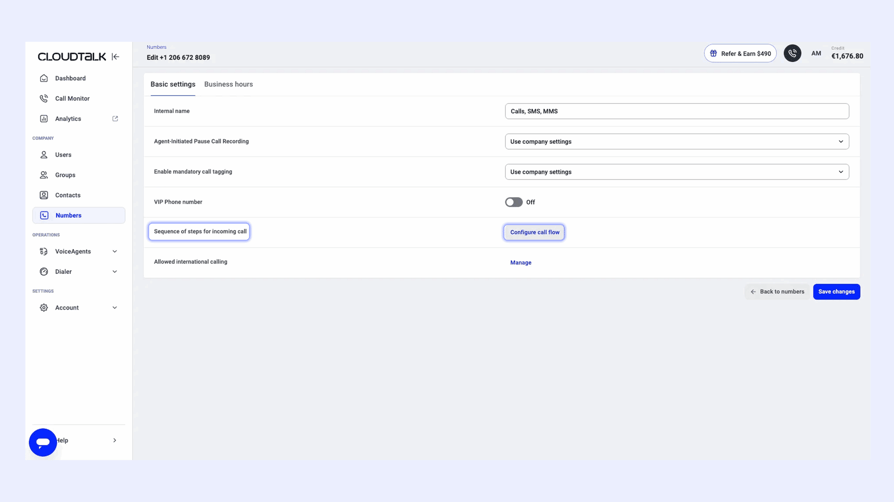
Étape 2 : Ouvrez le concepteur de flux d'appels
Faites défiler jusqu'à la section Séquence d'étapes pour les appels entrants, puis cliquez sur Configurer le flux d'appels. L'éditeur visuel s'ouvre alors.
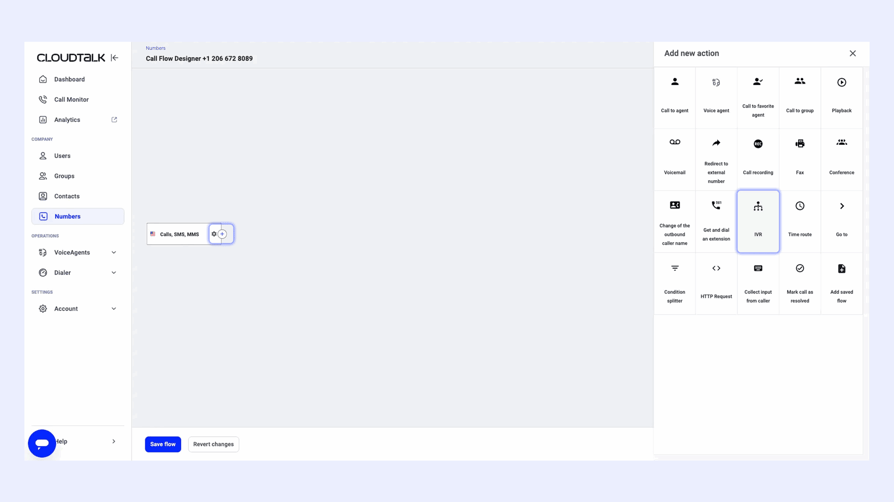
Étape 3 : Ajoutez l'étape SVI
Cliquez sur l'icône + dans votre flux et sélectionnez SVI. Importez ou enregistrez votre annonce d'accueil personnalisée et déterminez le délai d'attente des appelants à cette étape.
Étape 4 : Définissez les règles de routage
Après avoir ajouté l'étape SVI à votre flux, vous pouvez déterminer :
- Les actions déclenchées par l'appelant : appel vers un agent, agent vocal, messagerie vocale, lecture de message, etc. (sélectionnez les options utiles sans surcharger le menu)
- Le délai accordé à l'appelant pour faire son choix avant l'étape suivante
- L'option de repli par défaut si l'appelant ne sélectionne aucune touche
- La touche du clavier téléphonique sur laquelle l'appelant appuie pour lancer chaque action
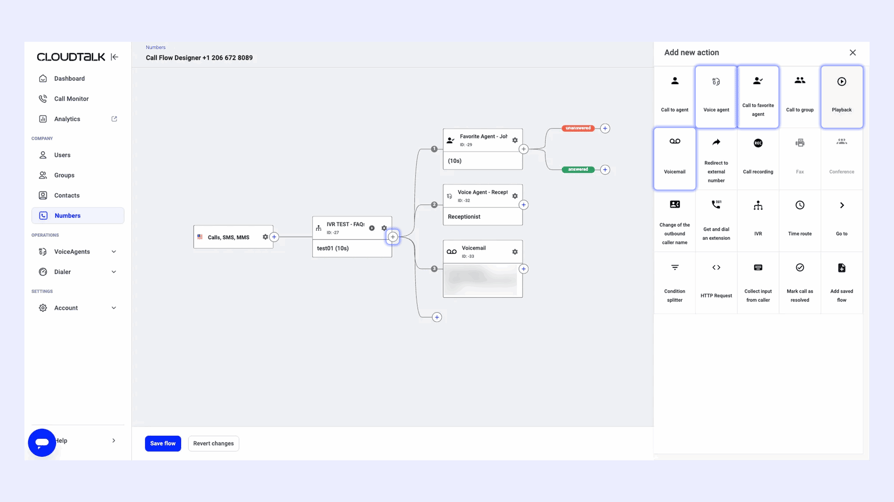
- Appel vers un groupe (ex. équipe d'assistance)
- Appel vers l'agent préféré
- Appel vers un agent vocal
- Lecture de message (ex. « Nos bureaux sont fermés »)
- Redirection vers la messagerie vocale
Étape 5 : Enregistrez et activez votre flux SVI
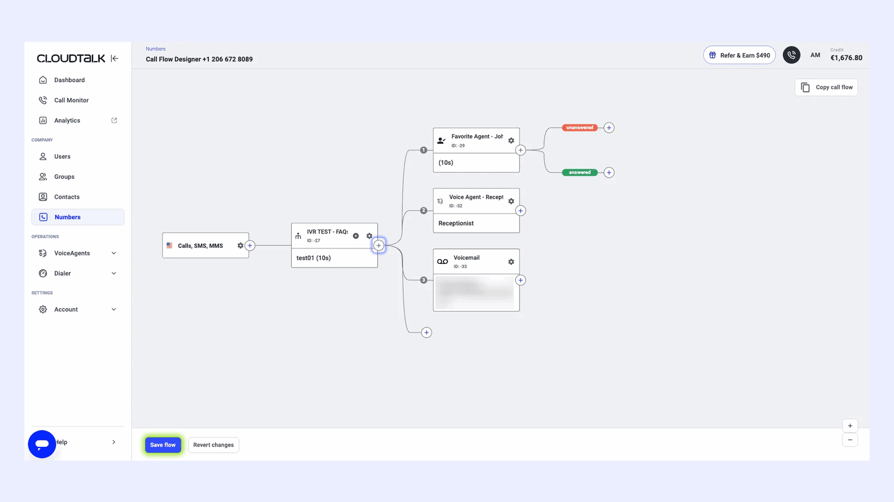
Une fois votre flux finalisé, cliquez sur Enregistrer. Votre nouveau SVI est immédiatement opérationnel sur le numéro choisi. Votre système SVI est prêt en quelques minutes seulement.
Vous voulez aller plus loin ? Intégrez des horaires d'ouverture, des agents vocaux IA ou un routage sous conditions à tout moment depuis le même éditeur. Pour en savoir plus, consultez notre guide du concepteur de flux d'appels.
Créez votre premier flux SVI gratuitement
5 erreurs de SVI nuisibles à l'expérience client (et comment les éviter)
Un SVI mal conçu irrite vos correspondants et nuit à votre image de marque. Voici cinq écueils fréquents à éviter.
- 01Surcharger les menus :Proposer un trop grand nombre d’options dans un seul menu sature l’esprit des appelants et entraîne des abandons d’appels.
- 02Des messages compliqués ou trop longs :Des instructions vagues ou interminables font perdre le fil aux clients ou les poussent à raccrocher.
- 03Aucun moyen clair de joindre un conseiller :Rien ne détruit plus vite la confiance qu’un « enfer SVI ». Si vos appelants ne peuvent pas joindre facilement un conseiller, ils risquent de ne plus jamais vous rappeler.
- 04Un audio de mauvaise qualité ou incohérent :Des voix dépareillées, des enregistrements inaudibles ou une mauvaise qualité audio déroutent les utilisateurs et manquent de professionnalisme.
- 05Pas d’option de rappel ni d’enquête de satisfaction :Ne pas proposer de rappel automatique ou ne pas solliciter de retours d’expérience empêche de rattraper une mauvaise expérience ou d’améliorer les futures interactions.
Bonnes pratiques pour configurer votre SVI comme un pro
Une fois votre logiciel SVI choisi, il est temps de le configurer. Ces bonnes pratiques vous aideront à concevoir un système efficace et convivial, tant pour votre équipe que pour vos clients :
- Faites simple et logique :Évitez de surcharger les appelants. Proposez des menus courts, ordonnés de manière logique et faciles à explorer.
- Utilisez des messages clairs et chaleureux :Enregistrez vos annonces d’une voix calme et claire, sans bruit de fond, et donnez des instructions directes.
- Proposez toujours l’option de parler à un conseiller :Tout le monde n’aime pas interagir avec une machine. Offrez toujours à vos appelants un moyen de joindre un humain.
- Optimisez la distribution des appels :Veillez à ce que les appels parviennent rapidement au bon conseiller ou service. Configurez un routage intelligent et des solutions de secours pour les agents indisponibles.
- Analysez, testez et ajustez :Vérifiez régulièrement les performances de votre système. Appuyez-vous sur les analyses de données et les retours de vos équipes pour ajuster vos flux de travail, vos menus et l’ergonomie générale.
- Proposez une option de rappel :Permettez aux appelants de demander un rappel automatique plutôt que de patienter en ligne. Cela améliore leur satisfaction tout en réduisant la pression sur vos conseillers.
Articles recommandés
L’avenir des logiciels SVI : plus intelligents, plus rapides et plus humains (tendances 2026)
Les systèmes rigides du type « tapez 1 pour le service commercial, tapez 2 pour l’assistance » cèdent la place à des outils intelligents et conversationnels qui apportent une réelle valeur à vos clients. En 2026, le SVI devient plus rapide, plus humain et parfaitement intégré aux outils que vos équipes utilisent déjà. Voici les grandes tendances à suivre :
- 01Des menus figés aux conversations fluides :Le TALN (traitement automatique du langage naturel) et l’IA conversationnelle remplacent les touches du clavier par une parole naturelle. Les SVI autonomes peuvent désormais planifier, mettre à jour et traiter des demandes sans aucune intervention humaine.
- 02Intégration poussée et personnalisation :Les SVI se connectent aux CRM et aux différents canaux pour personnaliser les appels en temps réel. En cas de transfert vers un conseiller, celui-ci reçoit tout le contexte de l’appel, évitant ainsi au client de se répéter.
- 03Une sécurité renforcée et invisible :La biométrie vocale et la détection des fraudes en temps réel authentifient les utilisateurs de manière transparente, limitant les frictions tout en renforçant la confiance.
- 04Des expériences visuelles et mobiles :Les SVI visuels permettent aux utilisateurs de naviguer parmi les options directement sur l’écran de leur smartphone, tandis que les intégrations SMS et WhatsApp apportent réactivité et souplesse.
- 05Apprentissage et analyses en temps réel :Les SVI dopés à l’IA analysent l’humeur et le comportement des appelants, tirant des enseignements de chaque interaction pour améliorer continuellement les performances et la satisfaction client.
SVI propulsé par l’IA : quelles nouveautés ?
En 2026, les systèmes SVI comprennent l’intention des clients, anticipent leurs besoins et agissent en conséquence. Grâce à l’IA, les solutions actuelles gèrent des tâches complexes telles que les réservations, les mises à jour de comptes ou les paiements de manière totalement autonome, tout en s’améliorant après chaque appel.
Pourquoi CloudTalk est le meilleur logiciel SVI pour les équipes en pleine croissance
Offrir un service d’exception implique de traiter chaque appel rapidement, de manière fluide et sans la moindre frustration. Ce guide a passé en revue les 8 meilleures plateformes de logiciels SVI pour vous aider à faire le bon choix.
Vous recherchez une solution simple d’utilisation, flexible et riche en fonctionnalités intelligentes ? CloudTalk facilite la création de flux d’appels SVI multi-niveaux personnalisés, automatise le routage et garantit un service rapide et sans accroc, le tout sans compétences techniques requises.
Grâce à son architecture cloud, vous pouvez faire évoluer votre infrastructure sans effort, gérer des numéros internationaux dans plus de 160 pays et vous connecter à vos outils préférés comme HubSpot, Pipedrive et Zendesk. Avec nos rapports d’analyse dopés à l’IA et notre routage basé sur les compétences, vous réduirez l’attente, optimiserez vos coûts et offrirez une expérience client plus intelligente et personnalisée. Consultez notre grille de tarifs pour trouver l’offre qui vous correspond.
Transformez la frustration en satisfaction. Optez pour un service ultra-rapide avec CloudTalk.
Foire aux questions sur les logiciels SVI
Un logiciel SVI (serveur vocal interactif) est une technologie qui accueille automatiquement les appels entrants, diffuse un menu d’options et dirige les appelants en fonction de leurs saisies clavier ou de leurs commandes vocales. Il collecte les données de l’appelant, se synchronise avec votre CRM et résout les demandes courantes (comme le suivi d’une commande) sans l’aide d’un conseiller. Des solutions comme le logiciel SVI de CloudTalk y associent la reconnaissance vocale par IA, des analyses en temps réel et des flux d’appels multi-niveaux conçus pour accompagner la croissance de vos équipes.
Un logiciel SVI pour centre d’appels est un système SVI spécialisé pour gérer de gros volumes d’appels entrants et sortants, traitant des milliers de requêtes quotidiennes grâce à un routage intelligent et à la gestion des files d’attente. Il accueille les appelants, vérifie leur identité dans le CRM et dirige chaque appel vers le groupe de compétences approprié ou vers un parcours en libre-service. Les plateformes d’entreprise telles que Five9 et Genesys s’adressent aux grandes structures, tandis que les forfaits de CloudTalk proposent un SVI pour centre d’appels adapté aux PME à partir de €25/utilisateur/mois.
Le meilleur choix de plateforme SVI dépend de la taille de votre équipe et de vos besoins. CloudTalk s’impose comme la solution idéale pour les PME et les entreprises en croissance, alliant un concepteur de flux d’appels sans code, des agents vocaux IA et une synchronisation CRM dès €19/utilisateur/mois. Genesys et NICE CXone Mpower dominent le marché des grands centres de contact, Twilio Flex convient parfaitement aux équipes disposant de développeurs, tandis que Bland AI ou Nextiva sont particulièrement adaptés pour un SVI conversationnel sans menu et axé sur l’IA.
Pour les petites entreprises, les meilleures options sont CloudTalk (forfait Starter à €25/utilisateur/mois), MightyCall (€20/utilisateur/mois) et Dialpad (€25/utilisateur/mois pour l’offre Pro). CloudTalk reste le plus complet : un concepteur de flux d’appels sans code, des intégrations natives avec HubSpot et Pipedrive, ainsi que des agents vocaux IA disponibles 24h/24 et 7j/7, le tout sans nécessiter de support informatique dédié. Évitez les plateformes d’entreprise telles que Genesys ou NICE CXone, dont les tarifs sont calibrés pour des centres de contact de plus de 100 positions.
Le coût d’un logiciel SVI varie de €15 à €30/utilisateur/mois pour les plateformes cloud destinées aux PME, et peut aller de €100 à €240/utilisateur/mois pour les suites logicielles de centres de contact d’entreprise. Les tarifs de CloudTalk débutent à €19/utilisateur/mois, le SVI étant inclus dès notre offre Starter à €25/utilisateur/mois. Les solutions d’entreprise affichent des prix plus élevés : Genesys dès €75/utilisateur/mois, NICE CXone dès €110/utilisateur/mois et Five9 dès €119/utilisateur/mois. Les systèmes sur site impliquent quant à eux entre €10 000 et plus de €50 000 de coûts de matériel initiaux.
Le concepteur de flux d’appels intuitif en glisser-déposer de CloudTalk vous permet de bâtir des flux SVI multi-niveaux sans écrire la moindre ligne de code, la plupart des modifications prenant effet en quelques minutes. MightyCall, RingCentral et Genesys proposent également des outils de création visuels adaptés aux administrateurs non techniques. Twilio met aussi à disposition un créateur de flux à faible code, mais celui-ci s’avère plus complexe et nécessite généralement l’intervention de développeurs pour personnaliser entièrement les parcours.
Les intégrations CRM natives les plus performantes sont proposées par CloudTalk (HubSpot, Salesforce, Pipedrive, Zoho, avec synchronisation bidirectionnelle dès les offres intermédiaires), RingCentral (Salesforce, Microsoft Dynamics et plus de 300 intégrations) ainsi que Five9 (Salesforce, Microsoft Dynamics, Oracle). Pour une synchronisation omnicanale englobant le chat, les SMS, les e-mails et la voix, Genesys et Five9 mènent la catégorie entreprise. Le véritable critère de choix reste de savoir si la synchronisation des données s’effectue en temps réel dans les deux sens ou s’il s’agit d’un simple export unidirectionnel.
Pour désengorger votre centre de contact, privilégiez un SVI doté de la compréhension du langage naturel, capable de résoudre les demandes courantes de manière autonome. C’est ce que proposent les agents vocaux IA de CloudTalk pour les PME, en qualifiant les prospects et en répondant aux questions fréquentes 24h/24. Five9, Genesys et Talkdesk proposent des agents virtuels comparables calibrés pour des volumes d’appels plus importants, bien qu’ils demandent souvent plus de configuration et affichent un coût par position supérieur.
Le SVI dans le cloud distribue les appels selon les compétences des conseillers, la langue, la localisation géographique et les données CRM, depuis n’importe quel endroit doté d’une connexion Internet et sans matériel sur site à installer. Vos équipes peuvent ajouter de nouveaux numéros, configurer des langues ou modifier les règles de routage en quelques minutes seulement. CloudTalk propose des numéros locaux dans plus de 160 pays, permettant aux équipes réparties et en télétravail d’étendre leur routage d’appels à l’international sans infrastructure supplémentaire.
Un logiciel de suivi de SVI analyse le parcours de vos appelants en temps réel : les touches choisies dans les menus, les points de décrochage ou encore la durée de chaque étape. Ces données vous aident à identifier les points de friction, comme un choix de menu confus causant de nombreux abandons, pour vous permettre d’ajuster vos parcours. Le tableau de bord d’analyse de CloudTalk intègre ce suivi par défaut, offrant aux managers la possibilité d’adapter les règles de routage de façon autonome.
Le SVI gère et automatise le traitement des appels grâce à des menus, des messages et des règles de distribution, tandis que la VoIP est la technologie sous-jacente qui achemine la voix sur Internet plutôt que par les lignes téléphoniques classiques. La VoIP constitue l’infrastructure, tandis que le SVI est une fonctionnalité qui s’y adosse. La plupart des solutions de téléphonie dans le cloud modernes, dont CloudTalk, intègrent nativement le SVI à leur plateforme VoIP plutôt que de le commercialiser séparément.
Un SVI mal conçu irrite les appelants en raison de menus trop longs, d’impasses dans la navigation ou d’un système de reconnaissance vocale qui peine à comprendre les accents et les bruits ambiants. Face à des difficultés pour joindre rapidement un interlocuteur humain, les clients ont tendance à raccrocher et à ne plus rappeler. Les meilleures solutions, comme le SVI de CloudTalk, évitent ces déconvenues en s’appuyant sur des arborescences courtes, des messages limpides et la possibilité de joindre un conseiller à tout moment.
Le SVI évolue : les arborescences rigides basées sur des touches de clavier laissent la place à des systèmes conversationnels pilotés par l’IA, capables de comprendre le langage naturel et de réaliser des actions complexes de manière autonome, comme le décalage d’un rendez-vous. Attendez-vous à des intégrations CRM plus poussées, à la biométrie vocale pour s’authentifier en toute transparence, ainsi qu’à l’ajout de canaux comme le SMS et WhatsApp en complément de la voix. Les agents vocaux IA de CloudTalk incarnent déjà cette évolution, en menant de véritables conversations fluides plutôt qu’en proposant de simples menus figés.
Un SVI hébergé dans le cloud fonctionne entièrement sur l’infrastructure de votre fournisseur de services et reste accessible en ligne, supprimant tout besoin de serveurs locaux ou d’équipe informatique dédiée. À l’inverse, un système SVI sur site classique requiert l’achat et la maintenance d’équipements physiques de téléphonie au sein même de votre entreprise. Plus rapide à déployer, le SVI dans le cloud s’adapte instantanément à vos besoins et bénéficie de mises à jour automatiques, ce qui en fait aujourd’hui la norme pour les PME et les entreprises de taille intermédiaire.