
10 Best Auto Dialer Software for Small Businesses (2026) — Call More, Dial Less
SUMMARY:
We reviewed 25+ auto dialer tools and chose the 10 best options for SMBs and growing teams in 2026, based on dialing modes, CRM integrations, reporting, pricing clarity, and scalability.
10 best automatic dialers for small business by use case:
-
CloudTalk – best overall for SMB sales and support teams scaling outbound with AI-powered dialing and CRM integration
-
Convoso – best for high-volume outbound teams maximizing contact rates
-
Five9 – best for enterprise contact centers and large organizations
-
NICE CXone – best for compliance-heavy enterprise environments
-
Readymode – best for predictive-driven BPO teams
-
Talkdesk – best for enterprise CX automation
-
Nextiva – best for business phone + basic contact center combo
-
MightyCall – best for small teams needing simple outbound
-
JustCall – best for sales/support teams wanting dialer + messaging
-
Voicent – best for budget-focused basic campaigns
CloudTalk is the strongest choice for most small businesses that want to scale outbound sales or support without adding enterprise-level complexity.
Larger organizations with strict compliance, governance, or multi-layered admin requirements may prefer a full CCaaS platform.
If your team spends more time clicking, waiting, and logging than talking, your business doesn’t have a motivation problem. It has a dialing workflow problem.
And the data backs that up. Salesforce reports that sales agents spend only 28% of their week actually selling, with the rest going to admin work, prep, and internal tasks.¹
In outbound teams, that lost time often comes down to one thing: using the wrong tool or the wrong dialing mode for how your team actually works.
In this guide, we compare the 10 best auto dialer solutions for small-to-medium businesses in 2026 and show you how to choose the right one based on call volume, team size, and growth plans.
Fix Your Dialing Workflow in One Demo
How We Chose the Best Auto Dialer Software for SMBs in 2026
To build this list, we reviewed 25+ popular auto dialers and cherry-picked the 10 best that solve the day-to-day problems sales managers and team leads actually deal with: not just “more dials,” but cleaner connects, better workflows, and easier coaching.
Here’s what we looked for:
-
Dialing modes that fit real workflows: preview, power/progressive, and predictive
-
Call controls that matter: pacing, retries, local presence, dispositions, reporting
-
List and campaign management: importing, filtering, scheduling, exclusions
-
Integrations that reduce admin work: CRM/helpdesk sync, click-to-call, activity logging
-
Compliance and deliverability support: opt-outs, consent, caller ID reputation basics
-
Reliability at scale: call quality, uptime, admin controls, role permissions
-
Total cost in practice: add-ons, implementation effort, and what features sit behind higher tiers
The goal wasn’t to crown one “winner” for every business. It was to make it easy to pick the right automatic dialer for small-to-medium-sized teams based on size, call volume, and how complex your operations are.
Why Trust Our Software Reviews
Over the last decade, we’ve helped over 30,000 professionals find and implement smarter communication tools.
We’ve reviewed hundreds of products, analyzed thousands of verified reviews from business-relevant platforms like G2, Capterra, or Trustpilot, and drawn insights from real user discussions on forums like Reddit or Quora.
In the past year alone, we published 1,000+ articles, all written and reviewed by humans, for humans, to provide reliable, data-backed insights you can trust.
Learn how we keep our content integrity and our software review methodology.
Top 10 Automatic Dialer Software for Small Businesses (2026 Guide)
If you’re comparing auto dialer software for small businesses, this shortlist highlights the platforms most teams consider in 2026.
Side-by-Side Comparison of the Best Auto Dialers for Small Businesses
The table below compares:
-
Best-fit use cases
-
Available dialing modes
-
Starting price (annual billing)
-
G2 rating
Use it to quickly narrow your shortlist before diving into the detailed breakdowns of each automatic dialer for SMB teams.
Best Auto Dialers for SMBs in 2026
| Dialer Software | Best for | Auto Dialer Modes | Starting Price* (annual billing) | G2 Rating |
|---|---|---|---|---|
| CloudTalk | SMB sales and support teams scaling outbound + service with AI automation and CRM integration | Smart, Preview, Power/Progressive, Parallel | $19/user/mo | 4.4/5 |
| Convoso | High-volume outbound teams optimizing contact rates | Preview, Power, Progressive, Predictive | Quote-based | 4.5/5 |
| Five9 | Enterprise contact centers needing a full CCaaS suite | Preview, Power, Progressive, Predictive | $119/user/mo | 4.1/5 |
| NiCE CXone | Large enterprises with complex compliance + governance | Preview, Progressive, Predictive | $110/user/mo | 4.3/5 |
| Readymode | BPOs + outbound-heavy teams that live in predictive | Predictive | $199/user/mo | 4.6/5 |
| Talkdesk | Enterprise CX teams that want AI + automation depth | Preview, Power, Progressive, Predictive | $85/user/mo | 4.4/5 |
| Nextiva | Teams that want UCaaS + basic contact center in one vendor | Progressive, Predictive | $15/user/mo | 4.5/5 |
| MightyCall | Small teams wanting simple calling + light auto dialing | Preview, Progressive, Predictive | $20/user/mo | 4.4/5 |
| JustCall | Sales/support teams wanting multi-channel + dialers | Preview, Power, Progressive, Predictive | $29/user/mo | 4.3/5 |
| Voicent | Budget-conscious teams needing basic automated campaigns | Preview, Progressive, Predictive | $19/user/mo | 4.5/5 |
* Note: Starting price shown reflects platform entry plan. Advanced dialer modes may require higher tiers.
1. CloudTalk
CloudTalk is the best auto dialer software for small business sales and support teams that need a modern AI-powered dialer for outbound workflows, plus strong CRM/helpdesk integrations. It’s built for growing teams that want to scale their outbound without turning their tool stack into a maintenance project.
Automatic dialing modes:
-
Smart + Click-to-Call
-
Preview
-
Power/Progressive
-
Parallel
Top platform features:
-
100+ native CRM and helpdesk integrations that significantly reduce manual logging
-
Smart Call routing that gets every caller to the right place and keeps queues moving
-
AI Voice Agents that take care of routine calls reps don’t have time for, including outbound lead qualification
-
Real-time analytics that gives you visibility and helps you spot trends faster (recordings, dashboards)
-
Conversation Intelligence with AI features like Sentiment analysis, AI smart notes, or AI call scoring that help teams learn faster
-
Call recording that automatically records all of your dialer interactions
G2 rating: 4.4/5 (1,600+ reviews)
CloudTalk pricing: from $19/user/month
Bottom line:
CloudTalk is a strong auto dialer choice, especially if you want an auto dialer for growing sales & support workflows (or even recruitment) that doesn’t require months of implementation.
Transparency Upfront
As a platform, CloudTalk starts at $19/user/month. To use the advanced Power Dialer, you need to be on the Expert plan, which costs $49/user/month, or add it to your base plan for $15/user/month. The Parallel Dialer is only available as an add-on, and it costs $39/user/month.
2. Convoso

Convoso is built for high-volume outbound operations that care deeply about contact rates and dialing efficiency. It’s a common pick in performance-driven environments like lead gen and certain BPO (Business Process Outsourcing) setups.
Automatic dialing modes:
-
Preview
-
Power
-
Progressive
-
Predictive
Top platform features:
-
Outbound-first campaign tooling
-
Strong analytics for dialing performance
-
Tools aimed at improving connect rates
G2 rating: 4.5/5 (250+ reviews)
Convoso pricing: Quote-based
Bottom line:
If your core problem is “we need more live connects per hour,” Convoso is a top contender.
3. Five9

Five9 is a long-standing enterprise CCaaS (Contact Centers as a Service) platform. It’s often chosen by large contact centers that want a broad suite: omnichannel, reporting, admin controls, and enterprise-grade operations.
Automatic dialing modes:
-
Preview
-
Power
-
Progressive
-
Predictive
Top platform features:
-
Enterprise-grade admin and governance
-
Omnichannel contact center capabilities
-
Broad ecosystem and enterprise support model
G2 rating: 4.1/5 (550+ reviews)
Five9 pricing: from $119/user/month
Bottom line:
If you need a full enterprise platform, Five9 belongs on your shortlist. If you mainly need an automated dialing software that’s easy to roll out, it may be more than you need.
4. NiCE CXone

NiCE CXone is a strong auto dialer software for enterprise environments where compliance, security, and governance aren’t “nice to have.” It’s built for big operational scale and strict requirements.
Automatic dialing modes:
-
Preview
-
Progressive
-
Predictive
Top platform features:
-
Enterprise security and compliance posture
-
Deep workforce and QA options (depending on package)
-
Strong platform depth for large teams
G2 rating: 4.3/5 (1,700+ reviews)
NiCE CXone pricing: from $110/user/month
Bottom line:
If your environment is regulated or highly governed, CXone is a serious candidate.
5. Readymode

Readymode is built for fast-paced outbound and BPO operations that prioritize predictive performance. It’s known for being outbound-focused and configurable for high throughput.
Automatic dialing modes:
-
Predictive
Top platform features:
-
Outbound-first workflows
-
Predictive pacing focus
-
Manager controls designed around volume
G2 rating: 4.6/5 (150+ reviews)
Readymode pricing: from $199/user/month (monthly billing)
Bottom line:
If your business lives and dies by predictive dialing performance, Readymode is one of the more relevant options.
6. Talkdesk
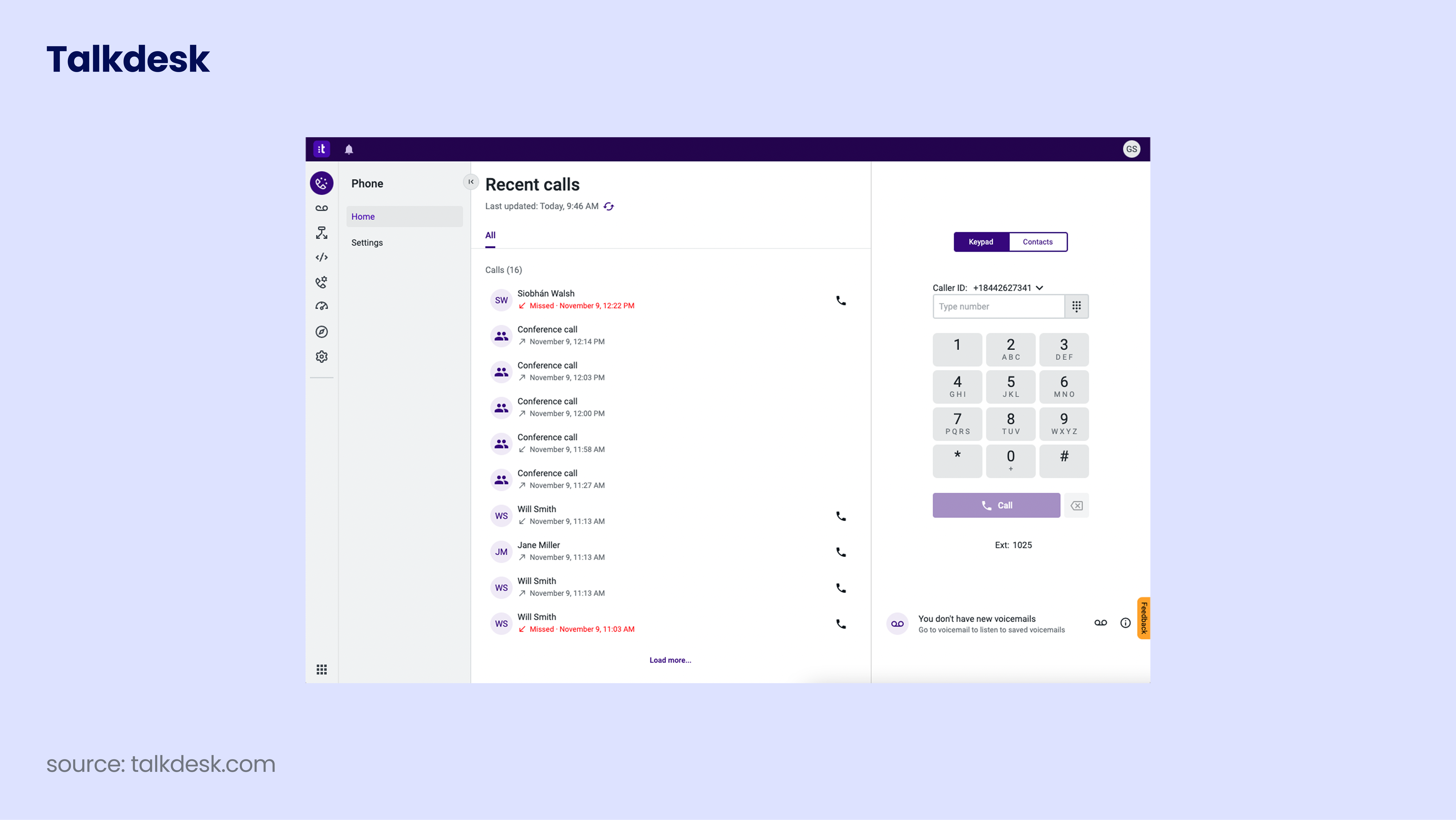
Talkdesk is an enterprise platform with a strong focus on automation and AI-driven CX workflows. It’s most common in larger environments that need more than voice and want deeper orchestration.
Automatic dialing modes:
-
Preview
-
Power
-
Progressive
-
Predictive
Top platform features:
-
Automation and AI depth
-
Enterprise CX workflows across channels
-
Reporting and admin structure for larger teams
G2 rating: 4.4/5 (2,500+ reviews)
Talkdesk pricing: from $85/user/month
Bottom line:
Talkdesk can be a strong pick for enterprise CX transformation. For SMBs, the price and complexity can be hard to justify versus a simpler stack.
7. Nextiva

Nextiva is often chosen by teams that want a UCaaS (Unified Communications as a Service) suite with contact center capabilities layered in. It can fit smaller teams that want “good enough” dialing plus business phone features.
Automatic dialing modes:
-
Progressive
-
Predictive
Top platform features:
-
UCaaS + contact center in one package
-
Solid calling foundation for distributed teams
-
Broad business communications feature set
G2 rating: 4.5/5 (3,400+ reviews)
Nextiva pricing: from $15/user/month
Bottom line:
If your priority is bundling business phone and basic calling setup, Nextiva is worth a look.
8. MightyCall

MightyCall is designed for small teams that want simple call handling and light outbound automation without a heavy setup. It’s not an enterprise predictive monster, but it can work for smaller outbound motions.
Automatic dialing modes:
-
Preview
-
Progressive
-
Predictive
Top platform features:
-
Simple setup for small teams
-
Basic call routing and tracking
-
Helpful for teams without dedicated ops resources
G2 rating: 4.4/5 (300+ reviews)
MightyCall pricing: from $20/user/month
Bottom line:
If you need something straightforward and you’re not running aggressive high-volume campaigns, MightyCall can be a practical pick.
9. JustCall

JustCall is a popular auto dialer software, especially with sales and support teams that want calling, messaging, and workflow support in one platform. It’s a common option when teams want dialers plus multi-channel communication.
Automatic dialing modes:
-
Preview
-
Power
-
Progressive
-
Predictive
Top platform features:
-
Sales-friendly workflows and integrations
-
Multi-channel messaging alongside voice
-
Useful for SMB teams that need speed over complexity
G2 rating: 4.3/5 (2,300+ reviews)
JustCall pricing: from $29/user/month
Bottom line:
If you’re running a blended sales and support motion and want one tool for multiple channels, JustCall can fit.
10. Voicent

Voicent is a budget auto-dialer option for teams that want automated phone-call software for basic campaigns, reminders, or simpler outbound automation. It can be a fit for seasonal campaigns or smaller operations with limited resources.
Automatic dialing modes:
-
Preview
-
Progressive
-
Predictive
Top platform features:
-
Basic automated campaigns and dialing
-
Straightforward, cost-focused packaging
-
Better for simple workflows than complex ops
G2 rating: 4.5/5 (only 2 reviews)
Voicent pricing: from $19/user/month
Bottom line
If your needs are simple and cost is the main constraint, Voicent is an option. If you need deeper integrations and reporting, you’ll likely outgrow it.
What Is Auto Dialer Software for Small Businesses (and How Does It Work)?
An auto dialer for small business teams is software that automatically dials phone numbers from a list and connects answered calls to available agents.
Instead of agents typing numbers and waiting through rings, busy signals, or voicemail, the system handles that part. Agents spend more time talking and less time dialing.
Here’s how SMB auto dialer software works:
-
Add contactsYou can upload a CSV file, sync contacts from your CRM or helpdesk, or use a smart dialer mode or click-to-call tool to capture phone numbers directly from your CRM or web pages and add them to a call queue.
-
Choose a dialing modeSelect how the system should place calls. For example, preview for context-first conversations, power for steady, fast-paced outbound, or parallel for reaching multiple leads at once and detecting voicemails.
-
Start dialing automaticallyThe dialer begins calling numbers from the queue based on agent availability and the dialing mode you selected.
-
Connect answered callsWhen someone answers, the system immediately connects the call with the agent, or routes the call to the next available agent.
-
Log the outcomeAfter each call, the system records the result automatically, such as answered, voicemail, no answer, or a custom disposition. This keeps your reporting clean and follow-ups organized.
The benefits of auto dialer software for small business use are quite straightforward:
-
More productive agent hoursAgents spend less time waiting through rings and voicemails and more time in real conversations. That directly increases conversations per hour without hiring more people.
-
Higher connect and conversion potentialBy moving through lists consistently and reducing manual errors, teams reach more real prospects and create more opportunities from the same data.
-
Cleaner, more reliable reportingCalls, outcomes, and notes are logged automatically. Managers don’t need to chase missing data, and forecasting becomes more accurate.
-
Easier coaching and accountabilityWith structured call outcomes and recordings in one place, supervisors can identify patterns, improve call center scripts, and support underperforming agents faster.
-
More consistent outreachEvery agent follows the same pacing rules and workflow. That means fewer missed leads, fewer duplicate calls, and better customer experience.
The dialing mode you choose sets how aggressive or controlled your outreach will be. The right mode gives you speed without sacrificing quality, compliance, or brand reputation.
Auto Dialer Modes Explained for Small Business Teams
TL;DR:
Each auto dialer mode solves a different business problem:
-
Preview – best when call quality and personalization matter more than speed
-
Power/Progressive – best for increasing talk time without losing control
-
Parallel – best for boosting connection rates and reducing voicemail time
-
Predictive – best for maximizing volume in large, high-capacity operations
-
Smart – best for cutting admin work and speeding up list building
Different dialing modes solve different problems. The “best” one depends on how much volume you need and how much context agents require before speaking.
1. Preview Dialer
What it is:
A preview dialer shows the agent full contact details before the call is placed. The agent reviews the information and then starts the call manually.
What problem it solves:
It prevents rushed conversations and improves call quality in environments where context matters.
Why SMBs choose it:
-
Agents can review CRM notes, ticket history, or past interactions
-
Better personalization and fewer awkward openings
-
Lower risk of errors on complex or regulated accounts
-
Stronger customer experience for high-value contacts
Best for:
-
Account management and renewals
-
Support callbacks that require ticket history
-
SMB teams where quality matters more than raw volume
Limitation:
It’s slower than other modes. If your priority is maximum outbound volume, this will not be the fastest option.
Bottom line:
Preview dialer is an excellent choice for personalized outbound campaigns, where agents need full context before dialing the next contact.
2. Power and Progressive Dialers
What they are:
A power dialer automatically calls the next number as soon as an agent finishes the previous call. One agent handles one active call attempt at a time.
A progressive dialer works almost the same way. It also uses a 1:1 call-to-agent ratio, but it waits until the system confirms the agent is fully ready before placing the next call.
In simple terms, both power and progressive modes dial one number per available agent. The only real difference is pacing.
What problem they solve:
They remove manual dialing while keeping control in the hands of your agents.
Why SMBs choose them:
-
Reduce idle time without overwhelming agents
-
Maintain consistent outbound rhythm across the team
-
Lower risk of dropped calls compared to predictive dialing
-
Keep reporting structured and easier to manage
-
Simple for supervisors to monitor and coach
Best for:
-
Small business sales teams scaling outbound campaigns
-
SDR and inside sales teams
-
Follow-up campaigns that need steady pace
-
Growing teams moving away from spreadsheets or manual dialing
Limitation:
They won’t generate as many raw call attempts per hour as predictive dialing in very large outbound operations.
Power vs Progress
CloudTalk treats power and progressive as one dialing mode. Technically, they use the same 1:1 call structure. The only difference is how quickly the next call is triggered, which you can set up to your liking directly in CloudTalk dashboard.
Bottom line:
For most growing companies, power or progressive dialing is the most practical balance between speed, control, and customer experience.
3. Parallel Dialer
What it is:
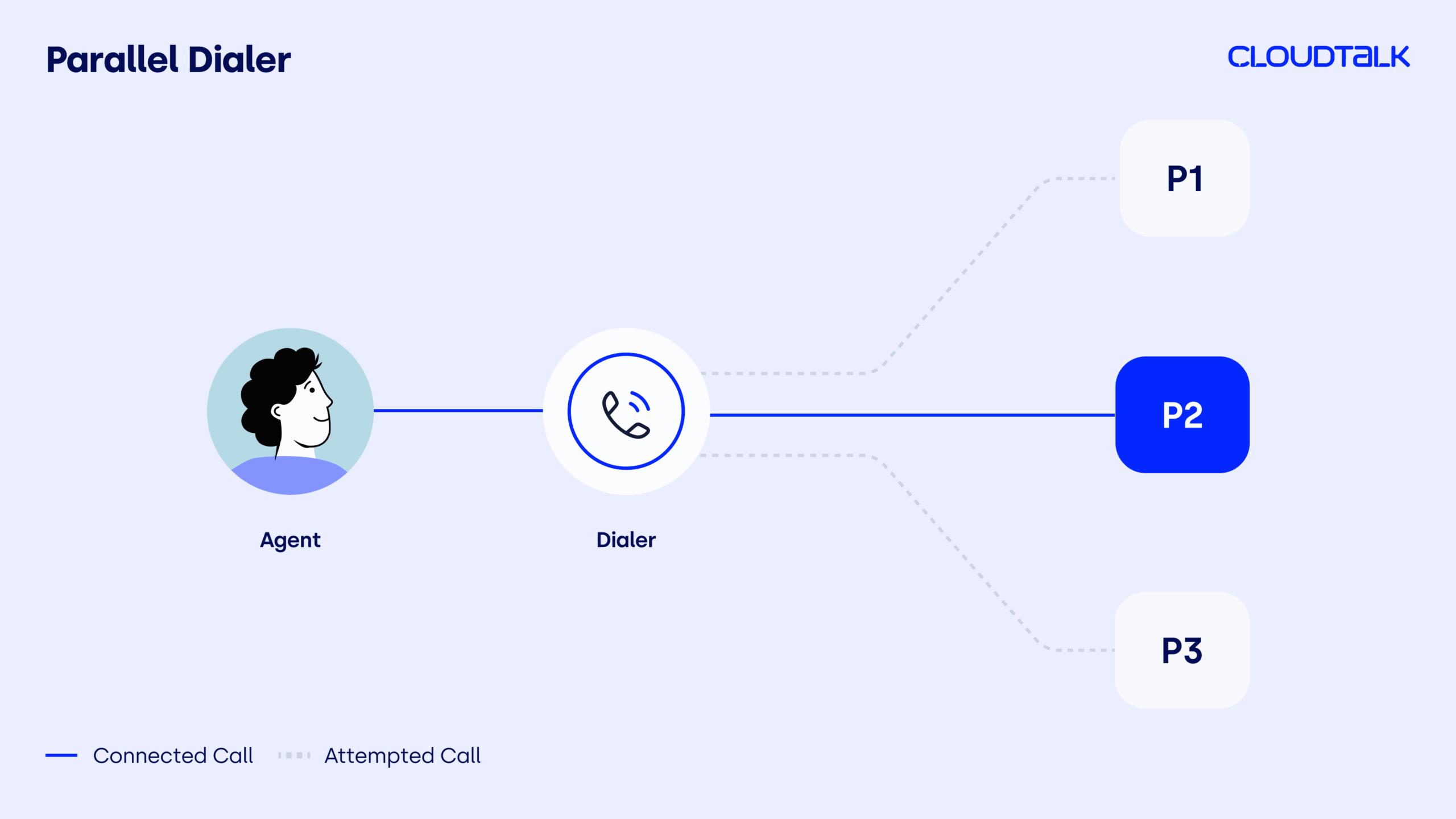
A parallel dialer places multiple call attempts at the same time (with CloudTalk, up to 10 lines at once) and connects the first live answer to an available agent. The best parallel dialers even help you detect voicemails, saving your agents a lot of time.
Unlike predictive dialing, it does not try to estimate agent availability using algorithms. It simply increases the number of simultaneous call attempts to improve connection speed.
What problem it solves:
Low answer rates and excessive time wasted on ringing and voicemail.
Why SMBs choose it:
-
Increases the likelihood of reaching a live person quickly
-
Reduces idle time caused by unanswered calls
-
Improves agent talk time without fully automating pacing
-
Helps outbound teams move through large lists faster
-
Often includes fast voicemail detection to avoid wasted time
Best for:
-
Outbound campaigns where speed is critical
-
Lead generation teams working large contact lists
-
Growing sales teams struggling with low connect rates
-
BPO operations running time-sensitive campaigns
Limitation:
If configured too aggressively, it can increase dropped calls. It also prioritizes speed over personalization, which may not suit complex or high-context conversations.
Bottom line:
Parallel dialing gives teams higher performance than power/progressive dialing, without stepping fully into predictive risk.
4. Predictive Dialer

What it is:
A predictive dialer automatically places multiple calls per agent and uses historical call data to estimate when agents will become available. The goal is to have a live call ready the moment an agent finishes the previous conversation.
What problem it solves:
Maximizing agent talk time in very large outbound environments where volume is the main goal.
Why SMBs choose it:
-
Designed for high-volume outbound floors
-
Can significantly increase call attempts per hour
-
Reduces agent idle time when tuned correctly
-
Common in collections, surveys, and large BPO operations
Best for:
-
Large BPO operations
-
Collections teams
-
Market research campaigns
-
High-volume enterprise teams prioritizing volume over personalization
Limitation:
Predictive dialing can boost output, but if pacing is too aggressive, customers may hear silence before an agent connects, creating abandoned calls and regulatory risk. The FTC (Federal Trade Commission) caps abandoned calls at 3% and requires 97% of answered calls to connect within two seconds², so precision isn’t optional.
Why CloudTalk Avoids Predictive Dialing for Small Businesses
Predictive dialing can increase call volume, but it also raises the risk of dropped calls, silent connections, and compliance issues if not tightly managed. For most growing businesses, CloudTalk recommends power and parallel dialing, which delivers strong outbound performance with better control and lower risk.
Bottom line:
Predictive dialing delivers maximum volume, but it demands operational maturity. For many SMBs, power or parallel dialing provides a safer balance between speed, customer experience, and compliance control.
5. Smart Dialer
What it is:
A smart dialer is a feature inside automated dialing software that allows agents to capture and queue phone numbers directly from CRM systems, helpdesk tools, or web pages.
Instead of manually copying and pasting numbers into a dialer before calling, agents can build call queues instantly while working inside their existing tools.
What problem it solves:
It helps you eliminate a lot of manual admin work, tab switching, and slow list building that eats into agent productivity.
Why SMBs choose it:
-
Faster list building inside CRM workflows
-
Fewer manual input errors
-
Less copy-paste between systems
-
Better visibility into customer details and history during calls
-
Cleaner data inside your dialer
-
Reduced time between research and outreach
Best for:
-
Sales teams working daily inside CRM platforms
-
Support teams calling directly from ticketing systems
-
Teams prospecting from web-based tools
-
Growing teams that want to reduce admin overhead
Limitation:
Smart dialing improves workflow speed, but it does not change call pacing. It works alongside power, parallel, or predictive dialing rather than replacing them.
Pair Smart Dialer with Click-to-Call for Maximum Speed
When combined with click-to-call, smart dialing becomes even more efficient. Agents can launch calls directly from CRM records or web pages without switching tabs. This shortens time-to-call and keeps customer data synced automatically.
Bottom line:
Smart dialing removes friction from your workflow. When paired with the right dialing mode, it helps teams move faster while keeping context and data accuracy intact.
Which Type of Auto Dialer Is Best for Your Business?
The best type of auto dialer software for a small business depends on two practical factors: how many conversations you need per hour and how much preparation each call requires.
If your agents need context before speaking, you need control. If your goal is more conversations per shift, you need speed.
Use this decision shortcut:
-
Choose preview dialing if calls are high-stakes and agents need full context before speaking
-
Choose power or progressive dialing if you want consistent outbound volume with control and low compliance risk
-
Choose predictive dialing if you operate a high-volume outbound floor with experienced operations support and clean data
For most small business teams, starting with power or progressive dialing is the safest approach. These modes increase talk time, keep pacing predictable, and reduce the risk of dropped calls. That’s why many teams consider them the most reliable auto dialer for small businesses, especially the ones that focus on sustainable growth.
If your sales team needs to move through large call lists faster, parallel dialing can improve connection rates and even skip voicemails while maintaining more control than predictive models.
Predictive dialing is designed for large, high-volume environments. For workflows requiring controlled growth and consistent customer experience, power or parallel dialing usually delivers better long-term stability.
How to Choose the Right Auto Dialer Software for Small Business Use
When choosing the right auto dialer software for your small business, focus on the solutions that increase productive talk time without adding admin work or compliance risk.
At this stage, you’re not choosing a dialing mode. You’re choosing a platform that can execute that mode reliably, every day.
When evaluating top small business auto dialer software, focus on what directly impacts performance:
-
Dialing modes that match your workflow so agents aren’t forced into the wrong pacing model
-
Clean call outcomes and reporting you can trust for forecasting and coaching
-
Native CRM or helpdesk sync so follow-ups never depend on manual logging, and your agents don’t burn time on admin
-
List controls that prevent wasted dials, duplicate calls, and off-hours outreach
-
Stable call quality and caller ID management to improve and protect answer rates
-
Supervisor visibility into live activity without exporting spreadsheets
-
Setup time measured in days, not months, so momentum isn’t lost
-
Responsive support if outbound calling drives revenue
If any of these break, productivity drops. Admin work increases. Performance becomes harder to manage.
Before committing, test one real campaign with one real list and one team lead. If the workflow requires manual fixes at small scale, it won’t scale cleanly.
The best automatic dialing software for growing teams, such as CloudTalk, tends to perform well here because it prioritizes controlled dialing modes, strong integrations, and fast implementation over unnecessary complexity.
Auto Dialer Pricing: What to Expect in 2026
Auto dialer pricing looks simple at first glance, while it rarely really is.
Most auto dialer vendors in 2026 advertise a per-user price, but advanced dialing modes, automation, AI features, and even reporting often sit behind higher tiers or paid add-ons. The plan you see first is not always the plan your team will actually need.
For small business teams, pricing usually follows this structure:
-
Base per-user subscription for business calling
-
Advanced dialing modes unlocked on higher plans
-
Add-ons for high-performance dialers or AI tools
-
Usage-based charges for minutes, numbers, or international coverage
-
Implementation fees for enterprise platforms
Bottom line:
The real question isn’t the cheapest seat price. It’s which plan unlocks the dialing workflow your team actually needs. A low entry price can become misleading if your required dialer mode sits behind a higher tier.
CloudTalk Auto Dialer Pricing
CloudTalk’s platform starts at $19/user/month in the Americas and $25/user/month elsewhere. This includes core business calling and click-to-call functionality.
Automated outbound dialing modes such as Smart Dialer, Preview Dialer, and Power/Progressive Dialer are available on the Expert plan, which comes at $49/user/month (billed annually).
For teams that need multi-line outreach and higher connection rates, the Parallel Dialer is an add-on available for $39/user/month.
This pricing structure lets businesses scale dialing capabilities based on workflow complexity, instead of paying for advanced modes they don’t yet use.
Projected Monthly Costs with CloudTalk Auto Dialer
To make that more tangible, here’s a realistic outbound scenario.
Let’s assume:
-
10 sales agents
-
Each on the Expert plan ($49/agent/month)
-
Each on the Parallel Dialer add-on ($39/agent/month)
Each agent with full outbound capability (Expert plan + Parallel Dialer) costs:
-
$88/agent/month
For a 10-agent team, that’s:
-
$880 per month in total
CloudTalk Auto Dialer: Features and Setup
CloudTalk is built for small- to medium-sized businesses that want more conversations without adding operational complexity. It focuses on dialing modes that increase talk time, improve connection rates, and stay compliant as you scale.
Auto Dialer Features That Improve Real Outbound Performance
CloudTalk’s auto dialer is designed to increase productive conversations while keeping pacing controlled and reporting clean.
Core outbound features of CloudTalk virtual call center:
-
100+ native CRM and helpdesk integrations (and many more tools you can connect through API) that log calls, notes, and outcomes automatically
-
International and local virtual phone numbers in 160+ countries to improve pickup rates and let you expand your business globally
-
Global infrastructure with 99.999% uptime SLA and high call quality, so your outbound campaigns run without disruptions or dropped connections
-
All-around analytics, real-time dashboards and call recordings for supervisor oversight
-
Built-in Conversation Intelligence for faster coaching (available as an add-on)
-
24/7, multilingual AI Voice Agents that help you handle the routine outbound calls like lead qualification or post-call surveys, so your reps can spend time on higher-value conversations (available as an add-on)
This ensures your dialer stays connected to the tools your team already uses, without manual syncing or duplicate admin work.
On top of that foundation, teams can layer dialing modes based on how aggressive their outreach needs to be.
Main dialing capabilities inside CloudTalk’s automated dialing software:
-
Power dialer (as well as Progressive) gets you up to 2.5× more calls a day than manual dialing. The strict 1:1 structure keeps pacing predictable and protects call quality, making it a practical auto dialer for outbound campaigns.
-
Parallel dialing lets you call up to 10 leads at once and connects the first live answer to an available agent. Built-in AMD (Answering Machine Detection) with high accuracy helps agents skip voicemails and focus on real conversations.
-
Smart dialer paired with Click-to-Call allows agents to build and launch call queues directly from CRM records or web tools, reducing admin time and improving data accuracy.
-
Preview dialing shows agents full contact context before placing the call. This gives reps time to review notes, tickets, or deal history, making it ideal for complex B2B sales, renewals, and high-value accounts where preparation directly impacts conversion.
Together, this feature set allows growing teams to increase conversations without sacrificing data accuracy, control, or customer experience.
How to Set Up CloudTalk Auto Dialer Software
If you already have a CloudTalk account, you can configure your first outbound campaign in minutes. If not, you can start with a free trial and test the workflow with your own call list.
Here’s what the setup typically looks like:
-
01
Create a campaign: Choose your dialing type (sequential or parallel), set retry rules, and select caller ID.
-
02
Choose your dialing mode: Select Preview, Power/Progressive, or Parallel depending on how much speed and control your outreach requires.
-
03
Import or sync contacts: Pull your audience from your CRM or assign contacts using tags.
-
04
Configure call outcomes: Set up dispositions like “Successful,” “Reschedule,” or “No Retry” to control retry logic and reporting.
-
05
Assign agents: Select which users or teams can run the campaign.
-
06
Start dialing: Agents open the dialer, click Start Session, and calls launch automatically based on the selected mode.
CloudTalk manages queue replenishment, retry timing, voicemail detection (for parallel dialing), and CRM sync automatically in the background.
Stop Wasting Agent Time on Manual Dialing
Recommended Articles
Final Verdict: The Best Auto Dialer Software for Small Businesses
The best auto dialer software for a small business is the one that helps your agents spend more time talking and less time waiting, logging, or fixing broken workflows.
Large enterprise platforms like Five9, NICE CXone, or Talkdesk make sense if you run a complex, highly structured contact center.
For most SMB and mid-sized teams, the goal is simpler: increase conversations, keep pacing under control, sync everything with your CRM, and get live fast.
That’s where CloudTalk’s auto-dialer SMB platform stands out. You get power and parallel dialing, global numbers, clean reporting, and setup measured in days, not months.
If you’re deciding between tools, don’t overthink it. Run one real campaign with your own list. The right automatic dialer for your business will feel easier immediately.

Ready to Have More Calls with Less Dialing?

Sources:
-
01
Salesforce Asia Blog
-
02
Federal Trade Commission






















