





TL;DR
As calling software experts, we’ve reviewed and tested 30+ platforms to find the best cold calling software for real estate and help you reach more prospects and close more deals in 2026.
Here are our top 15 cold calling software for real estate:
-
01
CloudTalk — The best cold calling software for balancing speed and personalization with automation, CRM integrations, and AI Voice Agents.
-
02
Mojo Dialer — Agents focused on high-volume outbound calling
-
03
Ooma — Micro businesses needing basic VoIP
-
04
Aircall — Small real estate teams valuing usability
-
05
RingCentral — Agencies needing unified voice, video, and chat
-
06
Grasshopper — Solo agents using mobile for business communication
-
07
Dialpad — Teams using AI for live insights and recaps
-
08
Nextiva — Remote teams needing stable call management
-
09
8×8 — Global brokerages with scalable call needs
-
10
Vonage — Companies needing flexible voice workflows
-
11
Ringover — Multi-channel communication & analytics
-
12
Five9 — Enterprise-grade platform for compliance and performance insights
-
13
Justcall — SMBs, flexible cloud calling
-
14
3CX — Cost-effective unified comms for SMBs
-
15
Talkdesk — Contact centers, deep analytics
Despite all the digital noise, 28% of real estate cold calls still turn into real conversations, and roughly 2% lead directly to appointments.
In an industry where timing, persistence, and personal connection decide who wins the listing, those numbers matter.
But here’s the problem: manually dialing numbers, logging notes, and juggling follow-ups kill momentum. That’s where the best cold calling software for real estate changes the game.

80+ Meaningful Conversations per Agent—test CloudTalk today

How We Chose the Best Cold Calling Software for Real Estate
To bring you this guide, we compared over 30 leading cold calling platforms, drawing on real feedback from 2,000+ sales professionals across user experience platforms like G2, Capterra, or TrustRadius.
The 15 best cold calling software for real estate were selected based on outbound features, integrations, ease of use, and adherence with the Real Estate industry requirements and compliance. We also reference recent research and industry stats from trusted sources like Baylor University to ensure our recommendations are data-backed.
Why Trust Our Software Reviews?
For nearly a decade, we’ve helped over 30,000 professionals choose and implement better communication tools. We’ve reviewed 200+ products, analyzed 5,500+ verified reviews from G2 and Capterra, and drawn insights from real user discussions on platforms like Reddit or Quora.
In the past year alone, we’ve published 1,000+ articles, all written and reviewed by humans, for humans, to provide reliable, data-backed insights you can trust.
Learn how we keep our content integrity and our software review methodology.
Top 15 Cold Calling Software for Real Estate in 2026
Choosing the right cold calling dialer software is more important than ever. With lead lists growing and sales targets rising, every extra second spent dialing—or waiting for a connection—means lost opportunities.
Before we dive into the detailed reviews, here’s a side-by-side table of the best cold calling dialers to help you compare the essentials—so you can see, at a glance, which dialers match your team’s workflow, budget, and goals:
Comparison Table: Best Real Estate Cold Calling Software
| Dialer Platform | Best for | Key Outbound Features | Starting Price | G2 Rating |
|---|---|---|---|---|
| CloudTalk | Growing SMBs that need to balance speed and personalization. | Power, Preview, Smart and Parallel Dialers, Call Monitoring, AI Agents, Automations and CRM integration | $19/user/month | 4.4/5 |
| Mojo Dialer | Agents focused on high-volume outbound calling | Triple-Line Dialer, Lead Manager, FSBO & Expired Listing Tools | $89/line/month | 4.1/5 |
| Ooma | Small businesses, basic VoIP | Caller ID controls, Call logs, Voicemail (basic), Mobile calling app | $19.95/user/month | 4.4/5 |
| Aircall | Small real estate teams valuing usability | Click-to-call, Power dialing, Call recording, Call tagging/notes, CRM integrations | $30/user/month | 4.4/5 |
| RingCentral | Agencies needing unified voice, video, and chat | Click-to-call, Call recording (add-on), Call logs/notes, Analytics | $20/user/month | 4.3/5 |
| Grasshopper | Solo agents using mobile for business communication | Business caller ID, Call forwarding to mobile (for returning calls), Voicemail, Call logs | $14/user/month | 3.9/5 |
| Dialpad | Teams using AI for live insights and recaps | Click-to-call, Call recording, AI transcription & call summaries, Coaching insights, CRM integrations | $15/user/month | 4.4/5 |
| Nextiva | Remote teams needing stable call management | Auto Attendant, Call recording, Call analytics (basic), CRM integrations | $20/user/month | 4.5/5 |
| 8×8 | Global brokerages with scalable call needs | Auto dialing, Call recording, Analytics & reporting, CRM integrations | $24/user/month | 4.2/5 |
| Vonage | Companies needing flexible voice workflows | Click-to-call, Call recording, CRM integrations, Call logs & reporting | $13.99/user/month | 4.3/5 |
| Ringover | Multi-channel communication & analytics | Power dialing, Click-to-call, Call recording, Call notes, CRM integrations | $21/user/month | 4.6/5 |
| Five9 | Compliance-focused, high-volume campaigns | Predictive Dialing, Omnichannel Support, Reporting & Analytics, Integrations | $159/user/month | 4.1/5 |
| Justcall | SMBs, flexible cloud calling | Auto/Predictive dialing, Call recording, Call notes & dispositions, SMS follow-ups, CRM integrations | $29/user/month | 4.3/5 |
| 3CX | Cost-effective unified comms for SMBs | Call Routing, Call Monitoring, Video Conferencing, CRM Integrations | $350/system/year | 4.4/5 |
| Talkdesk | Contact centers, deep analytics | Call recording, Call monitoring/QA, Workforce tools, Advanced analytics & reporting | $85/user/month | 4.4/5 |
1. CloudTalk
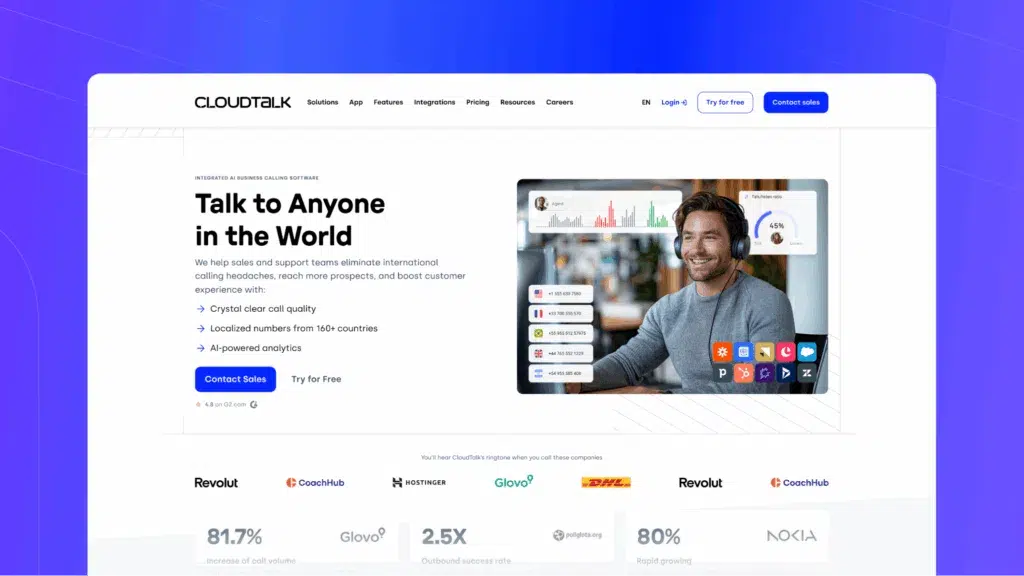
CloudTalk is the best real estate cold calling software for growing teams who want to connect with more leads and close deals faster.
With CloudTalk, you get automated dialing modes that help your reps spend less time clicking numbers and more time actually talking to prospects.
Build a local presence in 160+ countries, track performance with real-time analytics, and plug seamlessly into 100+ popular CRM tools—including HubSpot, Zendesk, and the tools your team already uses.
If you do a lot of outbound, CloudTalk gives you everything you need to boost connect rates, stay productive, and grow your results—without the busywork.
Key Features:
-
Power Dialer: Auto-dials lead lists to speed up outreach on FSBOs (for sale by owner) or cold prospects
-
Smart Dialer: Lets agents queue follow-ups from CRMs or listing platforms for fast callbacks
-
Call Flow Designer: Use Multi-Level IVR to route buyer vs. seller calls or assign by zip code or agent availability
-
Click-to-Call: Dial directly from CRMs, listings, or browser tools without switching tabs or typing numbers
-
Calling Intelligence: Enjoy automatic Summaries & Tags, Sentiment Analysis, or let AI Voice Agents qualify leads and make appointments.
-
Call Monitoring: Let team leads coach junior agents live or review call quality
-
Real-Time Dashboard: Track call volume, response rates, and who’s handling which lead list
-
CRM Syncing: Pull up showing history, deal stage, and notes while on the call
-
Virtual Caller ID: Show a local number to boost answer rates on cold outreach
What is CloudTalk missing?
According to some users, CloudTalk Analytics needed a refresh, something that would afford our users deeper insights into the data that drives their business forward.
We answered the call and launched Analytics 2.0, a powerful new data-visualization framework that gives users in-depth reports on the day-to-day operations of their call center. Identify problem areas and apply data-driven solutions faster than you ever thought possible.
What type of business is it best for?
CloudTalk is the perfect phone system for mid-sized companies looking to grow. Typically, it’s used in sales for outbound calls and in customer service for inbound calls.
Pricing: From $19/user/month
G2 rating: 4.4/5
What are the real users saying?
”What I like best about CloudTalk is that we use it on a daily basis for both outbound cold calling and customer support. This regular use highlights its reliability and efficiency in our workflow. It seamlessly manages our communication interactions, making it easy to monitor, record, and analyze calls. It ensures that we provide top-notch customer support and optimize our cold calling efforts, all while maintaining an intuitive and user-friendly experience.”
And what do CloudTalk customers say about the dialer?
Stop Dialing by Hand—Start Closing Like Dentakay
2. Mojo Dialer
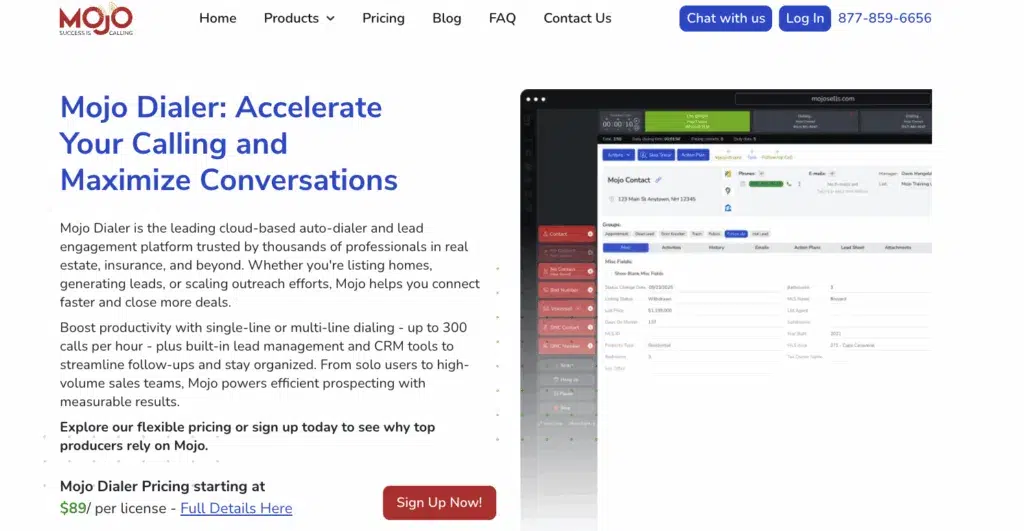
Mojo Dialer is a long-trusted real estate cold calling software that agents use mainly for FSBOs, expired listings, and large lead lists. Its standout feature is the triple-line dialer, which helps agents make up to 300 calls per hour.
Key Features:
-
Triple-Line Dialing for rapid cold outreach
-
Lead Manager with tagging and follow-up tools
-
Click-to-call from contact records
-
Local presence dialing and voicemail drop
-
Built-in calendar and callback scheduling
What is Mojo Dialer missing?
Mojo Dialer has a few notable limitations that are worth considering before committing to the platform. One of the main drawbacks is the lack of a native campaign builder or full CRM synchronization, which makes it harder to manage structured outbound campaigns or keep lead data automatically up to date across tools.
Additionally, deeper customization often requires paid add-ons. Features that are standard in more modern outbound platforms—such as automated workflows or tighter integrations—may come at an extra cost, which can drive up the total price as your team scales.
What type of business is it best for?
Mojo Dialer is a good choice for solo agents and real estate teams focused on high-volume outbound calling and prospecting.
Pricing: Starts at $99/single-line/month or $149/triple-line/month. There’s no free trial available.
G2 rating: ⅘
3. Ooma

Ooma is an ideal solution for smaller companies with up to 500 employees or a home phone service. It is mostly used for call logging, alerts, and escalations.
Ooma’s benefits:
-
Simple set-up: you can install the phone system without any technical expertise, and it comes pre-configured.
-
Feature-rich mobile app that is compatible with both iPhones and Android devices.
-
Ooma’s Virtual Receptionist is a great option for managing calls for your company. You can program a personalized welcome, direct callers to various extensions, or offer a menu of choices that can direct callers to the appropriate party.
Key features:
-
Voicemail-to-Email Forwarding
-
Caller ID or Video Conferencing
-
Desktop and Mobile apps for Android and iPhone
What is Ooma missing?
Although the setup is very simple, and you can seek assistance from guides or customer support, no in-person training is involved. Ooma also doesn’t offer predictive dialers and telemarketing management. These features speed up your workflow and make your sales efforts much smoother.
What type of business is it best for?
Ooma is best for smaller businesses looking for a basic VoIP service.
Pricing: From $19.95/user/month
G2 rating: 4.4/5
4. Aircall

Aircall is an advanced calling solution used by 15,000+ clients. It’s designed to speed up sales processes, boost communication with prospects, and close more deals. You can automatically dial multiple candidates in a back-to-back queue and surface crucial contact information directly within the phone interface.
Aircall’s benefits:
Aircall excels when it comes to automation. The provider also features many useful integrations, including Intercom, Pipedrive, and Zapier. Furthermore, it offers Advanced automation tools, user-friendly apps, and reliable customer support.
Key features:
-
Automatic Call Distribution
-
Call Monitoring
-
Call Transfer
-
Call Recording
-
Call routing
What is Aircall missing?
Aircall lacks some essential video-calling features. Webinar hosting and screen-sharing capabilities are severely limited on the platform, which can lead to a fair amount of frustration for users.
What type of business is it best for?
Aircall is a calling software primarily targeted at small businesses using the phone to conduct sales and support business daily, but certainly not all of them. Think about how frequently your team uses smart dialers. You might consider looking elsewhere if they’re a core part of your day-to-day work.
Pricing: From $30/license/month
G2 rating: 4.4/5
5. RingCentral

When you think about VoIP telephony solutions, RingCentral is among the first ones that come to mind. It’s no wonder the company has been on the market for over 20 years and has built quite a reputation.
RingCentral’s benefits:
RingCentral has a great variety of features and offers HD-quality voice and video. The provider is a good fit for enterprises since it provides an omnichannel experience, lead qualification tools, management, collaboration, and performance features – all in a single software.
Key features:
-
SIP Trunking
-
IVR
-
Call Recording
-
Call Routing
-
Contact Management
What is RingCentral missing?
Despite all the positives, RingCentral lacks many essential tools that modern businesses require.
Features like native sentiment analytics, speech-to-text transcription, smart dialers, and skill-based routing are only included in Contact Centre Solution. The same goes for some agent management features, like monitoring.
The Call recording tool and Toll-free numbers are only available as add-ons for an additional cost.
Furthermore, RingCentral’s implementation can take as much as 90 days and involves an implementation fee.
RingCentral UI is also not always the friendliest to work with.
What type of business is it best for?
RingCentral MVP is a flexible cloud-based solution ideal for businesses of all sizes.
Pricing: From $20/user/month
G2 rating: 4.3/5
6. Grasshopper
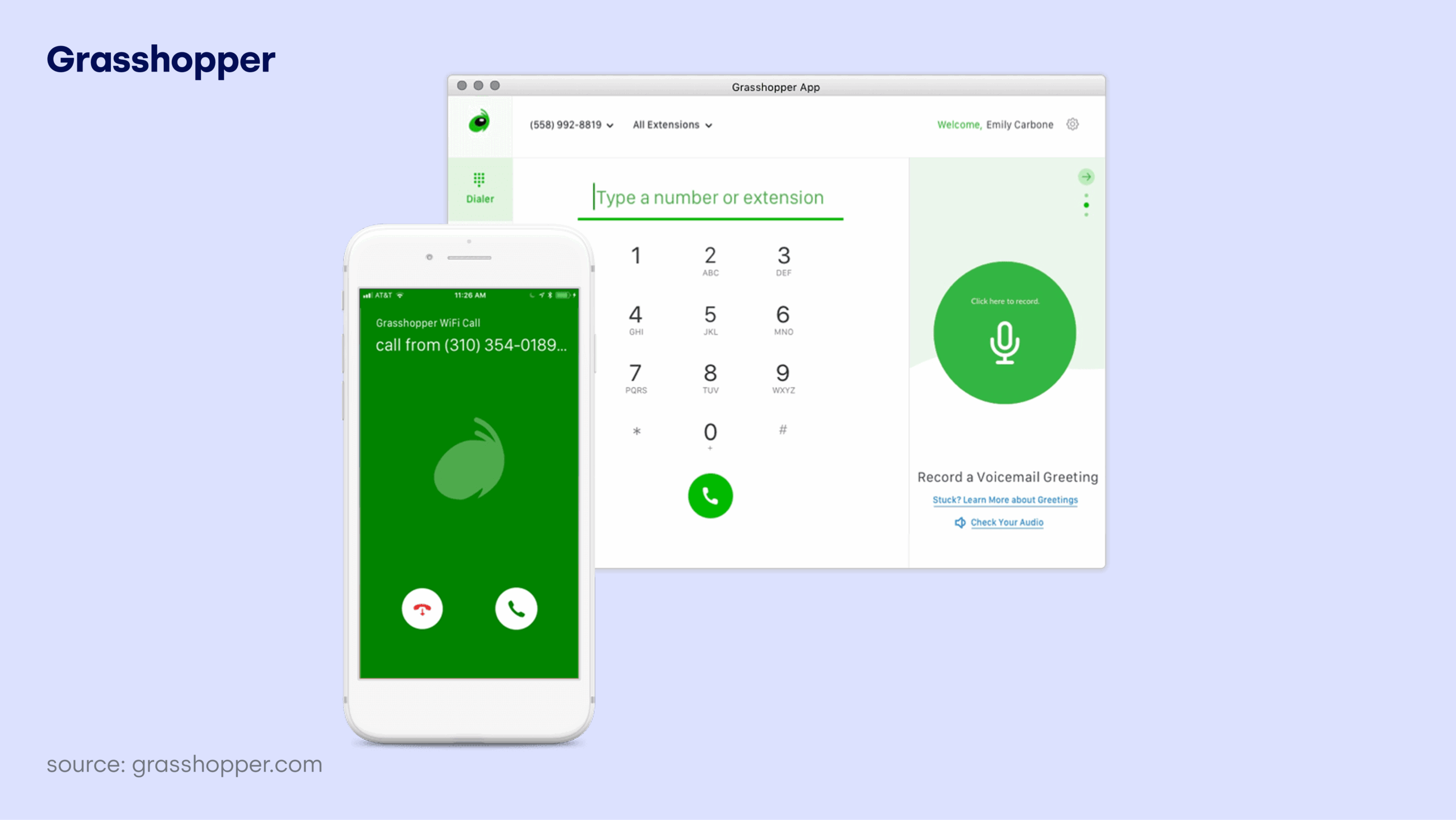
Grasshopper is a virtual phone system targeted at solopreneurs and small teams seeking a professional business line without hardware. It offers business numbers, extensions, call-forwarding, voicemail transcription and mobile/desktop apps.
Grasshopper’s benefits:
-
Rapid setup, minimal hardware or infrastructure required.
-
Provides business-style features (toll-free/local numbers, extensions, voicemail-to-email) at a low entry cost.
-
Helps small businesses separate personal vs business calls/texts for a more professional appearance.
Key features:
-
Local, toll-free or vanity number options; call forwarding to mobile/desktop.
-
Unlimited business calls and texts (U.S. only); unlimited extensions in higher tiers.
-
Voicemail transcription, mobile/desktop apps, custom greetings, and virtual receptionist in higher plans.
What is Grasshopper missing?
Grasshopper doesn’t provide advanced dialer or analytics features, has very limited international calling and texting capabilities, and can present challenges around support, scalability, and overall value as a business grows.
What type of business is it best for?
Solo entrepreneurs, freelancers, startups or very small teams that need a professional business phone presence without heavy investment.
Pricing: From $14/user/month
G2 rating: 3.9/5
20 Reviewed. 1 Stands Out.
7. Dialpad

Unless you’re new to the VoIP telephony market, you’ll surely have heard of Dialpad. It’s a reliable, unified telephony solution with simple built-in AI and advanced analytics. A live chat, phone hotline, and knowledge base make it a great deal for customer support teams.
Dialpad’s benefits:
Dialpad’s main advantages are voice intelligence and uptime, which are between 99% and 100%. You’ll get conference video calls, sentiment analysis, voicemail transcriptions, call tracking metrics, Speech-to-Text for an automatic call recording, and much more.
With Dialpad, you can call the US and Canada for free and from anywhere in the world. Inbound and outbound calling within your country is also free of charge. The provider has a modern, well-organized UI, plenty of training videos, and a well-built mobile application.
Key features:
-
Call Recording
-
Machine Learning
-
Call Analysis
-
Customer Scoring
-
Call Routing
What is Dialpad missing?
While Dialpad offers a Power dialer, it lacks a Smart and Predictive dialer. The Power dialer feature is limited, as it only works with Salesforce. Unlike the CloudTalk app, the Dialpad app only allows users to dial phone numbers manually. Also, the Preferred agent feature only works through API.
Dialpad also lacks a visual flow editor for its Call flow designer. Furthermore, you can’t send SMS messages outside of the US and Canada, although this feature will soon become available to those in the UK.
The provider offers a limited integration stack, and Voicemail drop comes only with Dialpad Sell.
What type of business is it best for?
Any size of sales organization looking to drive agent efficiency and speed up ramp times.
Pricing: From $15/user/month
G2 rating: 4.4/5
8. Nextiva

Nextiva is a big player in the VoIP market, providing services to more than 15,000 customers. Nextiva is widely regarded as user-friendly — users can start calling within minutes thanks to a simple and intuitive setup process. Furthermore, the system is hosted by Nextiva, which makes maintenance of the software Nextiva’s responsibility.
Nextiva’s benefits:
Nextiva offers various advanced features, including conference calling, voicemail transcription, multi-level attendant, and much more. The provider also integrates with solutions like Zendesk, ConnectWise, or MS Teams.
Nextiva’s HIPAA-compliant virtual faxing makes it a great solution for healthcare workers. Medical employees can share information without having to worry about data breaches. Furthermore, 24/7 support means agents are always on hand to assist you.
Key features:
-
Unlimited Calling
-
Video Conference Recordings
-
Mobile & Desktop Apps
-
Workflow Optimization
-
Omnichannel Communication
What is Nextiva missing?
Although Nextiva is a well-known VoIP solution, there are some issues you should know about when considering this provider:
What type of business is it best for?
Businesses need a robust, secure, and reliable enterprise phone system that works across every device and has advanced features like video conferencing, mobile apps, call recording, and more.
Pricing: From $20/user/month
G2 rating: 4.4/5
9. 8×8

8×8 is an evergreen telephony solution focusing on integrations and analytics. The provider is well-suited for enterprises, but lower-tier subscriptions also work for smaller organizations. There are many benefits 8×8 can offer its subscribers.
8×8 benefits:
First of all, the provider has done a great job building an Analytics system that can effectively track large-scale business processes. 8×8’s reporting system centralizes all data in a single place, so managers can make their teams more organized and speed up their workflow. You’ll also get real-time reports.
Then, we have the solution’s comprehensive integrations with software like Salesforce, Slack, Microsoft Teams, and many more. Furthermore, 8×8 users get unlimited calling to 40+ countries. 8×8 telephony software comes with a smart dialer, click-to-call, and call recording.
Key features:
-
Call Center Management
-
IVR
-
Contact Management
-
Analytics & Reporting
-
Call Monitoring
What is 8×8 missing?
If you own a business that works globally, there are a few things about 8×8 you might want to consider:
A crucial restriction, mainly for big international companies, is that there are regional constraints on unlimited calling. Users with the basic Express plan can only use unlimited calling in the US and Canada.
-
MS Office is required: You need an office where you want to call to get a number from there.
-
Geographical restrictions for SMS: You can only use the SMS feature within the US, and 8×8 does not cover costs for mobile numbers in Brazil.
-
Integrations: 8×8 doesn’t partner with telco companies, so users won’t have native integration with specific solutions like WhatsApp. Non-native integrations must be set up by the tech team.
-
Features: 8×8 lacks features like call tagging for more efficient calling processes, call masking for protecting your personal information, and API for connecting with the tools you love. Automation tools like IVR, skills-based routing, or automated callback come only with high-tier plans. You have to pay extra to get a call recording.
What type of business is it best for?
8×8 is generally considered a very flexible for any type of business.
Pricing: Per request
G2 rating: 4.2/5
10. Vonage

Vonage is among the best-known virtual phone providers in the world. They’ve been in the business for over 20 years and have established an enviable market leader reputation.
Vonage’s benefits:
-
The Virtual Receptionist, automatic attendant feature, allows calls to be forwarded to other departments.
-
Moreover, businesses can provide callers with alternatives for call routing that let them use either their name or an extension to dial. Before having their calls routed to a department, callers can also use the company directory.
-
Even when businesses use cloud services that consume a lot of bandwidth, such as collaboration, chat, and video tools, Vonage’s network optimization features ensure call continuity and call quality.
Key features:
-
Stability and reliability
-
Auto-attendant
-
CRM integrations
-
Voice and video conferencing
-
Call forwarding services
What is Vonage missing?
Unfortunately for customers, Vonage has capitalized on its reputation by charging much more for its services than other comparable virtual phone software providers.
Vonage pricing also includes many hidden fees that make the service far more expensive than expected.
This can be a real downside for small businesses that need to be more discerning about how and where they expend their resources.
What type of business is it best for?
Vonage is best for companies looking for a well-established provider.
Pricing: From $17.99/user/month
G2 rating: 4.3/5
11. Ringover

Ringover is a cloud-based phone system that offers a range of features to enhance business communications, including call recording, IVR, and analytics. The software provides multichannel communication options, including voice, chat, and video.
Ringover’s benefits:
-
Easy to set up and use.
-
Integrations with various third-party tools.
-
24/7 customer support.
-
Mobile application for on-the-go business management.
-
Advanced analytics and reporting tools.
Key features:
-
Call Recording: Records and stores all calls for future reference.
-
IVR System: Offers a menu of options for customers to direct their calls.
-
Real-Time Monitoring: Allows managers to monitor calls and agents in real time.
-
Multichannel Communication: Offers voice, chat, and video options for communication.
-
Analytics and Reporting: Provides data-driven insights into call volume and agent performance.
What is Ringover missing?
Ringover’s pricing plans can be expensive for small businesses, and its customer service can be slow to respond. Additionally, some users have reported issues with the software’s call quality and reliability.
What type of business is it best for?
Ringover is a good choice for businesses of all sizes that require a multichannel communication solution with advanced analytics and reporting tools.
Pricing: From $21/user/month
G2 rating: 4.6/5
12. Five9

Five9 is a cloud-based contact center solution that offers a range of features for customer service and sales teams. These include omnichannel support, workforce optimization, reporting and analytics, and more.
Five9’s benefits:
-
Offers an all-in-one cloud contact center solution.
-
Omnichannel support for a seamless customer experience.
-
Advanced workforce optimization features for improved agent productivity.
-
Robust reporting and analytics capabilities.
-
Easily integrate with other software.
Key features:
-
Omnichannel Support: Enables interaction across all channels.
-
Workforce Optimization: Improves agent productivity and engagement.
-
Reporting and Analytics: Provides insights to improve performance.
-
Integrations: Easily connect with other software.
-
All-in-one Solution: Offers an all-in-one cloud contact center solution.
What is Five9 missing?
Five9’s pricing can be higher compared to some other contact center solutions in the market, which may make it less attractive to some businesses. Additionally, some users have reported issues with the platform’s call quality.
What type of business is it best for?
Five9 is suitable for mid-sized and large enterprises that require an all-in-one cloud contact center solution with omnichannel support, advanced workforce optimization features, and robust reporting and analytics capabilities.
Pricing: From $159/user/month
G2 rating: 4.1/5
13. JustCall

JustCall is a cloud phone system that provides businesses with a seamless calling experience. It’s a VoIP solution that offers advanced features and tools to manage customer communications. The company was founded in 2016 and has since grown to serve over 6,000 customers globally.
JustCall’s benefits:
-
Integrates with multiple CRM and helpdesk platforms, including HubSpot, Zendesk, and Freshdesk.
-
Provides a dedicated mobile app for both iOS and Android devices.
-
Offers local phone numbers in over 95 countries and enables you to make calls from anywhere in the world.
-
Allows you to track your team’s performance with real-time analytics and insights.
Key features:
-
Automatic Call Distribution: Route calls to the right agent or team based on their skill set and availability.
-
Call Recording: Keep a record of all incoming and outgoing calls.
-
Call Masking: Protect your agents’ privacy by using Justcall’s masking feature, which replaces their personal phone numbers with a business number.
-
International Phone Numbers: Get local phone numbers in over 95 countries worldwide.
-
Conference Calls: Easily add up to 50 participants to a call with Justcall’s conference calling feature.
What is Justcall missing?
Justcall doesn’t offer some of the more advanced features, such as auto-attendant, call tagging, or skill-based routing. Additionally, while it does offer some integrations with popular CRM platforms, it doesn’t offer as many as some other competitors.
What type of business is it best for?
Justcall is best suited for small and medium-sized businesses that need a reliable phone system with advanced features. Its integrations with popular CRM and helpdesk platforms make it a great choice for sales and customer service teams.
Pricing: From $29/user/month
G2 rating: 4.3/5
14. 3CX

3CX is a software-based PBX system that offers a complete unified communications solution. It provides businesses of all sizes with enterprise-level features that allow them to improve their communications processes. 3CX has an easy-to-use interface and provides advanced features that boost productivity and improve customer experience.
3CX’s benefits:
-
Integration with popular CRMs, such as Salesforce, Microsoft Dynamics, and HubSpot, allows for a streamlined sales process.
-
Video conferencing: 3CX provides video conferencing that supports up to 250 people. This feature is available on desktop, mobile, and in your browser.
-
WebRTC technology: This enables you to make and receive voice and video calls directly from your web browser.
-
User-friendly interface: 3CX provides a clean, modern, and intuitive user interface that is easy to navigate.
-
Cost-effective: 3CX is much more affordable than traditional phone systems. It requires no additional hardware or maintenance fees.
Key features:
-
Web-based management console: The web-based console enables you to manage your phone system from anywhere in the world.
-
Mobile Apps: The mobile app allows you to take your office with you, giving you access to all the features of your desk phone.
-
Advanced call center features: The system provides all the features required to operate a professional call center, such as call queuing, call routing, and call monitoring.
-
SIP Trunks: 3CX supports many popular SIP trunks, making it easier to connect with other VoIP services.
-
Unified Communications: 3CX integrates with popular chat platforms, such as Slack, Microsoft Teams, and more, allowing for improved internal communications.
What is 3CX missing?
One significant limitation of 3CX is the lack of an agent interface. This means that users need to download and install a third-party application to use the system. There is also no real-time reporting or a card-free trial.
What type of business is it best for?
3CX is best suited for small and medium-sized businesses that need a phone system that is easy to set up and manage, with low costs, and reliable customer support. It’s also an excellent choice for remote teams as the platform can be used from anywhere with an internet connection.
Pricing: From $350/system/year
G2 rating: 4.4/5
15. Talkdesk
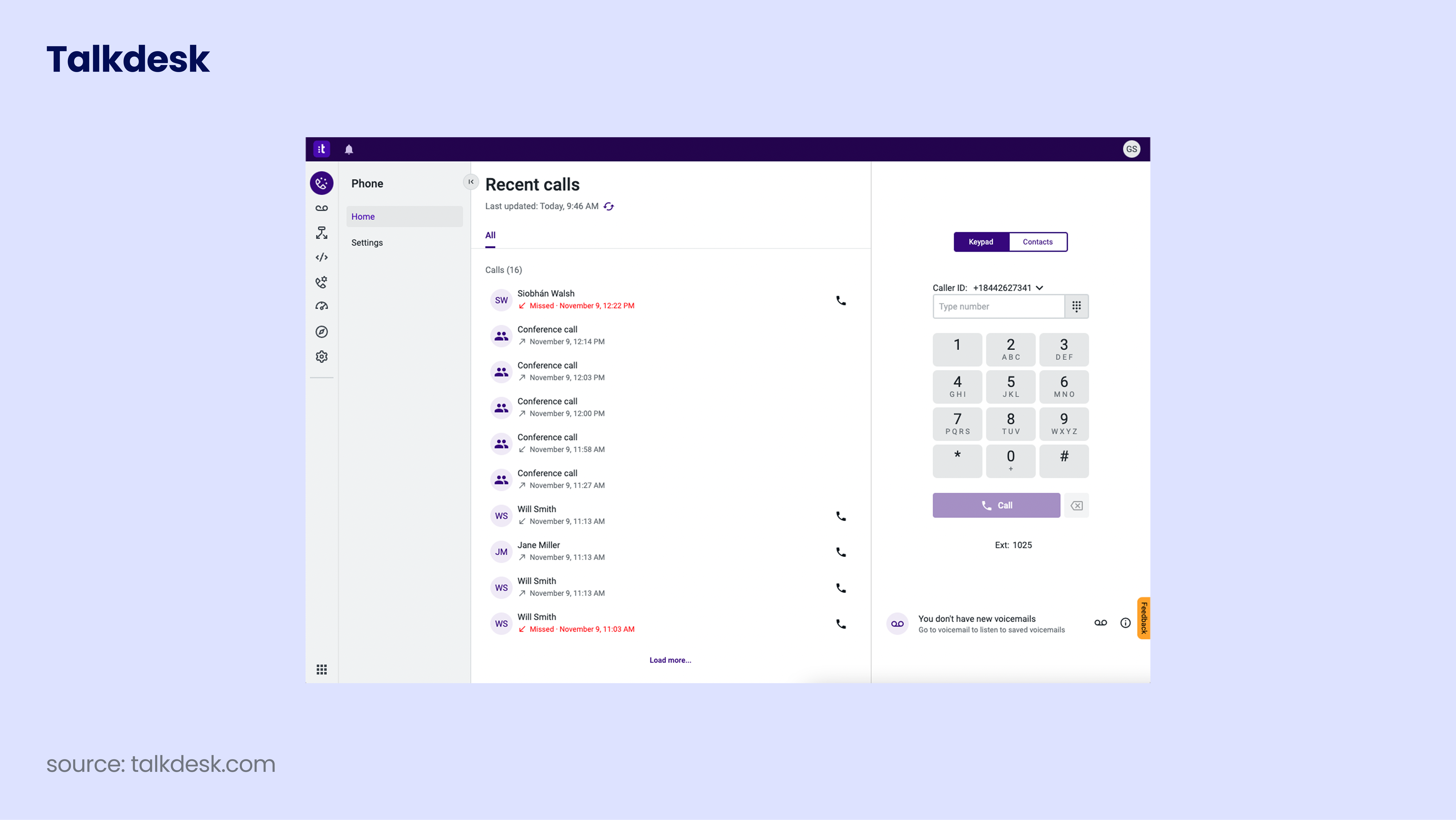
Talkdesk is a cloud-based contact center solution that enables businesses to provide customer support via phone, email, chat, and social media. It offers a range of features such as call routing, IVR, and workforce management and is used by companies of all sizes.
Talkdesk’s benefits:
-
Easy to set up and use.
-
Wide range of features and integrations.
-
24/7 customer support.
-
Advanced analytics and reporting tools.
-
Voice and screen recording for quality assurance.
Key features:
-
Call routing: Route calls based on skills, language, and more.
-
Interactive Voice Response (IVR): Provide customers with options.
-
Workforce management: Schedule and manage agents and their tasks.
-
Real-time monitoring: Monitor calls and agents in real time.
-
Voice and screen recording: Record calls and screens for quality assurance.
What is Talkdesk missing?
Talkdesk doesn’t offer conference calling or auto-attendants, which may be a disadvantage for sales teams. Additionally, some users have reported that the platform can be slow and prone to technical issues. There’s also no free trial available.
What type of business is it best for?
Talkdesk is a good choice for businesses of all sizes that need a flexible and scalable contact center solution. It’s especially useful for businesses that want a wide range of integrations and analytics tools.
Pricing: From $85/user/month
G2 rating: 4.4/5
30 Reviewed. 1 Stands Out.
How to Choose the Best Cold Calling Software for Real Estate Agents
Choosing cold calling software is about finding the one that fits how your real estate business actually works—today and as you grow. Let’s dive into the factors to watch out for.
1. Assess Your Business Needs and Goals
Start by getting clear on what you’re trying to achieve. Are you prospecting FSBOs and expired listings? Chasing speed-to-lead for inbound inquiries? Scaling outbound activity across a growing team?
A solo agent needs something very different from a brokerage managing dozens of reps. The right cold calling software should align with your goals—more conversations, more appointments, or better conversion rates.
2. Understand Your Call Volume & Agent Capacity
Cold calling success isn’t just about making more calls; it’s about making the right calls, at the right pace, with room to learn from every conversation.
If your agents handle a moderate number of calls each day, platforms with click-to-call or power dialing may be enough to stay efficient without rushing conversations. But as the contact list grows and outreach scales, you might need a more powerful tool, such as parallel dialers.
CloudTalk is regarded as one of the best cold calling software platforms for real estate agents because it balances call volume with call quality. It adapts to agent availability, maximizes productive talk time, and provides call analytics that help you understand connect rates, objections, and outcomes. Instead of overwhelming reps with nonstop calls, it creates a sustainable rhythm—where performance improves through insight, not exhaustion.
3. Look for Must-Have Features
Real estate cold calling has its own non-negotiables. You need tools that support outbound work from start to finish–whether they be sales dialers, workflow automation, analytics, or something else.
Write down a list of features that you absolutely must have and go through your list of potential solutions. Make sure to keep a close eye on where they fall in the pricing plans, as some might be locked behind higher tiers.
4. Prioritize 3rd Party Integrations
Integration with your existing CRM (Customer Relationship Management) and software platforms is essential for seamless operations and data management.
Choose cold calling software that provides robust integration capabilities with popular CRM systems, such as Salesforce, HubSpot, or Zoho CRM. CloudTalk offers 100+ integrations, so you can build on top of your existing stack.
This ensures that your sales team can access relevant customer information, track interactions, and sync data effortlessly, streamlining workflow and enhancing productivity.
What I like best about CloudTalk is its seamless integration with our CRM and the ability to automate call workflows. It makes it easy to route calls intelligently, record conversations for quality assurance, and track performance with detailed analytics. CloudTalk really empowers our remote team to operate like we’re in the same office.

5. Don’t Compromise on Compliance
Compliance with regulatory requirements, such as the Telephone Consumer Protection Act (TCPA) and General Data Protection Regulation (GDPR), is paramount when selecting an cold calling software.
The right platform builds these safeguards directly into the product. That way, your agents can focus on conversations and relationships, without worrying about crossing regulatory lines or exposing your business to unnecessary risk.
6. Weigh the Real Cost
Price tags can be misleading. Some tools look affordable at first, only to lock essential outbound features behind higher tiers or charge extra for analytics, recordings, or integrations.
Instead of asking, “What’s the cheapest option?”, ask, “Which tool helps my team close more deals?” The real cost of cold calling software is measured in time saved, connection rates improved, and appointments booked.
Pricing Breakdown: What to Expect From Cold Calling Tools in 2026
While most tools advertise a simple “starting from” price, the real cost depends on how you call, how much you call, and which features you actually need.
Let’s break down what you can realistically expect.
How Cold Calling Software Is Typically Priced
Most cold calling platforms don’t rely on a single pricing structure. Instead, they combine several models depending on features, call volume, and team size.
Common Pricing Models for Cold Calling Software
| Pricing Model | How It Works | Best For |
|---|---|---|
| Per user / per month | You pay a fixed monthly fee for each agent | Growing real estate teams |
| Per line | Pricing is based on the number of dialing lines used | High-volume solo agents |
| Usage-based (per minute / per call) | Charges depend on call duration or volume | Seasonal or variable calling |
| Tiered feature plans | Features unlocked as you move up plans | Teams scaling over time |
| Add-ons & extras | Key features sold separately | Teams with niche needs |
| Custom / enterprise pricing | Tailored pricing based on usage and requirements | Large brokerages & enterprises |
Why Pricing Models Matter More Than Price Tags
The right pricing model should match how your team works. If cold calling is central to your lead generation strategy, unpredictable usage-based pricing can create budget headaches. If you’re scaling a team, per-user pricing with outbound features included is usually more sustainable.
This is where outbound-focused platforms stand out. Tools built specifically for sales—like CloudTalk—bundle essential cold calling features (power dialers, analytics, CRM sync) into clear plans, so teams aren’t forced to upgrade just to unlock basic productivity.
A Practical Rule of Thumb
If you’re a solo agent or just getting started, entry-level plans may be enough—for now. But if cold calling is a core part of your lead generation strategy, investing in a mid-tier outbound-focused platform typically delivers the best balance of cost, efficiency, and scalability.
That’s why many growing real estate teams like CloudTalk pricing, which include advanced outbound dialers, analytics, and CRM integrations from the start.
Key Benefits of Using Cold Calling Software for Real Estate Agents
Making 40 calls a day by hand is exhausting—and inefficient—especially when quality leads are hard to come by. With prospects often requiring up to 8 attempts to connect and only around 2% of cold calls turning into appointments, relying on manual outreach just doesn’t scale.
Here’s what modern cold calling software can do for you:
-
Increase Productivity: With a real estate auto dialer, cold calling software allows your agents to dial 80+ numbers per hour, lower call times by up to 50%, and reach a lot more prospects.
-
Enhance Customer Experience: Faster, more personalized responses make customers feel valued and appreciated. This is crucial in an industry where 88% of buyers and 82% of sellers are likely to recommend and use their agent again.
-
Streamline Workflow: With on-screen real estate cold calling scripts, calling software improve focus and allow note-taking during calls. The information is saved for future use.
-
Increase pick up rates: Cold calling platforms, like CloudTalk, offer local numbers, so the calls feel familiar rather than spammy. Prospects are 40% more likely to answer, and your team can have dozens of extra conversations each week.
-
Improve Lead Management: Most of real estate cold calling software integrate with CRMs, making it easier to track lead status and ensure timely, effective follow-ups. According to a study by REDX, 23% of real estate agents with properly integrated CRMs achieved a close rate of 16%.
-
Prevent Missed Opportunities: Integrated reminder and callback features ensure you never lose track of a lead. Automating these tasks keeps your sales pipeline active.
-
Get Data-Driven Insights: Analytics and AI Conversation Intelligence reveal which conversations convert, which objections come up most often, and where deals stall. For team leaders, this enables better coaching. For solo agents, it creates a clear feedback loop to refine scripts and timing.
-
Improve Internal Communication: Auto-dialing software makes your teamwork smoother by letting you easily share call logs, notes, and updates on leads with your team. This central hub of information helps you stay in sync.
-
Scale with Ease: As the real estate business grows, modern dialing software scales with you. It adapts to increased call volumes without the need for substantial infrastructure investments.
-
Expand Mobility: Cloud-based dialers allow agents to access the system from anywhere, making remote work and real-time information updates easier—an essential feature for real estate agents.
Must-Have Features in the Best Cold Calling Software for Real Estate
The best cold calling software for real estate does far more than dial numbers. It helps agents reach the right prospects, run smarter conversations, and improve results over time. These are the features that truly make the difference.
-
Auto Dialers: Automated dialing modes eliminate manual dialing, reduce idle time between calls, and help agents connect with more live prospects per hour.
-
Campaign Management: Built-in tools for managing call lists and scripts allow agents to segment leads and prioritize outreach.
-
CRM Integration: Native CRM integrations ensure contacts, call outcomes, and notes are logged automatically. This keeps pipelines clean and reduces admin work.
-
Call Recording: Recording outbound calls enables coaching, quality assurance, compliance, and solving disputes.
-
Callback Scheduling: Automated callbacks help agents stay consistent with follow-ups—critical in real estate, where deals are closed after multiple touchpoints.
-
Local Phone Numbers: Use local numbers in different regions to increase pickup rates and build instant trust. Agents can sound local in every market they operate in.
The app has magnificent support for international calls, where it allows users to get local numbers and reach global customers. Calls can be remotely received by the agents and this simplifies engagement.
-
Real-Time Analytics: Dashboards showing connect rates, talk time, call outcomes, and agent activity turn cold calling into a measurable, improvable process.
-
Workflow Automation: Automation for follow-ups, lead status updates, or activity tracking reduces manual work and keeps outreach consistent across the team.
-
STIR/SHAKEN: Ensure your outbound calls are digitally verified, reducing spam flags, improving answer rates, and securing your brand’s reputation
AI-Powered Features to Look for in Real Estate Cold Calling Software
AI shouldn’t just sit on top of your cold calling software. It should actively change how calls are made, reviewed, and improved. Here’s what actually matters.
AI Voice Agents
AI Voice Agents handle the routine calls you’re already making—and the ones you should be making but never had the time for—first-touch outreach, missed-call follow-ups, basic qualification, and after-hours coverage.
For real estate teams, this means no more gaps in outreach when agents are busy, unavailable, or spread across markets. AI Voice Agents make sure every lead is contacted quickly, consistently, and professionally.
CloudTalk’s AI Voice Agent sounds so natural, you’ll forget it’s not human. With lifelike intonation and real-time responsiveness, CeTe delivers conversations that feel effortless and authentic.

Sentiment Analysis
Not every objection sounds like an objection. And not every “maybe” means interest.
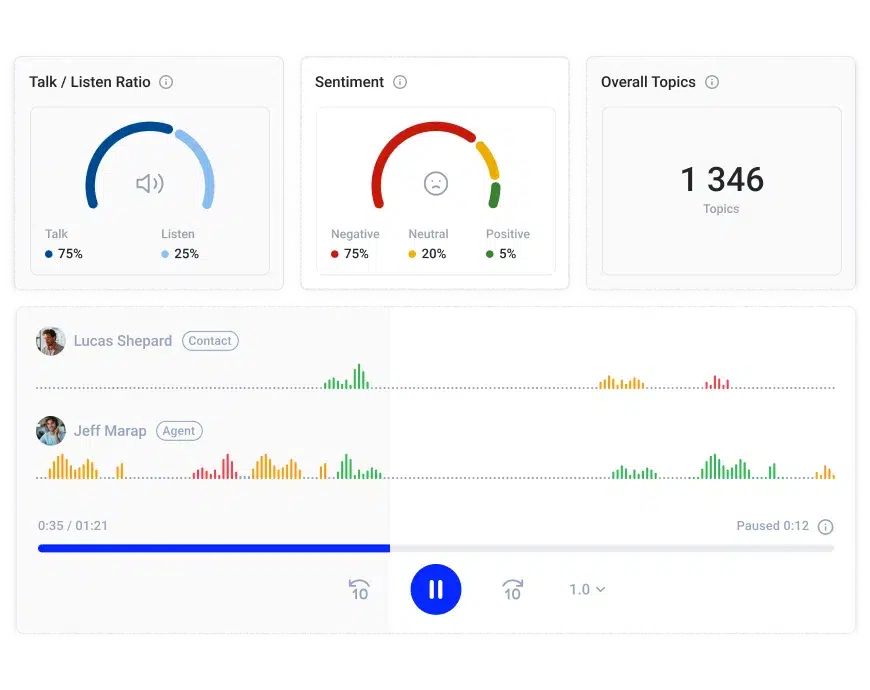
Sentiment Analysis uses AI to detect emotional signals in conversations—confidence, hesitation, frustration, or engagement—giving managers and agents a clearer picture of how calls are really landing.
Automatic Call Summaries
Listening to full call recordings doesn’t scale. Automatic summaries fix that.
AI Call Summaries extract the essentials: what was discussed, objections raised, interest level, and next steps. Agents can jump back into follow-ups days or weeks later with full context.
This is critical in long real estate sales cycles, where continuity often determines whether a lead progresses or goes cold.
AI Call Scoring
Call volume doesn’t tell you which conversations matter. AI Call Scoring does.
By evaluating calls based on defined success criteria—engagement, structure, sentiment, and outcomes—AI highlights which conversations are strong, which are risky, and which need follow-up or coaching.
Why CloudTalk Is the Cold Calling Software for Real Estate Teams in 2026
Outreach plays a key role in helping real estate agents connect with new prospects—but let’s not forget that relationship-building gives them a huge edge. In real estate, 82% of all transactions come from referrals, which means you need to keep your existing clients happy and engaged.
CloudTalk is built for both. It helps real estate teams run high-volume calling efficiently while maintaining call quality. At the same time, CloudTalk provides the tools and intelligence needed to nurture relationships consistently across every interaction.
With CloudTalk, you create a strategy that not only brings in new leads but also keeps your current clients coming back—and referring you to others.
Join 4000+ Teams Already Scaling with CloudTalk






















