TL;DR Comparison Table: Best Business Phone Systems for Small Businesses Compared
| Platform | Best For | Starting Price (Annual Billing) | G2 Rating |
|---|---|---|---|
| CloudTalk | Growing SMB sales & support teams needing AI insights, CRM sync & scalable workflows | $25/user/month | 4.4/5 |
| Dialpad | Teams wanting fast setup + strong AI transcription | $15/user/month | 4.4/5 |
| Nextiva | Small teams needing simple setup & multichannel support | $15/user/month | 4.5/5 |
| 8×8 | Businesses needing global calling + deeper analytics | Custom quote (reportedly $24.95/user/mo) | 4.2/5 |
| RingCentral | Growing teams wanting an all-in-one communications suite | $20/user/month | 4.2/5 |
| Ooma Office | Budget-conscious teams needing basic VoIP | $19.95/user/month | 4.5/5 |
| Vonage | SMBs wanting flexible VoIP with core routing tools | $13.99/line/month | 4.3/5 |
| Aircall | Sales teams needing automation-friendly workflows | $30/user/month (3-seat minimum) | 4.4/5 |
| OpenPhone (Quo) | Startups needing simple VoIP & number management | $15/user/month | 4.7/5 |
| GoTo Connect | Hybrid teams needing simple, unified communication tools | Custom quote (reportedly $26/user/mo) | 4.4/5 |
| Grasshopper | Solopreneurs & very small teams needing easy call handling | $14/month | 3.9/5 |
See Why SMB Teams Are Switching Their Business Phone System
The U.S. Small Business Administration1 counts more than 33 million small businesses in the country, and more of them run their calls through the cloud every year.
The phone system you pick decides a lot. A strong one keeps your team fast and organized. A weak one costs you missed leads, frustrated callers, and long days for your team. The same logic applies to product information reps rely on during those calls: an enterprise catalog system keeps pricing and availability accurate, so a strong phone system isn't undermined by outdated product details.
This guide breaks down the top 11 business phone systems for small businesses in 2026, comparing AI tools, CRM sync, pricing, and ease of setup, so you can find the one built for how your team actually works.
How We Chose the Best Business Phone Systems for SMBs
To help you choose your new business calling solution, we reviewed more than 40 business phone systems and read through hundreds of real user reviews on sites like G2, Capterra, or Reddit. We also listened to what small sales and support teams say online about what helps them stay organized, respond faster, and handle busy days without adding more staff.
We evaluated every platform against six key criteria:
- Easy setupSo your team can start taking calls the same day, without an IT project or a long onboarding process.
- Reliable callingSo calls stay clear and don't drop, even when every line is busy at once.
- Helpful featuresSo calls reach the right person fast, instead of getting stuck in transfers or voicemail.
- CRM connectionsSo every call logs itself, and reps stop losing time on manual data entry.
- Fair pricingSo your bill stays predictable as you add users, instead of creeping up with hidden fees.
- Room to scaleSo the system that works for 10 people still works once you're at 200.
Sentiment matters:
For each business phone system on our list, we also include a Sentiment Score. It's our honest editorial assessment across five fixed dimensions (Ease of Use, Feature Set, Value for Money, Customer Support, and Integration Depth). Each dimension is scored 1-10 based on recurring themes across G2 reviews. The same five dimensions apply to every tool so scores are directly comparable.
What Is the Best Business Phone System for Small Businesses in 2026?
CloudTalk is our top pick for small businesses that want a single business phone system combining reliable cloud calling with native AI automation and deep CRM sync. Unlike lighter VoIP tools that bolt on CRM sync or AI as an afterthought, CloudTalk connects call routing, AI Voice Agents, and your CRM in one platform, so growing teams get the structure and scale of an enterprise setup without the enterprise price tag.
One size doesn't fit all, though. That's why the section below sheds a bit more light on all 11 business phone systems that made our list, so you can compare features, pricing, and ratings side by side.
11 Best Business Phone Systems in 2026
1. CloudTalk: Best Phone System for Small Businesses Needing AI Insights, CRM Sync & Scalable Workflows
What Is CloudTalk?
CloudTalk is one of the best business phone systems for small, growing teams that need simple tools, powerful AI automation, and reliable calling. AI Voice Agents and AI Receptionists handle routine inquiries, qualify callers, and route conversations, freeing human reps to focus on complex questions and revenue-driving calls.
For support and sales teams working across markets, CloudTalk offers local and toll-free virtual numbers in 160+ countries, GDPR-compliant infrastructure, and a 99.999% uptime SLA. It also connects smoothly to the best CRMs, automating routine tasks and giving small teams clean workflows and real-time analytics.
What Are CloudTalk's Key Features?
- Backed by a 99.999% uptime guarantee, low delay, and automatic backups if something goes wrong.
- Handle routine inbound and outbound tasks, route calls, or help your team during busy hours. You new digital sidekicks will make lives of your reps easier 24/7, and in 60+ languages.
- Power and Parallel dialer modes help human reps connect with more leads, faster, without sitting through voicemails or punching in numbers manually.
- Use the best call routing software and send callers to the right person based on skills, schedule, or menu choices.
- CloudTalk equips teams with an intuitive, drag-and-drop designer that helps you build or change workflows quickly and without any IT help.
- Your phone system (as well as AI voice agents) natively connects with HubSpot, Pipedrive, Zendesk, and Salesforce. This way, calls log automatically, nothing gets lost, and your human reps stay focused on calls, not admin.
- Easy-to-read analytics will help managers track queues, agent activity, and call results. Such visibility helps make smarter decisions and optimize your workflows much quicker.
What Are CloudTalk's Pros and Cons?
| Pros | Cons |
|---|---|
| AI Voice Agents and AI Receptionists handle routine inbound and outbound calls, freeing reps for revenue-driving work | AI Voice Agents and Parallel Dialer are paid add-ons, not bundled into every plan |
| Numbers in 160+ countries with a 99.999% uptime SLA | Salesforce integration requires the Expert plan |
| 100+ native CRM integrations log every call automatically | Deeper reporting only arrived with the recent Analytics 2.0 update |
| Virtual numbers available in over 160 countries, helping you earn local trust and improve connection rates |
Who Is CloudTalk Best For?
CloudTalk is ideal for SMB sales and support teams (10 to 200 employees) that want a phone system connected to their CRM, clear call handling tools, and reliable workflows that scale.
How Much Does CloudTalk Cost?
CloudTalk's pricing starts at $25/user/mo (billed annually), with the following plans:
CloudTalk Pricing Plans
| Plan | Pricing (Annual) | Main Features |
|---|---|---|
| Starter | $25/user/mo | Call routing, call queues, unlimited inbound calling, 500 outbound mins, basic Call Flow Designer, business hours, ring groups |
| Essential | $29/user/mo | Everything in Starter + unlimited outbound, IVR, skill-based routing, call monitoring, SMS/MMS, API & webhooks, workflow automation, 95+ CRM/helpdesk integrations (excl. Salesforce) |
| Expert | $49/user/mo | Everything in Essential + Salesforce integration, Power Dialer, Smart Dialer, VIP queues, real-time analytics, wallboard, unlimited concurrent calls, SSO; 3-seat minimum |
| AI Receptionist | 50 free min/account, then from $99/mo (200 min) | No-code inbound AI voice agent: FAQ handling, call routing, appointment booking. Tiers up to $699/mo (2,500 min) |
| AI Voice Agent (Specialist) | From $349/mo (1,000 min) | Sales-led setup for complex multi-step workflows: lead qualification, outbound campaigns, appointment booking. Scale from $749/mo |
| Conversation Intelligence (add-on) | $9/user/mo | Available on all plans: real-time transcription, call summaries, topic detection, sentiment analysis |
What Are Real Users Saying About CloudTalk?
CloudTalk's Call Flow Designer is the reason most G2 reviewers say they switched from rigid IVR trees, and Pipedrive and HubSpot users specifically call out how cleanly calls log into the CRM. On the other hand, some buyers assume AI Voice Agents are bundled into the base plan and are surprised to see them priced as an add-on.
While G2 reviews are a great proof a solution works, case studies give you an even better idea of what to expect. See how growing businesses, including dental clinics like Dentakay, are using CloudTalk to improve their workflows and boost agent productivity.
The power dialer has been a game-changer for managing our call volume. Since we implemented the feature, about 90% of our agents are using it to automate dialing, saving time. The power dialer makes handling both new and old leads easier. It’s been crucial for our growth — our call volume has seen a 2.5X increase in just 8 months.
Data Management and Reporting Specialit at Dentakay

What Is CloudTalk's G2 Rating and Review Count?
CloudTalk's current G2 rating is 4.4/5, out of + verified user reviews.
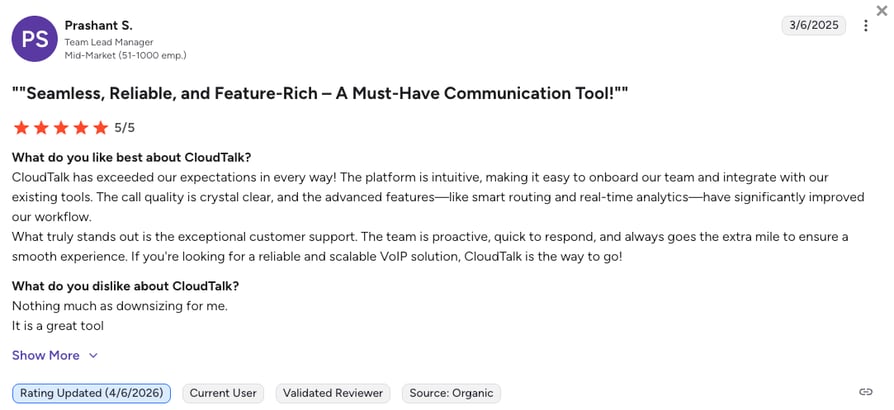
How Do We Rate CloudTalk?
CloudTalk Sentiment Score
| Category | Score (1–10) |
|---|---|
| Ease of Use | 9 |
| Feature Set | 9 |
| Value for Money | 9 |
| Customer Support | 8 |
| Integration Depth | 9 |
| Overall | 8.8 |
Stop Dialing by Hand, Start Closing Like DentaKay
2. Dialpad: Best for Teams Wanting Fast Setup & Strong AI Transcription
What Is Dialpad?
Dialpad is a mobile-first business phone system built around its own AI. It transcribes calls in real time, giving supervisors a live look into every conversation, with routing handled through standard ACD strategies (fixed order, round robin, longest idle, simultaneous ring, skills-based) layered on top of a multi-level IVR with dial-by-name directories.
What Are Dialpad's Key Features?
- AI featuresVoice transcription, AI-generated summaries, sentiment analysis, and automated post-call actions layered on top of every call.
- Auto Attendant / IVRMulti-level IVR menus and dial-by-name directories to route callers to the right person, team, or self-service option.
- Multi-Strategy ACDFixed order, round robin, longest idle, simultaneous ring, and skills-based routing available on higher tiers.
What Are Dialpad's Pros and Cons?
| Pros | Cons |
|---|---|
| Strong real-time transcription and AI-generated call summaries | Advanced AI coaching sits on higher-priced enterprise plans |
| Mobile-first with a reliable iOS/Android experience | Users report occasional dropped calls and app crashes during peak usage |
| Standard plan starts at $15/user/month | Only works with Salesforce for its Power Dialer, and doesn't offer Smart dialing |
Who Is Dialpad Best For?
Dialpad is ideal for small teams that want a fast, modern calling setup with strong AI transcription and a simple interface, especially remote-first teams that prioritize real-time coaching over deep IVR configuration.
How Much Does Dialpad Cost?
Dialpad's pricing starts at $15/user/mo (billed annually), with the following plans:
Dialpad Pricing Plans
| Plan | Starting Price (Annual) | Main Features |
|---|---|---|
| Standard | $15/user/mo | Unlimited calling, AI transcription, AI summaries, SMS, voicemail |
| Pro | $25/user/mo | Everything in Standard + call recording, CRM integrations (Salesforce, HubSpot), international numbers |
| Enterprise | Custom pricing | Advanced AI coaching, dedicated support, SLA |
What Are Real Users Saying About Dialpad?
G2 reviewers praise Dialpad's seamless AI integration, especially real-time transcription and call summaries. Negative reviews cluster around desktop app bugs and occasional call quality issues during peak usage or low-bandwidth conditions.
What Is Dialpad's G2 Rating and Review Count?
Dialpad's current G2 rating is 4.4/5, out of 4,100+ verified user reviews.
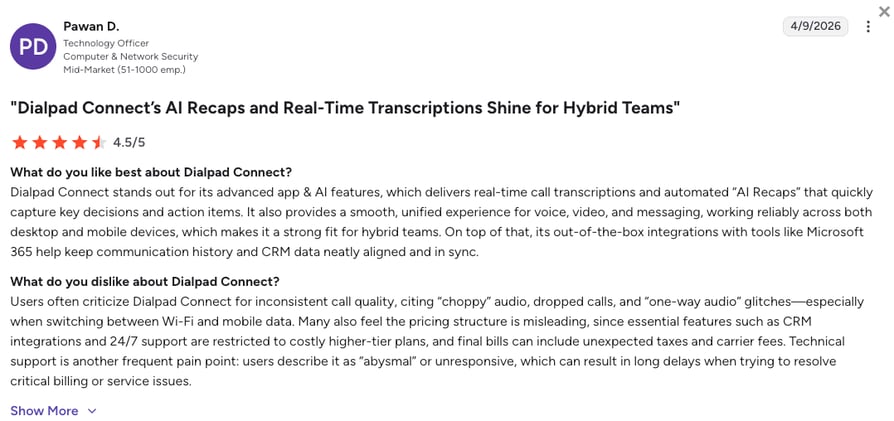
How Do We Rate Dialpad?
Dialpad Sentiment Score
| Category | Score (1–10) |
|---|---|
| Ease of Use | 8 |
| Feature Set | 8 |
| Value for Money | 7 |
| Customer Support | 7 |
| Integration Depth | 7 |
| Overall | 7.4 |
Dialpad vs. CloudTalk
Dialpad's real-time AI transcription and coaching are genuinely strong, and reps who live in Salesforce get a clean, focused calling experience out of the box.
CloudTalk is the better fit for teams that need routing and CRM sync beyond a single CRM, plus a Smart Dialer and visual call flow builder Dialpad doesn't offer.
3. Nextiva: Best for Small Teams Needing Simple Setup & Multichannel Support
What Is Nextiva?
Nextiva is a stable, well-regarded business phone system that balances calling features with basic CRM capabilities. The platform's known for its customer support reputation and reliability, and most teams can start calling within minutes since Nextiva hosts the platform.
What Are Nextiva's Key Features?
- All-in-One Communications SuiteVoice, video, messaging, and basic CRM tools in a single platform.
- Voicemail Transcription & Auto-AttendantAutomatically routes and transcribes calls so nothing gets missed during busy hours.
- Workflow ToolsVideo meeting recordings and workflow automation for small teams juggling multiple channels.
What Are Nextiva's Pros and Cons?
| Pros | Cons |
|---|---|
| Reliable service and strong customer support reputation | Does not offer some common integrations like Slack or Zapier |
| All-in-one suite (voice, video, messaging, basic CRM) | Pricing can increase quickly as features are added |
| Fast onboarding with minimal setup time | Some users mention slow or unresponsive app performance during busy hours |
Who Is Nextiva Best For?
Nextiva is one of the best phone systems for small teams that want a reliable phone system with simple setup and multichannel communication across devices.
How Much Does Nextiva Cost?
Nextiva's pricing starts at $15/user/mo (billed annually), with the following plans:
Nextiva Pricing Plans
| Plan | Starting Price (Annual) | Main Features |
|---|---|---|
| Core | $15/user/mo | Unlimited calling, 100 SMS/user, voicemail transcription, basic analytics |
| Engage | $25/user/mo | Everything in Core + call recording, CRM integrations, 500 SMS/user, AI assistant |
| Power Suite CX | $75/user/mo | Full omnichannel contact center with AI, workforce management, advanced routing |
What Are Real Users Saying About Nextiva?
Reviewers praise Nextiva's reliability, internal extensions, and customer support. Recurring criticism: some setup complexity and pricing that climbs as features are added, though users generally overcome it with support.
What Is Nextiva's G2 Rating and Review Count?
Nextiva's current G2 rating is 4.5/5, out of 3,500+ verified user reviews.
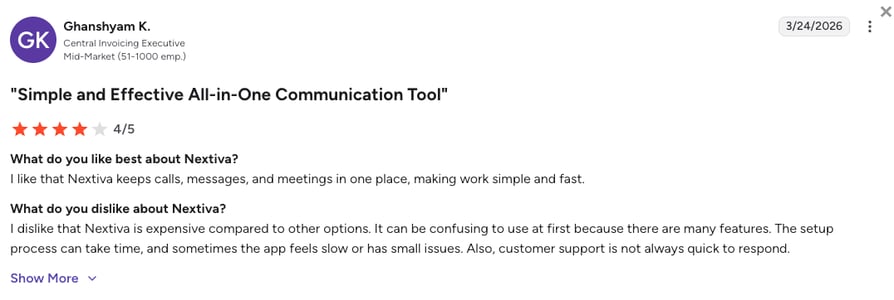
How Do We Rate Nextiva?
Nextiva Sentiment Score
| Category | Score (1–10) |
|---|---|
| Ease of Use | 7 |
| Feature Set | 8 |
| Value for Money | 7 |
| Customer Support | 9 |
| Integration Depth | 7 |
| Overall | 7.6 |
Nextiva vs. CloudTalk
Nextiva's onboarding is genuinely fast, and teams get calling, texting, and basic collaboration running within minutes with no dedicated IT support.
CloudTalk is the better fit once a team needs deeper CRM sync, AI-driven routing, or Slack and Zapier connections Nextiva doesn't include.
4. 8×8: Best for SMBs Needing Global Calling & Deeper Analytics
What Is 8×8?
8×8 is a business phone system built for teams that need strong analytics and global calling options. Small teams often choose it when they want deeper reporting and the flexibility to serve customers in multiple countries. It includes voice, video, messaging, and a broad range of integrations.
What Are 8×8's Key Features?
- Multi-level IVRRoutes callers through multi-level menus without a live receptionist.
- Call Center Management & AnalyticsDeeper reporting and call monitoring than most basic VoIP plans.
- Team MessagingBuilt-in chat alongside voice and video.
- Integrations with Salesforce, MS Teams, Google WorkspaceSyncs call activity with the tools your team already uses.
What Are 8×8's Pros and Cons?
| Pros | Cons |
|---|---|
| Strong analytics and reporting for teams that need deeper visibility | Unlimited calling is limited by region, especially on lower-tier plans |
| Broad integrations with Salesforce, MS Teams, and Google Workspace | Interface can be difficult to navigate, and advanced features often require higher-tier plans |
| Reliable global calling coverage across multiple countries | Setup for non-native integrations may require internal technical support |
Who Is 8×8 Best For?
8×8 works great for SMBs that need strong analytics and reliable global calling coverage, as well as for teams that are already using tools like MS Teams or work within Google Workspace.
How Much Does 8×8 Cost?
8×8's pricing is only available upon request, since advanced call center management and analytics sit on higher CCaaS (Contact Center as a Service) tiers. The entry-level UCaaS (Unified Communications as a Service) plan reportedly starts at $24.95/user/mo.
8x8 Pricing Plans
| Plan | Starting Price (Annual) | Main Features |
|---|---|---|
| X2 (UCaaS) | $24.95/user/mo | Voice, video, messaging, integrations with Salesforce, MS Teams, Google Workspace |
| X6+ (Contact Center) | Per request | Call center management, analytics & reporting, call monitoring |
What Are Real Users Saying About 8×8?
Reviewers like 8×8's global calling reach and deeper analytics. Recurring complaints connect mainly to the interface, which can be difficult to navigate. Some users also aren't happy about advanced features often requiring upgrading to a higher tier.
What Is 8×8's G2 Rating and Review Count?
8×8's current G2 rating is 4.2/5, out of 200+ verified user reviews.
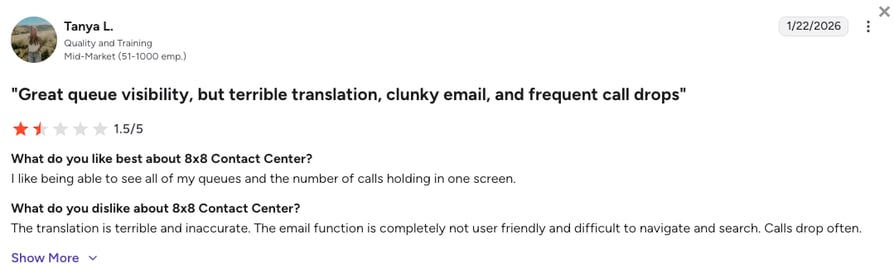
How Do We Rate 8×8?
8×8 Sentiment Score
| Category | Score (1–10) |
|---|---|
| Ease of Use | 6 |
| Feature Set | 8 |
| Value for Money | 6 |
| Customer Support | 6 |
| Integration Depth | 7 |
| Overall | 6.6 |
8×8 vs. CloudTalk
8×8's global calling reach and deeper analytics are a real advantage for businesses already serving customers across many countries.
CloudTalk is the better fit for SMB sales and support teams that want AI Voice Agents and CRM-driven routing without upgrading to a higher tier for basic reporting.
5. RingCentral: Best All-in-One Communications Suite for Growing Teams
What Is RingCentral?
RingCentral is one of the most established cloud communication platforms on the market. It offers voice, video, messaging, and collaboration tools in one system, which makes it appealing for SMBs looking to consolidate their workflows.
What Are RingCentral's Key Features?
- Enterprise Unified CommunicationsVoice, video, SMS, and team messaging in a single platform, with contact management built in.
- SIP Trunking & Call RoutingAdvanced call handling and routing for larger organizations.
- AI Writing Assistant & Auto Call NotesAutomated summaries and coaching tools available on higher tiers.
What Are RingCentral's Pros and Cons?
| Pros | Cons |
|---|---|
| One platform for voice, video, SMS, and messaging | Many advanced tools, including analytics, sentiment insights, and skill-based routing, only come with Contact Center plans |
| Strong for large, traditional organizations | Toll-free numbers and call recording can require add-on fees |
| AI writing assistant and auto call notes on higher tiers | Setup can take several weeks, and some users mention a dated or difficult-to-navigate interface |
Who Is RingCentral Best For?
RingCentral is a decent choice for SMBs that want a broad, all-in-one communication suite and don't mind a heavier setup.
How Much Does RingCentral Cost?
RingCentral's pricing starts at $20/user/mo (billed annually), with the following tiers available:
RingCentral Pricing Plans
| Plan | Starting Price (Annual) | Main Features |
|---|---|---|
| Core | $20/user/mo | Unlimited calling, video meetings, team messaging, IVR, AI writing assistant |
| Advanced | $25/user/mo | Everything in Core + call recording, 300+ integrations, auto call notes |
| Ultra | $35/user/mo | Everything in Advanced + unlimited storage, advanced analytics, device analytics |
What Are Real Users Saying About RingCentral?
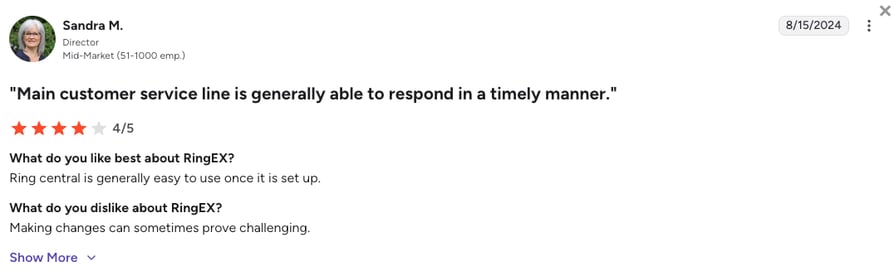
Reviewers praise RingCentral's call quality and reliability, along with features like call routing and voicemail-to-email. Recurring criticism concerns the platforms interface, which feels overwhelming at first, especially with so many features packed in.
What Is RingCentral's G2 Rating and Review Count?
RingCentral's current G2 rating is 4.2/5, out of 1,400+ verified user reviews.
How Do We Rate RingCentral?
RingCentral Sentiment Score
| Category | Score (1–10) |
|---|---|
| Ease of Use | 6 |
| Feature Set | 9 |
| Value for Money | 6 |
| Customer Support | 7 |
| Integration Depth | 8 |
| Overall | 7.2 |
RingCentral vs. CloudTalk
RingCentral's all-in-one suite genuinely appeals to teams that want voice, video, and messaging consolidated under a single established vendor.
CloudTalk fits sales and support teams that need AI-driven routing and analytics without paying for a separate Contact Center tier to unlock them.
6. Ooma Office: Best Ultra-Affordable VoIP for Small Businesses
What Is Ooma Office?
Ooma Office is a simple VoIP business phone system designed for small teams that want low costs and easy setup. It includes the basics, calling, forwarding, virtual receptionists, without needing technical training or complex onboarding.
What Are Ooma Office's Key Features?
- Greets callers and routes them without a dedicated front-desk hire.
- Voicemail-to-EmailVoicemails land in your inbox as audio files automatically.
- Unlimited Calling (U.S., Canada, Mexico, Puerto Rico)Covers the core North American markets most small teams need.
- Ring GroupsRings multiple phones at once so no call goes unanswered.
What Are Ooma Office's Pros and Cons?
| Pros | Cons |
|---|---|
| Straightforward, budget-friendly VoIP with no complex onboarding | No predictive dialing or sales automation tools |
| Unlimited calling across the U.S., Canada, Mexico, and Puerto Rico | Limited CRM integrations and no deeper analytics |
| Virtual receptionist and ring groups included on the base plan | Some users report slower app performance and support response times |
Who Is Ooma Office Best For?
Ooma Office is a great fit for budget-conscious small businesses that need a straightforward VoIP service.
How Much Does Ooma Office Cost?
Ooma Office's pricing starts at $19.95/user/mo (month-to-month; no annual discount published), with the following plan:
Ooma Office Pricing
| Plan | Starting Price | Main Features |
|---|---|---|
| Essentials | $19.95/user/mo | Includes a user extension, a local phone number, and unlimited calling to the US, Canada, Mexico, and Puerto Rico |
| Pro | $24.95/user/mo | Includes all standard Ooma Office features, plus Ooma Meetings, Call Recording, enhanced call blocking, Voicemail Transcriptions, and more |
| Pro Plus | $29.95/user/mo | Includes all standard Ooma Office and Ooma Office Pro features, plus Hotdesking, Call Queues, CRM integration, and more |
What Are Real Users Saying About Ooma Office?
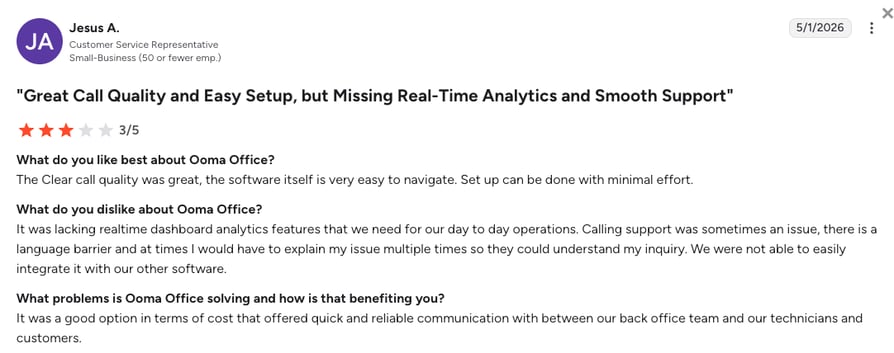
Reviewers like Ooma Office's low, predictable pricing and how quickly a small team can get set up. Recurring complaint: limited CRM integrations and slower support response times as call volume grows.
What Is Ooma Office's G2 Rating and Review Count?
Ooma Office's current G2 rating is 4.5/5, out of 100+ verified user reviews.
How Do We Rate Ooma Office?
Ooma Office Sentiment Score
| Category | Score (1–10) |
|---|---|
| Ease of Use | 8 |
| Feature Set | 5 |
| Value for Money | 8 |
| Customer Support | 6 |
| Integration Depth | 4 |
| Overall | 6.2 |
Ooma Office vs. CloudTalk
Ooma Office's low, predictable pricing genuinely wins for budget-conscious teams that just need basic, reliable VoIP calling.
CloudTalk is the better fit once a team needs deeper CRM integrations, AI features, or analytics that Ooma Office doesn't offer at any tier.
7. Vonage: Best for Flexible VoIP with Core Routing Tools
What Is Vonage?
Vonage is a long-standing VoIP provider known for reliability and strong call routing tools. Its auto-attendant and call forwarding features help small teams manage calls professionally without extra software.
What Are Vonage's Key Features?
- Auto-Attendant & Call ForwardingAnswers and routes calls automatically, and forwards them elsewhere when the office line goes unanswered.
- Video ConferencingBuilt-in meetings alongside voice calling.
- CRM Integrations (Salesforce, Teams, HubSpot)Syncs call activity with the CRM your sales team already uses.
What Are Vonage's Pros and Cons?
| Pros | Cons |
|---|---|
| Long-standing, reliable VoIP provider with strong core call routing tools | Users often report higher-than-expected pricing due to add-ons and hidden fees |
| CRM integrations with Salesforce, Microsoft Teams, and HubSpot | Analytics are limited compared to newer platforms |
| Video conferencing included alongside voice calling | International phone number availability is narrower than competitors |
Who Is Vonage Best For?
Vonage is best for companies looking for a well-established provider with dependable core routing tools.
How Much Does Vonage Cost?
Vonage's pricing starts at $13.99/line/mo (billed annually, priced per line rather than per user), with the following plans:
Vonage Pricing Plans
| Plan | Starting Price (Annual) | Main Features |
|---|---|---|
| Mobile | $13.99/line/mo | Unlimited calling and SMS, mobile and desktop apps, basic CRM integrations |
| Premium | $20.99/line/mo | Everything in Mobile + video meetings (up to 200 participants), full CRM integrations |
| Advanced | $27.99/line/mo | Everything in Premium + on-demand call recording, visual voicemail, call groups |
What Are Real Users Saying About Vonage?
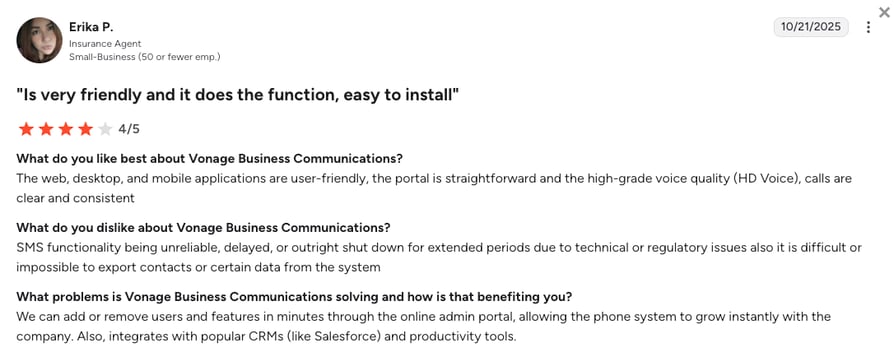
Reviewers highlight Vonage's reliable call routing and long track record as an established provider. Recurring complaint: unexpected add-on costs and hidden fees that push pricing higher than initially advertised.
What Is Vonage's G2 Rating and Review Count?
Vonage's current G2 rating is 4.3/5, out of 500+ verified user reviews.
How Do We Rate Vonage?
Vonage Sentiment Score
| Category | Score (1–10) |
|---|---|
| Ease of Use | 7 |
| Feature Set | 7 |
| Value for Money | 6 |
| Customer Support | 6 |
| Integration Depth | 7 |
| Overall | 6.6 |
Vonage vs. CloudTalk
Vonage's routing tools and long track record as an established provider genuinely reassure teams that want a proven, reliable vendor.
CloudTalk is the better fit for teams that want transparent per-seat pricing without the add-on and hidden-fee surprises users report on Vonage.
8. Aircall: Best for Automation-Friendly Sales Teams
What Is Aircall?
Aircall is a cloud phone system known for its extensive App Marketplace, popular among support and sales teams that rely on automation. It is built for teams that live inside their helpdesk or CRM, with Essentials and Professional plans that focus on simplicity.
What Are Aircall's Key Features?
- Smart QueuingEfficiently manages traffic peaks by letting callers opt for a callback instead of waiting on hold.
- Tags & FoldersOrganize calls using tags and labels for reporting and workflow management, connected to CRM or helpdesk rules.
- Automatic Call DistributionSimple, multi-level menus that guide customers to the right department without human intervention.
What Are Aircall's Pros and Cons?
| Pros | Cons |
|---|---|
| 200+ integrations in the App Marketplace | Costs climb quickly with add-ons (AI, analytics, extra numbers) |
| Fast setup for CRM-heavy tech stacks | Users report call quality drops during heavy usage |
| Callback queueing available on the entry tier | 3-user minimum on all plans |
Who Is Aircall Best For?
SMB sales teams that already have a complex tech stack (Salesforce, HubSpot, Zendesk, Intercom) and want automated workflows and simple, reliable calling that plugs into everything.
How Much Does Aircall Cost?
Aircall's pricing starts at $30/user/mo (billed annually, 3-user minimum), with the following plans:
Aircall Pricing Plans
| Plan | Starting Price (Annual) | Main Features |
|---|---|---|
| Essentials | $30/user/mo | IVR, click-to-call, call recording, 100+ integrations |
| Professional | $50/user/mo | Everything in Essentials + advanced analytics, mandatory call tagging, Salesforce integration |
| Custom | Quote-based | Custom onboarding, SLA, unlimited concurrent calls |
What Are Real Users Saying About Aircall?
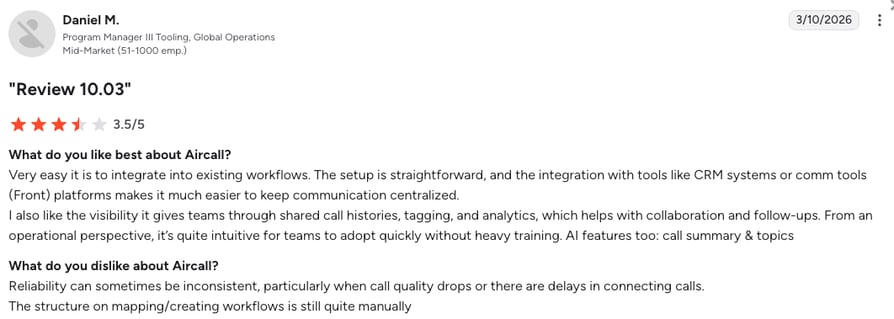
Reviewers like the App Marketplace and the reasonable price point compared to enterprise CCaaS platforms. Recurring complaints: app crashes during peak hours and missed inbound calls that customers still hear ringing on their end.
What Is Aircall's G2 Rating and Review Count?
Aircall's current G2 rating is 4.4/5, out of 1,600+ verified user reviews.
How Do We Rate Aircall?
Aircall Sentiment Score
| Category | Score (1–10) |
|---|---|
| Ease of Use | 8 |
| Feature Set | 7 |
| Value for Money | 6 |
| Customer Support | 7 |
| Integration Depth | 8 |
| Overall | 7.2 |
Aircall vs. CloudTalk
Aircall's automation-friendly workflows and deep sales-tool integrations genuinely help fast-moving sales teams work through high call volumes.
CloudTalk is the better fit for teams that also need strong AI Voice Agents or a lower seat minimum, since Aircall requires 3 users on every plan.
9. OpenPhone (Quo): Best for Startups Needing Simple VoIP
What Is OpenPhone (Quo)?
OpenPhone (now Quo) is a lightweight business phone system for startups that want simple calling and texting from a clean, modern app. It works well for teams that don't need complex features and prefer an easy, mobile-friendly setup.
What Are OpenPhone (Quo)'s Key Features?
- Customizable IVRBuild simple menus to route callers without a live receptionist.
- Give team members their own direct lines under one main number.
- Call Recording & LoggingEvery call is recorded and tracked automatically, no manual entry needed.
What Are OpenPhone (Quo)'s Pros and Cons?
| Pros | Cons |
|---|---|
| Clean, mobile-first app that's simple for lean teams to set up | Lacks auto-dialers and click-to-call tools that growing sales teams depend on |
| Customizable IVR and call recording included from the entry plan | Smaller integrations library than most competitors |
| Highest G2 rating among all 11 tools compared here | Standard plan only covers calling and texting within the U.S. and Canada |
Who Is OpenPhone (Quo) Best For?
OpenPhone (Quo) is the best solution for startups and small teams that need a simple, easy-to-manage phone system.
How Much Does OpenPhone (Quo) Cost?
OpenPhone (Quo)'s pricing starts at $15/user/mo (billed annually), with the following plans:
OpenPhone (Quo) Pricing Plans
| Plan | Starting Price (Annual) | Main Features |
|---|---|---|
| Starter | $15/user/mo | Shared inboxes, HubSpot + Salesforce integrations, calling, SMS, Sona AI receptionist |
| Business | $23/user/mo | Everything in Starter + advanced analytics, additional integrations, priority support |
| Enterprise | Custom pricing | Custom onboarding and support |
What Are Real Users Saying About OpenPhone (Quo)?
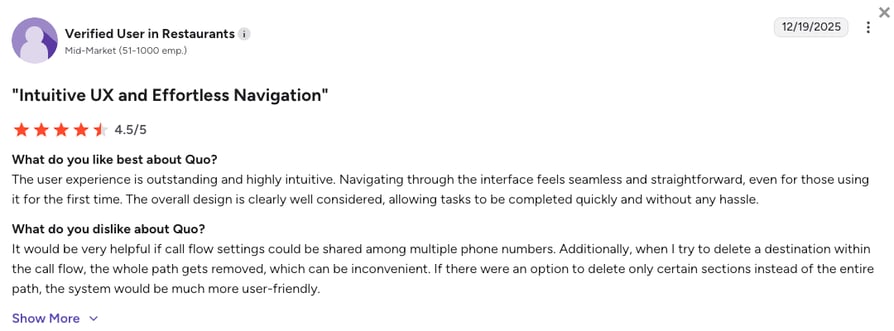
Reviewers consistently praise how quickly a small team can get OpenPhone (Quo) running and how clean the mobile app feels. Recurring complaint: the integration library is thinner than larger competitors, and calling outside the U.S. and Canada is limited on the Standard plan.
What Is OpenPhone (Quo)'s G2 Rating and Review Count?
OpenPhone (Quo)'s current G2 rating is 4.7/5, out of 3,300+ verified user reviews.
How Do We Rate OpenPhone (Quo)?
OpenPhone (Quo) Sentiment Score
| Category | Score (1–10) |
|---|---|
| Ease of Use | 9 |
| Feature Set | 6 |
| Value for Money | 8 |
| Customer Support | 7 |
| Integration Depth | 5 |
| Overall | 7 |
OpenPhone (Quo) vs. CloudTalk
OpenPhone (Quo)'s clean, mobile-first app and top-rated G2 score genuinely make it one of the simplest phone systems to get a lean team running fast.
CloudTalk is the better fit once a team needs auto-dialers, deeper CRM sync, or calling coverage beyond the U.S. and Canada.
10. GoTo Connect: Best for Hybrid Teams Needing Unified Communication
What Is GoTo Connect?
GoTo Connect equips small teams with VoIP calling, video meetings, and messaging in a single platform. It is a strong fit for hybrid teams that want one system for communication across office and remote environments.
What Are GoTo Connect's Key Features?
- Auto-Attendant with Dial Plan EditorBuild call routing logic visually without IT help.
- Ring Groups & Call QueuesDistributes calls across a team so no caller waits too long.
- Built-In Video MeetingsRuns alongside voice calling in the same app.
What Are GoTo Connect's Pros and Cons?
| Pros | Cons |
|---|---|
| Built-in video meetings alongside voice calling in a single platform | No advanced call center features like skill-based routing or automated dialing |
| Customizable dial plan editor and ring groups for team-based routing | International number availability is more limited than competitors |
| Strong fit for hybrid teams wanting one unified app | Pricing requires a custom quote, making comparisons harder for SMBs |
Who Is GoTo Connect Best For?
GoTo Connect benefits mainly hybrid SMB teams that want a unified, easy-to-use communication platform.
How Much Does GoTo Connect Cost?
GoTo Connect's pricing is only available upon request. However, based on verified industry data, plans are estimated at:
GoTo Connect Pricing Plans
| Plan | Estimated Starting Price (Annual) | Main Features |
|---|---|---|
| Phone System | ~$26/user/mo | Unlimited domestic calling, IVR, dial plan editor, video meetings, call recording |
| Connect CX | ~$34/user/mo | Everything in Phone System + calling in 50+ countries, CRM integrations, advanced reporting |
| Contact Center | ~$80/user/mo | Full contact center suite with AI, analytics, omnichannel routing |
What Are Real Users Saying About GoTo Connect?
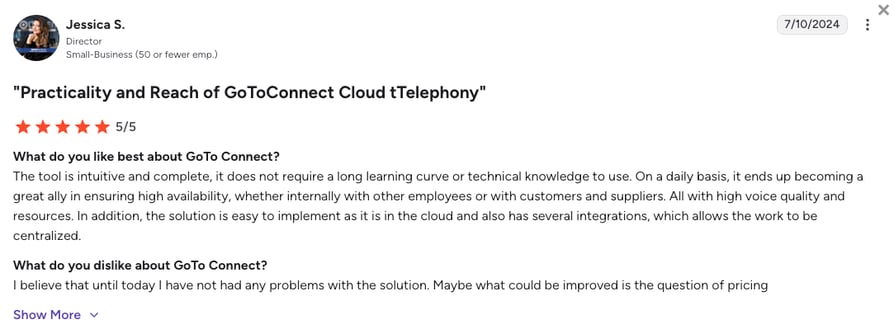
Reviewers like having video meetings and calling in one app, especially for hybrid teams. Recurring complaint: pricing requires a custom quote, which makes it harder to compare against self-serve competitors.
What Is GoTo Connect's G2 Rating and Review Count?
GoTo Connect's current G2 rating is 4.4/5, out of 1,400+ verified user reviews.
How Do We Rate GoTo Connect?
GoTo Connect Sentiment Score
| Category | Score (1–10) |
|---|---|
| Ease of Use | 7 |
| Feature Set | 7 |
| Value for Money | 6 |
| Customer Support | 7 |
| Integration Depth | 6 |
| Overall | 6.6 |
GoTo Connect vs. CloudTalk
GoTo Connect's built-in video meetings alongside calling genuinely suit hybrid teams that want one app for both.
CloudTalk is the better fit for teams that need skill-based routing and transparent pricing without a custom quote.
11. Grasshopper: Best for Solopreneurs & Very Small Teams
What Is Grasshopper?
Grasshopper is a virtual phone system designed for solo users and micro businesses that need a simple business line. It includes basic calling, forwarding, extensions, and voicemail transcription.
What Are Grasshopper's Key Features?
- Local, Toll-Free, or Vanity NumbersGet a professional number without new hardware.
- Voicemail TranscriptionReads voicemails as text instead of listening to audio.
- Unlimited Calls and Texts (U.S. Only)Covers day-to-day domestic calling and texting.
What Are Grasshopper's Pros and Cons?
| Pros | Cons |
|---|---|
| Simple, affordable professional phone line with no learning curve | No analytics, automation, or advanced routing |
| Unlimited U.S. calling and texting included on every plan | Not built for scaling teams or customer support operations |
| Fast setup for solo users and very small teams | No international calling options |
Who Is Grasshopper Best For?
Grasshopper is a great business calling platform for solopreneurs and very small teams wanting a professional phone line with simple features.
How Much Does Grasshopper Cost?
Grasshopper's pricing starts at $14/mo (flat rate, not per user, billed annually), with the following plans:
Grasshopper Pricing Plans
| Plan | Starting Price (Annual) | Main Features |
|---|---|---|
| True Solo | $14/mo | 1 user, 1 number, 1 extension, calling and SMS, instant response texts |
| Solo Plus | $25/mo | Unlimited users, 1 number, unlimited extensions, all True Solo features |
| Small Business | $55/mo | Unlimited users, 4 numbers, unlimited extensions |
What Are Real Users Saying About Grasshopper?
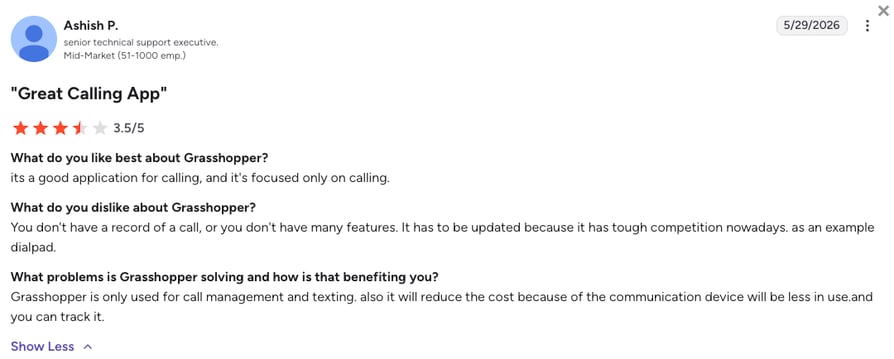
Reviewers appreciate how easy Grasshopper is to set up for a single professional number. Recurring complaint: the platform doesn't scale well once a team needs routing, analytics, or support-team features.
What Is Grasshopper's G2 Rating and Review Count?
Grasshopper's current G2 rating is 3.9/5, out of 150+ verified user reviews.
How Do We Rate Grasshopper?
Grasshopper Sentiment Score
| Category | Score (1–10) |
|---|---|
| Ease of Use | 8 |
| Feature Set | 4 |
| Value for Money | 7 |
| Customer Support | 5 |
| Integration Depth | 2 |
| Overall | 5.2 |
Grasshopper vs. CloudTalk
Grasshopper's simplicity genuinely suits solopreneurs who just need a professional number without learning a full platform.
CloudTalk is the better fit the moment a team grows past one or two people and needs routing, analytics, or CRM sync Grasshopper doesn't offer.
What Is a Business Phone System (and Why Growing Teams Need It)?
A business phone system, also called an office phone system, is the technology a company uses to make and receive calls, route them to the right person, and keep a record of every conversation. For small businesses, that usually means a cloud-hosted setup instead of a box of wires in a back closet.
Most modern systems run on VoIP (Voice over Internet Protocol), which turns your voice into data packets and sends them over the internet instead of a traditional copper phone line. That is why you can answer a call on a laptop in one city and a mobile app in another, all under the same business number. The provider hosts the infrastructure, handles maintenance, and pushes updates on its own, so a five-person team gets the same call quality and feature set as a five-hundred-person one.
The bigger decision small businesses face is cloud versus on-premise. An on-premise PBX puts the hardware in your office, so you own it and every maintenance bill and upfront cost lands on you. A cloud-based system moves that work to the provider's servers, so setup takes hours instead of weeks and you pay per user instead of per piece of equipment. Most small businesses today choose cloud-based systems because they are easier to set up, cheaper to maintain, and scale as the team grows.
What Are the Main Types of Business Phone Systems for Small Businesses?
Business phone systems for small businesses come in five main types: cloud-based VoIP, hosted PBX, on-premise PBX, virtual phone systems, and hybrid setups. Which one fits depends mostly on team size and how much control you want over your own hardware.
Types of Business Phone Systems
| Type | How It Works | Best Fit |
|---|---|---|
| Cloud-based VoIP | The most common cloud phone system for small business teams today: calls run entirely over the internet through a provider's servers, with no on-site hardware required. CloudTalk, Aircall, and Dialpad are common examples. | Small teams that want fast setup and predictable per-user pricing. |
| Hosted PBX | The provider hosts and manages your private branch exchange remotely, so you get hosted PBX-style features like extensions, voicemail, and call transfer without owning the equipment. | Teams that want more advanced call handling without an IT hire. |
| On-premise PBX | Physical hardware sits in your office and your own team maintains it. | Businesses with the budget and staff for full control over their phone infrastructure. |
| Virtual phone systems | A lightweight virtual phone system for small business owners: it forwards calls to an existing mobile or landline number, often without a full desktop app. | Solopreneurs or very small teams that need a professional number, not a full contact center. |
| Hybrid systems | Combines VoIP software with existing desk-phone hardware, letting teams migrate gradually instead of switching everything at once. | Businesses partway through a move away from legacy phone equipment. |
Cloud-based VoIP has become the default for most growing SMBs: it needs no upfront hardware, and adding a new user takes minutes. Most cloud-based and hosted options today also work as an automated phone system for small business use, handling IVR menus, call queueing, and routing without a dedicated receptionist.
Hosted PBX suits teams that want more advanced routing than a bare virtual number offers but still don't want equipment on-site. On-premise PBX still fits businesses with strict data-residency requirements or an IT team already running their own servers, though it's a shrinking share of new deployments among companies under 200 employees.
Whichever type you land on, the features your team uses every day matter more than the category label.
What Are the Essential Features of a Phone System for Small Businesses?
The right business phone system helps small businesses stay fast, organized, and responsive, without adding extra tools or complexity.
Here are the business phone system features that matter most for growing SMBs:
Key Features of SMB Phone Systems
| Feature | Why It Matters | Who It Helps Most |
|---|---|---|
| AI Automation | Cuts manual tasks, speeds up workflows, reduces busywork | Sales teams, support teams, small teams with high call volume |
| Call Routing | Gets callers to the right person faster | Support teams, service-heavy SMBs |
| CRM Sync | Keeps customer records accurate without extra admin | Sales teams, account managers |
| Call Quality & Uptime | Ensures every conversation is clear, even at peak hours | Every team using phones daily |
| Analytics & Reporting | Shows what's working, where bottlenecks are, and where to improve | Team leaders, managers |
| Scalability | Lets you add users, numbers, or workflows as you grow | SMBs planning to expand or add new markets |
These are the must-have features every modern SMB phone system should offer. If even one is missing, you'll feel it in your day-to-day workflows. On platforms like CloudTalk, those essentials turn into checkable capabilities rather than abstract promises.
- AI Automation shows up as the AI Voice Agent, which answers routine calls and qualifies leads before routing anything complex to a human rep. CloudTalk's voice AI solutions are offered as add-ons on any plan, so a team pays for it only once it is ready to use it.
- Call routing runs through the drag-and-drop Call Flow Designer, which lets a team rebuild its own logic without a developer, so a queue overwhelmed on a Monday morning gets rebalanced within minutes.
- CRM sync happens through native integrations with HubSpot, Salesforce, Pipedrive, and Zendesk that log every call automatically, cutting the hours reps would otherwise spend copying notes by hand. Call quality and uptime rest on a 99.999% SLA running across a multi-carrier network, which matters most to teams that live on the phone and lose real deals to dropped calls.
- Analytics inside a business phone system gives managers real-time visibility into queue performance and agent activity instead of a weekly report that's already stale by the time it lands. And scalability comes down to local and toll-free numbers across 160+ countries, so adding a new market takes a few configuration steps rather than a new vendor contract.
Try the Best SMB Phone System
How Much Does a Business Phone System Cost for a Small Business?
A business phone system for a small business typically costs between $15 and $30 per user per month, in the same range as general business phone line costs across landline, mobile, and VoIP setups. The final number depends on how many seats you need and which features you add on top of basic calling.
What Drives Business Phone System Costs
| Cost Driver | What It Affects |
|---|---|
| Number of users | Most providers price per seat, so cost scales directly with headcount. |
| Feature tier | Basic calling and voicemail sit at the low end; AI automation, advanced routing, and analytics push you into higher tiers. |
| International calling | Calling or receiving calls outside your home country usually carries per-minute or add-on fees. |
| Contract length | Annual billing is typically cheaper per seat than paying month-to-month. |
| Add-ons | AI features, extra dialer modes, and premium support get priced separately from the base plan on most platforms. |
When comparing phone packages for SMBs side by side, sticker price alone won't tell you the full story. Watch the add-ons closely. A plan that looks cheap on the pricing page can get expensive once you add the AI transcription, advanced dialer, or international minutes your team needs, since providers routinely price those as separate line items instead of bundling them in.
CloudTalk's plans start at $25/user/month, with AI Voice Agents and AI Conversation Intelligence sold as add-ons so you only pay for the AI capabilities your team uses.
How to Pick the Right Business Phone System for Small Businesses
Choosing the right phone system isn't about chasing the longest feature list, but rather about finding a tool that removes friction from your team's day-to-day work. The main reason is that small teams don't have time for complicated setups or tools that "almost" solve the problem. They need something that works on day one.
Here's a simple framework to evaluate your options, minus the jargon and long spec sheets.
1. Start With Your Team's Daily Workflow
Before you compare features, look at what slows your team down now:
- missed calls during busy hours
- manual dialing that eats up half the day
- scattered notes that never make it back into the CRM
- slow follow-ups because agents juggle too many tools
A good phone system removes these bottlenecks immediately.
A great one makes your small team feel bigger, without adding headcount.
2. Check How Well It Connects to Your CRM
For sales and support teams, CRM syncing is essential, not a "nice to have."
Without it, your reps waste hours each week copying call details, logging notes, and updating tickets manually.
Look for:
- automatic call logging
- automatic note syncing
- recordings tied to the right customer
- two-way data flow
SMBs see the biggest impact here because accuracy improves, handoffs stop breaking, and no one wastes time hunting for information.
3. Test Calling Quality, Especially During Busy Hours
Small businesses often depend on the phone more than anyone else, and customers notice call quality instantly.
Dropped calls, robotic audio, or delay don't just cause frustration; they cost you deals and damage trust.
That's why you need:
- strong global infrastructure
- high uptime SLAs
- local number availability
- low latency even during peak traffic
If your team talks to customers daily, call quality is not optional, it's your reputation.
CloudTalk delivers crystal-clear calling with a 99.999% uptime SLA across all regions, ideal for SMBs expanding into new markets without risking customer trust or lost calls.
Case study time: Allycom
Allycom, an IT outsourcing company serving clients across nearly 100 countries, needed guaranteed call quality and reliable recording once compliance became a legal requirement for its financial-services clients. "Over the nearly 8 years we've worked with CloudTalk, the improvement in both call quality and platform functionality has been incredible," the Allycom team says.
Test Best Call Quality
4. Look for AI That Actually Helps Your Team
Small teams carry big workloads. AI sidekicks like voice agents and virtual receptionists will help you lighten that load, not complicate workflows.
Useful AI handles:
- human hand-off (routing)
- caller qualification
- voicemail follow-up
- call summaries
- note-taking
- automated actions inside your CRM
- multilingual, 24/7 support
Strong AI gives your team back hours each week, letting them focus on the calls that move revenue, not the admin that slows them down.















5. Make Sure It Scales With You
Your business today might be five reps. Next year, it might be fifteen. The year after, you might expand into new markets.
Choose a phone system that grows with you, not one you'll outgrow in six months. That's the real difference between a business telephone solution built for six people and one built to scale past 200.
Your checklist:
- simple user expansion
- vast global coverage
- flexible number options
- multi-country support
- predictable pricing as you scale
SMBs often hit growing pains fast, your phone system should make scaling smoother, not harder.
6. Consider Ease of Setup & Adoption
Small businesses rarely have an IT department ready to run a project for weeks.
You want:
- drag-and-drop workflows
- clear settings
- no-code automation
- onboarding that takes hours, not weeks
If your team can't use it right away, they won't use it at all.
CloudTalk checks every box that matters: fast setup, crystal-clear calling, smart AI that cuts busywork, deep CRM sync, and the flexibility to scale as you grow.
Case study time: Tillväxtbyggarna
Tillväxtbyggarna, a lean Swedish marketing team, needed to stand up outbound calling from scratch with no complicated setup and no dedicated IT support. "You just open CloudTalk and start dialing — that’s really what changed everything," says Joshua Niyonzima, Owner. The team saw a 100% increase in revenue within six weeks of going live.
Test Drive CloudTalk Now
Final Thoughts: The Phone System That Actually Helps You Grow
For teams that live on the phone every day, the right system is what keeps sales moving and customers happy. A weak one costs you deals. A strong one becomes the reason your team outgrows the competition.
Want to be one of the businesses growing because of their phone system, not despite it? Just make sure you choose the right one.
CloudTalk's business phone system for scaling SMBs brings together everything that matters: automation, global-quality calling, CRM sync, real-time analytics, and scalability that future-proofs your team for 2026 and beyond.
If you're ready for fewer headaches, faster responses, and smoother days, CloudTalk is the upgrade that pays off immediately. Still wondering what is CloudTalk exactly? Here's the full picture.
One Demo Changes How You Think About Phone Systems
Sources:
- U.S. Small Business Administration
Frequently Asked Questions About Business Phone Systems for Growing Teams
Everything you need to know about business phone systems for scaling small-to-medium businesses.
The best phone system for a small business is a cloud-based VoIP platform: no on-site hardware, live within a day. Beyond that baseline, prioritize reliable call quality, CRM integrations, and pricing that scales predictably as your team grows.
A small business phone system usually costs between $15 to $30 per user per month, depending on seats and features. For example, CloudTalk's plans start at $25/user/month and its AI features work as add-ons sold as predictable, flat-rate bundles.
A business phone system for small businesses works by routing calls through the internet instead of traditional phone lines. It uses VoIP (Voice over Internet Protocol) to place and receive calls, stores call data in the cloud, syncs activity to your CRM, offers automated routing, IVR, and queueing, and includes tools like a small business AI dialer for outbound automation. This makes modern systems flexible and ideal for remote or hybrid teams.
You set up a business phone system for small businesses by choosing a provider, adding users, assigning numbers, and configuring your call flows: create your account with your chosen hosted small business phone system, add team members and roles, pick local or toll-free numbers, connect your CRM, set routing rules and IVR menus, then enable the dialer for outbound work. The very best small business phone system platforms, like CloudTalk, go live within hours, not weeks.
You need a business phone system for a small business to handle calls professionally, reduce missed opportunities, and manage customer conversations more consistently. Key reasons SMBs upgrade include better call routing during busy hours, cleaner customer records through CRM sync, a more reliable communication experience, tools for outbound work like an auto sales dialer, and the ability to support remote or distributed agents. Modern phone systems replace messy workflows with simple, organized communication.
There are five main types of business phone systems:
- cloud-based VoIP (internet-hosted, no hardware, best for most SMBs)
- hosted PBX (PBX features hosted by a provider)
- on-premise PBX (hardware in your office, higher upfront cost)
- virtual phone systems (forwards to existing mobile or landline, ideal for solopreneurs)
- hybrid systems (mix of VoIP and legacy hardware)
Most small businesses with 10 to 200 employees choose cloud-based VoIP or hosted PBX for their lower cost, faster setup, and ability to scale without IT overhead.
The best phone systems for small businesses include CloudTalk, Nextiva, Dialpad, RingCentral, and Aircall, each built around a strength. For example, CloudTalk's ideal for small business teams that need powerful AI automation and reliable CRM sync layered right into a complete business phone system and CRM sync. Nextiva is a great choice for HIPAA compliance and onboarding, while Dialpad is a good choice for AI transcriptions.
When choosing your new small business phone system, start with your team's daily workflow, not a feature checklist. Test call quality during busy hours, confirm the system syncs cleanly with your CRM, then check how fast your team can set it up without leaning on IT.
The benefits of a phone system for SMBs include clearer business communication, faster support, and more organized customer interactions. Top benefits include professional call routing, centralized customer information, automated follow-ups and call notes, support for remote agents, cost savings versus legacy hardware, and scalable small business telephony system features. Cloud systems help small teams act bigger without increasing overhead.
Highly-rated business phone systems for small businesses, per verified G2 reviews, include CloudTalk, Dialpad, OpenPhone, and Ooma Office. CloudTalk's rating rests on CRM sync and AI automation; OpenPhone's on how easily lean teams set it up.
CloudTalk, Dialpad, Nextiva, RingCentral, and Aircall are the most popular cloud phone systems for small businesses, each built around a strength: AI and CRM depth, transcription, fast onboarding, an all-in-one suite, or sales automation.
CloudTalk offers the best cloud-based business phone system for SMBs, pairing AI automation and native CRM sync with calling infrastructure that scales from a 10-person team past 200 seats without switching providers.
To choose a phone system that scales with your headcount, pick a provider that adds users, numbers, and features without a new contract or migration. Look for per-seat pricing, self-serve number provisioning, and call routing your team can reconfigure itself as headcount and call volume grow. CloudTalk is a great example of phone system providing all of that from day one.
CloudTalk and Dialpad lead on AI features for small businesses. CloudTalk pairs an AI Voice Agent and AI-powered call summaries with native CRM sync, while Dialpad focuses on real-time transcription and coaching.
Grasshopper and Quo are great virtual phone systems for enterpreneurs needing flexibility. Grasshopper forwards calls to your existing mobile or landline number with no new hardware. OpenPhone (Quo) suits entrepreneurs who want a dedicated business line instead of pure call forwarding.