
Top 15 Call Transcription Software for Accurate Call Records in 2026
TL;DR: Best Call Transcription Software
As sales experts, we reviewed and tested 30+ of the best AI call transcription software tools to help teams improve coaching, uncover conversation insights, and close more deals in 2026.
Here are our 5 best call transcription software picks…out of the 15 that made our list:
-
01
CloudTalk — the best call transcription software for growing sales teams with AI insights, CRM integrations, and conversation analytics
-
02
Dialpad — unified VoIP platform with built-in AI call transcription and real-time analytics
-
03
Nextiva — intuitive business phone system with automated call transcription and CRM connectivity
-
04
8×8 — enterprise communication platform with AI-powered call transcription and advanced analytics
-
05
RingCentral — scalable communications suite with call recording, transcription, and collaboration toƒols for distributed teams
We’ve reviewed even more call transcription tools and AI transcription platforms—read on for the full list, feature comparisons, and expert advice on choosing the best call transcription software for your team.
Your team records every sales call. But most of those insights never get used.
Sales teams now handle approx 250 calls per week, which is why more companies rely on the best AI call transcription software to turn calls into searchable insights automatically.
If you’re looking for the best call transcription software to analyze conversations, improve coaching, and uncover trends hidden inside customer calls, this guide is for you.
Real-World Impact: How Sound Advice MD Improved Coaching With AI Call Transcription
While features matter, the real value of the best call transcription software shows up in how teams coach, analyze conversations, and improve performance.

After switching to CloudTalk’s AI call transcription software, Sound Advice MD gained:
- 80% faster coaching thanks to AI call summaries
- 100% of calls automatically transcribed and analyzed
Instead of manually reviewing long recordings, managers can jump directly to key moments in conversations—making coaching faster, insights clearer, and customer interactions more consistent.
“Thanks to CloudTalk, we managed to greatly improve our team’s cost and efficiency. The script feature allows us to lead the calls in a much more systematic way.”


Start coaching better—test CloudTalk’s transcription software today

How We Chose the Best Call Transcription Software
To create this guide, we reviewed 30+ leading call transcription tools, analyzing feedback from 2,000+ real users across platforms like G2, Capterra, and TrustRadius.
The platforms included in our list of the best call transcription software were evaluated based on several critical factors, including transcription accuracy, AI-powered insights, integrations with CRM and calling platforms, and overall ease of use. We also looked at how well each AI call transcription software performs in real sales and support environments—where teams need to quickly review conversations, coach agents, and uncover insights from customer calls.
To ensure our recommendations are grounded in real-world performance, we also referenced recent industry research and market insights from trusted sources, alongside verified customer reviews.
What you’ll find in this guide:
Only call transcription tools that deliver measurable value—along with clear notes on which teams, workflows, and use cases each solution supports best.
Why Trust Our Software Reviews?
For nearly 10 years, we’ve been helping more than 30,000 professionals with our solutions. Along the way, we’ve worked closely with experts across customer support, sales, and operations—listening to their challenges and following market trends.
To support better software decisions, we’ve reviewed over 200 software tools across industries. In the process, we’ve analyzed 5,500+ verified customer reviews from platforms like G2, Gartner, Capterra, and TrustRadius, plus real discussions on Reddit and Quora.
In the last year alone, we published over 1,000 articles—each one written by humans for humans, with care and a deep understanding of our customers’ needs. The reviews are based on trustworthy data, with one clear goal: to provide reliable insights and answers for you.
Learn how we keep our content integrity and our software review methodology.
Top 15 AI Call Transcription Software of 2026
Choosing the right call transcription software is more important than ever. As sales and support teams handle hundreds of conversations every week, manually reviewing recordings or taking notes simply isn’t scalable—and critical insights can easily slip through the cracks.
Before we dive into the detailed reviews, here’s a side-by-side table of the best call transcription software to help you compare the essentials—so you can quickly see which call transcription tools best match your team’s workflows, integrations, and analytics needs:
Comparison Table: Best AI Call Transcription Software
| Transription Platform | Best for | Starting Price (annual billing) | G2 Rating |
|---|---|---|---|
| CloudTalk | Growing sales teams that need AI call transcription, conversation insights, and CRM integrations | $19/user/month | 4.4/5 |
| Dialpad | Built-in AI call transcription and real-time conversation analytics | $15/user/month | 4.4/5 |
| Nextiva | Businesses that want automated call recording and transcription with CRM syncing | $20/user/month | 4.5/5 |
| 8×8 | Enterprise teams that need AI-powered call transcription and advanced analytics | Per request | 4.2/5 |
| RingCentral | Distributed teams needing call recording and transcription in a unified platform | $20/user/month | 4.3/5 |
| Aircall | Support and sales teams needing call transcription with CRM integrations | $30/license/month | 4.4/5 |
| OpenPhone (Quo) | Small teams that want simple call transcription inside a lightweight phone system | $15/user/month | 4.7/5 |
| Talkdesk | Large contact centers using AI transcription for QA and coaching | $85/user/month | 4.4/5 |
| Justcall | SMB sales teams using AI transcription and call summaries | $29/user/month | 4.3/5 |
| Genesys | Enterprises using AI transcription for customer experience analytics | Per request | 4.4/5 |
| Five9 | Compliance-heavy call centers needing searchable call transcripts | $159/user/month | 4.1/5 |
| Ringover | Growing teams wanting conversation intelligence and call transcription | $21/user/month | 4.6/5 |
| Twilio | Developers building custom call transcription workflows with APIs | Pay as you go | 4.2/5 |
| Zendesk Talk | Customer support teams that need transcription for ticket context | $55/user/month | 4.3/5 |
| Google Voice | Google Workspace users who need basic phone call transcription | $10/user/month | 4.1/5 |
1. CloudTalk
CloudTalk is the best call transcription software for sales and support teams that want to turn conversations into actionable insights.
Designed for growing SMB and mid-market teams, CloudTalk combines calling, recording, and AI call transcription software with real-time analytics in one platform—helping teams review conversations faster, coach agents more effectively, and uncover trends hidden inside customer calls.
Instead of manually reviewing recordings, CloudTalk automatically converts conversations into searchable transcripts and AI summaries. This software to transcribe calls helps managers quickly identify coaching opportunities, track talk ratios, and analyze conversation quality across teams.
Beyond transcription, CloudTalk offers a full cloud phone system designed for global teams. Businesses can establish a local presence in 160+ countries, monitor performance with real-time analytics, and integrate seamlessly with popular tools like HubSpot, Zendesk, Salesforce, and Pipedrive.
Transcription & AI Intelligence
If you are hunting for the best call transcription software, CloudTalk has positioned itself as a market leader by embedding intelligence directly into your daily workflow.
-
Automated Documentation: CloudTalk acts as a powerful software to transcribe calls, automatically converting your audio into text so you never lose track of customer insights.
-
Advanced Intelligence: As one of the best call transcription ai platforms, it doesn’t just record; it processes. You get automatic call summaries and tags, making it easier to review key takeaways without listening to hours of audio.
-
Easy Implementation: It is essentially the best call recording and transcription software for teams that want “out of the box” functionality without a complex technical setup.
-
Searchable Data: Utilizing transcript search, you can pinpoint specific keywords or objections across thousands of calls, a vital capability for any of the best call transcription tools on the market.
-
Resource Support: If you’re wondering how to get started, you can learn more about how to transcribe phone calls or review our help center article on call transcripts for a deeper technical breakdown of the transcription software for phone calls capabilities.
Key Features:
-
AI Call Transcription – Automatically convert conversations into accurate, searchable transcripts
-
Conversation Intelligence – Analyze talk ratios, sentiment, and call outcomes to improve performance
-
Call Recording & Transcription – Combine recordings with transcripts for faster call reviews
-
Real-Time Analytics – Track call performance, trends, and agent activity
-
CRM Integrations – Automatically sync calls, transcripts, and notes with major CRM platforms
-
Global Calling Coverage – Local numbers available in 160+ countries for high-quality calls with guaranteed latency and minimal jitter
What was missing? (And how they fixed it)
Early on, some users felt the analytics dashboard could offer more depth. CloudTalk listened and launched Analytics 2.0. This is a comprehensive, data-visualization framework that allows you to identify operational bottlenecks and apply data-driven solutions before they impact your bottom line.
What type of business is it best for?
CloudTalk is the perfect call transcription + phone system for mid-sized companies looking to grow. Typically, it’s used in sales for outbound calls and in customer service for inbound calls.
G2 rating: 4.4/5
Pricing: From $19/user/month
What are the real users saying?
Most teams highlight AI combined with call transcription and workflow automation as a major benefit. Users often note that their data is much cleaner because the system handles the logging, removing the need for agents to manually update records after every call.
I’ve been using CloudTalk to enhance my customer experience, and it’s been fantastic! The automatic call transcription helps me keep track of conversations, and sentiment analysis provides insights into customer emotions. Call routing ensures calls are directed to the right person, reducing wait times. Integrating seamlessly with my existing CRM and helpdesk tools made setup a breeze.

And what do CloudTalk customers say about call transcription?
Stop Taking Notes —Start Automating Like Sound Advice
2. Dialpad

Dialpad is a unified communication suite that treats artificial intelligence as a core feature rather than an add-on.
Dialpad positions itself as an AI-first platform, making it a strong contender if you are evaluating the best ai call transcription software sales teams need to stay agile.
Dialpad call transcription features include:
- Real-time Transcription: Acts as a capable software to transcribe calls, providing instant, automated text from your conversations.
- Actionable Insights: It is one of the best call transcription ai platforms for summarizing conversations and extracting takeaways, reducing the time agents spend in manual entry.
- Salesforce Ecosystem: Highly effective as best ai call transcription software sales teams use to keep their CRM data clean and up-to-date.
Benefits
The platform’s greatest strength is its proprietary “Voice Intelligence” (Vi). It provides real-time sentiment analysis, which helps managers track the mood of a conversation as it happens. Because it is natively built into the platform, it functions as a highly integrated phone call transcription software. You get consistent performance, high uptime (99%–100%), and a clean UI that simplifies the user experience.
Key Features
- Voice Intelligence (Vi): Automates the process to become an effective ai call transcription software, capturing key moments and sentiment.
- Sentiment Analysis: Automatically scores calls, helping you identify successful strategies versus those that need coaching.
- Integrated Recording: A robust software to transcribe calls that logs everything within the unified app.
- Searchable Database: Allows you to leverage transcript search to find competitor mentions or objection handling techniques across your entire team.
What is Dialpad Missing? While powerful, Dialpad is built as a general-purpose communications suite, which leads to some functional trade-offs:
- Dialing Limitations: Unlike platforms built specifically for high-velocity outbound, Dialpad lacks true Smart or Predictive dialers.
- Integration Dependencies: Their Power dialer is largely restricted to Salesforce, which limits your options if you use a different CRM.
- Manual Bottlenecks: The standard Dialpad app is designed heavily around manual dialing. If you need a best call recording and transcription software that supports aggressive, automated dialing flows, you might find this interface slow.
- Missing Features: It currently lacks a visual call flow designer and has restrictions on SMS messaging outside of North America.
What Type of Business is it Best For? Dialpad is the ideal choice for sales and support teams of any size that are deeply embedded in Google Workspace or Salesforce and prioritize a unified, AI-native environment over high-volume dialing automation.
Pricing: Starts from $15/user/month.
G2 Rating: 4.4/5.
3. Nextiva: Transcription & AI Intelligence

Nextiva is a heavy hitter in the VoIP market, serving over 15,000 customers with a reputation for being incredibly user-friendly. If you’re looking for a reliable, enterprise-grade system that sets up fast, Nextiva is a top contender. It’s built to handle everything from basic voice calls to complex video conferencing, making it a solid choice for teams that need stability.
Nextiva is often prioritized for its stability and enterprise-grade support, but its transcription capabilities are a strong secondary benefit for teams seeking a consolidated system.
About Nextiva transcription:
- Limitations: If you require the best call transcription ai for complex, sentiment-heavy sales calls, Nextiva’s tools are more foundational. They lack some of the aggressive, automated, and generative AI insights found in niche platforms designed specifically for deep audio analytics.
- Standard Transcription: Provides reliable voicemail-to-text, which serves as functional phone call transcription software for distributed teams.
- Workflow Integration: While it doesn’t always have the deep conversational AI of specialized call transcription tools, it integrates well with existing workflows to improve documentation speed.
Nextiva’s benefits:
They offer HIPAA-compliant virtual faxing, which is a major advantage for healthcare teams. For those searching for phone call transcription software, Nextiva provides voicemail transcription and solid workflow optimization tools that keep distributed teams connected
Key Features:
-
Unlimited Calling
-
Video Conference Recordings
-
Mobile & Desktop Apps
-
Workflow Optimization
-
Omnichannel CommunicationCall Recording
What is missing?
The interface can feel a bit dated compared to newer options. Additionally, getting the most out of their advanced automation often requires a higher-tier subscription.
What type of business is it best for?
Ideal for larger enterprises or established service firms that prioritize uptime and bundled communication features.
- Starting Price: ~$20/user/month
- G2 Rating: 4.5/5
4. 8×8 Transcription & AI Intelligence

8×8 is an evergreen telephony solution focusing on integrations and analytics. The provider is well-suited for enterprises, but lower-tier subscriptions also work for smaller organizations. There are many benefits 8×8 can offer its subscribers.
About 8×8 transcription:
- Integrated Analytics: It offers a centralized reporting system that pairs well with call transcription tools for tracking large-scale business processes.
- Recording & Intelligence: Provides a solid foundation as best call recording and transcription software, ensuring that all interactions are archived and searchable.
- Limitations: Because it prioritizes general enterprise stability, some of its automation features are gated behind higher-tier plans. If you are looking for the best ai call transcription software sales teams use for rapid, automated sales-coaching insights, you may find the native toolset less specialized than dedicated AI transcription engines.
8×8 benefits:
The standout advantage here is their reporting system, which centralizes all data in one place, helping managers speed up workflows. 8×8 also includes a smart dialer and click-to-call, which makes it a viable option if you are searching for best call recording and transcription software. Users also get unlimited calling to over 40 countries, providing significant value for businesses that operate globally.
Key features:
-
Global Presence
-
Speech Analytics
-
Omnichannel Routing
-
Transcription & Recording
What is 8×8 missing?
The setup process is notoriously complex. Small teams often find themselves looking for an 8×8-alternative that offers a simpler, faster onboarding experience.
What type of business is it best for?
Global corporations that need a single vendor for all international communication.
Pricing: Per request
G2 rating: 4.2/5
5. RingCentral

About RingCentral transcription:
RingCentral is an enterprise giant that provides an all-in-one experience, but its AI depth depends heavily on your subscription tier.
-
Omnichannel Documentation: As a leader in unified comms, it serves as reliable phone call transcription software for organizations that need to sync video, voice, and messaging data.
-
Compliance-Ready: Excellent for industries requiring strict adherence to legal standards, using its call recording as the backbone for its ai call transcription software efforts.
-
Limitations: Advanced AI features like speech-to-text are typically reserved for higher-tier Contact Center solutions. For smaller teams, it may not be the most cost-effective software to transcribe calls.
RingCentral’s benefits:
It provides an all-in-one omnichannel experience, meaning your team gets voice, video, and collaboration tools in one dashboard. While it covers the basics, those needing deep phone call transcription software capabilities should note that advanced AI features—like speech-to-text—are often locked behind their specific Contact Center solution tiers.
Key features:
-
SIP Trunking
-
IVR
-
Call Recording
-
Call Routing
-
Contact Management
What is RingCentral missing?
It is one of the most expensive options on the market. Smaller firms often search for a ringcentral-alternative to avoid paying for a massive suite of features they’ll never use.
The Call recording tool and Toll-free numbers are only available as add-ons for an additional cost.
Furthermore, RingCentral’s implementation can take as much as 90 days and involves an implementation fee.
RingCentral UI is also not always the friendliest to work with.
What type of business is it best for?
Large enterprises that require total customization and a “future-proof” feature set.
Pricing: From $20/user/month
G2 rating: 4.3/5
6. Aircall

About Aircall transcription:
Aircall is a favorite for small-to-mid-sized teams that value integrations and ease of use. Its transcription tools are designed to be part of an automated workflow.
- Integrative Workflow: It excels at connecting with CRM and productivity tools, which is why it often appears on lists for best call transcription app options for teams using Pipedrive or HubSpot.
- Quality Assurance: Its recording tools are simple to implement, making it a viable transcription software for phone calls for teams that need quick access to call history without a steep learning curve.
- Limitations: It lacks the deep, granular, sales-specific AI insights found in the best call transcription ai platforms, focusing more on connectivity than advanced conversation intelligence.
Aircall’s benefits:
Aircall excels when it comes to automation. The provider also features many useful integrations, including Intercom, Pipedrive, and Zapier. Furthermore, it offers Advanced automation tools, user-friendly apps, and reliable customer support.
Key features:
-
Automatic Call Distribution
-
Call Monitoring
-
Call Transfer
-
Call Recording
-
Call routing
What is Aircall missing?
Reporting is clean but lacks the deep “data-crunching” capabilities of an aircall-alternative. It’s built for operational speed, not necessarily for deep-dive analysts.
What type of business is it best for?
Startups and mid-market teams that want a beautiful, easy-to-use interface.
Pricing: From $30/license/month
G2 rating: 4.4/5
7. OpenPhone (now Quo)

About OpenPhone transcription:
OpenPhone is a lightweight, intuitive app perfect for smaller teams. Its transcription features are straightforward and user-friendly.
- Simple Documentation: It provides functional voicemail-to-text, which acts as basic phone call transcription software for solopreneurs or small teams.
- Ease of Use: If you are asking what is the best transcription software audio to text that doesn’t require a technical setup, OpenPhone’s simplicity is hard to beat.
- Limitations: It lacks the sophisticated AI-driven analysis found in the best call transcription tools. It does not offer advanced sentiment analysis or coaching features for sales teams.
Openphone’s benefits:
The primary benefit of OpenPhone is the transparency it brings to team communication. Unlike traditional automatic dialers that isolate agent activity, OpenPhone provides a shared workspace where multiple team members can view the same conversation thread.
Key features:
-
API.
-
Automated Attendant.
-
Call Center Management.
-
Call Logging.
-
Call Recording.
What is OpenPhone missing?
It lacks the high-volume outbound dialer logic required for mass cold-calling campaigns. Many growing teams eventually move to an openphone-alternative for more robust dialing modes.
What type of business is it best for?
Small, collaborative teams and startups that prioritize text and voice in a single thread.
Pricing: From $15/user/month
G2 rating: 4.7/5
8. Talkdesk
Transcription features
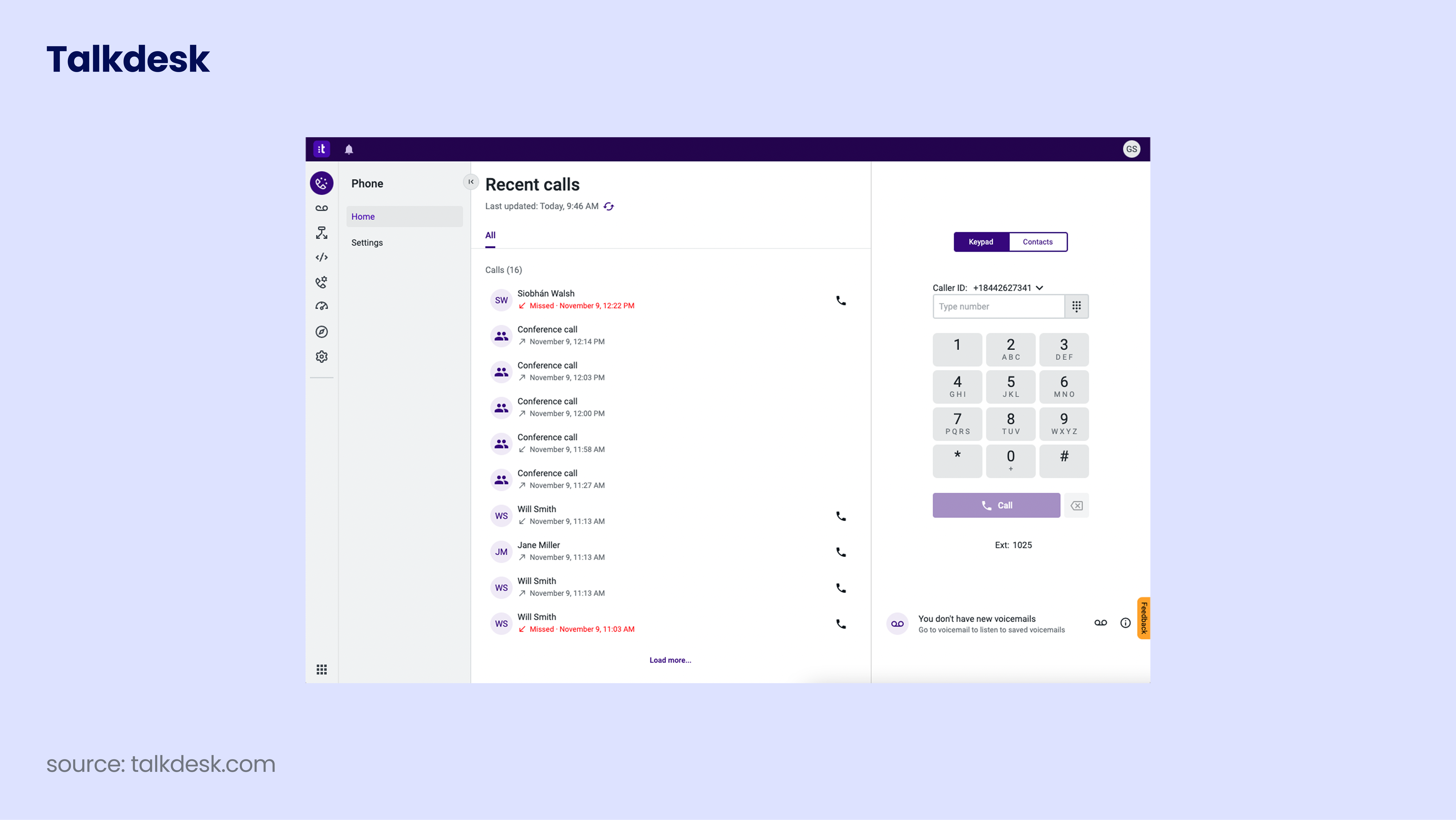
Talkdesk is a cloud-based contact center platform that utilizes AI to improve customer service quality.
- Quality Assurance: Highly focused on using speech recording and transcription to ensure agents are performing at their best.
- Contact Center Intelligence: Offers sophisticated tools that make it one of the best ai call transcription software sales and support teams use for managing quality at scale.
- Limitations: Being an enterprise-grade contact center solution, it is often more expensive and complex than standard call transcription software for phone calls targeted at SMBs.
Talkdesk’s benefits:
The core benefit of Talkdesk is its “Talkdesk IQ” AI layer, which analyzes every interaction to provide actionable insights. For large-scale contact centers, this means the system can predict customer intent and route calls with extreme precision. It also offers a massive benefit in terms of workforce management, helping managers schedule agents based on predicted call volume peaks.
Key features:
-
Call routing: Route calls based on skills, language, and more.
-
Interactive Voice Response (IVR): Provide customers with options.
-
Workforce management: Schedule and manage agents and their tasks.
-
Real-time monitoring: Monitor calls and agents in real time.
-
Voice and screen recording: Record calls and screens for quality assurance.
What is Talkdesk missing?
The pricing is among the highest in the industry, and implementation can be a multi-month project. Most SMBs search for a talkdesk alternative that is easier to manage without a dedicated IT staff.
What type of business is it best for?
Enterprise-level contact centers that need cutting-edge AI and advanced security compliance.
Pricing: From $85/user/month
G2 rating: 4.4/5
9. JustCall
Transcription features
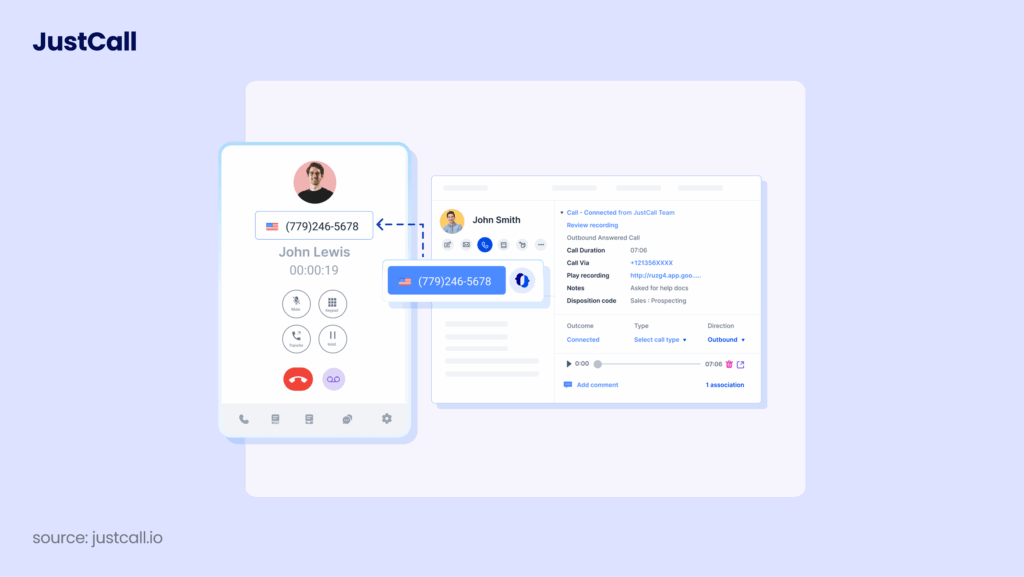
JustCall is a cloud phone system that provides businesses with a seamless calling experience. It’s a VoIP solution that offers advanced features and tools to manage customer communications. The company was founded in 2016 and has since grown to serve over 6,000 customers globally.is designed specifically for SMBs needing a flexible, cloud-native phone system.
- Limitations: It lacks some of the proprietary conversational AI found in premium suites, making it less suitable for organizations seeking the best call transcription ai for sales coaching.
- CRM Synergy: Its strongest point is its native integration with CRMs, allowing it to function effectively as ai call transcription software for teams that live in HubSpot or Freshdesk.
- Essential Features: Provides the foundational phone call transcription software capabilities most teams need—recording, storage, and retrieval.
JustCall’s benefits:
- Integrates with multiple CRM and helpdesk platforms, including HubSpot, Zendesk, and Freshdesk.
- Provides a dedicated mobile app for both iOS and Android devices.
- Offers local phone numbers in over 95 countries and enables you to make calls from anywhere in the world.
- Allows you to track your team’s performance with real-time analytics and insights.
Key features:
- Automatic Call Distribution: Route calls to the right agent or team based on their skill set and availability.
- Call Recording: Keep a record of all incoming and outgoing calls.
- Call Masking: Protect your agents’ privacy by using Justcall’s masking feature, which replaces their personal phone numbers with a business number.
- International Phone Numbers: Get local phone numbers in over 95 countries worldwide.
- Conference Calls: Easily add up to 50 participants to a call with Justcall’s conference calling feature.
What is Justcall missing?
Justcall doesn’t offer some of the more advanced features, such as auto-attendant, call tagging, or skill-based routing. Additionally, while it does offer some integrations with popular CRM platforms, it doesn’t offer as many as some other competitors.
What type of business is it best for?
Justcall is best suited for small and medium-sized businesses that need a reliable phone system with advanced features. Its integrations with popular CRM and helpdesk platforms make it a great choice for sales and customer service teams.
Pricing: From $29/user/month
G2 rating: 4.3/5
10. Genesys Cloud CX

Transcription features
Genesys is an enterprise powerhouse designed to match customers with agents using complex AI.
- Predictive Intelligence: Uses sophisticated AI to match interactions, setting it apart as a high-tier option for the best call transcription ai and conversational intelligence.
- Advanced Analytics: A robust software to transcribe calls that generates high-level insights for performance benchmarking in large environments.
- Limitations: High complexity and pricing make this less accessible than other call transcription tools for small to mid-sized teams.
Genesys’ benefits:
-
Offers predictive routing for improved customer service.
-
Easily integrate with other software.
-
Real-time analytics for better decision-making.
-
Omnichannel capabilities enable interaction across all channels.
-
Robust workforce engagement management capabilities.
Key features:
-
Predictive Routing: Uses AI to match customers with the right agent.
-
Real-time Analytics: Provides actionable insights to improve performance.
-
Workforce Engagement Management: Improves agent productivity and engagement.
-
Omnichannel: Enables interaction across all channels.
-
Integrations: Easily connect with other software.
What is Genesys Missing?
Genesys Cloud CX can be a bit complicated to set up and use, according to some users. Also, the platform’s pricing structure can be challenging to understand, which may make it challenging for some businesses to plan their budgets.
What type of business is it best for?
Genesys is a suitable solution for large enterprises with complex customer service needs that require advanced features like predictive routing, workforce engagement management, and omnichannel capabilities.
Pricing: Per request
G2 rating: 4.4/5
11. Five9

Five9 is a cloud-based contact center solution that offers a range of features for customer service and sales teams. These include omnichannel support, workforce optimization, reporting and analytics, and more.
Five9 Transcription features include:
- Enterprise-Scale AI: Offers sophisticated features that make it one of the best ai call transcription software sales teams use to maintain compliance and quality in regulated industries.
- Performance Analytics: Provides deep, granular data, acting as a top-tier software to transcribe calls that helps optimize team output.
- Limitations: It is geared toward large organizations. The barrier to entry for smaller companies seeking call transcription software for phone calls is significantly higher.
Five9’s benefits:
-
Offers an all-in-one cloud contact center solution.
-
Omnichannel support for a seamless customer experience.
-
Advanced workforce optimization features for improved agent productivity.
-
Robust reporting and analytics capabilities.
-
Easily integrate with other software.
Key features:
-
Omnichannel Support: Enables interaction across all channels.
-
Workforce Optimization: Improves agent productivity and engagement.
-
Reporting and Analytics: Provides insights to improve performance.
-
Integrations: Easily connect with other software.
-
All-in-one Solution: Offers an all-in-one cloud contact center solution.
What is Five9 missing?
Five9’s pricing can be higher compared to some other contact center solutions in the market, which may make it less attractive to some businesses. Additionally, some users have reported issues with the platform’s call quality.
What type of business is it best for?
Five9 is suitable for mid-sized and large enterprises that require an all-in-one cloud contact center solution with omnichannel support, advanced workforce optimization features, and robust reporting and analytics capabilities.
Pricing: From $159/user/month
G2 rating: 4.1/5
12. Ringover

Ringover is a cloud-based phone system that offers a range of features to enhance business communications, including call recording, IVR, and analytics. The software provides multichannel communication options, including voice, chat, and video.
Ringover transcription features include:
-
Analytics-Driven: Uses advanced reporting to help teams manage their performance, bridging the gap between raw audio and best call recording transcription software insights.
-
Multichannel Sync: Provides a consistent experience as a phone call transcription software for teams using multiple outreach channels.
-
Limitations: Users report that pricing can scale quickly, and call quality/reliability can sometimes be inconsistent compared to the best call transcription tools on the market.
Ringover’s benefits:
-
Easy to set up and use.
-
Integrations with various third-party tools.
-
24/7 customer support.
-
Mobile application for on-the-go business management.
-
Advanced analytics and reporting tools.
Key features:
-
Call Recording: Records and stores all calls for future reference.
-
IVR System: Offers a menu of options for customers to direct their calls.
-
Real-Time Monitoring: Allows managers to monitor calls and agents in real time.
-
Multichannel Communication: Offers voice, chat, and video options for communication.
-
Analytics and Reporting: Provides data-driven insights into call volume and agent performance.
What is Ringover missing?
Ringover’s pricing plans can be expensive for small businesses, and its customer service can be slow to respond. Additionally, some users have reported issues with the software’s call quality and reliability.
What type of business is it best for?
Ringover is a good choice for businesses of all sizes that require a multichannel communication solution with advanced analytics and reporting tools.
Pricing: From $21/user/month
G2 rating: 4.6/5
13. Twilio

Twilio is a cloud communications platform that enables businesses to communicate with customers via voice, SMS, and messaging apps. It offers developers a range of tools and APIs to build and customize communication workflows.
Twilio transcription features include:
-
Customization: Because it is an API-first platform, it is potentially the best ai call transcription software sales teams use if they have an in-house development team to build it to their specifications.
-
Scale: You can build any software to transcribe calls logic you require, handling massive call volumes with ease.
-
Limitations: Not a plug-and-play solution. If you want a finished product that offers the best call transcription ai out of the box, Twilio will require too much technical overhead.
Twilio’s benefits:
-
Scalable and flexible platform.
-
Wide range of communication channels.
-
Extensive documentation and support.
-
Advanced analytics and reporting tools.
-
Robust security features.
Key features:
-
Programmable Voice: Make and receive calls with APIs.
-
Programmable SMS: Send and receive SMS messages with APIs.
-
Programmable Chat: Embed chat into web and mobile apps.
-
Video: Add video capabilities to web and mobile apps.
-
Flex: A fully programmable contact center platform.
What is Twilio missing?
Some users have reported that the platform can be difficult to navigate, especially for non-developers. The pricing can also be confusing, as it charges for each API call, which can add up quickly for high-volume usage.
What type of business is it best for?
Twilio is an ideal solution for businesses that require customizable communication workflows and a range of communication channels. It’s especially useful for developers who want to build their own communication applications.
Pricing: Pay as you go
G2 rating: 4.2/5
14. Zendesk Talk

Zendesk is a customer service and engagement platform designed to improve the customer experience. It offers a range of features such as ticketing, chat, and call center software.
Zendesk call transcription features include:
-
Support Workflow: An excellent ai call transcription software for teams that need to link every call directly to a customer support ticket.
-
Efficiency: AI-powered summarization helps agents resolve issues faster, functioning as essential call transcription software for phone calls in a support context.
-
Limitations: Primarily focused on support. If you need the best call transcription ai for sales-specific coaching or high-velocity cold calling, its features may feel a bit limited.
Zendesk’s benefits:
-
User-friendly interface.
-
Multiple channels for customer support.
-
AI-powered automation and analytics.
-
Flexible pricing plans to suit different business sizes.
-
Integrated customer relationship management (CRM).
Key features:
-
Ticketing: Organize customer requests and track their progress.
-
Live chat: Interact with customers in real time.
-
Call center software: Route calls and manage agents effectively.
-
Self-service options: Allow customers to help themselves.
-
Analytics: Monitor performance and identify areas for improvement.
What is Zendesk Talk missing?
Some users have reported slow response times from support, and the platform may be difficult to navigate for some. Advanced reporting features may also be limited for some businesses.
What type of business is it best for?
Zendesk is a suitable solution for businesses of all sizes, but it’s especially useful for companies that value personalized customer support and need to manage customer requests across multiple channels.
Pricing: From $55/user/month
G2 rating: 4.3/5
15. Google Voice

Google Voice is the cloud-telephony offering from Google, built to integrate with Google Workspace and aimed at business calling, texting and voicemail with a virtual number across devices.
Google transcription features include:
-
Simplicity: Offers straightforward voicemail-to-text, acting as the most accessible phone call transcription software for teams that don’t need complex data.
-
Ecosystem Integration: The easiest setup for teams already using Google, acting as a functional software to transcribe calls for basic business needs.
-
Limitations: If you are wondering what is the best transcription software audio to text that provides sentiment analysis, topic extraction, or sales coaching, Google Voice is not it. It lacks the AI-intelligence found in premium call transcription tools.
Google Voice’s benefits:
-
Tight integration with Google Workspace tools (Gmail, Calendar, Meet) for businesses already in the Google ecosystem.
-
Competitive starting pricing for unlimited domestic calling/texting in the U.S. and Canada.
-
Simple setup and very familiar UI for users already comfortable with Google apps—makes onboarding easier.
Key features:
-
Virtual business phone number that works across mobile and web.
-
Voicemail transcription, call forwarding and ring groups (on higher tiers).
-
Unlimited SMS and voice within U.S./Canada (depending on plan) and support for international calling.
What is Google Voice missing?
Google Voice lacks advanced dialer functionality like power dialers, offers limited integrations outside Google’s own ecosystem, and comes with several geographic and feature restrictions — including limited texting support outside the U.S.
What type of business is it best for?
Small to medium businesses already using Google Workspace that want a low-cost, easy-to-deploy telephony number and basic dialling/texting functionality.
Pricing: From $10/user/month
G2 rating: 4.1/5
15 Reviewed. 1 Stands Out.
Dedicated AI Call Transcription Software (Honorable Mentions)
While the tools above combine calling infrastructure and transcription in one platform, the following solutions focus specifically on AI-powered call transcription and conversation analysis.
These tools specialize in converting conversations into searchable text, generating summaries, and helping teams review discussions faster. They can be useful if you already have a phone system and simply need software to transcribe calls.
Otter.ai
Otter.ai is one of the most widely used AI transcription platforms for meetings and conversations. It automatically converts speech into text in real time and generates searchable transcripts, summaries, and action items.
The tool integrates with platforms like Zoom, Google Meet, and Microsoft Teams and can automatically join meetings to record and transcribe them.
Best for: Teams that want simple meeting transcription and AI note-taking.
Fireflies.ai
Fireflies.ai is an AI meeting assistant that records calls and produces transcripts with searchable insights. The platform also includes conversation intelligence features that analyze voice interactions and surface patterns in conversations.
Because Fireflies can automatically join virtual meetings and generate notes, it’s commonly used by sales, HR, and product teams that want to capture discussions without manual note-taking.
Best for: Teams that want automated meeting transcription and conversation insights.
Gong
Gong is a revenue intelligence platform designed for sales teams that want to analyze customer conversations at scale. It records and transcribes calls and then uses AI to identify patterns in sales conversations, helping teams improve messaging, coaching, and deal strategy.
Unlike simple transcription apps, Gong focuses heavily on conversation analytics and pipeline insights, which is why it’s often used by larger enterprise sales teams.
Best for: Enterprise sales teams focused on conversation intelligence and revenue analytics.
Avoma
Avoma combines meeting transcription with AI-powered conversation analysis and collaboration tools. The platform records and transcribes meetings and then analyzes discussions to identify key moments, decisions, and action items.
It’s commonly used by sales and customer success teams that want structured insights from meetings rather than basic transcripts.
Best for: Mid-market teams looking for transcription plus conversation intelligence.
Dedicated transcription platforms are useful for documenting meetings and conversations. However, many sales and support teams prefer platforms that combine calling, recording, analytics, and AI call transcription software in one workflow, so conversations, transcripts, and CRM data stay connected.
How to Choose the Best Call Transcription Software for Your Business Needs
Selecting the best call transcription software is a strategic decision that directly impacts how your team processes customer data. It is not just about converting audio into text; it is about turning every conversation into actionable intelligence. When evaluating your options, prioritize a solution that aligns with your operational goals rather than one that simply checks boxes.
1. Prioritize Accuracy and Multi-Language Support
The foundation of any effective ai call transcription software is precision. If the software struggles with accents, technical jargon, or low-quality audio, your downstream data will be flawed. Look for platforms that offer high-fidelity speech-to-text-transcription that can handle various dialects. A tool that fails to capture the nuance of a conversation is essentially useless, as it forces your team to manually verify the accuracy of the logs anyway.
2. Ensure Deep CRM Integration
The best call recording transcription software must live where your reps actually work. If your transcription logs exist in a silo separate from your CRM, they will not be used. Opt for call transcription tools that offer native, two-way sync with your primary platforms—like Salesforce, HubSpot, or Pipedrive. This ensures that key insights are automatically attached to customer records, keeping your data clean and accessible.
3. Seek Advanced AI Intelligence
Modern platforms offer far more than simple text logs. When searching for the best call transcription ai, prioritize features that go beyond the words spoken. You want a tool that can perform automated sentiment analysis to gauge customer mood and call scoring to identify winning tactics. The most effective software to transcribe calls will also automatically generate summaries, saving your agents valuable time after every interaction.
4. Verify Compliance and Security Protocols
Data privacy is non-negotiable in 2026. Whether you are in healthcare, finance, or legal services, your phone call transcription software must adhere to rigorous standards like GDPR, TCPA, or HIPAA. As noted in industry benchmarks, choosing a provider that automates compliance call recording and consent management is critical to protecting your business from legal risk.
5. Evaluate Total Cost of Ownership
When you compare the best call transcription app options, look beyond the monthly subscription fee. Total cost includes implementation time, the need for third-party add-ons, and potential training costs. Some “cheap” solutions end up being expensive when you account for the lack of native features. Review pricing plans carefully to ensure that the features you need—like unlimited storage or advanced API access—aren’t locked behind unreachable higher-tier gates.
6. Focus on User Adoption and Onboarding
Complexity is the enemy of implementation. If the system is difficult to navigate, your agents will bypass it entirely, leading to gaps in your data. Look for solutions that provide an intuitive onboarding portal and clear training resources. The best transcription software for phone calls should feel like a natural extension of your team’s existing workflow, not an extra, clunky layer of technology they have to fight through.
Join 4000+ Teams Already Scaling with CloudTalk
AI Call Transcription Software Pricing: What to Expect in 2026
CloudTalk offers its robust AI Conversation Intelligence—which includes searchable transcripts, AI notes, and customer sentiment analysis—starting at just €9 per user/month when billed annually.
Pricing for best call transcription software has matured significantly by 2026. While early AI tools often relied on simple per-minute billing, the current market for ai call transcription software sales teams use is dominated by tiered subscriptions and bundled intelligent platforms. Whether you are looking for simple call recording or a full conversational intelligence suite, understanding your specific usage volume is key to predicting your monthly costs.
Understanding the Cost Drivers
When budgeting for call transcription tools, keep in mind that the lowest sticker price isn’t always the cheapest option. Here is how these models break down:
- Tiered Subscriptions (The Standard): Most modern platforms, including CloudTalk, bundle transcription into their standard business phone system tiers. This is generally the most cost-effective approach for teams that have consistent daily call volumes, as it avoids “surprise” overage fees.
- Usage-Based (Pay-as-you-go): These models are ideal if you only need to use software to transcribe calls occasionally (e.g., occasional market research or interviews). However, for a high-velocity sales team, this model can quickly become unpredictable and expensive as call volume scales.
- Enterprise Add-Ons: If you require the best call transcription ai for complex coaching—such as sentiment analysis, automated call summary tags, or topic extraction—be aware that these are often locked behind “Pro” or “Enterprise” tiers. Always review the full feature set before committing to a plan, as some entry-level tiers may offer recording but lack the AI-driven call analytics required for real performance gains.
For a clearer picture of how these features fit into your budget, review our feature pricing guide to see how transcription and AI capabilities can scale alongside your team.
What Is Call Transcription Software and How Does It Work?
Call transcription software is the technology that converts spoken audio from business calls into searchable, text-based records. It acts as a digital bridge between raw customer conversations and actionable business data. By leveraging speech-to-text technology, this software automates the tedious process of note-taking, ensuring that critical details—from objection handling techniques to customer feedback—are preserved in a format you can actually analyze.

How Does It Work?
The process generally happens in three distinct phases:
- Capture: The platform initiates call recording as soon as the line is connected. This is the raw data input for the engine.
- Processing: Advanced AI and Natural Language Processing (NLP) engines analyze the audio. The software parses phonetic patterns to distinguish between speakers and filter out background noise.
- Output: The audio is converted into a structured text document. Modern platforms then enhance this output by adding automatic call summary tags, performing topic extraction, and even applying sentiment analysis to gauge the customer’s mood.
Whether you are looking for the best call transcription software for your sales team or a simple software to transcribe calls for customer support audits, the goal is the same: to move away from memory and toward data-driven insights. By implementing high-quality phone call transcription software, you ensure that no critical lead information or support issue falls through the cracks. For organizations aiming to optimize performance, this is often the first step toward advanced call scoring and data-backed team coaching.
Stop Guessing. Start Transcribing.
Benefits of Using the Best AI Call Transcription Software for Sales and Support
In an era where every interaction is a potential data point, relying on manual note-taking is a strategic bottleneck. Implementing the best ai call transcription software is not just an administrative upgrade; it is a revenue-driving decision. When your team can automatically convert audio to text, they transition from active scribes to active listeners. Here are the core benefits of integrating advanced transcription into your sales and support workflows.
1. Accelerate Agent Onboarding and Coaching
Transcription transforms your agent reporting from guesswork into a precise science. Instead of relying on a manager’s memory or biased self-reports, you can review exact transcripts to provide targeted feedback. By using call scoring in tandem with accurate transcripts, managers can pinpoint the exact moment a prospect loses interest or a support call takes a wrong turn. This feedback loop significantly reduces ramp-up time for new hires.
2. Eliminate Manual Data Entry and Boost CRM Integrity
Reps should be closing deals, not acting as data entry clerks. The best ai call transcription software automates the logging process, ensuring that key takeaways are pushed directly into your CRM—whether your team operates in Salesforce or HubSpot. This native synchronization ensures that customer records are always up to date without manual effort, maintaining high data integrity across your entire organization.
3. Uncover Deeper Customer Insights and Trends
Using topics extraction, businesses can identify recurring themes, emerging competitor mentions, or product pain points without manually auditing thousands of calls. This “Voice of the Customer” data is invaluable for product and marketing teams. Combined with sentiment analysis, you can measure how effective your messaging is in real-time, allowing you to pivot strategies before a trend becomes a churn risk.
4. Mitigate Risk and Ensure Compliance
Accurate, searchable documentation acts as a vital safety net. In regulated industries like finance, insurance, or legal services, having a verbatim record—as provided by the best call recording and transcription software—is often a requirement, not a luxury. A searchable, high-fidelity transcript of every call recording provides clear evidence of compliance with regulatory standards, protecting your business from potential legal disputes or misunderstanding.
Key Features to Look for in Call Recording Transcription Software
When you are narrowing down your list of best call transcription software, you aren’t just looking for a tool that converts audio to text—you are looking for a system that integrates intelligence into your daily operations. A tool that fails to organize data is just another digital pile of information. To truly modernize your workflow, prioritize these essential features:
- Native CRM Integration: The best software to transcribe calls must push data directly into your systems of record, such as Salesforce or HubSpot. This prevents data silos and ensures your team has context before their next follow-up.
- Searchable Intelligence: A high-quality tool allows for advanced transcript search. You should be able to instantly query a library of thousands of calls to find specific competitor mentions, pricing objections, or product feature requests.
- Multi-Language and Accent Recognition: Modern global teams need reliable phone call transcription software that maintains high accuracy regardless of the speaker’s dialect or local accent, ensuring your data remains usable across regional offices.
- Data Security and Compliance: Whether your industry mandates HIPAA compliance or GDPR adherence, your chosen software must provide secure call recording storage, automated consent logging, and robust encryption protocols.
- Real-Time Data Processing: The best call transcription tools don’t wait until the end of the day to process audio; they provide near-instant results, allowing your agents to use insights while the conversation is still fresh.
AI-Powered Features That Enhance Call Transcription Accuracy and Speed
Static transcription is a commodity; AI-enhanced intelligence is the real differentiator. If you are choosing between the best ai call transcription software sales teams use, look for these three AI pillars that turn raw text into strategy.
1. Automated Summarization and Tagging
Manually listening to a 30-minute call to find key details is a waste of human capital. Advanced AI tools automatically generate concise summaries and apply automatic call summary tags. This allows your reps to glance at a brief, machine-generated executive summary rather than reading a full-page transcript, drastically speeding up post-call workflows.
2. Sentiment and Mood Analysis
The best call transcription ai does not just process words; it processes meaning. By utilizing sentiment analysis, platforms can flag calls where a customer’s mood shifts from positive to negative. This gives managers an immediate “early warning system” to intervene in at-risk accounts or replicate successful sales tactics across the entire team.
3. Topic Extraction and Trend Spotting
If you want to know what your market is actually saying, you need topics extraction. This feature automatically groups conversations by theme (e.g., “pricing concerns” or “feature requests”). It transforms thousands of unstructured files into actionable, high-level business intelligence, effectively acting as an automated market research department.
How Businesses Use AI Call Transcription Software for Sales, Support & Compliance
The primary value of phone call transcription software lies in its versatility. It is rarely used for just one thing; instead, it serves as the foundation for sales coaching, support quality assurance, and legal compliance.
1. Sales Coaching and Objection Handling
For managers looking for the best ai call transcription software sales teams need to hit quota, transcription is the ultimate coaching tool. By analyzing talk-listen ratios, managers can identify if a rep is over-talking or missing critical cues. Transcripts provide the “game tape” necessary to critique objection handling in real-time, helping reps practice better responses to common market pushback.
2. Support Quality Assurance and Resolution
In customer support, accurate software to transcribe calls is the gold standard for Quality Assurance. Supervisors can use call scoring based on transcripts to ensure agents are following proper protocols, using empathetic language, and resolving issues on the first call. It removes the subjectivity from performance reviews, relying instead on concrete evidence from every interaction.
3. Legal Auditing and Regulatory Compliance
In regulated sectors like insurance or finance, the ability to search for specific disclosures is vital. Using a system with searchable transcripts allows legal teams to quickly audit thousands of hours of audio to ensure that mandatory compliance scripts were read correctly. It essentially functions as an automated insurance policy, providing a verbatim record that protects your business from disputes.
Why You Can’t Go Without AI-Powered Transcription
The global AI transcription market is rapidly expanding; projections indicate it will surge from $4.5 billion in 2024 to $19.2 billion by 2034. Implementing automated transcription technology allows organizations to reduce costs by up to 70% compared to traditional manual methods. Beyond direct cost savings, productivity benefits are significant: 62% of professionals save over four hours weekly by using automated transcription—the equivalent of reclaiming more than a month of productive work annually. Furthermore, companies deploying conversation intelligence technology report an average ROI of 81% on their investment.
Ready to Transform Your Conversations into Data?
Why CloudTalk Is a Top Choice for AI-Powered Call Transcription
CloudTalk isn’t just a phone system; it is a dedicated intelligence engine for modern businesses. When you are asking what is the best transcription software audio to text for your organization, you are likely looking for a seamless, “all-in-one” integration rather than a fragmented tech stack.
CloudTalk stands out because it brings call transcription tools directly into the dialer environment. We don’t just provide a plug-in; we provide an ecosystem where AI Smart Notes and actionable summaries sync instantly with your CRM. By choosing CloudTalk, you get a system that identifies trending topics, tracks customer sentiment, and streamlines your entire call center software workflow—all without the need for additional development resources or manual effort.
Ready to Turn Conversations into Growth?
Choosing CloudTalk means you aren’t just buying transcription software; you are investing in a complete intelligence engine that turns every customer interaction into a measurable growth opportunity.
Try CloudTalk’s Best AI Call Transcription Software today and see how easy it is to scale your team’s performance.
Join 4000+ Teams Already Scaling with CloudTalk
Sources:







